The best coding toys for kids make programming ideas tangible, whether through a screen-free robot, a buildable machine, or a guided game-design course. MatataStudio Coding Set Pro is my best overall pick for its broad age range and hands-on coding play, while Botley 2.0 stands out for screen-free beginner activities and Makeblock mBot for kids ready to build and program a robot. The main tradeoff is between simple, immediate play and options that offer more complexity but ask for extra setup, reading, or screen time. Age labels help, but a child’s patience with instructions and interest in building matter just as much. Read on for the full comparison and a guide to choosing the right fit.

Get business pricing on monitors, keyboards and dev gear
- Business-only prices and quantity discounts
- Tax-exempt purchasing
- Multiple users, one account, clear invoices
Key Takeaways
- The MatataStudio Coding Set Pro is the most flexible all-round choice in this lineup, while Tale-Bot Pro is aimed at a younger preschool audience.
- Screen-free does not mean the same learning experience: Botley and the Code & Go Mouse focus on physical sequencing, while MatataStudio sets offer a different activity range.
- Build-first kits suit children who want to make a robot; Sillbird, Mech-5, and mBot bring construction into the coding experience, with added assembly demands.
- Osmo and ELECFREAKS bring coding onto a screen, making them better fits for families comfortable with device-based play than for shoppers seeking fully screen-free activities.
- CodaKid is the clearest software-first outlier: it focuses on Minecraft modding and Java game design rather than a physical robot or tabletop coding toy.
| Sillbird Building Robot Kit with Remote Control – STEM Gift for Kids (Ages 8–12) |  | Best for Builders Who Want to Program Their Own Creations | Brand: Sillbird | Model: US-B905R1 | Age range: 8–12 years | VIEW LATEST PRICE | See Our Full Breakdown |
| Learning Resources Code & Go Robot Mouse Activity Set | 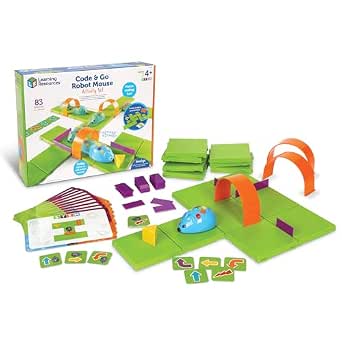 | Best for First-Time, Screen-Free Coders | Brand: Learning Resources | Model number: LER2831 | Age range: 4+ years | VIEW LATEST PRICE | See Our Full Breakdown |
| Learning Resources Botley 2.0 Coding Robot Activity Set |  | Best for Growing Beyond Basic Sequencing | Brand: Learning Resources | Model number: LER2938 | Age range: 5–10 years | VIEW LATEST PRICE | See Our Full Breakdown |
| MatataStudio Screen-Free Coding Robot Set for Kids Ages 4–10 |  | Best for Learning Loops and Debugging Without a Screen | Brand: MatataStudio | Robot: MatataBot | Age range: 4–10 years | VIEW LATEST PRICE | See Our Full Breakdown |
| MatataStudio Tale-Bot Pro Screen-Free Coding Robot for Kids Ages 3–5 | 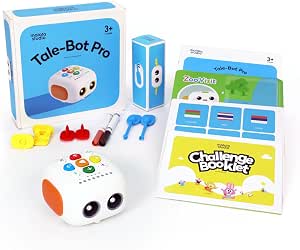 | Best for Preschool Storytelling and First Commands | Brand: MatataStudio | Model: Tale-Bot Pro | Recommended age: 3–5 years | VIEW LATEST PRICE | See Our Full Breakdown |
| ELECFREAKS Retro Coding Arcade Handheld Game Console |  | Best for Learning Text-Based Coding | Display: 2.4-inch LCD, 320 × 240 resolution | Programming: Microsoft MakeCode blocks and Python | Controls: Button control with eight directional inputs | VIEW LATEST PRICE | See Our Full Breakdown |
| Teach Tech Mech-5 STEM Coding Robot Building Kit |  | Best for Mechanical Engineering | Recommended age: 10+ | Model: TTC-895 | Kit type: Programmable mechanical robot coding kit | VIEW LATEST PRICE | See Our Full Breakdown |
| Makeblock mBot STEM Coding Robot Kit | 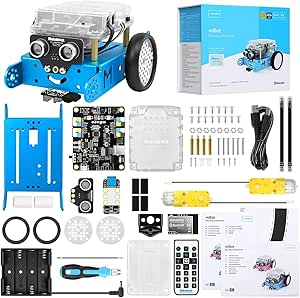 | Best for Expandable Robotics | Recommended age: 8+ years | Model: 90053 | Programming: Scratch and Arduino through free Makeblock apps | VIEW LATEST PRICE | See Our Full Breakdown |
| Learning Resources Code & Go Robot Mouse |  | Best for First Screen-Free Coding | Recommended age: 4–7 years | Programming method: Screen-free push-button commands | Included cards: 30 double-sided coding cards | VIEW LATEST PRICE | See Our Full Breakdown |
| Thames & Kosmos My Robotic Pet: Coding Chameleon |  | Best for Screen-Free Interactive Building | Recommended age: 8–12 years | Length: 15 inches | Play modes: Coding, Wild, and Pet | VIEW LATEST PRICE | See Our Full Breakdown |
| Osmo Coding Starter Kit for iPad, Ages 5–10+ |  | Best for iPad-Based Learning | Recommended age: 5–10+ years | Included games: Coding Awbie, Coding Jam, Coding Duo | Coding blocks: 31 | VIEW LATEST PRICE | See Our Full Breakdown |
| MatataStudio Coding Set Pro STEM Robot for Kids Ages 4–10 |  | Best Screen-Free Learning Kit | Age range: 4–10 years | Set name: Coding Set Pro | Included robot: MatataBot | VIEW LATEST PRICE | See Our Full Breakdown |
| Botley the Coding Robot |  | Best for First-Time Coders | Age range: 5–8 years | Set size: 45 pieces | Included components: Remote programmer, detachable robot arms, 42 coding cards, tiles, and obstacles | VIEW LATEST PRICE | See Our Full Breakdown |
| CodaKid Coding Box for Kids – Minecraft Modding & Java Game Design (Ages 9+) |  | Best for Older Kids Learning Real Code | Age range: 9+ | Platform compatibility: Windows PC and Mac | Access duration: 12 months | VIEW LATEST PRICE | See Our Full Breakdown |
More Details on Our Top Picks
Sillbird Building Robot Kit with Remote Control – STEM Gift for Kids (Ages 8–12)
The Sillbird kit suits kids who want coding tied to construction, not just directing a ready-made robot. Its 773 pieces can form five models, while Bluetooth, app, and remote controls give children several ways to operate what they build. That makes it a more open-ended engineering project than the Code & Go Robot Mouse, which focuses on planning a route through a maze with a simpler button interface. Rechargeable power, LED eyes, and sound effects add play appeal after the build is done. The tradeoff is a substantial assembly commitment: the piece count may frustrate younger or inexperienced builders, and the description offers less detail about the programming activities than dedicated coding sets do. Choose it for construction-first play; skip it if you want a guided, screen-free coding introduction.
Pros:- Five build configurations support repeated construction and engineering play.
- Bluetooth, app, and remote control offer flexible ways to operate the models.
- Rechargeable battery avoids relying solely on disposable power.
- LED eyes and sound effects give the robot an interactive character.
Cons:- The 773-piece build can be overwhelming for inexperienced builders.
- The product description gives limited detail about specific coding lessons or progression.
- App control may not suit families looking for a fully screen-free coding toy.
Best for: Ages 8–12 who enjoy assembling robots and want app or remote control after the build.
Not ideal for: Younger beginners or families seeking clearly guided, screen-free coding lessons; the large build and app-based control may not fit.
- Brand:Sillbird
- Model:US-B905R1
- Age range:8–12 years
- Number of pieces:773
- Build options:Up to five models
- Control methods:Bluetooth, app, and remote control
- Battery:Rechargeable; includes 1 AA battery
- Features:LED eyes and sound effects
- Dimensions:7 × 6 × 4 inches
Our verdict“Choose Sillbird for an older child who values building and controlling custom robot models more than a guided maze-coding curriculum.”
Learning Resources Code & Go Robot Mouse Activity Set
For a child just starting to connect commands with movement, the Code & Go set keeps the idea concrete: arrange a maze, plan a sequence with cards, then enter it using Colby’s buttons. Its 83 included pieces—including grids, walls, tunnels, and activity cards—give adults or teachers a ready-made structure for repeatable challenges. Compared with the Botley 2.0 Coding Robot Activity Set, this mouse set is more focused on basic path planning; Botley adds features such as 45-degree turns and object sensing for broader challenges. That simplicity is a strength for younger learners, but it can feel limiting as children want more complex commands. It also needs three AAA batteries that are not included, and it has no listed warranty. I’d pick it for an accessible first lesson, not for a child already ready for advanced robot play.
Pros:- Screen-free controls make commands visible and hands-on.
- Maze pieces and coding cards support structured activities at home or in a classroom.
- Two speeds, lights, and sounds help keep the robot engaging for young learners.
- The route-planning format clearly links a command sequence to the robot’s movement.
Cons:- Programming is limited to simple button controls, which may not hold older children’s interest.
- Requires three AAA batteries, which are not included.
- No warranty is listed in the supplied product information.
Best for: Parents, homeschoolers, and early-years teachers introducing children aged 4 and up to command sequences through physical maze play.
Not ideal for: Older children who already understand basic sequencing or want more varied robot behaviors; its button-based programming is intentionally simple.
- Brand:Learning Resources
- Model number:LER2831
- Age range:4+ years
- Included pieces:83
- Programming method:Robot buttons and coding cards
- Included activities:Maze grids, walls, tunnels, double-sided cards, cheese wedge, and activity guide
- Robot features:Lights, sounds, and two speeds
- Battery requirement:3 AAA batteries, not included
- Warranty:No warranty listed
Our verdict“Choose Code & Go for a young beginner who needs a straightforward, screen-free way to practice sequencing and maze routes.”
Learning Resources Botley 2.0 Coding Robot Activity Set
Botley 2.0 is a useful step up from a first maze toy: children send commands with a remote programmer, then build routes using cards, boards, and obstacles. Its 45-degree turns and object sensing allow challenges beyond the straightforward path planning of the Code & Go Robot Mouse Activity Set, while the screen-free setup keeps the focus on predicting and debugging movement rather than using an app. Lights, music, and sounds add variety, and the stated age range of 5–10 gives it room to serve a child over several learning stages. That flexibility comes with a setup demand: kids need to arrange challenge pieces and plan routes, so play is less immediate than a simple button-command toy. No manufacturer warranty is listed, either. It makes the most sense for children ready to build their own coding challenges.
Pros:- Screen-free remote programming encourages hands-on command sequencing.
- 45-degree turns and object sensing add challenge beyond basic maze routing.
- Cards, boards, and stackable obstacles let children create custom routes.
- Lights, sounds, and music provide varied feedback during play.
Cons:- Children must set up pieces and plan routes before each challenge.
- No manufacturer warranty is listed in the supplied product information.
- The remote-programmer format may be less direct for very young children than simple robot-button controls.
Best for: Children aged 5–10 who have tried basic commands and want screen-free route challenges with more varied movement.
Not ideal for: Families wanting a toy that works with minimal setup, or buyers who require a listed manufacturer warranty.
- Brand:Learning Resources
- Model number:LER2938
- Age range:5–10 years
- Number of pieces:78
- Included components:Coding robot, remote programmer, 40 coding cards, 6 double-sided boards, and stackable obstacles
- Programming features:Screen-free coding and 45-degree turns
- Sensing:Object sensing
- Robot feedback:Lights, sounds, and music
- Warranty:No warranty listed
Our verdict“Choose Botley 2.0 for a child ready to move past basic maze commands into more varied, self-built screen-free challenges.”
MatataStudio Screen-Free Coding Robot Set for Kids Ages 4–10
MatataBot is the strongest fit here for families who want young children to explore more than simple forward-and-turn commands while staying screen-free. Its tangible coding blocks, command tower, and control board make programming concepts such as sequencing, loops, and debugging part of the play setup. Compared with the Code & Go Robot Mouse, which centers on button-entered maze routes, this set offers a more explicit block-based way to build commands and work through challenge booklets. The two-sided map and included obstacles give children a place to test those ideas, though the set’s listed dimensions make it a substantial kit to store. Product information also reports conflicting weight and dimensions, so I would verify fit before buying. Some extra activities are sold separately, which limits how far the included content goes on its own.
Pros:- Tangible coding blocks make command sequences visible and adjustable.
- Introduces loops and debugging alongside sequencing.
- Screen-free, app-free, and internet-free play suits classrooms and device-free homes.
- Challenge booklets, a two-sided map, obstacles, and flags support varied activities.
Cons:- Listed product information contains conflicting weight and dimension details.
- Additional activity options are available separately.
- The listed dimensions suggest it needs more storage space than a compact robot toy.
Best for: Families and educators seeking a screen-free set for ages 4–10 that introduces blocks, loops, and debugging through guided challenges.
Not ideal for: Buyers with limited storage or those expecting all future activities to be included; the set is sizable and add-on activities are separate.
- Brand:MatataStudio
- Robot:MatataBot
- Age range:4–10 years
- Included coding pieces:37 coding blocks
- Included components:Robot, command tower with image recognition camera, control board, 3 challenge booklets, two-sided map, USB-C cable, obstacles, and flags
- Screen use:Screen-free
- Weight:1.5 kg listed; product information reports conflicting measurements
- Dimensions:13.86 × 9.72 × 4.41 inches listed; product information reports conflicting measurements
Our verdict“Choose MatataBot for a screen-free, block-based introduction to broader coding ideas, provided you can accommodate the kit and its add-on activity model.”
MatataStudio Tale-Bot Pro Screen-Free Coding Robot for Kids Ages 3–5
Tale-Bot Pro is designed for preschoolers who are more likely to engage with a story, song, or drawing task than a traditional maze challenge. Its touch-based command buttons let children direct movement and creative actions, while the interactive map and 14-mission booklet give those commands a playful purpose. Compared with the Learning Resources Code & Go Robot Mouse Activity Set, Tale-Bot puts more emphasis on storytelling and making marks with washable markers; the mouse set is a clearer choice for children focused on maze paths and coding cards. Support for 10 languages and Lego compatibility add ways to personalize play, but its 3–5 age focus makes it a shorter-lived choice as a child grows. Families may also want additional activity boxes for more material. This is an early-childhood play tool, not a deeper programming kit.
Pros:- Touch-based commands suit preschoolers beginning to learn sequences.
- Movement, drawing, singing, dancing, speaking, and recording broaden play beyond route planning.
- Interactive map and 14-mission booklet provide guided activities.
- Supports 10 languages and Lego-compatible building.
Cons:- The 3–5 age focus limits its fit as children move into more advanced coding.
- Additional activity boxes are recommended for more learning materials.
- Story and creative play may be less suitable than maze-based coding for children who prefer structured route challenges.
Best for: Parents and preschool educators looking for a screen-free introduction to commands, sequences, and loops through stories and creative activities.
Not ideal for: Older children or families seeking increasingly advanced coding challenges; the core design targets ages 3–5 and more activity materials may require add-ons.
- Brand:MatataStudio
- Model:Tale-Bot Pro
- Recommended age:3–5 years
- Control method:Touch-based command buttons
- Command capacity:Up to 256 commands
- Languages supported:10
- Compatibility:Lego blocks
- Included components:Robot, double-sided interactive map, 14-mission challenge booklet, configuration card, and 2 washable markers
- Activities:Movement, drawing, singing, dancing, speaking, and recording
Our verdict“Choose Tale-Bot Pro for a preschooler who will learn commands through storytelling and creative play rather than a conventional maze-coding format.”
ELECFREAKS Retro Coding Arcade Handheld Game Console
The ELECFREAKS Retro Coding Arcade is the pick for kids ready to move from visual blocks toward writing Python, while still keeping game-making at the center. It supports Microsoft MakeCode and Python, so a learner can start with blocks and take on text-based programming without changing devices. Its sensors, including a gyroscope and photocell, also give projects more possibilities than the button-sequenced Code & Go Robot Mouse. The tradeoff is a smaller, solo experience: its 2.4-inch screen and single-player format suit tinkering more than shared play, and the rechargeable battery needs periodic charging. Choose it for a child who wants to create and revise games; skip it if the goal is a screen-free first introduction or collaborative robot play.
Pros:- Supports both MakeCode blocks and Python, offering a path from visual coding to text.
- Built-in sensors and outputs allow varied interactive programming projects.
- 320 × 240 LCD makes game visuals clear on a compact handheld.
- Silicone directional buttons support direct control while testing games.
Cons:- Single-player design offers little collaborative play.
- Rechargeable lithium-ion battery needs charging and may limit long sessions.
- Screen-based game creation is less suitable for families prioritizing screen-free activities.
Best for: Kids who enjoy handheld games and are ready to explore MakeCode projects or beginner Python on one device.
Not ideal for: Families seeking screen-free coding, multiplayer play, or a toy that runs without battery recharging.
- Display:2.4-inch LCD, 320 × 240 resolution
- Programming:Microsoft MakeCode blocks and Python
- Controls:Button control with eight directional inputs
- Built-in components:Buzzer, photocell, gyroscope, vibration motor
- Players:1
- Power:Included rechargeable lithium-ion battery
- Interface:USB
- Materials:ABS and polycarbonate
Our verdict“Choose the ELECFREAKS for a budding game maker who wants to progress from blocks to Python, not for screen-free group coding.”
Teach Tech Mech-5 STEM Coding Robot Building Kit
The Mech-5 turns coding into a physical mechanism: kids assemble the robot, then arrange coding buttons on a wheel to trigger actions such as lifting, kicking, drawing, and moving. That makes it a better fit for children who want to understand how instructions drive machinery than the software-based programming of the Makeblock mBot. Its mission format gives each build a practical goal, and the kit does not rely on batteries for its mechanical actions. The tradeoff is a longer, more involved assembly process, aimed at ages 10 and up rather than younger beginners. It also lacks electronic sensors and software programming, so it cannot match the mBot’s line-following or obstacle avoidance. Pick Mech-5 for hands-on mechanical problem-solving, not sensor-rich robotics.
Pros:- Mechanical coding wheel connects sequences directly to robot actions.
- Missions give building and programming a concrete purpose.
- Step-by-step instructions support independent assembly for the intended age group.
- Does not require batteries to perform its mechanical actions.
Cons:- Assembly can take several hours and may frustrate younger or impatient builders.
- No electronic sensors or software-based programming.
- Its mechanical movement range is narrower than the Makeblock mBot’s programmable robotics functions.
Best for: Kids aged 10+ who like building mechanisms and want coding concepts linked to visible physical actions.
Not ideal for: Younger children, families wanting a quick-start robot, or learners seeking sensors, apps, or electronic programming.
- Recommended age:10+
- Model:TTC-895
- Kit type:Programmable mechanical robot coding kit
- Programming method:Coding buttons arranged on a wheel
- Actions:Throw, lift, kick, draw, and move in multiple directions
- Included components:Assembly parts and English instruction manual
- Warranty:1 year
Our verdict“Pick Mech-5 for an older child who wants a substantial mechanical build, and choose the mBot instead for electronic sensors and app-based coding.”
Makeblock mBot STEM Coding Robot Kit
The Makeblock mBot is the most flexible electronic robotics starting point in this group. Kids build the robot, then use free apps to program it with Scratch or Arduino; line-following and obstacle avoidance make code produce visible movement. Compared with the Mech-5, it offers software and sensor-driven behavior rather than a mechanical coding wheel, while its compatibility with LEGO parts and more than 100 add-on modules leaves room to extend projects. That flexibility comes with caveats: the robot needs four AA batteries and the remote needs a CR2025, neither included, and extra modules are needed for added capabilities. It is a stronger fit for a child who wants to keep experimenting than for someone seeking the simplest screen-free first coding toy.
Pros:- Scratch and Arduino programming offer both accessible and more technical routes.
- Line-following and obstacle avoidance make programmed behaviors easy to observe.
- Compatible with LEGO parts and more than 100 add-on modules.
- Assembly is designed to be quick, with clear instructions.
Cons:- Four AA batteries and the remote’s CR2025 battery are not included.
- Built-in sensor range is limited compared with what an expandable robotics setup may suggest.
- Additional modules are required for added functionality.
Best for: Ages 8+ who want to build an electronic robot, learn Scratch or Arduino, and add components over time.
Not ideal for: Families wanting a screen-free activity, included batteries, or advanced functions without buying extra modules.
- Recommended age:8+ years
- Model:90053
- Programming:Scratch and Arduino through free Makeblock apps
- Robot functions:Line-following and obstacle avoidance
- Expansion:Compatible with LEGO parts and over 100 add-on modules
- Robot power:4 AA batteries, not included
- Remote power:CR2025 battery, not included
Our verdict“Choose the mBot for an 8+ learner who wants an expandable, app-programmed robot; skip it if you need a screen-free kit with everything powered out of the box.”
Learning Resources Code & Go Robot Mouse
The Code & Go Robot Mouse keeps early coding concrete: children lay out double-sided cards to plan a route, enter commands with buttons, then watch the mouse move and respond with lights and sounds. Its ages 4–7 focus and screen-free format make it a more approachable first step than the Makeblock mBot, which introduces building, apps, and a wider robotics toolkit. The mouse also offers two speeds, giving children a simple way to see how a command sequence affects movement. Its limits are clear: the command set is basic, with no Scratch, Python, or sensor-based projects, and three AAA batteries are not included. Choose it for practicing sequencing and debugging; move to a more programmable robot when a child wants open-ended projects.
Pros:- Screen-free push-button coding makes basic sequencing approachable.
- Thirty double-sided coding cards and an activity guide provide structured challenges.
- Lights and sounds give immediate feedback when children test a route.
- Two speed settings add a simple variation to movement.
Cons:- Command options are limited to basic push-button sequences.
- Three AAA batteries are required and not included.
- Offers less scope for expanding into software coding than the Makeblock mBot.
Best for: Preschool and early-primary children, especially ages 4–7, learning sequencing through hands-on play at home or school.
Not ideal for: Older beginners who want open-ended programming, software, or more complex robot behaviors.
- Recommended age:4–7 years
- Programming method:Screen-free push-button commands
- Included cards:30 double-sided coding cards
- Included guide:Activity guide
- Movement speeds:2
- Power:3 AAA batteries, not included
- Length:4 inches
Our verdict“Choose the Robot Mouse for young children learning their first command sequences, not for learners ready for app-based or text coding.”
Thames & Kosmos My Robotic Pet: Coding Chameleon
The Coding Chameleon combines a substantial creature build with screen-free programming, making it a more character-driven option than the route-planning Code & Go Robot Mouse. Colored action cards control play across coding, wild, and pet modes, while touch and gesture responses, color changes, and a moving tongue give children visible reactions to explore. Its 48-page guide adds robotics and biomimicry context, so the activity extends beyond entering commands. The tradeoff is the build: at 15 inches, it is a larger project, and younger builders may need adult help. Batteries are recommended, but the supplied details do not confirm that they are included. Choose it for ages 8–12 who enjoy assembling and interacting with a themed robot; skip it for a quick, compact coding starter.
Pros:- Three modes combine coding, pet-style interaction, and wild behavior.
- Colored action cards provide screen-free programming.
- Touch and gesture responses, color changes, and tongue movement make behavior engaging to observe.
- The 48-page guide covers assembly, robotics, and biomimicry.
Cons:- Assembly may require adult help, especially for younger children.
- Batteries are recommended, but inclusion is not specified.
- Its 15-inch build is less compact and immediate than the Robot Mouse.
Best for: Ages 8–12 who enjoy building a character-based robot and learning through screen-free, card-driven play.
Not ideal for: Families seeking a small ready-to-play toy, a confirmed battery-included kit, or a simple first coding activity for preschoolers.
- Recommended age:8–12 years
- Length:15 inches
- Play modes:Coding, Wild, and Pet
- Programming method:Colored action cards
- Sensors:Color sensor and infrared sensor
- Lighting:RGB LEDs
- Guide:48 pages
- Included components:Plastic building parts and manual
Our verdict“Choose the Coding Chameleon for an older child who wants a buildable, interactive screen-free pet, and choose the Robot Mouse for simpler first coding practice.”
Osmo Coding Starter Kit for iPad, Ages 5–10+
Osmo Coding Starter Kit pairs physical coding blocks with three iPad games, making it a good fit for children who learn by moving pieces and seeing the result on screen. Its range spans sequencing, logic, problem-solving, and music creation, so it offers more variety than Botley the Coding Robot’s remote-programmed, screen-free challenges. The included 31 blocks and base give children a tactile way to build commands, while the games provide changing activities for beginner through more advanced play. The tradeoff is built into the format: a compatible iPad is required and sold separately, and the play area needs room for blocks. Compared with the MatataStudio Coding Set Pro, Osmo is the better choice for families who want an app-connected mix of coding and creative play, not a fully screen-free setup.
Pros:- Three games offer varied coding, logic, and creative music activities.
- Physical blocks make commands tangible for young learners.
- Includes an Osmo Base and reflector alongside 31 coding blocks.
- Supports play from beginner through advanced levels.
Cons:- Requires a compatible iPad running iOS 15 or later, sold separately.
- Blocks need a clear physical play area.
- The 90-day manufacturer-defect warranty is shorter than the MatataStudio Coding Set Pro’s 12-month warranty.
Best for: Families with a supported iPad who want children ages 5–10+ to explore coding through physical blocks, games, and music activities.
Not ideal for: Households without a compatible iPad, or caregivers seeking a screen-free robot activity.
- Recommended age:5–10+ years
- Included games:Coding Awbie, Coding Jam, Coding Duo
- Coding blocks:31
- Compatibility:Supported iPads running iOS 15 or later
- iPad included:No
- Included hardware:Osmo Base and reflector
- Warranty:90 days against manufacturer defects
- Model number:901-00021
Our verdict“Choose Osmo if your child has a supported iPad and will benefit from combining hands-on blocks with interactive coding games.”
MatataStudio Coding Set Pro STEM Robot for Kids Ages 4–10
The MatataStudio Coding Set Pro is the most activity-rich screen-free pick in this group: children program a robot with graphic blocks, a control board, and a picture-recognition command tower. The set introduces sequencing, conditions, and debugging through challenges, with books and creative warm-up cards adding options beyond direct robot commands. Compared with Botley the Coding Robot, this set supplies a broader assortment of learning materials and a 12-month warranty, while Botley offers remote programming and a simpler collection of cards, tiles, and obstacles. That breadth may suit families who want guided activities to revisit, but it also means more pieces and a dedicated setup. The robot and command tower are necessary for the coding activities, so this is not a general-purpose block set or a compact, device-free activity you can use without its core hardware.
Pros:- Screen-free and word-free activities suit early learners.
- Introduces sequencing, conditions, and debugging through hands-on challenges.
- Includes 99 coding blocks, three challenge books, and creative warm-up cards.
- USB-C charging and a 12-month warranty are specified.
Cons:- Coding activities depend on the included robot and command tower.
- The substantial set of blocks and accessories may require storage and setup.
- Children seeking on-screen games may prefer the iPad-based Osmo Coding Starter Kit.
Best for: Families with children ages 4–10 who want screen-free coding challenges with guided books and creative activities.
Not ideal for: Buyers looking for a compact, minimal-piece toy or activities that can be used without the robot and command tower.
- Age range:4–10 years
- Set name:Coding Set Pro
- Included robot:MatataBot
- Coding blocks:99
- Other included components:Command tower with picture recognition camera, control board, three family challenge books, three artist warm-up cards, three musician warm-up cards, double-sided playing card, obstacles, and flags
- Charging:USB-C
- Warranty:12 months
Our verdict“Pick the Coding Set Pro for a screen-free, guided robot experience with a wider activity assortment than a simpler remote-programmed kit.”
Botley the Coding Robot
Botley the Coding Robot gives young children a direct, screen-free introduction to programming: they send commands with a remote programmer, then watch the robot follow them through a physical course. Its focus on sequencing, loops, and if/then logic makes it a more straightforward starting point than the MatataStudio Coding Set Pro, which adds a command tower, many more blocks, and a wider range of learning materials. Botley’s 45-piece kit, including 42 coding cards, tiles, and obstacles, gives caregivers ways to set up new challenges at home or in a classroom. It can handle up to 80 programmable steps, enough for early experiments, though that limit may constrain longer projects. There is no warranty listed, and older children looking for computer-based Java projects may get more from CodaKid’s Coding Box.
Pros:- Remote programming offers a direct, accessible way to issue commands.
- Teaches sequencing, loops, and if/then logic without a screen.
- The 45-piece set includes 42 coding cards, tiles, and obstacles.
- Supports up to 80 programmable steps for building varied early challenges.
Cons:- The 80-step limit may restrict more advanced or extended projects.
- No warranty is listed.
- Has fewer included guided books and creative activity materials than the MatataStudio Coding Set Pro.
Best for: Caregivers and educators introducing children ages 5–8 to screen-free commands, loops, and conditional logic.
Not ideal for: Older children ready for extended projects, computer coding, or a product with a stated warranty.
- Age range:5–8 years
- Set size:45 pieces
- Included components:Remote programmer, detachable robot arms, 42 coding cards, tiles, and obstacles
- Programming capacity:Up to 80 steps
- Coding concepts:Sequencing, loops, and if/then logic
- Model number:LER2936
- Warranty:No warranty
Our verdict“Choose Botley for a straightforward, screen-free first coding robot, especially for children in its specified 5–8 age range.”
CodaKid Coding Box for Kids – Minecraft Modding & Java Game Design (Ages 9+)
CodaKid Coding Box is the clear step up for older children who are ready to move from programming a toy robot to writing Java code. Its Minecraft modding projects connect coding to a familiar game, while 22+ courses and 90+ project hours offer a longer learning path than Botley’s physical commands or Osmo’s block-based iPad games. Video tutorials and online mentor support add guidance for learners working on a computer, and the included 12 months of access frames this as a course-based experience rather than a toy to pick up for a quick activity. The tradeoff is a higher bar for both age and equipment: it is for ages 9+ and requires a Windows PC or Mac. Skip it for younger children seeking tangible, screen-free robot play.
Pros:- Uses Minecraft modding and game design to connect coding with a familiar interest.
- Teaches Java skills that extend beyond programming a toy.
- Includes step-by-step video tutorials and online mentor support.
- Provides 22+ courses and 90+ project hours over 12 months of platform access.
Cons:- Requires a Windows PC or Mac.
- Computer-based lessons are less tactile than Osmo’s blocks or Botley’s robot challenges.
- Its age and Java focus make it less suited to younger beginners.
Best for: Families with a child age 9+ who enjoys Minecraft and is ready to learn Java through guided computer projects.
Not ideal for: Families seeking a screen-free coding toy, a hands-on robot, or an option for children younger than 9.
- Age range:9+
- Platform compatibility:Windows PC and Mac
- Access duration:12 months
- Number of courses:22+
- Total project hours:90+ hours
- Programming language:Java
- Learning format:Video tutorials and online mentor support
Our verdict“Choose CodaKid for an older Minecraft fan ready to learn Java on a computer, rather than a younger child seeking a physical coding toy.”
How We Picked
I compared the 14 options by the kind of coding experience they give a child: screen-free sequencing, robot construction, app-supported play, or software-based game design. I also weighed age fit, how much adult setup or guidance the format may call for, the potential to keep offering new challenges, and whether the central activity is easy to understand from the product’s stated purpose.
The ranking favors options that balance an accessible starting point with room to grow, while keeping the toy’s role clear. That puts MatataStudio Coding Set Pro first as a broad-use pick, with Botley 2.0 and Makeblock mBot serving distinct beginner and build-and-code needs. Narrower choices are ranked for their specific audience rather than treated as direct substitutes: a preschool storytelling robot, a coding mouse, and a Java course solve different problems. I also account for tradeoffs such as device reliance, assembly effort, and a smaller age or interest fit.
Factors to Consider When Choosing Coding Toys For Kids
Before choosing, decide what you want the child to do with coding: arrange instructions, build a machine, solve guided puzzles, or write code on a computer. Those activities can all teach useful ideas, but they call for different levels of adult support, space, and patience.
Choose the coding activity, not just the age label
Age ranges are a starting point, not a measure of readiness. A child who enjoys puzzles may manage sequencing challenges before they are interested in assembling a robot, while a hands-on builder may prefer construction even if the coding tasks are introductory. Check whether the toy relies on reading, following multi-step directions, or interpreting symbols. Those demands can matter more than a small difference in the listed age range. A common mistake is buying for a child’s age without matching the activity to their interests and patience.
Decide how much screen time fits your household
Screen-free toys let children manipulate commands and see a physical result without a tablet or computer, but they can still involve adult-led setup or activity cards. App- and computer-based options may make it easier to present visual instructions or move toward text-based coding, but they add device access and screen-time considerations. Think about whether a child already has a suitable device and whether you want the toy to work away from it. Avoid assuming that screen-based automatically means more advanced; the learning value depends on what the child actually does. Pick the format your family will use consistently, not the one that sounds most technical.
Match the challenge level to the child’s appetite for frustration
Some toys introduce coding through short, guided tasks; others expect the child to assemble parts, debug a sequence, or work through software instructions. A little productive difficulty can help a child learn to find and fix mistakes, but too much setup can make the toy feel like homework. Consider how your child reacts when a first attempt does not work and how much help you can offer. For a first coding toy, a clear starting activity may matter more than a high ceiling for complexity. If the child already enjoys making and troubleshooting, a build-and-code format may hold attention longer.
Look for room to grow, but value replay in context
A large activity range or a path toward more advanced coding can extend a toy’s useful life, but only if the child is likely to use those features. A younger child may get more from varied simple play than from advanced modes they cannot reach yet. For older beginners, progression from blocks toward text or more independent projects can make a screen-based option more appealing. Check whether new challenges come from the toy itself, an app, a course, or the child inventing their own tasks. Do not pay extra attention to a feature list without asking whether it creates a next step the child will actually take.
Account for setup, space, and adult involvement
Robot kits can need assembly space, small parts management, charging or batteries, and time to get started. A simple tabletop activity may be easier to bring out for a short play session, while a construction project can better suit a child who likes longer builds. Computer-based learning may call for account setup and an adult nearby to help with instructions or troubleshooting. Consider where the toy will be stored and whether it can be packed away without losing components. The best fit is often the one whose setup matches the family’s normal routine.
Set expectations for what ‘learning coding’ means
Many early coding toys teach foundations such as sequencing, patterns, and debugging rather than a full programming language. That is a reasonable starting point, but it differs from writing code for a game or controlling a programmable robot. Decide whether you want playful exposure, a physical project, or a more direct route into software skills. The lineup includes all three, so comparing them only by the word “coding” can lead to a mismatch. Ask what the child will create or control by the end of a typical session, then choose the toy that answers that question best.
Frequently Asked Questions
Should I start with a screen-free coding toy or a computer-based one?
Choose screen-free if you want a child to practice sequencing through physical actions and prefer play that does not depend on a device. A computer- or app-based option may fit better if the child is motivated by digital games or you want a route toward block or text coding. Neither format is automatically better for learning; the difference is how the child gives instructions and sees results. For a first purchase, consider what the child already enjoys and how much device use fits your household. If you are unsure, a clearly guided physical activity can provide a lower-friction introduction.
Can one coding toy work for siblings of different ages?
It can, but a shared toy works best when its activities allow different levels of challenge or when an older child is happy to help a younger one. A wide listed age range does not guarantee that every activity will engage both children equally. Look at the specific demands: reading, small-part assembly, independent problem-solving, and the ability to create new challenges. A younger child may enjoy pressing buttons or directing a robot while an older sibling plans the sequence. If both children need independent play at very different levels, separate formats may be a better fit.
Is a robot-building kit a better choice than a ready-to-use coding robot?
A building kit combines construction with coding, which can appeal to a child who likes making things and does not mind following assembly steps. A ready-to-use robot puts more attention on programming activities and can be easier to start using. The tradeoff is that building adds setup time and can create extra frustration if the child mainly wants to play with code. Think about whether the child enjoys assembling models before choosing a kit for its coding features. If their main interest is directing a robot, a simpler ready-to-use format may get them to the core activity sooner.
When does a software course make more sense than a coding toy?
A software course can suit a child who already spends time on a computer, enjoys following guided lessons, and wants to create digital projects such as game modifications. A physical coding toy may be a more inviting first step for a child who learns through movement, building, or immediate visual feedback. Courses also depend on reading stamina, access to a computer, and willingness to work through instructions. Do not choose a software option only because it sounds more advanced; interest and independence matter. For a child who is ready to make digital projects, though, it can provide a more direct path than a robot toy.
What should I check before buying a coding toy as a gift?
Check the child’s age and interests, but also ask the family about device access, available play space, and comfort with small pieces or assembly. Find out whether the toy needs batteries, a compatible tablet or computer, or adult help to get started. If the child is new to coding, choose a format with a clear first activity rather than relying on them to invent a project immediately. For an experienced young builder or programmer, a more involved kit or software project may be a better match. A quick check with a caregiver can prevent a well-meant gift from arriving without the tools or support it needs.
Conclusion
For the best overall fit, I recommend MatataStudio Coding Set Pro, which stands out as a flexible screen-free option for children across a broad age range. Choose Botley 2.0 as the best beginner pick for guided, screen-free robot activities, and consider Learning Resources Code & Go Robot Mouse as a straightforward value-oriented choice for basic sequencing play. For a child who wants to build as well as program, Makeblock mBot is my best build-and-code recommendation; Sillbird and Mech-5 offer other construction-centered directions. For a younger preschooler, MatataStudio Tale-Bot Pro has a more age-specific role, while Osmo and ELECFREAKS suit families seeking device-supported activities. Choose CodaKid when the child is ready for Minecraft modding and Java game design rather than a physical toy.
Evergreen bestsellers Picks

eufy E15 Gen 2 Wire-Free Robotic Lawn Mower

Samsung 48 4K OLED Smart TV (2026) with WireLogic 8ft Ultra High Speed HDMI Cable

Breville Bambino Espresso Machine, Brushed Stainless Steel
As an affiliate, we earn on qualifying purchases.