For most developers, I’d start with the SanDisk Extreme Fit 256GB: its compact USB-C design suits a laptop that stays docked or travels often, while its capacity leaves room for repositories, installers, and working files. The Lexar D40E 256GB is a stronger fit if you move files between USB-C laptops and older USB-A machines, and the SanDisk Ultra Dual Drive Go 128GB offers a smaller-capacity option with both connector types. The key tradeoff is between a low-profile drive that can stay plugged in and a dual-connector drive that works across more devices. Capacity, sustained transfer performance, and whether you need to hand off files to other people also matter. Read on for the full breakdown of all 15 options and how I’d match them to different developer workflows.

Get business pricing on monitors, keyboards and dev gear
- Business-only prices and quantity discounts
- Tax-exempt purchasing
- Multiple users, one account, clear invoices
Key Takeaways
- Compactness and cross-device flexibility are separate strengths. The SanDisk Extreme Fit 256GB is the low-profile USB-C pick, while the Lexar D40E 256GB adds USB-A for older laptops, desktops, and shared lab equipment.
- The Lexar D40E lineup gives developers a capacity choice within one dual-connector format. Its 64GB, 128GB, and 256GB options make it easier to match storage needs without changing the basic USB-A/USB-C workflow.
- SanDisk’s Extreme Fit models prioritize leaving a drive in place. The 128GB and 256GB versions make more sense for an ultraportable laptop than larger capped or hinged drives, but they lack USB-A.
- Bundled and multi-pack options solve distribution problems, not necessarily performance ones. The PNY Elite five-pack and the black-and-blue two-pack can help with provisioning or separating files, but capacity per drive and labeling should guide the choice.
- Special connectors and low capacities serve narrower jobs. The SanDisk Phone Drive adds Lightning alongside USB-C for compatible iPhone transfers, while the 32GB KOOTION is better suited to small handoffs than carrying development environments or sizable archives.
| SanDisk Extreme Fit 256GB USB-C Flash Drive |  | Best Overall for Compact Developer Storage | Capacity: 256GB | Interface: USB 3.2 Gen 1 | Connector: USB Type-C | VIEW LATEST PRICE | See Our Full Breakdown |
| Lexar D40E 64GB Dual USB 3.2 Gen 1 Type-C Flash Drive, Champagne Silver |  | Best for Legacy-Port Compatibility | Capacity: 64GB | Interface: USB 3.2 Gen 1 | Connectors: USB Type-A and USB Type-C | VIEW LATEST PRICE | See Our Full Breakdown |
| SanDisk 256GB Phone Drive for iPhone with USB-C and Lightning Connectors |  | Best for Apple Device Handoffs | Capacity: 256GB | Connectors: USB-C and Lightning | Read speed: Up to 150MB/s | VIEW LATEST PRICE | See Our Full Breakdown |
| Lexar D40E 128GB Dual USB 3.2 Gen 1 Flash Drive, Champagne Silver |  | Best Value for Mixed-Port Workflows | Capacity: 128GB | Interface: USB 3.2 Gen 1 | Connectors: USB Type-A and USB Type-C | VIEW LATEST PRICE | See Our Full Breakdown |
| SanDisk Extreme Fit 128GB USB-C Flash Drive | | Best Compact Pick for Everyday Tools | Capacity: 128GB | Interface: USB 3.2 Gen 1 | Connector: USB Type-C | VIEW LATEST PRICE | See Our Full Breakdown |
| PNY Elite 64GB USB Type-C 3.2 Flash Drive, 5-Pack |  | Best for Team Kits | Capacity: 64GB per drive | Pack quantity: 5 drives | Connector: USB Type-C | VIEW LATEST PRICE | See Our Full Breakdown |
| Lexar D40E 128GB Dual USB 3.2 Gen 1 Flash Drive, USB Type-A and Type-C, Titanium Grey |  | Best for Cross-Device Compatibility | Capacity: 128GB | Connectors: USB Type-A and USB Type-C | Interface: USB 3.2 Gen 1 | VIEW LATEST PRICE | See Our Full Breakdown |
| SanDisk Ultra Dual Drive Go 128GB USB-C and USB-A Flash Drive | 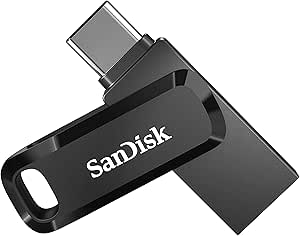 | Best for Mobile-to-Computer Handoffs | Capacity: 128GB | Connectors: USB Type-C and USB Type-A | Interface: USB 3.1 Gen 1 / USB 3.0 | VIEW LATEST PRICE | See Our Full Breakdown |
| JOIOT 128GB Dual USB-C and USB-A 3.0 Flash Drive |  | Best for Plug-and-Play Simplicity | Capacity: 128GB | Connectors: USB Type-C and USB Type-A | Interface: USB 3.0; supports USB 2.0 ports | VIEW LATEST PRICE | See Our Full Breakdown |
| Lexar D40E 256GB Dual USB 3.2 Gen 1 Flash Drive, USB-A and USB-C, Champagne Silver |  | Best for Larger Portable Project Archives | Capacity: 256GB | Connectors: USB Type-A and USB Type-C | Interface: USB 3.2 Gen 1 | VIEW LATEST PRICE | See Our Full Breakdown |
| SanDisk Ultra Dual Drive 128GB USB-C and USB-A Flash Drive | 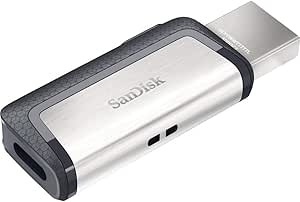 | Best for Android-to-PC Backups | Storage capacity: 128 GB | Connectors: USB Type-C and USB Type-A | USB interface: USB 3.1 Gen 1 | VIEW LATEST PRICE | See Our Full Breakdown |
| KOOTION 32GB Dual USB-A and USB-C Flash Drive |  | Best for Small Project Transfers | Stated storage capacity: 32GB in title and description; product information also lists 512GB | Connectors: USB-A 3.0 and USB-C | Read speed: Up to 100 MB/s in description; product information lists 90 MB/s | VIEW LATEST PRICE | See Our Full Breakdown |
| SanDisk Ultra Dual Drive Go 64GB USB-C and USB-A Flash Drive | | Best Compact Keyring Drive | Storage capacity: 64 GB | Connectors: USB Type-C and USB Type-A | Interface: USB 3.1 Gen 1 / USB 3.0 | VIEW LATEST PRICE | See Our Full Breakdown |
| KEXIN 128GB Dual USB-A and USB-C 3.0 Flash Drive, Black |  | Best for 128GB Everyday Carry | Storage capacity: 128 GB | Connectors: USB Type-A and USB Type-C | Interface: USB 3.0 | VIEW LATEST PRICE | See Our Full Breakdown |
| 2-Pack 128GB USB-C and USB-A Flash Drives, Black and Blue |  | Best for Split Backups | Quantity: 2 flash drives | Capacity per drive: 128GB | Connectors: USB-C and USB-A | VIEW LATEST PRICE | See Our Full Breakdown |
| USB-C flash drives for developer | Interface | Connectors | Capacity | Write speed |
|---|---|---|---|---|
| SanDisk Extreme Fit 256GB USB- | USB 3.2 Gen 1 | — | 256GB | — |
| Lexar D40E 64GB Dual USB 3.2 G | USB 3.2 Gen 1 | USB Type-A and USB Type-C | 64GB | Up to 80MB/s |
| SanDisk 256GB Phone Drive for | — | USB-C and Lightning | 256GB | 10–50MB/s |
| Lexar D40E 128GB Dual USB 3.2 | USB 3.2 Gen 1 | USB Type-A and USB Type-C | 128GB | Up to 80MB/s |
| SanDisk Extreme Fit 128GB USB- | USB 3.2 Gen 1 | — | 128GB | — |
| PNY Elite 64GB USB Type-C 3.2 | USB 3.2 Gen 1; backward compatible with USB 3.0 and USB 2.0 | — | 64GB per drive | Not specified |
| Lexar D40E 128GB Dual USB 3.2 | USB 3.2 Gen 1 | USB Type-A and USB Type-C | 128GB | Not specified |
| SanDisk Ultra Dual Drive Go 12 | USB 3.1 Gen 1 / USB 3.0 | USB Type-C and USB Type-A | 128GB | Lower than read speed; varies by capacity |
| JOIOT 128GB Dual USB-C and USB | USB 3.0; supports USB 2.0 ports | USB Type-C and USB Type-A | 128GB | — |
| Lexar D40E 256GB Dual USB 3.2 | USB 3.2 Gen 1 | USB Type-A and USB Type-C | 256GB | Up to 80MB/s |
| SanDisk Ultra Dual Drive 128GB | — | USB Type-C and USB Type-A | — | 10 MB/s |
| KOOTION 32GB Dual USB-A and US | — | USB-A 3.0 and USB-C | — | Up to 30 MB/s |
| SanDisk Ultra Dual Drive Go 64 | USB 3.1 Gen 1 / USB 3.0 | USB Type-C and USB Type-A | — | Up to 40 MB/s |
| KEXIN 128GB Dual USB-A and USB | USB 3.0 | USB Type-A and USB Type-C | — | — |
| 2-Pack 128GB USB-C and USB-A F | USB 2.0 | USB-C and USB-A | — | — |
More Details on Our Top Picks
SanDisk Extreme Fit 256GB USB-C Flash Drive
The 256GB Extreme Fit is my strongest all-around pick for developers who want a small drive to leave in a USB-C laptop or tablet. Its read speed is listed up to 400MB/s, substantially higher than the Lexar D40E models’ 100MB/s ceiling, while its compact plug-and-stay shape suits keeping project files or tools close at hand. It has twice the capacity of the 128GB Extreme Fit, so it makes more sense for larger repositories, SDKs, or portable work files. The tradeoff is a single USB-C connector: unlike the Lexar D40E, it cannot plug directly into USB-A ports. Maximum speed also depends on the host, and file management or backup through Memory Zone requires installing the app.
Pros:- 256GB capacity accommodates larger project folders and portable tools.
- Up to 400MB/s read speed is higher than the Lexar D40E drives’ listed maximum.
- Compact plug-and-stay design reduces protrusion from a compatible device.
- USB-C connection works with compatible computers, tablets, and smartphones.
Cons:- USB-C only, so USB-A devices need an adapter or a different drive.
- Maximum read speed depends on the host device, conditions, and drive capacity.
- Memory Zone backup and file-management features require app installation.
Best for: Developers with USB-C computers who want a low-profile drive for project files, utilities, and portable backups.
Not ideal for: People who regularly move files between USB-C and older USB-A computers, or who need app-free backup workflows.
- Capacity:256GB
- Interface:USB 3.2 Gen 1
- Connector:USB Type-C
- Read speed:Up to 400MB/s
- Listed write speed:400MB/s
- Dimensions:0.73 × 0.54 × 0.63 in
- File management app:SanDisk Memory Zone for Windows and Mac
Our verdict“Choose this for high-capacity, low-profile storage on USB-C devices; pick a Lexar D40E if you need built-in USB-A compatibility.”
Lexar D40E 64GB Dual USB 3.2 Gen 1 Type-C Flash Drive, Champagne Silver
The 64GB Lexar D40E earns its place for developers who move small files between newer USB-C devices and older USB-A machines. Its dual connectors rotate on a 360-degree swivel, avoiding a loose cap and making it more flexible across a mixed-device setup than the USB-C-only SanDisk Extreme Fit drives. The compromise is capacity: 64GB is better for scripts, configuration files, and a modest toolkit than large SDKs or full project archives. Its listed 100MB/s read and 80MB/s write speeds also trail the Extreme Fit’s read figure, so frequent transfers of large build assets may take longer. The metal enclosure, encryption software, and three-year limited warranty add useful practical touches, but the 26g body is heavier than a tiny plug-and-stay drive.
Pros:- USB-C and USB-A connectors cover newer and legacy ports without an adapter.
- Swivel design keeps both connectors attached without a removable cap.
- 256-bit AES encryption software is included.
- Metal enclosure and three-year limited warranty.
Cons:- 64GB capacity is limiting for large project archives and development environments.
- Listed read and write speeds are lower than the SanDisk Extreme Fit’s read-speed figure.
- At 26g, it is less lightweight than a compact plug-and-stay USB-C drive.
Best for: Developers who exchange source files and tools between USB-C laptops, USB-A desktops, and compatible mobile devices.
Not ideal for: Developers carrying large repositories, virtual machine images, or frequent bulky builds who need more capacity or faster listed transfers.
- Capacity:64GB
- Interface:USB 3.2 Gen 1
- Connectors:USB Type-A and USB Type-C
- Read speed:Up to 100MB/s
- Write speed:Up to 80MB/s
- Design and material:360-degree swivel; metal enclosure
- Weight:26g
- Security and warranty:256-bit AES encryption software; 3-year limited warranty
Our verdict“Pick this D40E when cross-generation port compatibility matters more than capacity or transfer speed.”
SanDisk 256GB Phone Drive for iPhone with USB-C and Lightning Connectors
This 256GB SanDisk Phone Drive is the specialist pick for developers who need to move files between a compatible iPhone or iPad and a computer. Its USB-C and Lightning connectors cover Apple devices with different ports, a workflow the Extreme Fit drives cannot handle on Lightning hardware. The capacity is generous for source snapshots, documentation, and media, but its listed 10–50MB/s write speed makes it a less suitable choice for repeatedly copying large builds than the Extreme Fit’s faster listed read performance. Lightning transfers and backup features also depend on the SanDisk Memory Zone app, adding a software step absent from a basic USB-C drive. Password-protected encryption is available through the app, and the compact metal body favors portable use.
Pros:- USB-C and Lightning connectors bridge compatible Apple devices with different ports.
- 256GB capacity provides room for substantial file collections and backups.
- Memory Zone supports manual and automatic backups with progress tracking.
- Compact metal enclosure and app-based password-protected encryption.
Cons:- Lightning transfers and backup functions require the SanDisk Memory Zone app.
- Listed write speed of 10–50MB/s is modest for large, repeated transfers.
- Does not provide USB-A connectivity for older computers.
Best for: Apple-focused developers who need to transfer files between compatible Lightning iPhones or iPads and USB-C computers.
Not ideal for: Developers who want a simple, app-free USB-C drive or routinely write large build artifacts at higher speeds.
- Capacity:256GB
- Connectors:USB-C and Lightning
- Read speed:Up to 150MB/s
- Write speed:10–50MB/s
- Material and color:Metal; Metallic Sky blue
- Dimensions:0.34 × 0.61 × 1.97 in
- App:SanDisk Memory Zone
- Certification:Made for iPhone
Our verdict“Choose this drive for app-assisted transfers between compatible iPhones and USB-C computers, not as a fast general-purpose build drive.”
Lexar D40E 128GB Dual USB 3.2 Gen 1 Flash Drive, Champagne Silver
The 128GB Lexar D40E offers a useful middle ground for developers who need both USB-C and USB-A access without moving up to the 256GB SanDisk Extreme Fit. Its swivel dual-connector design makes handoffs between a modern laptop and a lab desktop straightforward, while the listed 100MB/s read and 80MB/s write speeds suit code, documents, and moderate-sized folders. Compared with the 64GB D40E, the extra capacity gives more room for source trees and utilities; compared with the Extreme Fit, it trades speed and a lower-profile form for broader port compatibility. The metal body and included encryption software add practical value. Skip it if your daily work involves huge build outputs, where the Extreme Fit’s higher listed read speed is a better match.
Pros:- USB-C and USB-A connectors support mixed-generation computers and compatible mobile devices.
- 128GB gives more working room than the 64GB Lexar D40E.
- Swivel mechanism avoids a separate cap.
- Metal enclosure, encryption software, and three-year limited warranty.
Cons:- Listed 100MB/s read speed is below the SanDisk Extreme Fit’s up-to-400MB/s figure.
- The 26g swivel drive is larger and heavier than a compact plug-and-stay option.
- Maximum transfer speeds vary with the host device, interface, and usage conditions.
Best for: Developers using both USB-C laptops and USB-A workstations who want room for code, utilities, and moderate project backups.
Not ideal for: People who need a nearly flush USB-C drive or routinely transfer large build folders and want higher listed read speeds.
- Capacity:128GB
- Interface:USB 3.2 Gen 1
- Connectors:USB Type-A and USB Type-C
- Read speed:Up to 100MB/s
- Write speed:Up to 80MB/s
- Design and material:360-degree swivel; metal enclosure
- Weight:26g
- Security and warranty:256-bit AES encryption software; 3-year limited warranty
Our verdict“Choose this D40E for a practical balance of capacity and USB-A/USB-C flexibility; choose the Extreme Fit for faster listed reads and a smaller profile.”
SanDisk Extreme Fit 128GB USB-C Flash Drive
For developers who want the Extreme Fit’s compact shape but do not need a quarter-terabyte of storage, this 128GB version is the more restrained choice. It retains the listed up-to-400MB/s read speed of the 256GB model, making it a better fit for frequently accessed tools and smaller project sets than the 128GB Lexar D40E, whose listed read speed tops out at 100MB/s. The Lexar counters with USB-A compatibility, however, while this SanDisk is USB-C only. Its low-profile design can stay connected to a compatible device, but that also means it is not as convenient to move between port types. Memory Zone can help with file management and backups on Windows and Mac, though backup features require downloading and installing the app.
Pros:- Compact plug-and-stay design suits persistent storage on compatible USB-C devices.
- Up to 400MB/s read speed is higher than the Lexar D40E’s listed maximum.
- 128GB offers a useful everyday capacity for tools and moderate file collections.
- Memory Zone for Windows and Mac supports file management and backup.
Cons:- USB-C only, unlike the dual-connector Lexar D40E.
- Less capacity than the 256GB Extreme Fit for large repositories and archives.
- USB 3.2 host support is needed for the stated performance, and backup features require app installation.
Best for: Developers who keep a compact set of scripts, utilities, and active files on a USB-C laptop or tablet.
Not ideal for: People who need USB-A access, more than 128GB of working storage, or app-free backup features.
- Capacity:128GB
- Interface:USB 3.2 Gen 1
- Connector:USB Type-C
- Read speed:Up to 400MB/s
- Color:Black
- Dimensions:0.73 × 0.54 × 0.63 in
- Additional features:Lightweight; compatible with SanDisk Memory Zone for Windows and Mac
Our verdict“Choose the 128GB Extreme Fit for compact, faster-listed USB-C storage when your toolkit does not require the 256GB model’s added capacity.”
PNY Elite 64GB USB Type-C 3.2 Flash Drive, 5-Pack
The five-drive bundle suits developers who want separate portable media for boot tools, project handoffs, or distributing files to a small team. Each drive has 64GB and connects directly to compatible USB-C devices, while the sliding collar protects the connector without a loose cap to misplace. Its stated read speed reaches 120MB/s, ahead of the Lexar D40E 128GB’s 100MB/s ceiling, but PNY does not specify write speed, so I would not choose it for predictable, repeated large writes. Unlike the Lexar and SanDisk dual-connector drives here, this model lacks USB-A, which can mean carrying an adapter for older lab machines. Phone use also depends on OTG support and an unobstructed port. Pick it for multiple modest-capacity drives, not one high-capacity work archive.
Pros:- Five separate drives make it easy to assign media to different projects or people.
- USB-C connects directly to compatible computers, tablets, and phones.
- Stated read speeds reach 120MB/s over compatible USB 3.2 Gen 1 connections.
- Sliding collar protects the connector without a removable cap.
Cons:- USB-A devices require an adapter, unlike the dual-connector Lexar D40E and SanDisk Ultra Dual Drive Go.
- Write speed is not specified, leaving large or repeated transfers harder to predict.
- Phone and tablet use requires OTG support and an unobstructed USB-C port.
Best for: Developers who need several individually assignable USB-C drives for team handoffs, boot media, or separating project files.
Not ideal for: Anyone moving files regularly between USB-C and older USB-A computers, or needing one drive for large repositories and dependable write-speed expectations.
- Capacity:64GB per drive
- Pack quantity:5 drives
- Connector:USB Type-C
- Interface:USB 3.2 Gen 1; backward compatible with USB 3.0 and USB 2.0
- Maximum read speed:Up to 120MB/s
- Write speed:Not specified
- Design:Lightweight body with sliding connector collar
- Mobile compatibility:Requires OTG support; device case must leave the USB-C port unobstructed
Our verdict“Choose this five-pack when you want several separate USB-C drives for everyday developer handoffs, rather than dual-port flexibility or a single large workspace.”
Lexar D40E 128GB Dual USB 3.2 Gen 1 Flash Drive, USB Type-A and Type-C, Titanium Grey
For developers who move files between a current USB-C laptop and older USB-A desktops, the dual-connector layout is the main reason to pick this Lexar. Its 360-degree swivel exposes either connector without a separate cap, and the metal enclosure gives it a more substantial build than the lightweight PNY five-pack. At 128GB, it also offers twice the capacity of each PNY drive, though PNY supplies multiple drives for splitting up tasks. The stated read speed is up to 100MB/s, so it is a straightforward transfer tool rather than a speed-focused option; write performance is not listed. AES encryption software may help protect sensitive project files, but it requires using the supplied software rather than providing a stated hardware-encryption feature. Choose it for convenient device-to-device movement, not for fast, measured write workloads.
Pros:- USB-A and USB-C connectors work across a wider mix of compatible computers and mobile devices.
- Swivel design switches connectors without a removable cap.
- Metal enclosure and 26g weight make it a compact carry option.
- Supports 256-bit AES encryption through security software and includes a three-year limited warranty.
Cons:- Read speed is specified at up to 100MB/s, below the PNY drive’s stated 120MB/s.
- Write speed is not provided, limiting performance comparisons for large project copies.
- AES encryption depends on security software rather than a stated hardware-encryption feature.
Best for: Developers who routinely shuttle source archives or setup files between USB-C laptops and USB-A workstations and want a single compact drive.
Not ideal for: Buyers who need published write-speed figures or prioritize higher stated read speed over having both connector types.
- Capacity:128GB
- Connectors:USB Type-A and USB Type-C
- Interface:USB 3.2 Gen 1
- Maximum read speed:Up to 100MB/s
- Write speed:Not specified
- Design and material:360-degree swivel; metal enclosure
- Weight and dimensions:26g; 70.4 × 16.9 × 11.7mm
- Security and warranty:256-bit AES encryption via security software; three-year limited warranty
Our verdict“Choose the 128GB D40E if switching between USB-A and USB-C machines matters more than maximizing capacity or published transfer speed.”
SanDisk Ultra Dual Drive Go 128GB USB-C and USB-A Flash Drive
The Ultra Dual Drive Go is a good fit when developer files need to move between an OTG-capable phone and a computer, with USB-C and USB-A connectors built into one swivel drive. Its keyring hole makes it easier to keep attached to a work bag, while the SanDisk Memory Zone app can back up files from compatible mobile devices. That app-based workflow is a distinction from the Lexar D40E, which instead lists AES encryption software. SanDisk’s speed data is less straightforward: the product information gives both 400MB/s and 150MB/s read figures, so I would not base a workflow decision on the higher number without checking the applicable specification. Write speed is lower and capacity-dependent. This is more convenient for mixed-device transfers than the USB-C-only PNY pack, but mobile use still requires OTG support.
Pros:- USB-C and USB-A connectors support transfers between compatible mobile devices and computers.
- Swivel design helps protect both connectors without a separate cap.
- Keyring hole provides a convenient way to carry the drive.
- SanDisk Memory Zone app offers a mobile backup and storage-management option.
Cons:- Listed read-speed claims differ, making performance harder to judge.
- Write speed is lower than read speed and varies by capacity.
- Mobile compatibility requires OTG support, and automatic backup requires installing the app.
Best for: Developers who regularly move files between an OTG-capable USB-C phone or tablet and USB-A computers, and value an optional mobile backup app.
Not ideal for: Buyers who need unambiguous performance figures, published write speed, or compatibility with Lightning-only Apple devices.
- Capacity:128GB
- Connectors:USB Type-C and USB Type-A
- Interface:USB 3.1 Gen 1 / USB 3.0
- Listed read speeds:Up to 400MB/s; specifications also state up to 150MB/s
- Write speed:Lower than read speed; varies by capacity
- Design and dimensions:Reversible swivel connectors; 0.34 × 0.48 × 1.75in
- Mobile compatibility:USB-C devices require OTG support
- Backup option:SanDisk Memory Zone app can back up files and help free device space
Our verdict“Pick the Ultra Dual Drive Go for convenient phone-to-computer transfers and optional app-based backup, but not when clear speed specifications are your priority.”
JOIOT 128GB Dual USB-C and USB-A 3.0 Flash Drive
The JOIOT’s appeal is its simple USB-C and USB-A pairing: developers can move files between compatible phones, tablets, and computers without installing software or carrying a connector adapter. It includes a protective cap rather than the swiveling connector design used by the SanDisk Ultra Dual Drive Go and Lexar D40E, so the cap is one more small part to keep track of. The listed read and write speeds are inconsistent between the description and specifications: read is given as 130MB/s or 70MB/s, and write as 35MB/s or 20MB/s. That uncertainty makes it harder to rely on for large builds or frequent repository transfers than the more clearly specified alternatives. It supports several operating systems, but not Lightning iPhones or iPads. Choose it for uncomplicated compatibility, not confidence in a particular transfer rate.
Pros:- USB-C and USB-A connectors support transfers across compatible device types.
- Plug-and-play operation avoids a required companion app or software installation.
- Protective cap helps shield the connectors when carried.
- Listed compatibility includes Windows, Android, Linux, and Mac OS.
Cons:- Read and write speeds differ between the description and specification figures.
- Not compatible with Lightning iPhones or iPads.
- The protective cap is removable and can be misplaced.
Best for: Developers wanting a basic, software-free drive to transfer files between compatible USB-C Android devices and USB-A computers.
Not ideal for: Developers who use Lightning iPhones or iPads, or need consistent published speeds for large and frequent file transfers.
- Capacity:128GB
- Connectors:USB Type-C and USB Type-A
- Interface:USB 3.0; supports USB 2.0 ports
- Listed read speeds:Up to 130MB/s in description; 70MB/s in specifications
- Listed write speeds:Up to 35MB/s in description; 20MB/s in specifications
- Dimensions and color:2.5 × 0.7 × 0.3in; black
- Additional features:Protective cap; described as shockproof
- Compatibility:Windows, Android, Linux, and Mac OS; not compatible with Lightning iPhone or iPad
Our verdict“Choose the JOIOT for straightforward, app-free transfers across compatible USB-C and USB-A devices, provided its conflicting speed claims do not matter to your workflow.”
Lexar D40E 256GB Dual USB 3.2 Gen 1 Flash Drive, USB-A and USB-C, Champagne Silver
When 128GB is too limiting for source archives, installers, and other portable work files, this 256GB D40E offers twice the capacity of the Lexar D40E 128GB while keeping the same dual USB-A/USB-C format. The 360-degree swivel and metal enclosure make it a compact carry option, and the stated 80MB/s write speed gives developers a more useful reference for file copies than the smaller D40E’s unspecified write speed. Read speed tops out at 100MB/s, though, so this is a capacity-first choice rather than the fastest listed option; the PNY five-pack claims up to 120MB/s read but provides only 64GB per drive. AES encryption software and a three-year limited warranty add practical extras, but the specified 0° to 50°C operating range may not suit every environment. Choose it for roomier portable storage, not sustained high-speed work.
Pros:- 256GB capacity provides twice the space of the 128GB Lexar D40E.
- USB-A and USB-C connectors support transfers across newer and older compatible devices.
- Stated write speed of up to 80MB/s helps set expectations for file copies.
- Metal swivel design, AES encryption software, and a three-year limited warranty.
Cons:- Read speed is up to 100MB/s, below the PNY five-pack’s stated 120MB/s.
- Actual performance may vary by host device and usage conditions.
- Specified operating temperature range is 0° to 50°C.
Best for: Developers who carry larger project archives between USB-C and USB-A machines and want a stated write-speed figure.
Not ideal for: Anyone seeking a small, low-capacity handoff drive or higher stated read speeds for frequent large transfers.
- Capacity:256GB
- Connectors:USB Type-A and USB Type-C
- Interface:USB 3.2 Gen 1
- Maximum read speed:Up to 100MB/s
- Write speed:Up to 80MB/s
- Design and material:360-degree swivel; metal enclosure
- Weight and dimensions:26g; 70.4 × 16.9 × 11.7mm
- Security and warranty:256-bit AES encryption software; three-year limited warranty
- Operating temperature:0° to 50°C (32° to 122°F)
Our verdict“Choose this D40E when a larger portable archive and dual-device compatibility matter more than higher read speeds or a smaller handoff capacity.”
SanDisk Ultra Dual Drive 128GB USB-C and USB-A Flash Drive
For developers who move project files between a USB-C Android device and older USB-A machines, this drive offers a practical bridge: two connector types, 128GB capacity, and retractable protection in one unit. Its listed read speed of up to 150 MB/s can help with retrieving files, but the 10 MB/s write speed is a clear limitation when copying large builds or archives onto it. Compared with the SanDisk Ultra Dual Drive Go 64GB, this model gives you twice the capacity, while the Go lists a higher maximum write speed and adds a keyring hole. The Memory Zone app can help Android users manage backups, though phone access depends on USB-C OTG support. I’d choose this for mixed-device backup workflows, not frequent large writes.
Pros:- USB-C and USB-A connectors support transfers between compatible newer and older devices.
- 128GB capacity provides room for project files and device backups.
- Retractable design shields the connectors when the drive is stored.
- SanDisk Memory Zone supports Android content management and backups.
Cons:- Listed write speed of 10 MB/s can make large uploads slow.
- USB-C phones and tablets need OTG support to use the drive.
- The maximum read speed depends on a compatible USB 3.1 Gen 1 or USB 3.0 host.
Best for: Android developers who need to move source files, documents, and backups between an OTG-compatible phone and USB-A computers.
Not ideal for: Developers who regularly copy large build artifacts or datasets to a drive, since the listed write speed is only 10 MB/s.
- Storage capacity:128 GB
- Connectors:USB Type-C and USB Type-A
- USB interface:USB 3.1 Gen 1
- Maximum read speed:Up to 150 MB/s
- Write speed:10 MB/s
- Design:Retractable
- Mobile requirement:USB-C port and OTG support
Our verdict“Choose this for Android-to-computer file transfers and backups, but skip it if fast, repeated writes matter more than capacity and connector flexibility.”
KOOTION 32GB Dual USB-A and USB-C Flash Drive
This KOOTION is a compact-capacity option for developers who want a dual-connector drive for scripts, configuration files, or a small portable toolkit rather than a full project archive. It lists up to 100 MB/s read and 30 MB/s write, making its write figure more useful than the SanDisk Ultra Dual Drive 128GB’s listed 10 MB/s, though the KOOTION’s 32GB stated capacity leaves less room for larger repositories or backups. There is a data conflict in the supplied product details: product information also lists 512GB and a 90 MB/s read speed, so buyers should verify the actual variant before relying on those figures. USB 2.0 connections can also slow transfers, and phone use requires OTG. I’d treat it as a lightweight utility drive, not dependable bulk storage.
Pros:- USB-A 3.0 and USB-C connectors support transfers across different compatible device ports.
- Listed write speed of up to 30 MB/s exceeds the SanDisk Ultra Dual Drive 128GB’s stated 10 MB/s.
- USB-A connector is compatible with USB 2.0 and USB 1.1 devices.
- Small dimensions suit a pocket-sized toolkit.
Cons:- Supplied product details conflict on capacity and read speed, listing both 32GB and 512GB and two read figures.
- USB-C smartphone use requires OTG support and may require enabling OTG in settings.
- USB 2.0 connections can limit transfer performance.
Best for: Developers who carry small code samples, scripts, or installation utilities between compatible USB-A computers and OTG-capable USB-C devices.
Not ideal for: Anyone storing large repositories, virtual machine images, or dependable backups, especially if the listed capacity and speed need to be certain.
- Stated storage capacity:32GB in title and description; product information also lists 512GB
- Connectors:USB-A 3.0 and USB-C
- Read speed:Up to 100 MB/s in description; product information lists 90 MB/s
- Write speed:Up to 30 MB/s
- Color:Blue
- Dimensions:0.3 × 0.63 × 0.3 in
- Smartphone requirement:USB-C phone must support OTG; OTG may need to be enabled
Our verdict“Consider this for modest file transfers only after confirming the capacity of the specific listing, and choose a more clearly specified drive for project backups.”
SanDisk Ultra Dual Drive Go 64GB USB-C and USB-A Flash Drive
The Ultra Dual Drive Go is the most pocket-focused pick here: its swivel connector cover and keyring hole make it easy to keep a small transfer drive attached to a bag or keys. It lists up to 150 MB/s read and 40 MB/s write, a stronger stated write figure than the SanDisk Ultra Dual Drive 128GB, but its 64GB capacity is half as large. That tradeoff suits source snapshots, utilities, and handoff files better than sizable media datasets or repeated backups. USB-C and USB-A give developers flexibility across devices, while Android Memory Zone can support automatic backups. Phone access still depends on USB-C and OTG support, and the backup app requires installation. Compared with the KEXIN 128GB, this SanDisk favors portability and app support over capacity.
Pros:- USB-C and USB-A connectors work across compatible device types.
- Swivel design covers the connectors when the drive is not in use.
- Keyring hole and compact dimensions support everyday carry.
- Listed speeds reach up to 150 MB/s read and 40 MB/s write.
Cons:- 64GB capacity offers less storage than the SanDisk Ultra Dual Drive 128GB and KEXIN 128GB.
- Mobile-device use requires USB-C and OTG support.
- Automatic backups require downloading and installing SanDisk Memory Zone.
Best for: Developers who want a small drive on a keyring for code snippets, configuration files, and occasional transfers between OTG-capable phones and computers.
Not ideal for: Developers who need room for large repositories or frequent full-device backups; its 64GB capacity is below the 128GB options here.
- Storage capacity:64 GB
- Connectors:USB Type-C and USB Type-A
- Interface:USB 3.1 Gen 1 / USB 3.0
- Read speed:Up to 150 MB/s
- Write speed:Up to 40 MB/s
- Design:Swivel connector protection with keyring hole
- Dimensions:1.7 × 0.5 × 0.3 in
- Backup support:SanDisk Memory Zone app
Our verdict“Pick this when keyring portability matters more than capacity, and choose a 128GB model for larger project collections.”
KEXIN 128GB Dual USB-A and USB-C 3.0 Flash Drive, Black
The KEXIN pairs 128GB capacity with USB-A and USB-C connectors, giving developers a straightforward way to carry larger working sets between compatible computers and devices. Its listed transfer speed reaches up to 100 MB/s, but the supplied data does not separate read and write performance, so I would not treat that ceiling as a promise for sustained code or build-file uploads. Against the SanDisk Ultra Dual Drive Go 64GB, the KEXIN doubles storage and lists a matching maximum read figure, while the SanDisk provides a stated write speed and Android backup-app support. A 360-degree swivel cover protects the connectors, and the loop helps with carrying; at 9.5 g, it remains light. iPhone and iPad compatibility is limited to USB-C models.
Pros:- 128GB capacity provides more room than the 64GB SanDisk Ultra Dual Drive Go.
- USB-A and USB-C connectors support transfers between compatible device ports.
- 360-degree swivel cover helps protect both connectors.
- Compact, lightweight body includes a loop for a keychain or bag.
Cons:- The up-to-100 MB/s figure is not divided into separate read and write speeds.
- iPhone and iPad compatibility is limited to USB-C models.
- Supplied details do not specify OTG requirements for phone use.
Best for: Developers who want 128GB of portable storage and need both USB-A and USB-C connectors for moving files among compatible devices.
Not ideal for: Users who need confirmed sustained write performance or support for iPhones and iPads with Lightning connectors.
- Storage capacity:128 GB
- Connectors:USB Type-A and USB Type-C
- Interface:USB 3.0
- Maximum transfer speed:Up to 100 MB/s
- Memory type:NAND
- Design:360-degree swivel cover with attachment loop
- Dimensions:0.45 × 0.75 × 0.45 in
- Weight:9.5 g
Our verdict“Choose the KEXIN for 128GB everyday carry across USB-A and USB-C devices, but look elsewhere if you need clearly stated write speeds or broad Apple compatibility.”
2-Pack 128GB USB-C and USB-A Flash Drives, Black and Blue
This two-pack makes sense when a developer wants separate copies of files or one drive for a work kit and another for a backup. Each drive has 128GB and both USB-C and USB-A connectors, but the USB 2.0 interface and stated 20 MB/s read speed put it behind the faster USB 3.x options in this roundup. That difference matters when copying large repositories, container images, or build outputs; these drives suit smaller handoffs and occasional storage better. Unlike the SanDisk Ultra Dual Drive Go, the pack gives you two units and more total capacity, but it lacks a stated write speed and the SanDisk lists faster read performance. Plug-and-play operation avoids extra software, though I would not treat two physical drives as a substitute for verified backup integrity.
Pros:- Two drives provide separate storage locations or a spare for another kit.
- Each drive has 128GB capacity and USB-C and USB-A connectors.
- Plug-and-play operation requires no extra software or drivers.
- Compact, lightweight design suits travel and portable storage.
Cons:- USB 2.0 is slower than the USB 3.x interfaces used by the SanDisk Ultra Dual Drive Go and KEXIN.
- Stated read speed is 20 MB/s, and no write speed is provided.
- Compatibility details identify USB-C Android devices but do not specify OTG support.
Best for: Developers who want two separate 128GB drives for portable file handoffs or keeping an extra copy of modest project files.
Not ideal for: Developers who frequently transfer large datasets or build artifacts and need USB 3.x performance or a stated write speed.
- Quantity:2 flash drives
- Capacity per drive:128GB
- Connectors:USB-C and USB-A
- Interface:USB 2.0
- Read speed:20 MB/s
- Additional feature:Shockproof
- Colors:Black and blue
- Compatible devices:USB-C Android phones, laptops, personal computers, and tablets
Our verdict“Choose the pack for two separate, basic storage drives, but skip it for frequent large transfers where USB 2.0 will slow your workflow.”

How We Picked
I ranked these drives around developer workflows rather than treating capacity or connector count as a stand-alone measure of quality. I compared USB-C availability, USB-A compatibility, listed capacity, portability, and the usefulness of each format for moving source files, build artifacts, installers, backups, and data between personal and shared devices. Where products share a family, I treated capacity and connector variations as meaningful differences rather than assuming every model offers the same fit.
The order favors options that combine practical capacity with a clear everyday role. A compact USB-C drive ranks well for a developer who wants storage that can stay on a laptop; dual-connector models move up for people working across newer and older machines. Multi-packs, phone-oriented connectors, and lower-capacity drives rank for more specific needs. Product names and listed configurations do not establish real-world sustained speed, durability, encryption, or compatibility with every device, so I avoid claims beyond the supplied specifications and treat those as points buyers should verify before purchase.
| USB-C flash drives for developer | Interface | Connectors |
|---|---|---|
| SanDisk Extreme Fit 256GB USB- | USB 3.2 Gen 1 | — |
| Lexar D40E 64GB Dual USB 3.2 G | USB 3.2 Gen 1 | USB Type-A and USB Type-C |
| SanDisk 256GB Phone Drive for | — | USB-C and Lightning |
| Lexar D40E 128GB Dual USB 3.2 | USB 3.2 Gen 1 | USB Type-A and USB Type-C |
| SanDisk Extreme Fit 128GB USB- | USB 3.2 Gen 1 | — |
| PNY Elite 64GB USB Type-C 3.2 | USB 3.2 Gen 1; backward compatible with USB 3.0 and USB 2.0 | — |
| Lexar D40E 128GB Dual USB 3.2 | USB 3.2 Gen 1 | USB Type-A and USB Type-C |
| SanDisk Ultra Dual Drive Go 12 | USB 3.1 Gen 1 / USB 3.0 | USB Type-C and USB Type-A |
| JOIOT 128GB Dual USB-C and USB | USB 3.0; supports USB 2.0 ports | USB Type-C and USB Type-A |
| Lexar D40E 256GB Dual USB 3.2 | USB 3.2 Gen 1 | USB Type-A and USB Type-C |
| SanDisk Ultra Dual Drive 128GB | — | USB Type-C and USB Type-A |
| KOOTION 32GB Dual USB-A and US | — | USB-A 3.0 and USB-C |
| SanDisk Ultra Dual Drive Go 64 | USB 3.1 Gen 1 / USB 3.0 | USB Type-C and USB Type-A |
| KEXIN 128GB Dual USB-A and USB | USB 3.0 | USB Type-A and USB Type-C |
| 2-Pack 128GB USB-C and USB-A F | USB 2.0 | USB-C and USB-A |
Factors to Consider When Choosing USB-C Flash Drives For Developers
For development work, a flash drive is usually a transfer tool or secondary copy, not a substitute for source control, a working SSD, or a tested backup. I’d choose based on the devices and files in your workflow first, then check speed, security, and physical fit rather than buying the largest capacity by default.
Choose Connectors Around Your Actual Device Mix
USB-C is common on current laptops, but developer workflows often include older desktops, routers, single-board computers, lab systems, and borrowed machines with USB-A ports. A dual-connector drive can save an adapter and simplify handoffs, but the cap, swivel, or two-ended design may be bulkier than a low-profile USB-C model. Before choosing, list the devices you expect to connect to and check whether they accept USB storage at all; some locked-down work computers block removable media. If you use only USB-C equipment, paying for a second connector may add little value. If you frequently move files between mixed-generation machines, connector flexibility can matter more than a smaller physical shape.
Match Capacity to the Files You Need to Carry
Code itself is often small, but SDK installers, container exports, datasets, virtual-machine images, and compiled artifacts can consume storage quickly. Estimate the largest transfer you make, then leave room for more than one copy or version rather than buying to fit a single project. A 32GB or 64GB drive can work for small source handoffs and utility files; larger capacities make more sense for local archives and substantial assets. Keep active repositories in version control and keep backups on a separate, managed storage system. A flash drive can fail, be misplaced, or be reformatted, so capacity should not tempt you to make it your only copy.
Read Speed Claims as a Starting Point, Not a Workflow Guarantee
USB generation labels describe an interface capability, not a promise that every drive will sustain that rate during a long transfer. Small random files, a nearly full drive, the host port, and the filesystem can all affect how long a repository or dependency tree takes to copy. If you regularly move large builds or datasets, seek published read and write speeds and independent sustained-transfer results for the exact capacity variant. For occasional source handoffs, portability and connector fit may matter more than peak throughput. Avoid assuming two products with similar USB labels will perform alike, especially when write-speed details are absent.
Check Physical Fit and Port Placement
A compact drive can remain attached to a laptop, which is handy for a persistent set of scripts or read-only utilities. The same low profile can make it harder to grip, and a drive that sits close to a neighboring port may block another connector. Larger dual-ended drives are easier to remove but can catch on a bag or take up more room when connected. If you expect to leave a drive plugged in while carrying a laptop, inspect its dimensions and the spacing of your ports before choosing. For frequent transfers, a cap or swivel cover may protect the connector, but it also adds a part that can be lost or wear over time.
Treat Security and Backups as Separate Decisions
Most ordinary flash drives should be treated as unencrypted unless the product documentation explicitly says otherwise. If you carry credentials, customer data, or proprietary code, use approved encryption and follow your organization’s removable-media rules; a connector choice does not provide data protection. Keep a second copy of important files in a separate location, and verify that backups can be restored instead of assuming a successful copy is enough. Developers should also avoid leaving secrets in repositories or build bundles that are shared through a drive. A low-cost spare can be useful, but it should not replace access controls, version history, or a reliable backup plan.
Check Device Compatibility and Filesystem Needs Before Buying
USB-C describes the connector, not universal support for every phone, tablet, operating system, or managed computer. Mobile devices may require an operating-system feature, an app, or a particular power and file format; confirm support for the exact device before relying on a drive for field transfers. A drive’s preformatted filesystem may also affect compatibility with older operating systems or devices that expect a specific format. Reformatting can improve fit but erases existing files, so copy data elsewhere first and check whether the destination device can read the chosen filesystem. For cross-platform developer work, test the intended format and permissions before loading the only copy of important files.
Frequently Asked Questions
Should I choose a compact USB-C drive or a USB-C/USB-A dual drive for development?
I’d choose a compact USB-C model if the drive will mostly stay with one modern laptop and a low-profile fit matters. A dual-connector model is more useful when files move between current laptops and older desktops, lab equipment, or coworkers’ machines. The extra connector can remove adapter hassles, but the body may be less suited to staying plugged in during travel. Check port spacing and whether your target devices permit removable storage before deciding. If your workflow includes both kinds of machines, compatibility usually outweighs the size advantage.
Is a 64GB drive enough for carrying developer files?
It can be enough for source code, scripts, configuration examples, and modest file handoffs. It may fill quickly if you also carry SDKs, container images, large datasets, virtual machines, or several versions of build artifacts. Think about the largest single transfer you need, not only the size of a typical repository. Leave spare capacity so you can keep a clean copy while moving or updating files. For a drive that doubles as an archive, a larger option is usually more convenient.
Can I use one of these drives as my only backup?
I wouldn’t rely on a single flash drive as the only backup of source code or project data. Small drives are easy to lose, and removable storage can fail or be damaged without warning. Use version control for code and keep another backup on a separate device or service, ideally with a recovery process you have tested. A flash drive is useful for an extra offline copy or a transfer between machines, but it should sit within a broader backup plan. Keep sensitive files encrypted if they leave your normal workspace.
Will a USB-C flash drive work with my phone or tablet?
Not automatically: the USB-C connector alone does not confirm that a phone or tablet supports external storage. Check the device’s operating-system version, file-management support, and any manufacturer restrictions before buying for mobile use. The SanDisk Phone Drive in this roundup adds a Lightning connector alongside USB-C for compatible iPhones, but that specialized connector is not a general substitute for checking device support. You may also need to confirm the drive’s filesystem and whether an app is required. Test a small, nonessential file before using a mobile drive for important transfers.
When does a multi-pack make more sense than one higher-capacity drive?
A multi-pack can be a practical choice when you provision several machines, give separate copies to teammates, or keep distinct drives for source handoffs and recovery media. It can also reduce the risk of mixing unrelated files if you label each drive clearly. One larger drive is usually simpler when a single person needs to carry a substantial archive or a few large datasets. Compare the capacity of each individual drive with your actual transfer size; total pack capacity is not the same as usable capacity on one drive. Before distributing drives, set a policy for encryption, labeling, and secure reuse.
Conclusion
For the broadest everyday developer fit, I’d choose the SanDisk Extreme Fit 256GB as best overall if USB-C is all you need and a low-profile design suits your laptop. My best value direction is the Lexar D40E 128GB when you want USB-A and USB-C flexibility without carrying a separate adapter; choose its 64GB or 256GB version if your workload calls for less or more space. For a premium-capacity, dual-connector setup, the Lexar D40E 256GB is the clearest match in this lineup, though I’d verify current speed and build details before paying more for any model. Beginners who mainly need an easy way to move files between modern and older computers can start with the SanDisk Ultra Dual Drive Go 128GB. For specific needs, choose the SanDisk Phone Drive for compatible USB-C/Lightning transfers, the PNY five-pack for distributing several drives, or the Extreme Fit 128GB when a smaller low-profile option matters more than USB-A access.