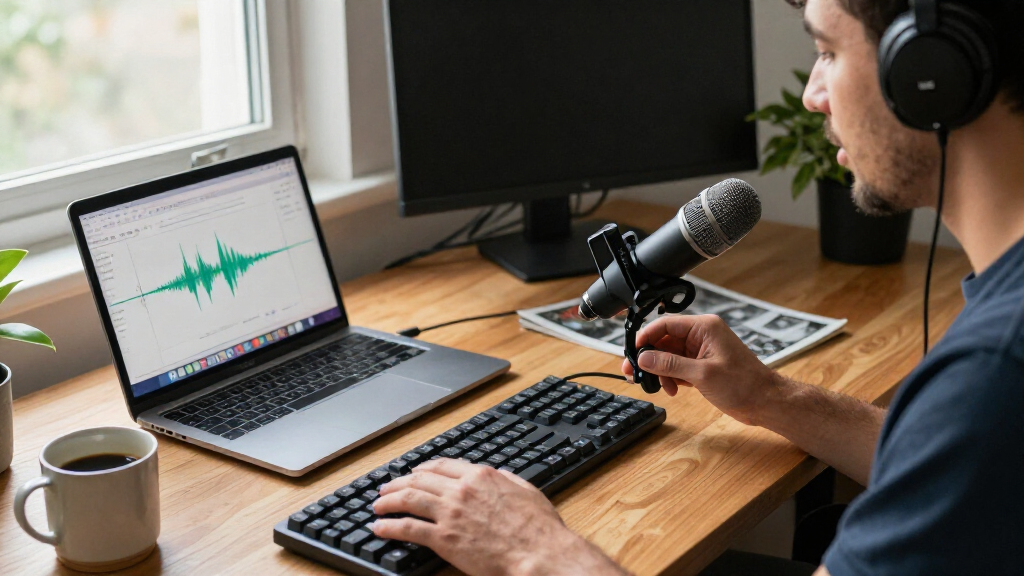
USB microphone kits for developers range from simple plug-and-play desk mics to dynamic USB/XLR setups that can grow into a recording rig. I’d name the Samson Q2U best overall for its USB/XLR flexibility, the MAONO PD200XS a strong pick for a feature-rich desk setup, and the CMOCIIY gooseneck a fit for compact, mute-ready calls. The main tradeoffs are background-noise control versus sensitivity, a tidy desk versus a boom arm, and easy USB use versus room to upgrade. A condenser can capture a clear voice in a quiet space, while a dynamic mic may be more forgiving around keyboards and other room sounds. Read on for the full breakdown and help choosing a kit that fits your work setup.

Get business pricing on monitors, keyboards and dev gear
- Business-only prices and quantity discounts
- Tax-exempt purchasing
- Multiple users, one account, clear invoices
Complete the kit


Key Takeaways
- The Samson Q2U stands out for upgrade flexibility: USB supports a straightforward developer desk, while XLR leaves a path to an audio interface later.
- Dynamic USB/XLR models recur among the flexible picks: the MAONO PD200XS, TONOR TD510+, and FIFINE K688CT pair a close-talk style with options beyond USB.
- Complete kits can save setup work but take more desk space: boom-arm bundles such as the TONOR TC310+ and FIFINE A6TW suit fixed workstations better than compact desks.
- Condenser and gaming-focused kits are not interchangeable: models like the MAONO A04 and FIFINE A6T favor a feature-rich desk setup, while developers should account for room and keyboard noise.
- Not every developer needs a studio-style rig: the CMOCIIY gooseneck emphasizes simple placement and a physical mute, while the ALSO GO bundle adds a sound card and more setup complexity.
| TONOR TC310+ USB Condenser Microphone Kit with Boom Arm and RGB Lighting | 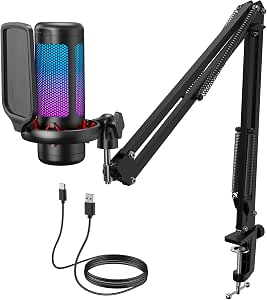 | Best for Desk-Based Developer Calls | Microphone type: Condenser | Connectivity: USB-A | Polar pattern: Unidirectional | VIEW LATEST PRICE | See Our Full Breakdown |
| MAONO PD200XS USB/XLR Dynamic Microphone Kit with RGB Lighting and Boom Arm |  | Best for USB-to-XLR Growth | Microphone type: Dynamic | Connectivity: USB, USB Type-C, XLR | Polar pattern: Unidirectional cardioid | VIEW LATEST PRICE | See Our Full Breakdown |
| TONOR TD510+ Dynamic Podcast Microphone with USB/XLR, Boom Arm, and Headphone Monitoring |  | Best Complete USB/XLR Bundle | Microphone type: Dynamic | Connectivity: USB, XLR | Polar pattern: Cardioid (unidirectional) | VIEW LATEST PRICE | See Our Full Breakdown |
| FIFINE AmpliGame A6T USB Gaming Microphone Kit |  | Best Beginner-Friendly USB Kit | Microphone type: USB condenser | Connectivity: USB | Polar pattern: Unidirectional cardioid | VIEW LATEST PRICE | See Our Full Breakdown |
| FIFINE AmpliTank K688CT USB/XLR Dynamic Podcast Microphone Kit with Boom Arm | 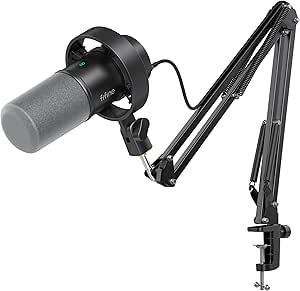 | Best for Loud Recording Environments | Microphone type: Dynamic | Connectivity: USB, XLR | Polar pattern: Unidirectional cardioid | VIEW LATEST PRICE | See Our Full Breakdown |
| ALSO GO Podcast Equipment Bundle with V8s Sound Card and BM-800 Microphone |  | Best for Effect-Focused Developer Streams | Microphone: BM-800 condenser | Connectivity: USB Type-C | Pickup pattern: Hypercardioid | VIEW LATEST PRICE | See Our Full Breakdown |
| FIFINE AmpliGame AM8 USB/XLR Dynamic Microphone |  | Best for a USB-to-XLR Upgrade Path | Microphone type: Dynamic | Connectivity: USB and XLR | Pickup pattern: Cardioid, unidirectional | VIEW LATEST PRICE | See Our Full Breakdown |
| MAONO A04 USB Condenser Microphone Kit |  | Best for Desk-Based Tutorials | Microphone type: Large-diaphragm condenser | Capsule size: 16 mm | Connectivity: USB and USB Type-C | VIEW LATEST PRICE | See Our Full Breakdown |
| TONOR TC310 USB Condenser Gaming Microphone with RGB Lighting, White |  | Best for Simple, Compact Desk Control | Microphone type: Condenser | Connectivity: USB | Pickup pattern: Unidirectional | VIEW LATEST PRICE | See Our Full Breakdown |
| FIFINE A6TW USB Gaming Microphone Kit with RGB Lighting and Boom Arm |  | Best for an Out-of-the-Box Boom-Arm Setup | Connectivity: USB | Connector: USB-C to USB | Pickup pattern: Unidirectional, cardioid | VIEW LATEST PRICE | See Our Full Breakdown |
| Samson Q2U USB/XLR Dynamic Microphone Recording and Podcasting Bundle |  | Best for Developers Who May Upgrade to XLR | Microphone type: Dynamic | Connectivity: USB, XLR | Polar pattern: Unidirectional | VIEW LATEST PRICE | See Our Full Breakdown |
| CMOCIIY Plug-and-Play USB Gooseneck Microphone with Mute Button and LED Indicator |  | Best for Simple Desk Calls | Microphone type: Gooseneck | Connectivity: USB | Polar pattern: Omnidirectional | VIEW LATEST PRICE | See Our Full Breakdown |
| FIFINE AmpliGame AM8PROT Dynamic Gaming Microphone Kit with Boom Arm |  | Best for Developers Who Stream or Record | Microphone type: Dynamic | Connectivity: USB, XLR | Polar pattern: Unidirectional (cardioid) | VIEW LATEST PRICE | See Our Full Breakdown |
| FIFINE AmpliGame AM8T XLR/USB Dynamic Microphone Kit with Boom Arm |  | Best for a Ready-to-Position Desk Setup | Microphone type: Dynamic | Connectivity: USB, XLR | Polar pattern: Unidirectional (cardioid) | VIEW LATEST PRICE | See Our Full Breakdown |
| USB microphone kits for developer | Connectivity | Microphone type | Polar pattern | Frequency response |
|---|---|---|---|---|
| TONOR TC310+ USB Condenser Mic | USB-A | Condenser | Unidirectional | — |
| MAONO PD200XS USB/XLR Dynamic | USB, USB Type-C, XLR | Dynamic | Unidirectional cardioid | 40 Hz–16 kHz |
| TONOR TD510+ Dynamic Podcast M | USB, XLR | Dynamic | Cardioid (unidirectional) | 50 Hz–14 kHz |
| FIFINE AmpliGame A6T USB Gamin | USB | USB condenser | Unidirectional cardioid | — |
| FIFINE AmpliTank K688CT USB/XL | USB, XLR | Dynamic | Unidirectional cardioid | — |
| ALSO GO Podcast Equipment Bund | USB Type-C | — | — | — |
| FIFINE AmpliGame AM8 USB/XLR D | USB and XLR | Dynamic | — | 50 Hz–16 kHz |
| MAONO A04 USB Condenser Microp | USB and USB Type-C | Large-diaphragm condenser | — | 30 Hz–16 kHz |
| TONOR TC310 USB Condenser Gami | USB | Condenser | — | — |
| FIFINE A6TW USB Gaming Microph | USB | — | — | 20 kHz |
| Samson Q2U USB/XLR Dynamic Mic | USB, XLR | Dynamic | Unidirectional | — |
| CMOCIIY Plug-and-Play USB Goos | USB | Gooseneck | Omnidirectional | 20 Hz–20 kHz |
| FIFINE AmpliGame AM8PROT Dynam | USB, XLR | Dynamic | Unidirectional (cardioid) | 20 Hz–20 kHz |
| FIFINE AmpliGame AM8T XLR/USB | USB, XLR | Dynamic | Unidirectional (cardioid) | 50 Hz–16 kHz |
More Details on Our Top Picks
TONOR TC310+ USB Condenser Microphone Kit with Boom Arm and RGB Lighting
The TONOR TC310+ suits developers who want a ready-to-use USB setup with physical controls close at hand. Its tap-to-mute and adjustable gain make it easier to silence a call or adjust voice level without hunting through software, while the metal boom arm helps position the mic near the speaker. Compared with the dynamic TONOR TD510+, this condenser model is more focused on simple USB communication and adds controllable RGB lighting, but it does not offer an XLR path for a later studio or interface setup. The kit includes a pop filter and shock mount, though the clamp only fits desks up to 2.36 inches thick. Its USB-A connection is straightforward for compatible computers, but buyers should check their available ports and the Type-C connector seating before setup.
Pros:- Tap-to-mute and gain controls allow quick adjustments during calls.
- Metal boom arm provides adjustable positioning.
- Includes a pop filter, shock mount, and USB cable.
- RGB modes and brightness can be controlled.
Cons:- USB-only connectivity does not support an XLR upgrade path.
- Desk clamp is limited to surfaces up to 2.36 inches thick.
- USB-A connection may call for an adapter on computers without that port.
Best for: Developers who take frequent video calls or record tutorials at a fixed desk and want accessible mute and gain controls.
Not ideal for: Developers planning to move to an XLR interface, or those with desks thicker than 2.36 inches.
- Microphone type:Condenser
- Connectivity:USB-A
- Polar pattern:Unidirectional
- Signal-to-noise ratio:78 dB
- Audio sensitivity:10 dB
- Boom arm material:Metal
- Maximum desk thickness:2.36 inches
- Included components:Microphone, pop filter, mic stand, shock mount, USB cable, manual
Our verdict“Choose the TC310+ for a desk-based USB call setup with convenient controls, but pick the TD510+ if you want XLR connectivity.”
MAONO PD200XS USB/XLR Dynamic Microphone Kit with RGB Lighting and Boom Arm
The MAONO PD200XS is a strong fit for developers who want a convenient USB mic now and the option to connect to audio equipment later. Its USB and XLR outputs make that path possible, while the cardioid dynamic design is suited to emphasizing a nearby voice over some surrounding sound. In USB mode, MAONO Link adds audio adjustments and RGB controls; onboard gain, headphone-volume, mute, and monitoring controls also make it practical for daily calls and recordings. Compared with the TONOR TD510+, it adds USB-mode software and lighting control, but the TD510+ includes an XLR cable while this kit does not. MAONO Link features are limited to USB operation, so switching to XLR means giving up those software controls. Buyers who expect to use XLR should budget for a separate cable and interface or mixer.
Pros:- USB and XLR connections support both computer use and compatible audio equipment.
- On-mic gain, headphone-volume, and mute controls simplify routine adjustments.
- 3.5 mm headphone jack supports direct monitoring.
- USB-mode MAONO Link offers audio adjustments and RGB control.
Cons:- XLR cable is not included.
- Software adjustments and RGB controls are available only in USB mode.
- XLR use requires a compatible interface or mixer.
Best for: Developers who want a USB microphone for current calls and recordings, with a plan to add an audio interface or mixer later.
Not ideal for: Buyers who need a complete XLR connection kit or expect MAONO Link controls to work over XLR.
- Microphone type:Dynamic
- Connectivity:USB, USB Type-C, XLR
- Polar pattern:Unidirectional cardioid
- Frequency response:40 Hz–16 kHz
- Signal-to-noise ratio:80 dB
- Headphone monitoring:3.5 mm jack
- Software:MAONO Link; audio adjustments and RGB control in USB mode
- Included accessories:Shock mount, adjustable boom arm, USB-C to USB-A/C cable, 5/8 in to 3/8 in adapter
Our verdict“Pick the PD200XS if you want USB convenience today and an XLR upgrade path, and can supply the XLR cable and equipment yourself.”
TONOR TD510+ Dynamic Podcast Microphone with USB/XLR, Boom Arm, and Headphone Monitoring
The TONOR TD510+ stands out for developers who want both connection choices without having to source a separate XLR cable. The kit includes USB and XLR cables, a boom arm, and a clamp, so it can serve for computer calls now and a compatible interface or mixer later. Its cardioid dynamic pickup, quick mute, volume controls, and 3.5 mm headphone jack make it a practical choice for voice work where monitoring matters. Compared with the MAONO PD200XS, the TD510+ includes the XLR cable and skips software-dependent RGB controls; the MAONO offers USB-mode software adjustments instead. The TD510+ has a 50 Hz–14 kHz response and does not include the MAONO’s listed software features. XLR still requires extra audio hardware, and the microphone needs a wired connection in either setup.
Pros:- Includes both USB and XLR cables.
- Cardioid dynamic design is suited to close voice capture.
- Quick mute, volume controls, and headphone monitoring are onboard.
- Boom arm and clamp are included in the kit.
Cons:- XLR operation requires an audio interface or mixer.
- Wired connectivity limits use away from the desk.
- Frequency response tops out at 14 kHz, narrower than the PD200XS listing.
Best for: Developers who want a ready-to-connect USB/XLR kit for calls, voice-over work, or a future interface-based recording setup.
Not ideal for: Developers seeking a wireless mic, software-controlled lighting, or an XLR setup that works without an interface or mixer.
- Microphone type:Dynamic
- Connectivity:USB, XLR
- Polar pattern:Cardioid (unidirectional)
- Frequency response:50 Hz–14 kHz
- Maximum SPL:110 dB
- Signal-to-noise ratio:95 dB
- Headphone jack:3.5 mm
- Included components:Microphone, USB cable, XLR cable, boom arm, clamp, 4 cable ties, manual
Our verdict“Choose the TD510+ if you want an included XLR cable and practical monitoring controls in a single USB/XLR bundle.”
FIFINE AmpliGame A6T USB Gaming Microphone Kit
The FIFINE AmpliGame A6T makes the most sense for developers who want a single USB connection and a full desk setup without adding an audio interface. Plug-and-play compatibility with computers and PlayStation consoles, plus touch mute and gain control, keeps everyday setup and call adjustments simple. The included boom arm, shock mount, and pop filter also provide more positioning and noise-management hardware than a bare desktop mic. Compared with the TONOR TC310+, the A6T lists a higher sampling rate and 24-bit depth, while the TONOR clamp accommodates desks up to 2.36 inches thick versus 2 inches here. Both are USB condenser kits with lighting and quick controls, so the A6T is less suited to buyers seeking XLR expansion. Its wired connection and desk clamp limit placement options.
Pros:- Plug-and-play USB setup works with listed computers and PlayStation consoles.
- Touch mute and gain control allow quick on-mic adjustments.
- Includes a metal boom arm, shock mount, and pop filter.
- Cardioid pickup pattern focuses on sound from the front.
Cons:- USB-only connectivity offers no XLR upgrade path.
- Clamp fits desks only up to 2 inches thick.
- Requires a wired USB connection.
Best for: Developers setting up their first desk microphone for video calls, screen recordings, or voice chat on a computer or PlayStation.
Not ideal for: Developers who need XLR connectivity, wireless placement, or a clamp that fits a desk thicker than 2 inches.
- Microphone type:USB condenser
- Connectivity:USB
- Polar pattern:Unidirectional cardioid
- Sampling rate:192 kHz
- Bit depth:24 bit
- Frequency range:60 Hz–18 kHz
- Cable length:8.2 ft (2.5 m)
- Desk clamp capacity:Up to 2 inches thick
Our verdict“Choose the A6T for a beginner-friendly USB desk kit with included positioning accessories, but skip it if you need XLR or a thicker-desk clamp.”
FIFINE AmpliTank K688CT USB/XLR Dynamic Podcast Microphone Kit with Boom Arm
The FIFINE AmpliTank K688CT is a sensible pick for developers recording energetic narration, demonstrations, or louder sources who want a dynamic mic and room to grow beyond USB. Its listed 120 dB maximum SPL gives it headroom for loud input, while the cardioid pattern and included windscreen, shock mount, and metal boom arm help manage voice placement and handling noise. USB mode provides mute, gain, and headphone-monitoring controls, making it usable for computer calls without separate audio hardware. Compared with the TONOR TD510+, the K688CT lists a higher maximum SPL and a metal enclosure, but the TD510+ includes both USB and XLR cables. The K688CT’s controls are unavailable over XLR, and its clamp only fits desks under 2 inches thick, so check the desk and planned connection before buying.
Pros:- USB and XLR connectivity support computer and compatible audio-interface setups.
- 120 dB maximum SPL is suited to handling loud sources.
- Metal boom arm, shock mount, and windscreen are included.
- USB mode provides mute, gain, and headphone-monitoring controls.
Cons:- On-mic controls are unavailable when connected through XLR.
- XLR cable is not listed among the included accessories.
- Clamp fits desks under 2 inches thick.
Best for: Developers recording louder voice-overs or demonstrations who want USB convenience now and XLR compatibility for a later studio setup.
Not ideal for: Buyers who need controls while using XLR, an included XLR cable, or a clamp for desks 2 inches thick or more.
- Microphone type:Dynamic
- Connectivity:USB, XLR
- Polar pattern:Unidirectional cardioid
- Maximum SPL:120 dB
- Frequency range:50 Hz–16 kHz
- Signal-to-noise ratio:80 dB
- USB-mode controls:Tap-to-mute, gain knob, headphone-volume knob
- Boom arm clamp fit:Desks under 2 inches thick
Our verdict“Choose the K688CT for a dynamic USB/XLR mic with high listed SPL headroom, provided its clamp fits your desk and you accept USB-only controls.”
ALSO GO Podcast Equipment Bundle with V8s Sound Card and BM-800 Microphone
The ALSO GO bundle suits developers who want a ready-made setup for live coding streams with voice effects, rather than a simple mic for calls. Its mixer adds four voice-changing modes and 10 sound effects, while the BM-800, boom arm, shock mount, and pop filter provide a fuller starter kit than the desktop-focused FIFINE AmpliGame AM8. USB-C support across computers and phones is useful if you switch between a desk stream and mobile recording. The tradeoff is added setup complexity: the mixer’s effects and controls are more than most developers need for stand-ups or clear technical narration. The listed 5 MHz frequency response is also an unclear specification, so I would not use it to judge recording quality. Choose it for effects and included accessories, not for a documented audio profile.
Pros:- Includes a BM-800 microphone, mixer, boom arm, shock mount, and pop filter.
- Mixer offers 10 sound effects and four voice-changing modes.
- USB-C connectivity supports compatible computers and smartphones.
- Noise reduction and volume controls are built into the mixer.
Cons:- The listed 5 MHz frequency response is unclear and does not offer a useful basis for judging voice capture.
- More effects and controls add complexity compared with plug-and-play options such as the FIFINE AmpliGame AM8.
- The mixer should be fully charged before first use or after long storage.
Best for: Developers who livestream or make tutorial videos and want voice effects, a mixer, and a complete set of recording accessories in one kit.
Not ideal for: Developers who mainly need a straightforward microphone for meetings, or who want clearly documented audio specifications and minimal controls.
- Microphone:BM-800 condenser
- Connectivity:USB Type-C
- Pickup pattern:Hypercardioid
- Mixer sound effects:10
- Voice effects:4: female, male, child, and monster
- Channels:2
- Compatible systems:Windows, Mac OS, iOS, and Android
- Included accessories:Audio mixer, adjustable arm, pop filter, shock mount, earphone, and charging cable
Our verdict“Pick the ALSO GO if you want a mixer-led developer streaming kit with voice effects; skip it for uncomplicated work calls.”
FIFINE AmpliGame AM8 USB/XLR Dynamic Microphone
The FIFINE AmpliGame AM8 is the most flexible pick here for a developer whose setup may grow from laptop calls into a dedicated audio interface. In USB mode, it has gain and headphone controls, monitoring, tap-to-mute, and RGB lighting; the XLR connection supports a different kind of future setup. That makes it a more practical long-term choice than the USB-only TONOR TC310, though the TC310’s included stand and simple controls may suit someone who never plans to change gear. The AM8 is a dynamic cardioid mic, but its recommended 2–6 inch speaking distance calls for close placement—less convenient if you tend to move around while presenting. XLR also requires a separate cable, and USB-mode features such as mute controls and lighting are inactive when using XLR.
Pros:- USB and XLR connections support both simple computer use and a later interface-based setup.
- USB mode includes tap-to-mute with an LED reminder.
- Headphone monitoring, gain, and volume controls are available in USB mode.
- Built-in 3/8-inch and 5/8-inch threads fit many microphone stands.
Cons:- An XLR cable is not included.
- RGB lighting and onboard controls are inactive in XLR mode.
- The recommended 2–6 inch speaking distance may feel restrictive for presenters who move around.
Best for: Developers who want convenient USB controls now and the option to connect the microphone to an XLR interface or mixer later.
Not ideal for: People who speak from farther away, need a complete XLR setup in the box, or expect the onboard controls and RGB to work in XLR mode.
- Microphone type:Dynamic
- Connectivity:USB and XLR
- Pickup pattern:Cardioid, unidirectional
- Frequency response:50 Hz–16 kHz
- Signal-to-noise ratio:80 dB
- USB-mode features:Tap-to-mute, headphone monitoring, gain and volume controls, RGB lighting
- Stand threads:3/8 inch and 5/8 inch
- Form factor:Desktop
Our verdict“Choose the AM8 if you want a close-talk USB mic with a genuine XLR upgrade path, and accept that XLR needs extra gear.”
MAONO A04 USB Condenser Microphone Kit
For developers recording code walkthroughs or longer tutorials at a fixed workstation, the MAONO A04 makes a stronger case than the smaller control-focused TONOR TC310: it bundles a scissor arm, shock mount, pop filter, and foam windscreen for positioning the mic and managing common desk and speech noise. Its USB connection keeps setup simple, while the 16mm condenser capsule and support for up to 192kHz/24-bit sampling offer plenty of recording-format headroom for compatible software. That high sampling ceiling does not make it a better fit for every desk, though. The clamp only fits surfaces under 2.1 inches thick, and the listed 2–6 inch recording distance means it works best when positioned close to the speaker. It also lacks the AM8’s XLR route, and it is not compatible with Xbox or Maono Link.
Pros:- Includes a scissor arm, metal shock mount, pop filter, and foam windscreen.
- Plug-and-play USB connection requires no separate audio interface.
- Supports sampling up to 192kHz/24-bit for compatible recording workflows.
- Metal enclosure and shock mount help keep the desk-mounted microphone steady.
Cons:- The desk clamp only fits desktops less than 2.1 inches thick.
- Not compatible with Xbox or Maono Link.
- USB-only connectivity lacks the XLR upgrade option available on the FIFINE AmpliGame AM8.
Best for: Developers who record narrated tutorials or demos at a fixed desk and want a complete USB arm-and-filter setup.
Not ideal for: Xbox users, people with desks 2.1 inches thick or more, or developers seeking an XLR connection or Maono Link support.
- Microphone type:Large-diaphragm condenser
- Capsule size:16 mm
- Connectivity:USB and USB Type-C
- Pickup pattern:Cardioid
- Sampling support:Up to 192kHz/24-bit
- Frequency response:30 Hz–16 kHz
- Included accessories:Scissor arm, shock mount, pop filter, foam windscreen, and USB-A/USB-C to USB-B cable
- Desk clamp limit:Desktops less than 2.1 inches thick
Our verdict“Choose the A04 for a fixed developer recording desk with a bundled boom arm, but check clamp fit and platform support first.”
TONOR TC310 USB Condenser Gaming Microphone with RGB Lighting, White
The TONOR TC310 is a straightforward choice for developers who want a USB mic with quick mute and gain adjustment, without the extra mixer features of the ALSO GO bundle or the XLR path offered by the FIFINE AmpliGame AM8. Its touch mute and adjustable gain keep common call and stream adjustments close at hand, while four RGB modes can be dimmed or switched off when lighting is distracting. It includes a stand, pop filter, and shock mount, so it is ready for a basic desktop setup without a separate boom arm. The tradeoff is that its unidirectional pickup is intended to focus on one speaker, not a group gathered around the desk. It works with Windows, Mac, PS4, and PS5, but not Xbox, which narrows its appeal for developers who also use that console.
Pros:- Touch mute and gain adjustment offer quick access to common controls.
- Four RGB modes include adjustable brightness and an option to turn the lighting off.
- Plug-and-play USB setup works with Windows PCs and Macs.
- Includes a pop filter, stand, and shock mount.
Cons:- Not compatible with Xbox.
- Unidirectional pickup is a poor fit for capturing multiple speakers from different directions.
- USB-only design does not offer the XLR upgrade path of the FIFINE AmpliGame AM8.
Best for: Developers who want a simple USB desktop mic with accessible mute and gain controls for calls, streaming, or solo demos.
Not ideal for: Xbox users, developers recording multiple people around one microphone, or anyone who needs XLR connectivity or a boom arm.
- Microphone type:Condenser
- Connectivity:USB
- Pickup pattern:Unidirectional
- Channels:1
- Controls:Touch mute, gain adjustment, and RGB brightness
- RGB modes:4
- Compatible devices:Laptop, PC, Mac, PS4, and PS5
- Included items:Microphone, pop filter, mic stand, shock mount, and USB cable
Our verdict“Pick the TC310 for uncomplicated solo desk use with handy controls, provided you do not need Xbox support or XLR.”
FIFINE A6TW USB Gaming Microphone Kit with RGB Lighting and Boom Arm
The FIFINE A6TW is a practical fit for developers who want to move a mic off the desk and position it near their keyboard for coding streams or calls. Its boom arm, shock mount, and pop filter are included, giving it a more adjustable setup than the desktop stand bundled with the TONOR TC310. Tap-to-mute, a gain knob, and an RGB status indicator make routine adjustments easy without adding a mixer. It is USB-only, though, so unlike the FIFINE AmpliGame AM8 it offers no XLR route if your recording setup later expands. The 6–12 inch recommended distance also means it is meant to sit farther from the speaker than close-talk options. Check desk thickness before buying: the C-clamp supports surfaces up to 2 inches.
Pros:- Includes a boom arm, shock mount, and pop filter for flexible desk positioning.
- Tap-to-mute has an RGB status indicator, and a gain knob allows quick level adjustment.
- Plug-and-play USB connection supports compatible computers and PS4 or PS5 setups.
- An 8.2-foot cable allows some flexibility when routing from the desk arm to a computer.
Cons:- The C-clamp only supports desktops up to 2 inches thick.
- USB-only connectivity lacks the XLR option available on the FIFINE AmpliGame AM8.
- The recommended 6–12 inch recording distance may not suit close-talk recording.
Best for: Developers who want an adjustable boom-arm mic for desk-based calls or streaming and prefer simple USB controls over an XLR setup.
Not ideal for: People with desks thicker than 2 inches, users who need XLR connectivity, or speakers who prefer to work within a few inches of the microphone.
- Connectivity:USB
- Connector:USB-C to USB
- Pickup pattern:Unidirectional, cardioid
- Frequency response:20 kHz
- Signal-to-noise ratio:58 dB
- Cable length:8.2 ft (2.5 m)
- Recommended recording distance:6–12 inches
- Included accessories:Shock mount, pop filter, boom arm, C-clamp, and USB cable
- C-clamp limit:Desktops up to 2 inches thick
Our verdict“Choose the A6TW if an included boom arm and simple USB controls matter more than XLR flexibility or close mic placement.”
Samson Q2U USB/XLR Dynamic Microphone Recording and Podcasting Bundle
The Samson Q2U is the most practical pick here for developers who want a straightforward USB setup now and a path to mixer or interface use later. Its USB and XLR outputs offer more flexibility than the USB-only CMOCIIY gooseneck, while the dynamic, unidirectional design is a sensible fit for voice calls in a room with some background noise. A headphone output with level control supports zero-latency monitoring, and the bundle includes both a desktop tripod and a microphone arm, plus the required USB and XLR cables. The tradeoff is a single-channel design and a less desk-integrated accessory setup than the FIFINE AM8PROT’s adjustable boom arm kit. Choose the Q2U for connectivity and a broad starter bundle, not for app-based sound controls or a polished RGB setup.
Pros:- USB and XLR outputs allow connection to a computer or compatible mixer and audio interface.
- Plug-and-play computer connection avoids driver installation.
- Headphone output with level control enables zero-latency monitoring.
- Bundle includes a desktop tripod, microphone arm, pop filter, and USB and XLR cables.
Cons:- Single-channel output limits recording flexibility.
- The included desktop tripod may not suit developers who need a full-size stand or a fixed boom-arm setup.
- It lacks the app-based EQ, mix, and lighting customization offered by the FIFINE AM8PROT.
Best for: Developers who want a no-driver USB mic for calls and recordings, with the option to connect to an XLR mixer or interface later.
Not ideal for: Developers who want extensive on-mic mixing controls, software customization, or a boom arm as the primary stand.
- Microphone type:Dynamic
- Connectivity:USB, XLR
- Polar pattern:Unidirectional
- Headphone output:1/8-inch stereo with level control
- Channels:1
- Included accessories:Desktop tripod with extension, mic clip, USB cable, XLR cable, microphone arm, pop filter, microfiber cloth
- Dimensions:17.5 × 11.75 × 5.25 inches
- Warranty:2-year manufacturer warranty
Our verdict“Choose the Q2U if you want a flexible USB starter mic with included XLR connectivity and accessories, rather than extensive software controls.”
CMOCIIY Plug-and-Play USB Gooseneck Microphone with Mute Button and LED Indicator
For a developer who mostly needs a mic for standups, support calls, or quick voice notes, the CMOCIIY gooseneck keeps setup and controls simple: plug in over USB, bend the neck into position, and check the LED before speaking. Its touch mute button and red-muted indicator are useful when calls interrupt focused work, while the compact base is easier to place or carry than the boom-arm kits from FIFINE. The main compromise is the omnidirectional pickup pattern, which can gather keyboard noise and nearby voices instead of favoring the person at the desk. The specified best pickup distance is 6–12 inches, so placement matters. Compared with the unidirectional Samson Q2U, this is the simpler desktop-call tool, but it gives up XLR connectivity and the Q2U’s headphone monitoring.
Pros:- USB plug-and-play operation works with Windows and Mac without drivers.
- Touch mute control and LED status make it easy to check whether the mic is live.
- Flexible metal gooseneck supports direct positioning at the desk.
- Compact 190 g design is easy to move or pack.
Cons:- Omnidirectional pickup can capture keyboard sounds and other nearby audio.
- Best voice pickup is specified within a 6–12 inch range, making placement less forgiving.
- USB-only connection offers no XLR upgrade path or headphone monitoring.
Best for: Remote developers who want a compact, driver-free desktop mic with a visible mute state for meetings and routine calls.
Not ideal for: Developers recording in noisy shared rooms or seeking focused voice pickup, headphone monitoring, or XLR expansion.
- Microphone type:Gooseneck
- Connectivity:USB
- Polar pattern:Omnidirectional
- Frequency response:20 Hz–20 kHz
- Compatible operating systems:Windows, Mac
- Mute indicator:Green when connected and working; red when muted
- Cable length:1.8 m (6 ft)
- Weight:190 g
Our verdict“Pick the CMOCIIY for simple, compact calls in a relatively quiet workspace, but choose the Samson Q2U for more focused pickup and monitoring.”
FIFINE AmpliGame AM8PROT Dynamic Gaming Microphone Kit with Boom Arm
The FIFINE AmpliGame AM8PROT makes the most sense for developers whose mic needs extend beyond meetings to streaming, demos, or recorded tutorials. In USB mode, tap-to-mute, headphone monitoring, mix and volume controls put common adjustments within reach; the FIFINE Genie app adds EQ and mix-channel customization. Its included boom arm reaches up to 30 inches, helping clear desk space and bring the mic close without placing it beside the keyboard. Compared with the more basic Samson Q2U bundle, the AM8PROT offers more software and USB controls, but several features—including monitoring, mixing, and RGB settings—are limited to USB mode. It also has one channel, and the controls may be more than a developer needs for occasional calls. This is the feature-rich desk setup, not the simplest one.
Pros:- USB and XLR connections support computer use and later connection to compatible audio gear.
- USB mode includes tap-to-mute, headphone monitoring, mix control, and volume control.
- Included boom arm extends up to 30 inches for flexible placement and a clearer desk.
- FIFINE Genie app offers EQ, mix-channel, and RGB customization.
Cons:- Mixing, headphone monitoring, and RGB controls are available only in USB mode.
- Single-channel design limits recording flexibility.
- The extra controls and app features may be unnecessary for developers who only attend calls.
Best for: Developers who stream coding sessions, record tutorials, or switch between calls and content creation from a boom-arm setup.
Not ideal for: Developers who only need occasional calls, want a minimal setup, or plan to use its monitoring and mix controls over XLR.
- Microphone type:Dynamic
- Connectivity:USB, XLR
- Polar pattern:Unidirectional (cardioid)
- Audio resolution:48 kHz/24-bit (XLR)
- Frequency response:20 Hz–20 kHz
- Maximum SPL:115 dB
- Boom arm extension:Up to 30 inches
- Software:FIFINE Genie Desktop App
- USB cable length:8.2 ft
Our verdict“Choose the AM8PROT if you will use its USB controls, app, and long boom arm for streaming or recordings, not just routine meetings.”
FIFINE AmpliGame AM8T XLR/USB Dynamic Microphone Kit with Boom Arm
The FIFINE AmpliGame AM8T is a strong fit for developers who want the mic mounted off the desk and the everyday controls on the device. Its included metal boom arm and desk clamp support flexible placement, while USB provides plug-and-play computer use and XLR leaves room to connect an interface or mixer. Mute, gain, and headphone-volume controls, along with a monitoring jack, make it more self-contained than the CMOCIIY gooseneck for someone adjusting audio during calls or recordings. Compared with the AM8PROT, this kit emphasizes on-mic controls and a straightforward boom setup rather than app-based EQ and lighting customization. Two practical limits matter: the clamp fits desks under 2 inches thick, and an XLR cable is not included. Factor in those fit and connection needs before choosing it.
Pros:- USB plug-and-play and XLR connections accommodate computer and compatible audio-interface setups.
- Included metal boom arm and clamp allow adjustable positioning away from the keyboard.
- Mute, gain, headphone-volume controls, and a monitoring jack are built into the setup.
- RGB lighting can be customized or switched off using the microphone button.
Cons:- XLR cable is not included, so an XLR setup requires a separate cable.
- Desk clamp fits surfaces less than 2 inches thick.
- Compared with the AM8PROT, the listed features do not include its desktop app for EQ and mix customization.
Best for: Developers who want a dynamic USB/XLR mic with a boom arm, on-mic gain and mute controls, and headphone monitoring.
Not ideal for: Developers with desks 2 inches thick or more, or anyone who needs an included XLR cable for immediate interface use.
- Microphone type:Dynamic
- Connectivity:USB, XLR
- Polar pattern:Unidirectional (cardioid)
- Frequency response:50 Hz–16 kHz
- Signal-to-noise ratio:80 dB
- Included accessories:Metal boom arm, desk clamp, USB-to-USB-C cable (8.2 ft), windscreen, user manual
- Desk clamp capacity:Desktops less than 2 inches thick
- Weight:1 kg
- XLR cable:Not included
Our verdict“Choose the AM8T if its clamp fits your desk and you want a boom-mounted mic with direct controls; look elsewhere if you need an included XLR cable.”
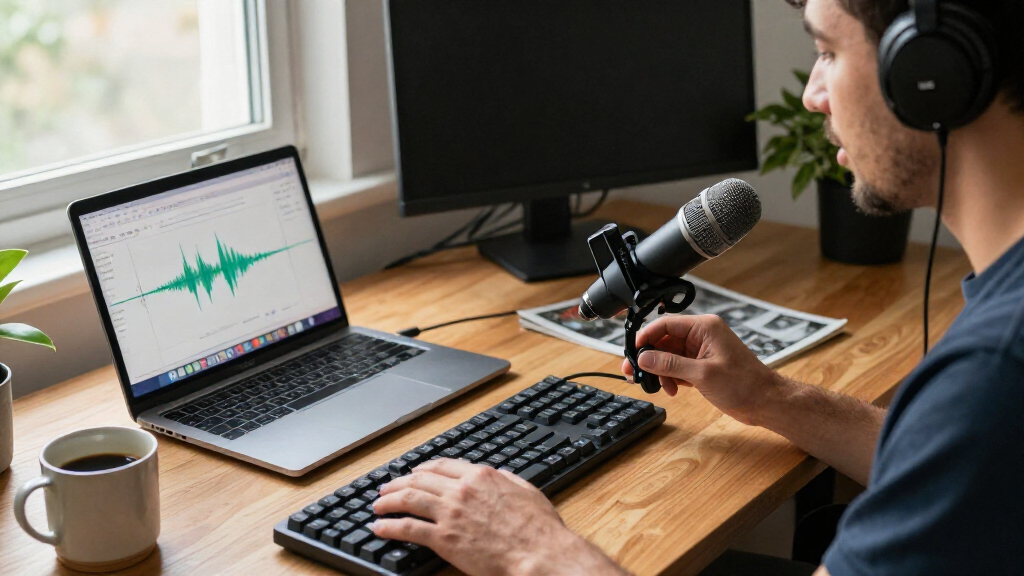
How We Picked
I ranked these kits around common developer tasks: video meetings, code walkthroughs, screen recordings, tutorials, and occasional streaming. The main criteria were connection options, expected usefulness in a typical home or office, controls that matter during calls, included mounting hardware, and how much setup or desk space each kit demands. I gave extra weight to choices that balance clear voice capture with low-friction daily use, rather than treating RGB lighting or a long feature list as a substitute for practical fit.
The order reflects distinct strengths, not a claim that one microphone suits every room. USB/XLR models rank well when they combine easy computer connection with a credible upgrade path; simple USB kits can be better when setup speed and a complete mount matter more. I also account for tradeoffs: condenser sensitivity can expose keyboard and room noise, bundles with sound cards can add complexity, and compact designs may offer fewer positioning options. Since the products span different formats, the best pick depends on the user’s workspace and recording plans.
| USB microphone kits for developer | Microphone type | Polar pattern |
|---|---|---|
| TONOR TC310+ USB Condenser Mic | Condenser | Unidirectional |
| MAONO PD200XS USB/XLR Dynamic | Dynamic | Unidirectional cardioid |
| TONOR TD510+ Dynamic Podcast M | Dynamic | Cardioid (unidirectional) |
| FIFINE AmpliGame A6T USB Gamin | USB condenser | Unidirectional cardioid |
| FIFINE AmpliTank K688CT USB/XL | Dynamic | Unidirectional cardioid |
| ALSO GO Podcast Equipment Bund | — | — |
| FIFINE AmpliGame AM8 USB/XLR D | Dynamic | — |
| MAONO A04 USB Condenser Microp | Large-diaphragm condenser | — |
| TONOR TC310 USB Condenser Gami | Condenser | — |
| FIFINE A6TW USB Gaming Microph | — | — |
| Samson Q2U USB/XLR Dynamic Mic | Dynamic | Unidirectional |
| CMOCIIY Plug-and-Play USB Goos | Gooseneck | Omnidirectional |
| FIFINE AmpliGame AM8PROT Dynam | Dynamic | Unidirectional (cardioid) |
| FIFINE AmpliGame AM8T XLR/USB | Dynamic | Unidirectional (cardioid) |
Factors to Consider When Choosing USB Microphone Kits For Developers
Before choosing a kit, match the microphone to your room, desk, and work habits—not just to the feature list. These broader decisions can matter more than RGB effects or a second connection port.
Choose a pickup style for your actual room
A microphone cannot distinguish a useful explanation from keyboard clatter simply because the voice comes from a developer. In a quiet, treated space, a condenser may capture a more open sound, but it can also make room reflections and desk noise more apparent. A dynamic mic used close to the mouth can be a more forgiving choice in a shared room or beside a mechanical keyboard, though it calls for consistent positioning. Before buying, listen to a recording made with your current headset in the room where you work. If the room sounds boxy or noisy, changing mic placement and reducing noise sources may help more than buying a more sensitive microphone.
Decide whether a boom arm helps your workflow
A boom arm can move a microphone off the desk and closer to your mouth, which may reduce the need to raise your voice during long calls. It also occupies space, can obstruct monitors, and may transfer desk movement into the recording if mounted poorly. Check the desk edge, monitor arrangement, and clamp clearance before choosing a bundle with an arm. A tabletop stand or gooseneck can be a better fit if the desk is shallow, shared, or frequently rearranged. Avoid buying a kit for its included arm alone if its reach and mounting style do not suit your workspace.
Treat USB/XLR as an upgrade choice, not a sound guarantee
USB is usually the simpler route for connecting directly to a computer, while XLR can support a later move to an audio interface or mixer. That second connection is useful only if you expect to add equipment and are willing to manage cables, gain, and routing. An XLR socket does not automatically improve voice quality when the microphone, room, and placement remain the same. For calls and occasional recordings, a well-matched USB setup may be easier to maintain. If you choose a dual-output mic, check what accessories the kit includes and what you would still need for an XLR setup.
Prioritize call controls over decorative features
For day-to-day development work, a reachable mute button and a clear indication of mute status can prevent awkward moments during a meeting. Headphone monitoring can help when recording a tutorial, but its usefulness depends on whether the mic and computer setup support the monitoring path you need. RGB lighting may suit a visible streaming setup, yet it does little for call clarity or workflow. Consider whether you can mute quickly without searching through conferencing software, especially when switching between calls and screen recordings. Choose controls that reduce friction in your routine, and treat lighting as a secondary preference.
Check the computer and software connection before buying
USB microphones are not automatically plug-and-play in every work environment. Managed computers may restrict driver installation, USB access, or audio-device changes, while a dock can introduce connection quirks. Check your operating system, available ports, and conferencing software settings before choosing a bundle with extra controls or a sound card. A simpler USB connection can be easier to support across a work laptop and a personal computer. If you plan to switch between devices, confirm how the mic connects and whether you will need to reselect it as the input source.
Pay for the setup you will use, not the one you might someday build
It is easy to buy a large bundle because it appears to cover every recording scenario, then leave much of it unused. A sound card, several accessories, and an XLR path add value when you will use their controls or expand your setup; otherwise they can add clutter and setup steps. On the other hand, a complete mic-and-arm kit may be worthwhile if you need a ready-to-place workstation and lack mounting hardware. List the tasks you expect to do each week, then separate current needs from hypothetical upgrades. That makes it easier to choose between a minimal call mic and a broader recording kit without paying in desk space or complexity.
Frequently Asked Questions
Should I choose a dynamic or condenser microphone for coding calls?
Start with the room rather than the job title. A dynamic mic used close to your mouth can help keep keyboard and room sounds less prominent, which may suit a busy home office. A condenser can work well in a quiet room, but its sensitivity may reveal reflections or background noise you had not noticed before. Neither type removes noise by itself, so placement and microphone technique still matter. If you are unsure, record a short call-style sample in your normal workspace before deciding.
Is USB/XLR worth choosing if I only need USB right now?
It can be worthwhile if you expect to add an interface, mixer, or more advanced recording workflow later. For a developer who mainly takes calls and records occasional tutorials, USB alone may keep the setup simpler. XLR adds little practical benefit until you have the extra gear and time to configure it. Compare the kit’s included accessories with the future setup you actually plan to build. Do not treat the extra port as a guarantee of better sound over USB.
Will a microphone kit make my keyboard quieter on calls?
A kit cannot guarantee that keyboard noise will disappear. A close-positioned dynamic microphone may capture less of the room than a more sensitive condenser, but keyboard sound can still reach it through the air or desk. A boom arm can help by moving the mic closer to your mouth and away from direct desk vibration, provided the arm is mounted securely. Software noise suppression and a quieter typing technique may also help, though aggressive processing can affect voice quality. Test the complete setup during an ordinary call rather than judging it from microphone type alone.
Do I need a sound card bundle for meetings and screen recordings?
Most developers who use standard conferencing and recording software can start with a direct USB microphone. A sound card bundle makes more sense if you want physical controls or plan to manage multiple audio sources through one device. Extra hardware can add routing steps and another point of failure, especially on a work computer with restricted settings. Check whether your software already provides the controls you need before adding a separate unit. Choose the bundle only when its functions solve a regular problem in your workflow.
What should I check if I move between a work laptop and a personal computer?
Confirm the connection type, cable arrangement, and available ports on both computers before buying. A direct USB mic is often the easiest option, but a dock or USB hub can affect recognition and may require selecting the microphone again in your meeting app. If the kit uses a separate sound card or offers USB and XLR connections, plan how those parts will connect on each machine. Company policies may also restrict audio devices or software changes on a managed laptop. Keeping the setup simple can make switching devices less frustrating.
Conclusion
For most developers seeking one mic for calls, tutorials, and possible future recording, I’d start with the Samson Q2U as the best overall because its USB/XLR design supports a simple start and a later expansion path. For best value in a ready-to-mount setup, compare the included features and arm on the TONOR TC310+ or FIFINE A6T, while remembering that condenser-style gaming kits can pick up more room sound. The MAONO PD200XS is my best feature-rich pick for someone who wants a dynamic USB/XLR desk mic with a boom arm and lighting; it is the closer fit for a premium-style setup among these options, rather than a universal upgrade. Beginners who want a straightforward computer connection should look at the MAONO A04 or CMOCIIY gooseneck, depending on whether they prefer a traditional kit or compact placement with a mute button. For a small desk and quick call control, choose the CMOCIIY; for a more expandable recording path, choose the Q2U. Pick the kit whose placement, controls, and connection match your workday, not the one with the longest feature list.