Developer conference webcams need to make code reviews, stand-ups, and remote team discussions easy to follow, whether you work alone or share a meeting room. My best overall pick is the Yealink UVC34, an all-in-one 4K system suited to teams that want a camera, microphones, and speaker in one setup. The NexiGo N990 (Gen 2) stands out for PTZ control and zoom, while the Anker PowerConf C200 is a more compact choice for an individual workstation. The main tradeoffs are room coverage versus desk simplicity, and advanced framing versus straightforward setup. Read on for the full breakdown and guidance on matching a webcam to your meeting space.

Get business pricing on monitors, keyboards and dev gear
- Business-only prices and quantity discounts
- Tax-exempt purchasing
- Multiple users, one account, clear invoices
Key Takeaways
- All-in-one systems make the strongest case for shared rooms: the Yealink UVC34, Logitech MeetUp, and TONGVEO conference systems combine room-oriented camera and audio functions, reducing the need to assemble separate gear.
- PTZ and AI framing serve different needs: the NexiGo N990 offers controllable pan, tilt, and zoom, while models such as the TONGVEO 3-in-1 and WyreStorm Focus 210 emphasize automated framing.
- Resolution alone does not decide meeting quality: 1080p desk webcams such as the Logitech C920x and Brio 101 can suit one-person calls, while a 4K sensor matters more when framing a group or cropping the image.
- Audio requirements separate desk webcams from conference systems: built-in microphones on compact models are convenient for solo calls, but larger groups may benefit from dedicated speakerphone or room-audio hardware.
- There is no single best fit for every developer: the lineup ranges from simple USB desk cameras to 360-degree and dual-lens room systems, so room size and meeting style should guide the choice.
| NexiGo N990 (Gen 2) 4K PTZ Webcam with 5× Digital Zoom |  | Best for Presenter-Controlled Framing | Resolution: 3840 × 2160 at 30 fps | Sensor: 8.5-megapixel Sony CMOS | Pan and tilt: -170° to +170° pan; -35° to +85° tilt | VIEW LATEST PRICE | See Our Full Breakdown |
| Nuroum C40 2K Video Conference Webcam with Microphone and Speaker |  | Best for Small Group Calls | Video: 2K at 30 fps; 1080p at 60 fps | Sensor: 5MP CMOS | Field of view: 120° | VIEW LATEST PRICE | See Our Full Breakdown |
| Yealink UVC34 4K All-in-One Video Conference Camera System |  | Best for Hands-Off Room Framing | Camera resolution: 4K UHD | Sensor: 8MP, 1/2.8-inch CMOS | Field of view: 120° | VIEW LATEST PRICE | See Our Full Breakdown |
| Logitech BCC950 Desktop Video Conferencing Webcam and Speakerphone |  | Best for Simple Small-Room Setup | Video: 1080p HD at 30 fps | Lens: Carl Zeiss | Microphone: Noise-canceling; specified range up to 8 feet | VIEW LATEST PRICE | See Our Full Breakdown |
| TONGVEO 3-in-1 4K Webcam with AI Auto-Framing, Voice Tracking, Microphones, and Speaker |  | Best for Flexible All-in-One Framing | Resolution: 4K (3840 × 2160) at 30 fps | Image sensor: 1/2.8-inch CMOS, 8.29MP | Fields of view: 118°, 100°, and 88° | VIEW LATEST PRICE | See Our Full Breakdown |
| Anker PowerConf C200 2K Webcam |  | Best for Flexible Solo Setups | Resolution: 2K | Connectivity: USB | Focus: Autofocus | VIEW LATEST PRICE | See Our Full Breakdown |
| Logitech Brio 101 Full HD 1080p Webcam with Built-In Microphone and Privacy Shutter, Black |  | Best for Simple Plug-and-Play Calls | Resolution: Full HD 1080p | Connectivity: USB-A | Focus: Fixed focus | VIEW LATEST PRICE | See Our Full Breakdown |
| WyreStorm Focus 210 4K AI Conference Webcam with Microphones |  | Best for Small Team Rooms | Camera resolution: 4K | Video frame rate: 1080p at 60 fps | Field of view: 120° | VIEW LATEST PRICE | See Our Full Breakdown |
| j5create 360-Degree All-Around Meeting Webcam, 1080p HD with Omnidirectional Microphone and USB-C |  | Best for Round-Table Discussions | Video resolution: 1080p | Frame rate: 30 Hz | Capture: 360-degree | VIEW LATEST PRICE | See Our Full Breakdown |
| BizEye P30 All-in-One 4K Dual-Lens Conference System with Bluetooth Speakerphone |  | Best All-in-One Room System | Camera resolution: 4K PTZ camera and 1080p panoramic lens | Camera zoom: 3× optical, 5× digital | Field of view: 110° PTZ lens; 120° panoramic lens | VIEW LATEST PRICE | See Our Full Breakdown |
| Logitech C920x HD Pro Webcam with Microphone, Full HD 1080p at 30 fps |  | Best Value for Individual Developer Calls | Resolution: Full HD 1080p | Frame rate: 30 fps | Connectivity: USB | VIEW LATEST PRICE | See Our Full Breakdown |
| Logitech MeetUp Ultra HD 4K Video Conferencing System |  | Best for Small Team Conference Rooms | Resolution: 4K UHD (3840 × 2160) | Field of view: 120 degrees | Zoom: 5x HD zoom | VIEW LATEST PRICE | See Our Full Breakdown |
| TONGVEO All-in-One Conference Camera System with AI Auto-Tracking and Bluetooth Speakerphone |  | Best for Presenter Tracking | Resolution: 1920 × 1080 (Full HD) | Frame rate: Up to 60 fps | Optical zoom: 3× | VIEW LATEST PRICE | See Our Full Breakdown |
| Logitech ConferenceCam BCC950 1080p Video Conferencing Camera |  | Best for Simple Desk-Based Group Calls | Resolution: 1080p | Frame rate: 30 fps | Connectivity: USB | VIEW LATEST PRICE | See Our Full Breakdown |
| Logitech Brio 4K Webcam with Autofocus and 5x Digital Zoom | 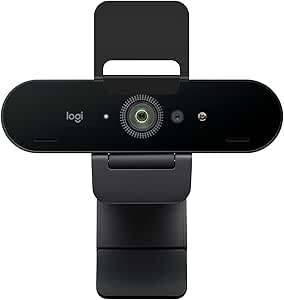 | Best Premium Personal Webcam | Resolution and frame rates: 4K at 30 fps; 1080p at 60 fps; 720p at up to 90 fps | Digital zoom: 5x | Field of view: 65°, 78°, or 90° diagonal | VIEW LATEST PRICE | See Our Full Breakdown |
| developer conference webcam | Connectivity | Resolution | Field of view |
|---|---|---|---|
| NexiGo N990 | — | 3840 × 2160 at 30 fps | — |
| Nuroum C40 2K Video Conference | — | — | 120° |
| Yealink UVC34 4K All-in-One Vi | USB-B to USB-A; 7 m cable | — | 120° |
| Logitech BCC950 Desktop Video | USB | — | — |
| TONGVEO 3-in-1 4K Webcam with | — | 4K (3840 × 2160) at 30 fps | — |
| Anker PowerConf C200 2K Webcam | USB | 2K | — |
| Logitech Brio 101 Full HD 1080 | USB-A | Full HD 1080p | — |
| WyreStorm Focus 210 4K AI Conf | USB 3.0; includes 5 ft USB-A to USB-C cable | — | 120° |
| j5create 360-Degree All-Around | USB-C | — | — |
| BizEye P30 All-in-One 4K Dual- | USB, Bluetooth, LAN Web UI | — | 110° PTZ lens; 120° panoramic lens |
| Logitech C920x HD Pro Webcam w | USB | Full HD 1080p | 78 degrees |
| Logitech MeetUp Ultra HD 4K Vi | USB and Bluetooth | 4K UHD (3840 × 2160) | 120 degrees |
| TONGVEO All-in-One Conference | — | 1920 × 1080 (Full HD) | 114 degrees |
| Logitech ConferenceCam BCC950 | USB | 1080p | — |
| Logitech Brio 4K Webcam with A | USB-A and USB-C | — | 65°, 78°, or 90° diagonal |
More Details on Our Top Picks
NexiGo N990 (Gen 2) 4K PTZ Webcam with 5× Digital Zoom
The NexiGo N990 (Gen 2) suits developer talks where one presenter needs to shift between a face shot, a whiteboard, or a shared demo area without repositioning the camera by hand. Its motorized pan and tilt cover a broad range, and two saved presets make it easier to return to familiar angles during a call. The 4K Sony sensor offers more detail than the 1080p Logitech BCC950, though its 5× zoom is specified at 1080p, not 4K. Unlike the Yealink UVC34, this model does not list AI auto framing or speaker tracking, so the operator remains in control. Fixed focus may be a limitation if the speaker moves significantly closer or farther away, and the USB-C port carries video only. I’d pick it for manual camera control, not hands-off group framing.
Pros:- 4K video at up to 30 fps from an 8.5-megapixel Sony CMOS sensor.
- Motorized pan and tilt with two saved position presets.
- Remote provides camera controls, image flip, and 5× digital zoom.
- Dual noise-canceling microphones and low-light correction support meeting use.
Cons:- 5× digital zoom is specified at 1080p rather than 4K.
- Fixed focus offers less flexibility than the autofocus systems in the Yealink UVC34 and Nuroum C40.
- USB-C is video-only, limiting its usefulness for other connected accessories.
Best for: Developers who present at a fixed workstation and want remote-operated pan, tilt, and saved views for switching between themselves and a demo area.
Not ideal for: Teams seeking automatic speaker tracking, autofocus, or full-resolution zoom; its focus is fixed and zoom is specified at 1080p.
- Resolution:3840 × 2160 at 30 fps
- Sensor:8.5-megapixel Sony CMOS
- Pan and tilt:-170° to +170° pan; -35° to +85° tilt
- Digital zoom:5× at 1080p
- Focus:Fixed focus
- Microphones:Built-in dual stereo microphones with noise cancellation
- Connections:USB 2.0, USB-C (video only), and 3.5 mm audio jack
- Mounting:Wall mount and threaded base
Our verdict“Choose the N990 if you want sharp 4K video and remote-controlled camera positioning, but skip it if you need automatic tracking or autofocus.”
Nuroum C40 2K Video Conference Webcam with Microphone and Speaker
The Nuroum C40 is geared toward a small developer team sharing one camera, rather than a solo presenter optimizing every image detail. Its 120° view and AI auto framing can help keep several people in the shot, while four microphones and a built-in full-duplex speaker provide a single-device meeting setup. That makes it a more group-oriented alternative to the NexiGo N990, whose motorized pan and tilt are better for a presenter choosing views manually. The C40 also offers autofocus and 1080p at 60 fps, alongside 2K at 30 fps, giving buyers a choice between smoother motion and higher resolution. Its speaker’s increased volume requires the power adapter, and the listed 16-foot pickup range may not suit larger conference spaces. For a compact team table, its integrated audio is the draw; for a room installation, the Yealink UVC34 offers a more dedicated conference-system approach.
Pros:- 120° field of view and AI auto framing help include multiple participants.
- Four-microphone array with AI noise cancellation and voice pickup up to 16 feet.
- Built-in full-duplex speaker supports an all-in-one meeting setup.
- Offers 2K at 30 fps or 1080p at 60 fps, plus autofocus.
Cons:- Increased speaker volume requires the power adapter.
- At 1.08 kg, it is heavier than a basic personal webcam.
- The listed 16-foot voice pickup range is less suited to larger meeting rooms than a dedicated room system.
Best for: Small developer teams who need a wide shared view, built-in speaker, and multi-person microphone pickup for desk-based calls.
Not ideal for: Large meeting rooms or buyers who want a simple camera-only device; speaker volume may require the power adapter, and its listed pickup range is up to 16 feet.
- Video:2K at 30 fps; 1080p at 60 fps
- Sensor:5MP CMOS
- Field of view:120°
- Microphones:Four-element omnidirectional array with AI noise cancellation
- Voice pickup:Up to 16 ft
- Speaker:One full-duplex speaker
- Focus and zoom:Autofocus and continuous autofocus; up to 5× zoom
- Compatibility:Windows, macOS, Linux, and ChromeOS
Our verdict“Choose the C40 for a small team that wants a wide camera with built-in meeting audio, not for a large room or a camera-only setup.”
Yealink UVC34 4K All-in-One Video Conference Camera System
For a developer team that wants the camera to manage the room view, the Yealink UVC34 is the most meeting-system-oriented pick in this group. Its AI auto framing and speaker tracking can adjust the image as participants speak, while the 120° lens and eight-microphone array are suited to a shared table rather than a single face at a laptop. Compared with the Nuroum C40, it adds 4K capture and speaker tracking, and its automatic electric privacy shutter gives a clear physical cue when the camera is closed. The tradeoff is a heavier, more room-focused unit and a USB-B-to-USB-A connection, rather than the simpler USB setup listed for the C40. It also has no built-in speaker specified, so buyers may need separate audio hardware. I’d favor it for a fixed team room; solo developers may find the NexiGo N990’s remote framing more direct.
Pros:- 4K camera with an 8MP sensor and a 120° field of view.
- AI auto framing and speaker tracking can adapt the shot during group discussions.
- Eight-microphone array is specified for pickup up to 5 meters.
- Automatic electric privacy shutter and a 7 m USB cable suit fixed meeting-room use.
Cons:- No built-in speaker is listed, so room audio may require separate equipment.
- At 1,620 g, it is less suited to frequent travel or a compact personal desk.
- Uses USB-B to USB-A connectivity rather than a direct USB-C connection.
Best for: Development teams using a shared conference room who want automatic speaker tracking, wide 4K coverage, and an integrated microphone array.
Not ideal for: Solo developers seeking a lightweight personal webcam or buyers who need a built-in speaker; the UVC34 is a 1.62 kg room-focused camera system.
- Camera resolution:4K UHD
- Sensor:8MP, 1/2.8-inch CMOS
- Field of view:120°
- Microphones:Eight-microphone array; pickup range up to 5 m (16.4 ft)
- Framing features:AI auto framing and speaker tracking
- Digital zoom:5×
- Connectivity:USB-B to USB-A; 7 m cable
- Privacy:Automatic electric privacy shutter
Our verdict“Pick the UVC34 for a fixed developer meeting room where automatic framing and room-wide microphone pickup matter more than portability or integrated speaker audio.”
Logitech BCC950 Desktop Video Conferencing Webcam and Speakerphone
The Logitech BCC950 is the straightforward choice when a small developer team values one USB-connected camera and speakerphone over newer image features. Its full-duplex speakerphone, noise-canceling microphone, and echo cancellation are aimed at conversations around a desk, with controls on both the base and remote for camera movement, volume, and call functions. That integrated approach is simpler than pairing a separate camera and audio device, but the 1080p ceiling makes it less suitable for buyers prioritizing image detail than the 4K NexiGo N990 or Yealink UVC34. Its specified microphone range is 8 feet, also shorter than the Nuroum C40’s listed 16-foot pickup range. The BCC950 makes sense for a small room with one to four participants; larger teams or speakers who move around the room should choose a wider-coverage system.
Pros:- Combines a 1080p webcam and full-duplex speakerphone in one USB-connected unit.
- Noise-canceling microphone and echo cancellation support clearer conversations.
- Remote and base buttons control camera movement, volume, mute, and calls.
- Designed for small-room meetings with one to four people.
Cons:- 1080p resolution offers less image detail than the 4K NexiGo N990 and Yealink UVC34.
- The specified microphone range is limited to 8 feet, shorter than the Nuroum C40’s listed range.
- No wireless connection option is specified.
Best for: Small developer teams of one to four people who want a familiar USB camera and speakerphone with physical call controls.
Not ideal for: Teams needing 4K video, microphone pickup beyond 8 feet, or modern AI framing; its stated use is small rooms.
- Video:1080p HD at 30 fps
- Lens:Carl Zeiss
- Microphone:Noise-canceling; specified range up to 8 feet
- Speakerphone:Full duplex with echo cancellation
- Audio frequency response:200 Hz–8 kHz
- Connectivity:USB
- Controls:Remote and base buttons for camera pan, tilt, zoom, volume, mute, and calls
- Intended room size:Small rooms; 1–4 people
Our verdict“Choose the BCC950 for a small team that wants an uncomplicated camera-and-speakerphone unit, but skip it if 4K or wider room pickup is a priority.”
TONGVEO 3-in-1 4K Webcam with AI Auto-Framing, Voice Tracking, Microphones, and Speaker
The TONGVEO 3-in-1 brings 4K capture, auto framing, voice tracking, microphones, and a speaker into one USB-powered conference webcam. Its three selectable views—118°, 100°, and 88°—give developers more control over how much of a desk or room appears than the fixed 120° views listed for the Nuroum C40 and Yealink UVC34. Voice tracking aims to keep the active speaker in view, while the remote handles framing and call controls without reaching for the camera. This is a more self-contained setup than the NexiGo N990, which offers motorized positioning but no listed speaker. The main uncertainty is zoom: product data conflicts between 5× and 4×, so I wouldn’t choose it for a specific magnification requirement. Its dual microphones and 3W speaker are convenient, but the supplied information does not list a pickup range.
Pros:- 4K video at up to 30 fps from an 8.29MP CMOS sensor.
- Three field-of-view settings let users choose among 118°, 100°, and 88° framing.
- AI auto framing and voice tracking help follow participants or the active speaker.
- Built-in dual microphones, 3W speaker, remote, and privacy cover create a self-contained setup.
Cons:- Zoom data conflicts between 5× and 4×, making the actual maximum unclear.
- No microphone pickup distance is provided, complicating room-size planning.
- The product is listed as not water resistant, so it is less suited to exposed or outdoor setups.
Best for: Developers who want one USB-powered device for 4K video, adjustable room coverage, speaker tracking, and basic meeting audio.
Not ideal for: Buyers who need a confirmed zoom specification, a documented microphone pickup range, or a camera without a built-in speaker.
- Resolution:4K (3840 × 2160) at 30 fps
- Image sensor:1/2.8-inch CMOS, 8.29MP
- Fields of view:118°, 100°, and 88°
- Digital zoom:Listed as 5× in the title and description; product information also lists 4×
- Microphones:Dual omnidirectional microphones with noise cancellation
- Speaker:Built-in 3W speaker
- Connectivity and power:USB 2.0/3.0; USB-powered, no separate power supply required
- Privacy:Privacy cover
Our verdict“Choose the TONGVEO if you want adjustable 4K room framing and built-in audio in one USB-powered unit, but not if a precise zoom or pickup-range specification is required.”
Anker PowerConf C200 2K Webcam
The Anker PowerConf C200 suits developers who move between solo calls, screen shares, and occasional two-person conversations. Its 2K video offers more image detail than the 1080p Logitech Brio 101, while the selectable 65°, 78°, and 95° views let you frame a workspace without moving the camera. Autofocus and low-light correction are useful when your desk lighting or distance from the lens changes. The dual microphones with AI noise cancellation give it a stronger audio proposition than the Brio 101’s mono mic. The tradeoff is that it remains a desk-oriented USB webcam, not a room camera: its widest view and built-in microphones are not a substitute for the WyreStorm Focus 210’s 120° room coverage and longer pickup range. Choose it for a configurable personal setup, not a group conference table.
Pros:- 2K resolution adds image detail compared with 1080p webcams such as the Logitech Brio 101.
- Three software-selectable viewing angles adapt framing to different desk setups.
- Autofocus and low-light correction help when distance or lighting varies.
- Dual microphones with AI noise cancellation and an integrated sliding privacy cover.
Cons:- Its 95° maximum view is narrower than room-focused options such as the WyreStorm Focus 210.
- Compatibility is specified for Windows 7 or later and macOS 10.11 or later; other operating systems are not listed.
Best for: Developers who take calls from a personal desk and want sharper-than-1080p video, adjustable framing, and a built-in lens cover.
Not ideal for: Teams meeting around a conference table; its 95° maximum view and laptop-oriented design are less suited to capturing a whole room than the WyreStorm Focus 210.
- Resolution:2K
- Connectivity:USB
- Focus:Autofocus
- Viewing angles:65°, 78°, or 95° via software
- Microphones:Dual microphones with AI noise cancellation
- Privacy:Integrated sliding lens cover
- Compatibility:Windows 7 or later; macOS 10.11 or later
- Weight:7.04 oz
Our verdict“Choose the C200 for a flexible, higher-resolution developer desk setup, but pick a room-focused camera for group meetings.”
Logitech Brio 101 Full HD 1080p Webcam with Built-In Microphone and Privacy Shutter, Black
The Logitech Brio 101 is the straightforward pick for developers who want a basic camera for daily stand-ups without adjustable framing or extra setup. It connects over USB-A, supports Windows, macOS, and Chrome OS, and pairs with common meeting platforms including Zoom, Teams, and Meet. RightLight boosts brightness to help reduce shadows, while the sliding shutter makes it easy to block the lens between calls. Its 1080p image is sufficient for routine meetings, but the fixed-focus lens and 60° view limit flexibility compared with the autofocus, adjustable-angle Anker PowerConf C200. The mono microphone is also a simpler audio setup than the C200’s dual noise-canceling mics. That tradeoff makes the Brio 101 a sensible low-fuss choice for one person in a consistent spot, not for a changing workspace or a group around a table.
Pros:- Full HD 1080p video fits routine one-to-one calls and stand-ups.
- USB-A connectivity and broad operating-system support simplify setup.
- RightLight helps brighten the image and reduce shadows.
- Integrated sliding privacy shutter and at least 34% post-consumer recycled plastic.
Cons:- Fixed focus offers less flexibility than the autofocus Anker PowerConf C200.
- The 60° viewing angle is restrictive for showing more than one person or a wider desk.
Best for: Developers who want an uncomplicated 1080p webcam for solo calls on Windows, macOS, or Chrome OS, especially if their camera position stays fixed.
Not ideal for: People who frequently change distance from the camera, need a wider view, or want stronger built-in audio than a mono microphone can provide.
- Resolution:Full HD 1080p
- Connectivity:USB-A
- Focus:Fixed focus
- Viewing angle:60°
- Microphone:Built-in mono
- Lighting feature:RightLight boosts brightness by up to 50%
- Privacy:Integrated sliding shutter
- Compatible operating systems:Windows 7 and up, macOS 10.10 and up, Chrome OS
- Recycled material:Minimum 34% post-consumer recycled plastic
Our verdict“Pick the Brio 101 for simple solo calls and broad OS support; choose the Anker C200 if you need adjustable framing or autofocus.”
WyreStorm Focus 210 4K AI Conference Webcam with Microphones
The WyreStorm Focus 210 earns its place for developer teams that meet in a small room rather than at individual desks. Its 120° field of view and AI group framing are aimed at keeping several participants in the shot, while presenter tracking can follow whoever is speaking. Dual noise-canceling microphones are specified to pick up voices from as far as 5 meters, a practical advantage over desk webcams such as the Logitech Brio 101. The camera supports 4K resolution and 1080p video at 60 fps, but this is a more room-specific choice than the Anker PowerConf C200: the Anker is easier to tailor to one person’s framing, while the Focus 210 is built around shared-room coverage. Its USB 3.0 connection and 5-foot cable also make placement dependent on nearby equipment. Skip it if your calls are mostly solo.
Pros:- 120° field of view is suited to capturing participants across a small meeting room.
- AI group framing and presenter tracking adapt to changing speakers and meeting layouts.
- Dual AI noise-canceling microphones have a stated pickup range of up to 5 m.
- Physical lens cover and USB 3.0 connectivity.
Cons:- Its room-oriented framing is less tailored to a single person’s desk than the Anker PowerConf C200.
- The included USB-A to USB-C cable is 5 ft, which can restrict placement depending on the room setup.
- Designed for small meeting spaces rather than larger conference rooms.
Best for: Small developer teams that hold stand-ups or design reviews in one room and need wide framing, speaker tracking, and pickup beyond desk distance.
Not ideal for: Solo developers seeking a compact personal webcam or people who need a camera for larger rooms; this model is designed for small meeting spaces.
- Camera resolution:4K
- Video frame rate:1080p at 60 fps
- Field of view:120°
- Zoom:5× digital
- Microphones:Dual AI noise-canceling
- Microphone pickup range:Up to 5 m
- Connectivity:USB 3.0; includes 5 ft USB-A to USB-C cable
- Privacy:Physical lens cover
- Compatibility:Mac OS 10.10 or later; Windows 10/11; laptops, PCs, and tablets
Our verdict“Choose the Focus 210 for a small team room that needs wide coverage and tracking, not for a simple personal desk camera.”
j5create 360-Degree All-Around Meeting Webcam, 1080p HD with Omnidirectional Microphone and USB-C
The j5create JVCU360 takes a different approach from conventional front-facing webcams: its 360-degree capture and six display modes are designed to show participants around a table. Touch controls let users specify participant locations, making it a distinctive fit for developer discussions where the person speaking may sit anywhere. Compared with the WyreStorm Focus 210, which uses a 120° view with AI framing and presenter tracking, the JVCU360 prioritizes an all-around table view rather than tracking one presenter. Its 1080p capture at 30 Hz and built-in omnidirectional microphone cover basic conferencing needs, but the fixed-focus lens offers less adaptability than the autofocus WyreStorm or Anker PowerConf C200. USB-C plug-and-play is convenient, though firmware updates or app permissions may be needed for best operation.
Pros:- 360-degree capture and six display modes suit round-table conversations.
- Touch controls let participants specify locations in the displayed view.
- Built-in omnidirectional microphone supports shared-room calls.
- USB-C connectivity and compatibility with a broad range of meeting apps.
Cons:- Fixed focus is less adaptable than the autofocus WyreStorm Focus 210 or Anker PowerConf C200.
- 1080p at 30 Hz offers less frame-rate headroom than the WyreStorm’s 1080p at 60 fps.
- Firmware updates or app permissions may be required for optimal operation.
Best for: Development teams that meet around a table and want selectable views of participants seated in different directions.
Not ideal for: Solo callers or teams that want autofocus, higher frame-rate video, or automatic presenter tracking rather than touch-selected views.
- Video resolution:1080p
- Frame rate:30 Hz
- Capture:360-degree
- Display modes:6
- Microphone:Built-in omnidirectional
- Connectivity:USB-C
- Focus:Fixed focus
- Digital zoom:2×
- Compatible apps:Skype, Microsoft Teams, Google Meet, Cisco, Zoom, BlueJeans, Amazon Chime, GoToMeeting, Slack
Our verdict“Choose the JVCU360 when your team needs selectable 360-degree table views, but favor a tracking camera for presenter-led meetings.”
BizEye P30 All-in-One 4K Dual-Lens Conference System with Bluetooth Speakerphone
The BizEye P30 Kit is the most complete room setup in this group, combining a 4K PTZ camera, a separate 1080p panoramic lens, and a wireless speakerphone. AI framing, presenter tracking, and gallery modes give a developer team several ways to run stand-ups or design reviews, while four omnidirectional microphones provide 360° audio pickup with echo cancellation and noise reduction. Compared with the WyreStorm Focus 210, the BizEye adds a speakerphone, Bluetooth, and a second camera view; that breadth comes with a larger, heavier kit and more setup choices. Its stated room capacity is 4–8 participants, and microphone pickup reaches up to 5 m, so it is not a cure for every room-size problem. The speakerphone’s battery lasts up to 10 hours, but this system is excessive for a single developer’s desk.
Pros:- Combines a 4K PTZ camera, 1080p panoramic lens, and speakerphone in one conferencing kit.
- AI framing, presenter tracking, and gallery modes support varied meeting formats.
- Four omnidirectional microphones provide 360° pickup with echo cancellation and noise reduction.
- Speakerphone supports USB or Bluetooth and offers up to 10 hours of battery life.
Cons:- Its stated room capacity is limited to 4–8 participants, so larger teams may need another system.
- The stated microphone pickup range is up to 5 m, which may not suit larger rooms.
- At 1.88 kg, it is substantially less portable than desk webcams such as the Anker PowerConf C200.
Best for: Developer teams of four to eight who need a combined camera and speakerphone for recurring small- or medium-room meetings.
Not ideal for: Solo developers or teams seeking a lightweight USB webcam; the 1.88 kg kit and room-focused camera and speakerphone are more equipment than a desk setup needs.
- Camera resolution:4K PTZ camera and 1080p panoramic lens
- Camera zoom:3× optical, 5× digital
- Field of view:110° PTZ lens; 120° panoramic lens
- Audio pickup:Four omnidirectional microphones with 360° pickup
- Audio range:Up to 5 m
- Speakerphone battery life:Up to 10 hours
- Connectivity:USB, Bluetooth, LAN Web UI
- Room capacity:4–8 participants
- Weight:1.88 kg
Our verdict“Choose the BizEye P30 for a small team that wants camera flexibility and a wireless speakerphone in one kit, not for solo desk calls.”
Logitech C920x HD Pro Webcam with Microphone, Full HD 1080p at 30 fps
For a developer who mostly joins stand-ups, code reviews, and remote conference sessions from a desk, the Logitech C920x covers the practical basics without the room-system footprint of the MeetUp or TONGVEO. Its 1080p at 30 fps, autofocus, and automatic light correction help keep a solo speaker clear when desk lighting is uneven. The dual microphones provide stereo audio, though a dedicated headset or separate mic may suit noisy home offices better. The included XSplit VCam license adds background blur or replacement without a green screen, useful for calls in shared spaces. Compared with the Brio, it lacks 4K and higher frame-rate options; its tradeoff is a simpler feature set. It also has no privacy shutter, so users who want a physical camera cover should choose another option.
Pros:- 1080p video at 30 fps suits routine conference calls and screen-side presentations.
- Autofocus and automatic light correction help maintain a clear image as lighting changes.
- Dual microphones capture stereo audio without requiring a separate mic for basic calls.
- Three-month XSplit VCam license supports background blur, removal, and replacement.
Cons:- No privacy shutter is included.
- Limited to 1080p at 30 fps, unlike the Logitech Brio’s 4K and higher-frame-rate modes.
- The built-in microphones may not be the right choice for noisy or acoustically difficult rooms.
Best for: Individual developers who want a straightforward 1080p webcam for desk-based conference calls, with autofocus and software background effects.
Not ideal for: Developers who need 4K detail, a built-in privacy shutter, or room-wide framing for a group of people.
- Resolution:Full HD 1080p
- Frame rate:30 fps
- Connectivity:USB
- Lens and focus:Five-element glass lens; autofocus
- Field of view:78 degrees
- Audio:Stereo audio with dual microphones
- Compatibility:Windows and macOS
- Privacy shutter:None
Our verdict“Choose the C920x for dependable solo developer calls and useful background effects, but skip it if you need a privacy shutter or higher-resolution video.”
Logitech MeetUp Ultra HD 4K Video Conferencing System
When several developers share a huddle room, a laptop webcam like the Logitech Brio cannot frame the whole group as naturally as MeetUp. Its 120-degree field of view captures a wide seating area, while motorized pan and tilt let a team adjust what remote attendees see. The 4K camera and 5x HD zoom give more room to frame a speaker or part of the room than a fixed desktop webcam. This is an all-in-one system, with a speaker and beamforming microphones rated to pick up voices from up to 4 m, so it suits a dedicated meeting space better than an individual desk. The tradeoffs are size and setup requirements: USB 3.0 is needed for 4K, and the optional expansion microphone costs extra. For a single developer, the C920x is a simpler fit.
Pros:- 4K video and a 120-degree field of view accommodate a group seated around a small meeting space.
- Motorized pan and tilt allow remote framing adjustments.
- 5x HD zoom helps bring a speaker or area of the room into closer view.
- Integrated beamforming microphones and speaker provide an all-in-one room setup.
Cons:- USB 3.0 is required to use 4K video.
- Expansion microphone is sold separately for greater pickup coverage.
- Its room-focused size and features are excessive for a single-person workstation.
Best for: Small engineering teams that regularly meet in a huddle room and need a wide view, adjustable framing, and integrated room audio.
Not ideal for: Solo developers or teams needing a compact personal webcam; 4K also requires a USB 3.0 connection, and expanded mic coverage requires a separate accessory.
- Resolution:4K UHD (3840 × 2160)
- Field of view:120 degrees
- Zoom:5x HD zoom
- Pan and tilt:Motorized; up to 170 degrees
- Microphone pickup range:Up to 4 m; up to 5 m with optional Expansion Mic
- Connectivity:USB and Bluetooth
- USB requirement:USB 2.0 supported; USB 3.0 required for 4K video
- Compatibility:Windows 7, 8.1, or 10; macOS 10.10 or later; Chrome OS 29.0.1547.70 or later
Our verdict“Pick MeetUp for a shared huddle room where wide framing and integrated audio matter more than compact size or a simple desk setup.”
TONGVEO All-in-One Conference Camera System with AI Auto-Tracking and Bluetooth Speakerphone
For a developer leading a demo or technical walkthrough while moving around a small-to-medium room, the TONGVEO system adds AI face and subject tracking that the fixed-frame C920x does not offer. Its 1080p camera reaches 60 fps over HDMI or USB 3.0, which can make motion look smoother during a presentation, and the 114-degree view keeps a wider scene in frame. The separate Bluetooth speakerphone brings echo cancellation and up to 6–8 hours of operation, giving teams more freedom to place the audio pickup. Unlike the Logitech MeetUp, however, its camera is wired, and the camera uses manual focus. That makes placement and setup more hands-on; the wireless speakerphone does not make the camera itself wireless. Its tracking is most useful when someone actually moves, not for a seated desk call.
Pros:- AI face and subject tracking can keep a moving presenter in view.
- Supports Full HD video at up to 60 fps through HDMI 2.0 and USB 3.0.
- Wireless Bluetooth speakerphone includes echo cancellation and a microphone array.
- Speakerphone provides a stated 6–8 hours of operation per charge.
Cons:- The camera remains wired even though the speakerphone is wireless.
- Manual focus requires more care when positioning or changing the camera setup.
- The tracking and separate speakerphone may add complexity for a simple one-person desk call.
Best for: Developers who present standing demos or lead meetings in spaces up to 40 m² and want subject tracking with a movable speakerphone.
Not ideal for: People seeking a compact personal webcam, automatic camera focus, or a fully wireless camera setup.
- Resolution:1920 × 1080 (Full HD)
- Frame rate:Up to 60 fps
- Optical zoom:3×
- Field of view:114 degrees
- Camera rotation:350 degrees horizontal; 180 degrees vertical
- Video outputs:HDMI 2.0 and USB 3.0
- Speakerphone connectivity:USB, Bluetooth 5.0, and wireless dongle
- Speakerphone battery:2400 mAh; 6–8 hours of operation
- Recommended room size:Up to 40 m²
Our verdict“Choose TONGVEO for moving presenters who need tracking and flexible room audio, not for a plug-and-play personal webcam.”
Logitech ConferenceCam BCC950 1080p Video Conferencing Camera
The Logitech BCC950 suits a small desk meeting where two or a few developers need both camera and speakerphone functions without assembling separate devices. Its USB plug-and-play setup, full-duplex speakerphone, and noise-cancelling microphone make it more meeting-oriented than the personal C920x, which relies more on the host computer or separate audio gear. An included remote lets participants control meeting functions without reaching for the computer. The camera offers 1080p at 30 fps, autofocus, and 3x optical zoom, but it does not match the MeetUp’s 120-degree view or motorized pan and tilt for covering a room. Its USB connection also ties the setup to a computer. This makes the BCC950 a practical middle ground for close-range desk groups, rather than a room system for larger teams.
Pros:- Built-in full-duplex speakerphone supports simultaneous two-way conversation.
- Noise-cancelling microphone is suited to shared desk calls.
- Included remote controls meeting functions from a distance.
- USB plug-and-play setup works with PC and Mac and most conferencing applications.
Cons:- 1080p at 30 fps lacks the 4K detail and wide view of the Logitech MeetUp.
- Requires a USB connection to a computer.
- Best suited to close-range groups rather than broad room coverage.
Best for: Small developer pairs or compact desk teams who want a camera, two-way speakerphone, and remote control in one USB-connected unit.
Not ideal for: Larger meeting rooms or users who need broad room coverage, 4K video, or a camera that works without a computer connection.
- Resolution:1080p
- Frame rate:30 fps
- Connectivity:USB
- Focus:Autofocus
- Zoom:3x optical; 2x digital
- Microphone:Noise-cancelling
- Speakerphone:Built-in, full duplex
- Compatibility:PC and Mac
- Remote control:Included
Our verdict“Choose the BCC950 for a small desk group that wants camera and speakerphone together, but opt for MeetUp when the room needs wider coverage.”
Logitech Brio 4K Webcam with Autofocus and 5x Digital Zoom
For developers who want a sharper personal camera for conference talks, recorded demos, or close-up product work, the Logitech Brio offers more image flexibility than the 1080p C920x. It records up to 4K at 30 fps, while its 1080p mode reaches 60 fps and its 720p mode reaches up to 90 fps. Those options let buyers prioritize detail or smoother motion based on the call or recording. Three diagonal field-of-view settings—65, 78, or 90 degrees—make it easier to frame a single speaker without always showing a wide background. RightLight 3 with HDR and app-based controls add room for image adjustments. Compared with the room-oriented MeetUp, Brio is much better suited to one person at a computer; it lacks the MeetUp’s integrated speaker system and room-scale microphones. Its stated compatibility is Windows, a limitation for macOS-dependent buyers.
Pros:- Captures up to 4K at 30 fps, with 1080p at 60 fps and 720p at up to 90 fps.
- Three field-of-view settings help tailor framing to a solo speaker or a wider desk view.
- Autofocus, RightLight 3, and HDR support adjustments to focus and changing light.
- Dual omnidirectional microphones include noise-cancelling technology.
Cons:- Listed operating-system compatibility is Windows, which may rule it out for Mac-dependent workflows.
- Its microphones are specified for a range of up to 1.2 m, not room-scale pickup like the MeetUp.
- The added resolution and controls may be unnecessary for routine calls that the C920x can handle.
Best for: Windows-based developers who want adjustable framing and high-resolution video for calls, demos, or recordings at a personal workstation.
Not ideal for: Mac users relying on stated operating-system compatibility, teams needing room-wide audio, or buyers who only need basic 1080p calls.
- Resolution and frame rates:4K at 30 fps; 1080p at 60 fps; 720p at up to 90 fps
- Digital zoom:5x
- Field of view:65°, 78°, or 90° diagonal
- Focus:Autofocus
- Microphones:Dual omnidirectional microphones with noise-cancelling technology
- Microphone range:Up to 1.2 m
- Lighting features:RightLight 3 and HDR
- Connectivity:USB-A and USB-C
- Compatible devices:Personal computer, laptop, and tablet
Our verdict“Choose the Brio for a Windows desk setup where 4K, adjustable framing, and higher frame-rate options matter more than integrated room audio.”
How We Picked
I compared these developer conference webcams by how well their designs match real meeting setups: an individual desk, a small team room, or a larger shared space. The main criteria were camera resolution and framing options, microphone and speaker integration, connection and setup demands, physical format, and the flexibility to support different meeting layouts. I treated advertised features as indicators of intended use, not proof that a model will outperform another in every room.
The ranking favors products that offer a clear and practical fit for common developer meetings, with a useful balance of camera control, audio, and setup simplicity. All-in-one systems rank well for teams that need room coverage and integrated sound; compact USB webcams make more sense for personal desks and straightforward calls. I placed specialist options lower when their 360-degree, dual-lens, or advanced tracking approach serves a narrower setup, and I separated older or simpler 1080p choices from models aimed at more demanding room use.
Factors to Consider When Choosing Developer Conference Webcams
Choosing a webcam for developer meetings starts with the room and the way people collaborate, not the biggest resolution number on a product page. I would first map who needs to appear on screen, how far they sit from the camera, and whether the webcam must handle audio as well as video.
Match the camera to the meeting space
A webcam designed for a single monitor position may leave people at the end of a table too small or out of frame. For a personal desk, a fixed-angle camera is often easier to set up and less distracting than a room system. Shared rooms call for wider coverage, pan-and-tilt control, or automatic framing, depending on how often participants move. A common mistake is buying a high-resolution desk webcam for a room where seating distance is the real problem. Measure the distance from the camera to the farthest participant and check whether the device can frame that space. If your team changes rooms often, prioritize flexible placement over a camera that only works well from one fixed spot.
Treat resolution and framing as separate decisions
Resolution describes image detail, but it does not tell you whether everyone will fit in the shot. A 4K camera can provide room to crop or reframe, while a 1080p model may be entirely adequate for one person at a desk. Digital zoom enlarges a crop rather than adding new image detail, so zoom claims should not replace checking the lens view and sensor output. Auto-framing can keep a moving presenter centered, but it may feel distracting when people enter or leave the frame. For code reviews, stable framing that shows faces clearly can be more useful than constant camera movement. Choose the framing behavior that suits your meeting style, not just the highest resolution listed.
Decide whether built-in audio is enough
Integrated microphones and speakers reduce desk clutter and make an all-in-one system easier to deploy. They can be a sensible match for a small meeting room, but room acoustics, participant distance, and background noise affect how well built-in audio works. A webcam microphone that handles one developer at a desk may not pick up a group around a table evenly. Before buying, decide whether participants will use the camera’s audio, a separate speakerphone, or individual headsets. Avoid paying for speaker hardware if everyone already joins calls with headsets. For shared spaces, audio pickup and echo handling deserve as much attention as the camera sensor.
Check connection, mounting, and meeting software
A camera that connects by USB may still need the right port, cable length, mounting position, or room-computer setup. Confirm that your computer or conference-room system can connect to the device and that the cable reaches the intended camera location without creating a trip hazard. USB-C can simplify connections on newer laptops, while other setups may rely on adapters or a dedicated room computer. Also check whether your preferred meeting software recognizes the camera, microphone, and speaker as separate devices or as one combined system. A frequent buying mistake is focusing on the camera and overlooking the room’s display, hub, or cable layout. Simple plug-in operation matters most when multiple developers share the same meeting space.
Pay for features your meeting habits will use
PTZ control, AI tracking, 360-degree capture, and dual-lens designs can solve real room problems, but they add little value to a stationary solo caller. Manual controls may suit a facilitator who wants to choose exactly what appears on screen, while automatic tracking can help when a presenter moves around. A 360-degree device may be useful for a group arranged around a table, yet it is not automatically the best choice for a conventional conference-room layout. Consider who will operate the camera and whether they have time to learn its controls. If meetings follow the same format each day, a simpler fixed camera may be more dependable and easier for everyone to use. Spend more on specialized features only when they address a recurring room or workflow need.
Plan for privacy and shared-device upkeep
Developer teams may leave cameras connected to shared machines or use them in rooms that are not supervised between calls. A physical privacy shutter can make it easier to see when the lens is covered, while a removable setup may suit a personal laptop that travels between locations. For shared hardware, decide who stores the camera, checks cables, and selects the correct audio device before a call. Cameras with moving parts or advanced controls may need more care than a simple fixed webcam. Build quality matters most when equipment is frequently repositioned or handled by different people. A clear ownership routine can prevent more meeting delays than adding another camera feature.
Frequently Asked Questions
Should I choose a 4K webcam for remote code reviews?
Not automatically. For a single developer speaking at a desk, a well-positioned 1080p webcam may provide a clear enough view, and screen sharing will carry the code itself. 4K is more useful when you need room to crop, reframe, or show several people without changing the camera position. It will not fix poor lighting, a camera placed too far away, or unclear audio. I would choose based on framing needs first, then use resolution as a deciding factor between cameras with similar coverage.
Is an all-in-one conference system a good replacement for headsets?
It can reduce headset use in a small meeting room, but the result depends on room size, seating, and background noise. Built-in microphones and speakers are convenient when several people share one computer, while headsets often give individual participants more consistent sound in open offices. For hybrid meetings, confirm that remote attendees can hear people seated away from the camera. A separate speakerphone may be a better fit if audio coverage is the main concern and you already have a camera. Test the room layout before removing headsets as a fallback.
When is AI auto-framing worth choosing over manual PTZ?
Auto-framing is most useful when presenters move around or the group changes position during calls, and no one wants to operate the camera. Manual PTZ suits meetings where a facilitator wants deliberate control over which person or area appears on screen. Automated movement can be distracting if participants shift often or if the camera keeps reacting to background activity. Think about whether your calls are mostly stationary stand-ups, active presentations, or group discussions. If camera movement is rarely needed, a fixed view may be easier for the whole team.
Can a 360-degree webcam work well for a normal conference table?
It can, especially when participants sit around the camera and the goal is to capture the whole group from one central position. A conventional room camera may produce a more familiar, controlled view for people seated on one side of a table. Check how the 360-degree model presents participants to remote viewers, since all-around capture can divide or rearrange the scene. Table placement, microphone pickup, and nearby displays also affect whether the format works. Choose it for a seating layout that benefits from all-around coverage, not simply because the feature sounds versatile.
What should I prioritize for a webcam shared across a developer team?
Prioritize predictable setup, broad compatibility, and a framing style that works for the team’s usual room. A physical privacy cover, clear device controls, and accessible cables can make shared use less error-prone. If several people lead meetings, avoid a system that depends on one person knowing specialized camera controls. Decide whether the room needs integrated audio or whether team members will keep using headsets. A less elaborate webcam that everyone can connect and position consistently may serve a shared team better than a feature-rich device with a steep learning curve.
Conclusion
For most shared developer meeting rooms, I would start with the Yealink UVC34 as the best overall because its all-in-one design addresses camera and room-audio needs together. The Anker PowerConf C200 is my best value-style pick for a personal desk, while the Logitech MeetUp is the best premium fit for teams that need a dedicated room system. Beginners who want a straightforward individual setup can look to the Logitech Brio 101; teams needing active camera control should compare the NexiGo N990 with AI-tracking options, and groups arranged around a table can consider the j5create 360-degree webcam. Choose by meeting space and audio needs first, then narrow the shortlist by resolution and camera controls.