
If you’re looking for the best iMacs for classroom labs in 2025, I recommend considering models with the powerful M4 chip, high-resolution Retina 4.5K displays, and vibrant color options that engage students. Look for features like ample memory, fast storage, and connectivity tailored for educational needs. These iMacs combine sleek design with performance, making them ideal for creative, multimedia, and learning applications. Keep exploring to find out which models best suit your classroom!
Key Takeaways
- High-resolution Retina 4.5K displays with vibrant color support enhance visual learning and creative projects.
- Powerful M4 chips with 8-core or 10-core CPUs ensure smooth multitasking and multimedia editing in classroom tasks.
- Sleek, lightweight designs in multiple colors facilitate easy setup, mobility, and engaging classroom aesthetics.
- Limited internal storage options favor external drives, requiring consideration for large media files and data management.
- Connectivity options like USB-C and Thunderbolt support peripherals, but may need adapters for legacy USB-A devices.
Apple iMac 24-inch Desktop with M4 Chip
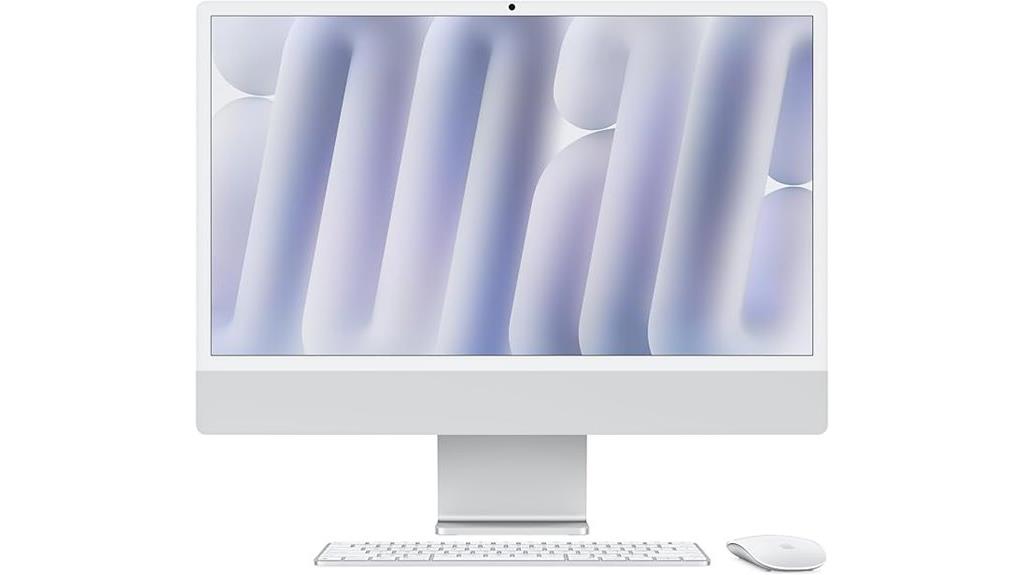
If you’re looking for a sleek, vibrant, and powerful desktop for classroom labs in 2025, the Apple iMac 24-inch with M4 Chip is an excellent choice. Its slim design comes in seven lively colors, making any space more inviting. The 24-inch Retina 4.5K display delivers stunning visuals with support for a billion colors and high brightness. Powered by the M4 chip, it offers fast, efficient performance for multitasking, photo editing, and multimedia projects. With 16GB of memory and a 256GB SSD, it handles demanding tasks smoothly. Plus, its advanced camera, audio, and privacy features make it perfect for modern educational environments.
Best For: educators, students, and creative professionals seeking a vibrant, powerful all-in-one desktop for classroom and multimedia use in 2025.
Pros:
- Stunning 24-inch Retina 4.5K display with support for a billion colors for immersive visuals
- Powerful M4 chip with an 8-core CPU and GPU ensures fast performance for multitasking and creative tasks
- Sleek, colorful design that enhances any educational or workspace environment
Cons:
- Limited 256GB SSD storage may require external drives for large media files
- Premium price point could be a barrier for budget-conscious schools or individuals
- All-in-one design reduces the possibility of upgrading internal components later
Apple 2024 iMac Desktop Computer with M4 Chip

The Apple 2024 iMac Desktop Computer with M4 Chip stands out as an excellent choice for classroom labs that prioritize sleek design and high performance. Its 10-core CPU and GPU deliver fast, reliable multitasking, ideal for creative and educational tasks. The 24-inch Retina 4.5K display supports 1 billion colors, providing stunning visuals for art and media projects. With 24GB of unified memory and a 512GB SSD, it handles heavy workloads smoothly. Its vibrant color options and slim all-in-one design make it both functional and visually appealing, fitting seamlessly into modern classroom environments while supporting a variety of educational applications.
Best For: educators, students, and creative professionals seeking a sleek, high-performance all-in-one computer for classroom or media projects.
Pros:
- Stunning 24-inch Retina 4.5K display with vibrant color support
- Powerful M4 chip with 10-core CPU and GPU for efficient multitasking
- Elegant, slim all-in-one design that fits seamlessly into modern classroom environments
Cons:
- Limited number of USB-C ports, requiring hubs or adapters for peripherals
- No traditional USB-A ports, which may necessitate additional accessories
- Internal storage options are limited, potentially needing external solutions
Apple 2024 iMac Desktop Computer with M4 Chip

The Apple 2024 iMac with M4 chip stands out as an excellent option for classroom labs seeking a sleek, powerful desktop solution. Its 10-core CPU and GPU deliver fast, reliable performance for multitasking, creative work, and educational software. The 24-inch Retina 4.5K display offers stunning visuals with rich colors and brightness, enhancing learning experiences. Lightweight at under 10 pounds and available in vibrant colors, it fits easily into various classroom setups. While it has limitations like only two external monitor support and no USB-A ports, the iMac’s speed, design, and user-friendly features make it a top choice for modern educational environments.
Best For: educators, creative professionals, and small businesses seeking a sleek, high-performance all-in-one desktop for multitasking and creative projects.
Pros:
- Stunning 24-inch Retina 4.5K display with vibrant colors and high brightness
- Powerful M4 chip with 10-core CPU and GPU for fast, reliable performance
- Lightweight design in vibrant colors that fits seamlessly into various environments
Cons:
- Supports only two external monitors, limiting multi-display setups
- Lacks traditional USB-A ports, requiring adapters or hubs for legacy peripherals
- Initial setup may be challenging without printed instructions or detailed guidance
Apple 2024 iMac Desktop Computer with M4 Chip

For educators seeking a powerful, versatile computer that can handle a variety of classroom tasks, the Apple 2024 iMac with M4 chip stands out. Its 10-core CPU and GPU deliver lightning-fast performance for photo editing, presentations, and even gaming. The stunning 24-inch Retina display with 4.5K resolution and vibrant colors makes visuals pop, while 16GB of unified memory guarantees smooth multitasking. With a sleek, colorful design, it fits beautifully into any classroom setting. Plus, its advanced Apple Intelligence system and privacy features help streamline productivity and keep data secure. This all-in-one desktop is a top choice for modern educational environments.
Best For: educators and students seeking a powerful, stylish all-in-one computer to enhance classroom productivity, creativity, and collaboration.
Pros:
- Fast performance with M4 chip, ideal for multitasking, editing, and creative projects
- Stunning 24-inch Retina display with vibrant colors and 4.5K resolution for immersive visuals
- Sleek, colorful design that complements modern classroom environments
Cons:
- Limited upgradability due to all-in-one design and integrated components
- Higher price point may be a barrier for some budget-conscious schools or individuals
- Limited ports compared to traditional desktop setups, potentially requiring adapters for certain peripherals
Apple iMac 2024 Desktop Computer with M4 Chip

If you’re looking for a powerful, stylish desktop that can handle diverse classroom tasks, the Apple iMac 2024 with M4 chip is an excellent choice. It features a sleek all-in-one design available in seven vibrant colors, making it both functional and visually appealing. The 10-core CPU and GPU, combined with 16GB of unified memory and a 512GB SSD, deliver fast, smooth performance for photo editing, presentations, and more. The 24-inch 4.5K Retina display supports up to 1 billion colors, and the advanced camera, microphones, and speakers ensure top-quality video calls and multimedia experiences. It’s compatible with macOS, Microsoft 365, and Adobe Creative Cloud, perfect for education environments.
Best For: educators, students, and creative professionals seeking a powerful, stylish all-in-one desktop for productivity, multimedia, and classroom tasks.
Pros:
- Sleek, vibrant design available in seven colors that enhances any space
- Powerful M4 chip with 10-core CPU and GPU for fast performance across tasks
- High-quality 24-inch 4.5K Retina display supports immersive visuals and color accuracy
Cons:
- Limited upgrade options due to integrated design
- Relatively higher price point compared to some other all-in-one desktops
- May be overkill for basic tasks that don’t require high processing power
Apple 2024 iMac Desktop Computer with M4 Chip

Educators seeking a sleek, powerful desktop will appreciate the Apple 2024 iMac with M4 chip, especially given its stunning 24-inch Retina display with 4.5K resolution. Its vibrant colors and 500 nits brightness make visuals pop, whether for lessons or creative projects. Powered by the M4 chip with a 10-core CPU and GPU, it handles multitasking smoothly. With 16GB of unified memory and a 256GB SSD, it’s fast and efficient. The all-in-one design saves space and looks great in any classroom. Plus, features like the 12MP camera, spatial audio, and advanced privacy protections enhance both learning and security.
Best For: educators and creative professionals seeking a sleek, powerful desktop with stunning visuals and advanced privacy features.
Pros:
- Vibrant 24-inch Retina display with 4.5K resolution and wide color support enhances visual clarity and color accuracy.
- Powerful M4 chip with 10-core CPU and GPU ensures smooth multitasking and fast app performance.
- All-in-one, space-saving design with a stylish range of colors fits seamlessly into any classroom or workspace.
Cons:
- Limited storage capacity with 256GB SSD may require external solutions for extensive data needs.
- Premium pricing could be a barrier for budget-conscious institutions or individuals.
- Lack of upgradeability due to integrated design may limit future hardware enhancements.
Factors to Consider When Choosing an iMac for Classroom Labs
When selecting an iMac for classroom labs, I focus on performance capabilities to handle various tasks smoothly. I also consider display quality and storage options to meet students’ needs and guarantee future-proofing. Finally, I look at port availability and the overall design and size to create a functional, space-efficient learning environment.
Performance Capabilities
Choosing the right iMac for classroom labs hinges on its ability to handle demanding tasks smoothly. A powerful processor, like an M4 chip with at least an 8-core CPU, ensures multitasking and resource-heavy applications run seamlessly. I recommend models with a minimum of 16GB of unified memory, so students can work on multiple projects or large files without lag. Fast SSD storage, ideally 256GB or more, is essential for quick data access and efficient performance. Graphics capabilities also matter—an 8-core or 10-core GPU supports multimedia editing, rendering, and visual tasks effectively. Ultimately, reviewing system performance benchmarks helps confirm that the iMac can sustain high workloads typical in classroom environments, ensuring consistent, reliable operation for students and educators alike.
Display Quality
A high-quality display is crucial for classroom iMacs, as it directly impacts how students view and interact with educational content. The Retina 4.5K display ensures sharp, vibrant visuals, supported by up to 1 billion colors that make images and videos look incredibly lifelike. Brightness levels of 500 nits help reduce glare and eye strain, even in well-lit classrooms. The wide color support enhances color accuracy, which is essential for creative projects and multimedia work. With a large 24-inch screen, students benefit from ample viewing space, making group work and collaborative activities more engaging. An immersive display experience helps students better focus and absorb lessons, making these iMacs ideal for dynamic and interactive learning environments.
Storage Options
Selecting the right storage options for classroom iMacs is essential to guarantee students have enough space for their applications, files, and educational resources. I recommend considering storage capacities like 256GB or 512GB, but larger options may be necessary for multimedia projects or large datasets. An SSD is preferable because it offers faster data access and greater reliability, which helps students work efficiently. It’s also important to check if the iMac supports external storage, such as USB-C or Thunderbolt drives, for easy expansion later on. Balancing storage size with budget constraints is vital, as larger internal drives typically increase the cost. Finally, think about future needs; choosing expandable storage options ensures the device remains useful as students’ projects grow in size.
Port Availability
When evaluating storage options for classroom iMacs, it’s also important to take into account port availability to guarantee seamless connectivity with all necessary peripherals. Make sure the iMac has enough USB-C or Thunderbolt ports to connect external drives, keyboards, and displays simultaneously. Check if it includes traditional USB-A ports or if you’d need adapters or hubs for legacy devices. Consider future needs—more ports can accommodate additional accessories or expansion. Verify whether the iMac supports external storage solutions like SSDs or external drives through its ports, which is essential for data management and backups. Keep in mind that some models might have limited port options, so using external hubs could become necessary to connect multiple devices efficiently in a classroom environment.
Design and Size
Considering the limited space in classroom labs, selecting an iMac with a compact and lightweight design that fits comfortably on desks or tables is essential. I look for slim, all-in-one models that minimize clutter and maximize available workspace. The size of the Retina display is also important; it should offer enough screen real estate for students to collaborate and work efficiently without feeling cramped. I prefer models with vibrant color options that can brighten the classroom environment and boost engagement. Additionally, a well-designed size makes setup, maintenance, and mobility easier, ensuring the iMac can be moved or adjusted as needed. Ultimately, choosing a device that combines a sleek design with practical dimensions helps create an efficient and inviting learning atmosphere.
Software Compatibility
Ensuring software compatibility is essential when choosing an iMac for classroom labs because the device must run all educational applications smoothly. I always check that the iMac’s operating system aligns with the software used in the curriculum, guaranteeing no glitches or delays. It’s also important to verify support for productivity suites like Microsoft 365 and creative tools such as Adobe Creative Cloud, which are common in educational settings. I look at the hardware specifications—processor, memory, and graphics—to confirm they meet or exceed the minimum requirements for the software. Additionally, I guarantee the iMac can handle specialized or custom programs needed for specific courses. Lastly, I consider how well the device receives updates and security patches to keep everything running securely and compatibly over time.
Privacy Features
As I assess the right iMac for classroom labs, privacy features stand out as a top priority. I look for advanced data encryption that secures student and staff information during storage and transmission. The macOS operating system provides robust privacy controls, giving me confidence that I can manage app permissions and access levels effectively. Built-in protections prevent unauthorized access to the camera, microphone, and location services, safeguarding user confidentiality. Apple’s privacy architecture ensures personal data remains secure and inaccessible to third parties without consent. Regular software updates are also critical, as they patch vulnerabilities and enhance data security. These privacy features collectively create a safer environment for students and educators, making the iMac a reliable choice for classroom labs.
Connectivity Needs
Choosing the right iMac for classroom labs means paying close attention to its connectivity options. I look for models with enough USB-C or Thunderbolt ports to connect external drives, projectors, and input devices without hassle. It’s also vital to consider adapters or hubs for legacy devices that still rely on USB-A, HDMI, or Ethernet connections. I evaluate whether the iMac’s built-in Wi-Fi and Bluetooth meet the classroom’s networking needs, especially when multiple devices are involved. Additionally, supporting external monitors can be essential for collaborative work or teaching, so compatibility here matters. Finally, I guarantee that the iMac’s connectivity aligns with the classroom’s infrastructure, including network speed and peripheral compatibility, to create a seamless and efficient teaching environment.
Frequently Asked Questions
How Durable Are Imacs for Daily Classroom Use?
I find that iMacs are quite durable for daily classroom use when handled properly. Their sturdy build and high-quality materials help withstand regular handling, accidental bumps, and spills. However, I always recommend using protective cases and keeping the workspace organized to prolong their lifespan. With proper care, an iMac can serve well in a busy educational environment, providing reliable performance year after year.
What Software Compatibility Is Essential for Educational Purposes?
I believe fundamental software for education includes tools like Microsoft Office or Google Workspace for creating and sharing documents, spreadsheets, and presentations. Math and science apps such as GeoGebra or PhET simulations are also crucial for interactive learning. Additionally, coding platforms like Scratch or Python IDEs help students develop programming skills. Ensuring compatibility with these programs guarantees a seamless and productive learning experience on classroom iMacs.
Can Imacs Be Easily Upgraded or Repaired in Schools?
I find that iMacs aren’t very easy to upgrade or repair in schools. Apple designs them with a focus on sleekness, which often means components are soldered or integrated tightly. This makes upgrading RAM or replacing parts tricky and usually requires professional service. For school labs, I recommend models that are more repair-friendly or considering alternative devices like Mac minis or Windows PCs, which tend to be more upgradeable.
How Do Imacs Perform With Different Teaching Applications?
I find that iMacs handle a wide range of teaching applications smoothly, thanks to their powerful processors and high-resolution displays. Whether I’m using interactive learning tools, video editing software, or virtual labs, they perform reliably without lag. Their seamless integration with macOS makes multitasking easy, allowing me to switch between applications effortlessly. Overall, iMacs are a solid choice for classroom labs aiming for smooth, efficient tech support.
What Are the Best Accessories to Enhance Classroom Productivity?
Think of accessories as the secret spices that turn a good meal into a feast. To boost classroom productivity, I recommend a high-quality wireless keyboard and mouse combo for seamless work, a versatile document camera for dynamic teaching, and a reliable external hard drive for quick backups. An adjustable stand can also help create ergonomic comfort. These tools transform your workspace into a well-oiled machine, making teaching smoother and learning more engaging.
Conclusion
So, there you have it—your future classroom heroes, the iMacs of 2025. They’re sleek, powerful, and ready to turn your students into digital geniuses… or at least make them look busy. Whether you pick the M4 marvel or the budget-friendly beauty, just remember: the real magic isn’t in the specs—it’s in the teacher who can turn these shiny boxes into learning gold. Happy teaching!