For most programmers, the Keychron V5 Max is the best overall choice: its compact 96% layout keeps a number pad while making room-saving wireless flexibility practical. The Keychron Q5 Pro stands out for a more substantial, programmable build, while the Keychron K3 Version 2 suits desks where a slim profile matters more than a number pad. The main tradeoffs are layout and desk space, switch sound and feel, and whether wireless features or a sturdier wired setup matter more to your workflow. I compare all 15 options by how well their design fits long coding sessions, not by gaming features alone. Read on for the full breakdown and help choosing a keyboard that matches your habits.

Get business pricing on monitors, keyboards and dev gear
- Business-only prices and quantity discounts
- Tax-exempt purchasing
- Multiple users, one account, clear invoices
Key Takeaways
- Compact full-function layouts lead this lineup: the Keychron V5 Max and Q5 Pro retain a number pad in a smaller footprint than full-size boards, giving programmers a useful middle ground.
- Programmability is a meaningful separator: the Q5 Pro pairs a programmable knob with a more substantial build, while simpler boards such as the Logitech K845 focus on straightforward typing.
- Wireless is not automatically the better coding choice: tri-mode and Bluetooth options add desk flexibility, but wired models such as the Keychron V6 and Logitech K835 avoid charging and connection management.
- Layout determines daily convenience more than lighting: buyers who rely on function keys, navigation keys, or numeric entry should check the exact layout before choosing a compact 75% or TKL model.
- Switch choice can change the office experience: clicky switches such as the K845’s TTC Blue option are more audible, while linear and quieter-feeling alternatives may better suit shared workspaces.
| Keychron Q5 Pro 96% Wireless Mechanical Keyboard with Programmable Knob, Hot-Swappable K Pro Brown Switches, and PBT Keycaps |  | Best Premium Compact Workstation | Layout: 96% QWERTY, 101 keys | Switches: Tactile Keychron K Pro Brown | Hot-swap compatibility: Most 3-pin and 5-pin MX-style switches | VIEW LATEST PRICE | See Our Full Breakdown |
| AULA F99 Tri-Mode Wireless Mechanical Keyboard | 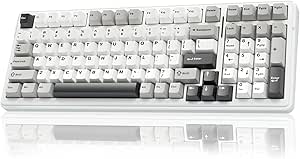 | Best for Multi-Device Setups | Layout: 99-key, 96% compact layout | Connectivity: Bluetooth 5.0, 2.4GHz wireless, USB-C wired | Multi-device support: Up to 5 devices | VIEW LATEST PRICE | See Our Full Breakdown |
| Redragon K745 PRO Wireless 108-Key Gasket Gaming Keyboard |  | Best Full-Size Wireless Pick | Layout: QWERTY, 108 keys | Connectivity: USB-C, Bluetooth, 2.4GHz wireless | Mounting design: Gasket-mounted | VIEW LATEST PRICE | See Our Full Breakdown |
| Keychron K3 Version 2 75% Wireless Low-Profile Mechanical Keyboard |  | Best Compact Low-Profile Pick | Layout: 75%, 84 keys | Switches: Brown tactile | Connectivity: Bluetooth 5.1 and USB-C wired | VIEW LATEST PRICE | See Our Full Breakdown |
| Logitech K845 Full-Size Mechanical Illuminated Keyboard with TTC Blue Switches |  | Best Simple Wired Full-Size Pick | Layout: Full-size QWERTY, 104 keys | Switches: TTC Blue, clicky | Connectivity: USB wired | VIEW LATEST PRICE | See Our Full Breakdown |
| Keychron V5 Max 96% Wireless Mechanical Keyboard with Number Pad |  | Best Overall for Programmers Who Need a Number Pad | Layout: 96% QWERTY | Number of keys: 97 | Connectivity: 2.4 GHz, Bluetooth 5.1, USB-C | VIEW LATEST PRICE | See Our Full Breakdown |
| Logitech Alto Keys K98M Wireless Mechanical Keyboard, Graphite |  | Best for a Cushioned Typing Feel | Layout: 98-key compact 1800-style with numpad | Switches: Hot-swappable Marble mechanical switches | Connectivity: Bluetooth Low Energy, Logi Bolt USB receiver | VIEW LATEST PRICE | See Our Full Breakdown |
| RK Royal Kludge S98 Wireless Mechanical Keyboard with Smart Display and Knob |  | Best for On-Board Controls | Layout: 98-key QWERTY | Connectivity: Bluetooth 5.0, 2.4 GHz wireless, USB-C | Switches: Linear | VIEW LATEST PRICE | See Our Full Breakdown |
| Keychron V6 Full-Size Wired Mechanical Keyboard with Hot-Swappable Brown Switches |  | Best Wired Choice for Layout Customization | Layout: Full-size QWERTY | Number of keys: 108 | Connectivity: Wired USB-C | VIEW LATEST PRICE | See Our Full Breakdown |
| Keychron K10 Pro Full-Size Wireless Mechanical Keyboard |  | Best Full-Size Wireless Pick | Layout: Full-size QWERTY | Number of keys: 108 | Connectivity: Bluetooth 5.1, USB-C wired | VIEW LATEST PRICE | See Our Full Breakdown |
| Logitech G413 SE Full-Size Mechanical Gaming Keyboard |  | Best for Straightforward Full-Size Typing | Layout: Full-size QWERTY, 108 keys | Connectivity: Wired USB 2.0 | Switch type: Tactile mechanical | VIEW LATEST PRICE | See Our Full Breakdown |
| Redragon K668 108-Key Hot-Swappable Wired RGB Gaming Keyboard |  | Best Value for Switch Customization | Layout: Full-size QWERTY, 108 keys | Connectivity: Wired USB-C | Switch type: Linear red switches | VIEW LATEST PRICE | See Our Full Breakdown |
| AULA F75 Pro 75% Wireless Mechanical Keyboard with Knob |  | Best Compact Multi-Device Pick | Layout: 75%, QWERTZ, 81 keys | Connectivity: Bluetooth 5.0, 2.4 GHz wireless, USB-C wired | Multi-device support: Up to 5 devices | VIEW LATEST PRICE | See Our Full Breakdown |
| Keychron Q5 Pro 96% Wireless Mechanical Keyboard, Purple |  | Best Premium Programmable Layout | Layout: 96% QWERTY, 101 keys | Connectivity: Bluetooth 5.1, USB-C | Wireless device support: Up to 3 devices | VIEW LATEST PRICE | See Our Full Breakdown |
| Logitech K835 TKL Wired Mechanical Keyboard with Aluminum Frame and Red Linear Switches |  | Best No-Frills Desk-Space Saver | Layout: Tenkeyless QWERTY, 84 keys | Connectivity: Wired USB-A | Cable length: 5 ft | VIEW LATEST PRICE | See Our Full Breakdown |
| mechanical keyboards for programmer | Layout | Connectivity | Switches |
|---|---|---|---|
| Keychron Q5 Pro 96% Wireless M | 96% QWERTY, 101 keys | Bluetooth 5.1 and wired | Tactile Keychron K Pro Brown |
| AULA F99 Tri-Mode Wireless Mec | 99-key, 96% compact layout | Bluetooth 5.0, 2.4GHz wireless, USB-C wired | Pre-lubed linear |
| Redragon K745 PRO Wireless 108 | QWERTY, 108 keys | USB-C, Bluetooth, 2.4GHz wireless | Custom linear |
| Keychron K3 Version 2 75% Wire | 75%, 84 keys | Bluetooth 5.1 and USB-C wired | Brown tactile |
| Logitech K845 Full-Size Mechan | Full-size QWERTY, 104 keys | USB wired | TTC Blue, clicky |
| Keychron V5 Max 96% Wireless M | 96% QWERTY | 2.4 GHz, Bluetooth 5.1, USB-C | Linear Gateron Jupiter Red |
| Logitech Alto Keys K98M Wirele | 98-key compact 1800-style with numpad | Bluetooth Low Energy, Logi Bolt USB receiver | Hot-swappable Marble mechanical switches |
| RK Royal Kludge S98 Wireless M | 98-key QWERTY | Bluetooth 5.0, 2.4 GHz wireless, USB-C | Linear |
| Keychron V6 Full-Size Wired Me | Full-size QWERTY | Wired USB-C | Tactile Keychron K Pro Brown |
| Keychron K10 Pro Full-Size Wir | Full-size QWERTY | Bluetooth 5.1, USB-C wired | Tactile Keychron K Pro Brown |
| Logitech G413 SE Full-Size Mec | Full-size QWERTY, 108 keys | Wired USB 2.0 | — |
| Redragon K668 108-Key Hot-Swap | Full-size QWERTY, 108 keys | Wired USB-C | — |
| AULA F75 Pro 75% Wireless Mech | 75%, QWERTZ, 81 keys | Bluetooth 5.0, 2.4 GHz wireless, USB-C wired | — |
| Keychron Q5 Pro 96% Wireless M | 96% QWERTY, 101 keys | Bluetooth 5.1, USB-C | — |
| Logitech K835 TKL Wired Mechan | Tenkeyless QWERTY, 84 keys | Wired USB-A | — |
More Details on Our Top Picks
Keychron Q5 Pro 96% Wireless Mechanical Keyboard with Programmable Knob, Hot-Swappable K Pro Brown Switches, and PBT Keycaps
The Q5 Pro is my premium pick for programmers who want a number pad without a full-size footprint. Its 96% layout keeps 101 keys close together, while the aluminum body and gasket design give it a more substantial build than the plastic Redragon K745 PRO. The programmable knob and QMK/VIA support make it especially suited to custom shortcuts, media control, or frequent workflow adjustments. Brown switches provide tactile feedback without the sharp click of the Logitech K845’s Blue switches, though neither is a silent typing option. Hot-swappable sockets leave room to change the feel later. The tradeoff is that remapping requires a wired connection, and wireless polling is slower than wired. Choose it for build quality and customization, not for the lightest or simplest setup.
Pros:- 96% layout retains a number pad while saving space compared with full-size keyboards
- QMK and VIA support allow custom key maps and knob functions
- Hot-swappable sockets support most 3-pin and 5-pin MX-style switches
- Aluminum body and double-gasket construction provide a substantial, cushioned typing platform
Cons:- Key remapping requires wired mode
- Wireless polling rate is lower than wired
- The aluminum construction makes this a less portable choice than compact plastic keyboards
Best for: Programmers who want a compact number-pad layout, a premium metal build, and extensive key and knob customization.
Not ideal for: People who regularly remap keys while using the keyboard wirelessly, or who need a lightweight, low-cost-feeling board.
- Layout:96% QWERTY, 101 keys
- Switches:Tactile Keychron K Pro Brown
- Hot-swap compatibility:Most 3-pin and 5-pin MX-style switches
- Keycaps:KSA double-shot PBT
- Connectivity:Bluetooth 5.1 and wired
- Wireless device connections:Up to 3
- Polling rate:1000 Hz wired; 90 Hz wireless
- Body and lighting:Aluminum; RGB backlighting
- Compatible operating systems:Linux, macOS, Windows
Our verdict“Choose the Q5 Pro if you want a customizable, premium-feeling compact keyboard with a number pad and can accept wired-only remapping.”
AULA F99 Tri-Mode Wireless Mechanical Keyboard
The F99 suits programmers who switch between a work computer, personal laptop, and mobile devices: it supports three connection modes and up to five paired devices. That flexibility goes beyond the Keychron Q5 Pro’s three-device Bluetooth support, while its 99-key layout keeps a number area and arrow keys in a compact footprint. Pre-lubed linear switches and layered gasket construction lean toward a smoother, more muted typing feel than the Q5 Pro’s tactile Browns. Hot-swap support also makes later switch changes possible without soldering. The compromises matter for desk use: the listed operating-system compatibility is Windows, and some lighting controls require the driver. The product data also identifies an AZERTY layout, which may be a poor match for programmers who rely on QWERTY muscle memory. Check the layout before choosing it.
Pros:- Bluetooth, 2.4GHz wireless, and USB-C provide three ways to connect
- Pairs with up to five devices for a multi-computer workflow
- Gasket construction and five layers of filling help soften typing noise and impact
- Hot-swappable sockets accept 3-pin and 5-pin switches
Cons:- Listed AZERTY layout may not suit QWERTY typists
- Product data lists Windows compatibility rather than confirmed macOS or Linux support
- RGB customization and music effects require the driver
Best for: Windows-based programmers who move among several computers or mobile devices and want a compact layout with a number area.
Not ideal for: QWERTY users who do not want an AZERTY layout, or programmers seeking confirmed macOS or Linux support and driver-free lighting control.
- Layout:99-key, 96% compact layout
- Connectivity:Bluetooth 5.0, 2.4GHz wireless, USB-C wired
- Multi-device support:Up to 5 devices
- Switches:Pre-lubed linear
- Hot-swap compatibility:3-pin and 5-pin switches
- Keycaps:Double-shot PBT
- Backlighting:RGB with 16 lighting effects
- Battery:Rechargeable 8000mAh
- Listed operating-system compatibility:Windows
Our verdict“Pick the F99 for a Windows-centered, multi-device desk if its AZERTY layout matches your typing habits.”
Redragon K745 PRO Wireless 108-Key Gasket Gaming Keyboard
The K745 PRO is the full-size option for programmers who want a dedicated number pad and wireless flexibility without moving to a more compact 96% layout such as the Keychron Q5 Pro. Its 108 keys preserve the familiar spacing of a traditional board, and four programmable shortcut keys offer quick access to recurring commands. Gasket mounting and five layers of dampening aim for a cushioned, less sharp typing sound than the Logitech K845’s clicky Blue switches. Linear switches and hot-swap sockets also give this model a straightforward path to a different feel. Its main compromise is the plastic enclosure, which lacks the solidity of the Q5 Pro’s aluminum body. The supplied data gives no specific water-resistance rating, so I would not treat it as protected against spills. It is a practical feature-rich pick, not a premium-build choice.
Pros:- Full-size 108-key layout includes a dedicated number pad
- USB-C, Bluetooth, and 2.4GHz support wired and wireless setups
- Gasket mount and five-layer dampening provide a cushioned typing feel
- Hot-swap sockets and four programmable shortcut keys support customization
Cons:- Plastic enclosure feels less substantial than the aluminum Keychron Q5 Pro
- Water-resistance details do not include a specific rating
- Full-size footprint takes more desk space than compact 96% boards
Best for: Programmers who prefer a conventional full-size keyboard, need a number pad, and want wired or wireless connection options.
Not ideal for: Buyers who prioritize an aluminum enclosure, compact desk use, or clearly specified spill protection.
- Layout:QWERTY, 108 keys
- Connectivity:USB-C, Bluetooth, 2.4GHz wireless
- Mounting design:Gasket-mounted
- Switches:Custom linear
- Switch compatibility:3-pin and 5-pin
- Keycaps:PBT, translucent
- Backlighting:RGB
- Weight:0.88 kg
- Warranty:1 year
Our verdict“Choose the K745 PRO if you want full-size keys, wireless options, and a cushioned feel more than a metal case.”
Keychron K3 Version 2 75% Wireless Low-Profile Mechanical Keyboard
The K3 is the lineup’s most space-conscious choice for programmers who want mechanical keys without a tall, wide board. Its 75% layout and low-profile frame leave room for a mouse or notebook, while retaining an 84-key arrangement. Compared with the number-pad-equipped Keychron Q5 Pro, it gives up numeric input and a programmable knob in favor of a lighter, thinner setup. Brown switches offer tactile feedback, and Bluetooth can connect it to as many as three devices; USB-C remains available for wired use. QMK customization is useful for adapting a compact layout to coding shortcuts, but the listed compatibility is Mac and Windows rather than Linux. White-only backlighting is less flexible than the RGB options on the Q5 Pro and AULA F99. This is a portability-first keyboard, not a desk-bound customization showcase.
Pros:- Compact 75% layout keeps 84 keys in a small footprint
- Low-profile construction is easier to fit into a portable work setup
- Bluetooth supports up to three devices, with USB-C wired use as an alternative
- QMK customization supports remapping and macros
Cons:- No number pad, unlike the Q5 Pro or full-size Logitech K845
- Single-color white backlighting offers less flexibility than RGB models
- Listed compatibility covers macOS and Windows, not Linux
Best for: Programmers with limited desk space who want a low-profile keyboard for switching between Mac and Windows devices.
Not ideal for: Users who need a number pad, RGB lighting, confirmed Linux support, or a tall, conventional mechanical-key feel.
- Layout:75%, 84 keys
- Switches:Brown tactile
- Connectivity:Bluetooth 5.1 and USB-C wired
- Multi-device support:Up to 3 devices
- Backlighting:Single-color white LED
- Dimensions:12.05 × 4.57 × 0.87 in
- Weight:500 g
- Body materials:Aluminum top, plastic bottom frame
- Listed compatibility:macOS, Windows
Our verdict“Pick the K3 if desk space and a low-profile form matter more than a number pad or RGB customization.”
Logitech K845 Full-Size Mechanical Illuminated Keyboard with TTC Blue Switches
The K845 is the straightforward choice for programmers who want a full-size layout with a number pad and do not need wireless pairing or hot-swappable switches. Its aluminum top case and adjustable tilt offer a sturdier, more adaptable desk setup than the plastic Redragon K745 PRO, but the Redragon adds tri-mode connections and switch swapping. The K845 instead keeps the feature set simple: plug in over USB, choose one of five white-light patterns, and type on clicky TTC Blue switches. That switch sound can be satisfying in a private office, but it may distract people nearby or carry into calls. Compared with the tactile Brown switches in the Keychron Q5 Pro, the Blues are louder and more distinctly clicky. This model makes sense for a fixed workstation, not a quiet shared desk or a multi-device workflow.
Pros:- Full-size 104-key layout includes a number pad and function keys
- Aluminum top case provides a sturdy upper surface
- Adjustable tilt supports changes to typing angle
- Five white backlighting patterns provide basic visibility options
Cons:- Wired USB connection limits placement flexibility and device switching
- Clicky Blue switches can be disruptive in shared workspaces
- Listed operating-system compatibility is Windows 10
Best for: Programmers at a fixed Windows workstation who want a full-size layout, number pad, and audible clicky feedback.
Not ideal for: People sharing an office, working on calls in a quiet space, or needing wireless connectivity and cross-platform flexibility.
- Layout:Full-size QWERTY, 104 keys
- Switches:TTC Blue, clicky
- Connectivity:USB wired
- Backlighting:White, 5 patterns
- Tilt:Adjustable, 4–8 degrees
- Top case:Aluminum
- Dimensions:17.12 × 5 × 1.43 in
- Weight:2.2 lb
- Listed operating-system compatibility:Windows 10
Our verdict“Choose the K845 for a stable Windows desk setup with full-size keys and clicky feedback, but skip it for shared or wireless work.”
Keychron V5 Max 96% Wireless Mechanical Keyboard with Number Pad
I’d put the V5 Max first for programmers who want a number pad without giving up desk space to a full-size board. Its 96% layout keeps the numeric keys while bringing the main typing area and navigation keys closer together than on the full-size Keychron V6 or K10 Pro. The three connection options also make it easier to move between a workstation and other devices, while QMK Launcher programmability and hot-swappable switches support layout changes as your workflow shifts. Its linear switches suit quick, uninterrupted typing, though they lack the tactile bump of the V6 and K10 Pro’s brown switches. The plastic enclosure feels less substantial than a premium metal build, and the PBT keycaps are not shine-through, which limits the usefulness of RGB in dim rooms. I’d choose it over the Logitech Alto Keys K98M for broader OS support and more connection flexibility.
Pros:- 96% layout retains a number pad in less space than a full-size board
- 2.4 GHz, Bluetooth 5.1, and USB-C support several workstation setups
- Hot-swappable switches and QMK Launcher programming allow customization
- Compatible with macOS, Windows, and Linux
Cons:- Plastic enclosure has a less substantial feel than a metal-bodied keyboard
- Non-shine-through PBT keycaps make the RGB less useful in low light
- Linear switches offer less tactile feedback than the brown-switch Keychron V6 and K10 Pro
Best for: Programmers who regularly enter numbers, want programmable keys, and switch between Linux, macOS, and Windows setups
Not ideal for: Buyers who want a full-size, heavier-feeling chassis or key legends that glow through the caps
- Layout:96% QWERTY
- Number of keys:97
- Connectivity:2.4 GHz, Bluetooth 5.1, USB-C
- Switches:Linear Gateron Jupiter Red
- Hot-swappable:Yes; compatible with 3-pin and 5-pin MX-style switches
- Programmability:QMK Launcher
- Keycaps and lighting:OSA profile double-shot PBT; RGB backlighting
- Compatibility:macOS, Windows, Linux
Our verdict“Choose the V5 Max if you need a programmable, multi-device keyboard with a number pad in a more compact footprint than full-size models.”
Logitech Alto Keys K98M Wireless Mechanical Keyboard, Graphite
The Alto Keys K98M’s distinguishing feature for long coding sessions is its gasket mount, which absorbs vibration and gives typing a softer character than the more direct feel of the wired Keychron V6. Its 98-key compact layout keeps the numpad close at hand, while Bluetooth and Logi Bolt offer practical ways to connect to a laptop or desktop. I’d pick it over the Keychron V5 Max when typing feel and a simple, office-friendly setup matter more than extensive OS flexibility or RGB effects. Hot-swappable Marble switches and programmable Action Keys add room for adjustment, but the available details list Windows and macOS only, not Linux. The white-only backlight is restrained rather than customizable, and battery-life claims can vary by connection and device. This is a comfort-leaning alternative, not the strongest fit for programmers who want deep layout customization.
Pros:- Gasket mount absorbs vibration for a softer typing feel
- Compact 98-key layout includes a numpad
- Hot-swappable Marble switches and programmable Action Keys allow some customization
- Bluetooth and Logi Bolt support wireless connections
Cons:- White-only backlighting offers no RGB color options
- Compatibility details list Windows and macOS, not Linux
- Battery-life performance may vary by connection and device
Best for: Windows or macOS programmers who want a compact numpad layout, wireless device options, and a softer-feeling typing experience
Not ideal for: Linux users, RGB fans, or programmers who need extensive key remapping and clearly specified multi-device battery performance
- Layout:98-key compact 1800-style with numpad
- Switches:Hot-swappable Marble mechanical switches
- Connectivity:Bluetooth Low Energy, Logi Bolt USB receiver
- Mount:Vibration-absorbing gasket mount
- Backlighting:Single-color white
- Battery life:Up to 12 months
- Charging:USB-C
- Compatibility:Windows, macOS
Our verdict“Pick the Alto Keys K98M if a cushioned typing feel and wireless office setup matter more than RGB or broad OS support.”
RK Royal Kludge S98 Wireless Mechanical Keyboard with Smart Display and Knob
The S98 is the pick here for programmers who want controls and status information on the keyboard itself. Its customizable smart display and multifunction knob give it a more interactive desk presence than the straightforward Keychron V5 Max, while the 98-key layout preserves a numpad. Bluetooth, 2.4 GHz, and USB-C cover different desk arrangements, and hot-swap support makes switch changes possible without soldering. The layered sound-dampening materials also make it a more sound-focused option than the Logitech Alto Keys K98M’s simpler listed feature set. The tradeoff is uncertainty around everyday compatibility: the supplied specs list Windows only, so I wouldn’t assume it will fit a Linux or macOS workflow. Battery capacity and life are also unspecified. Choose it for the display and knob; choose the V5 Max if OS support and a clearer programming ecosystem matter more.
Pros:- Customizable smart display and multifunction knob provide on-board controls
- Bluetooth, 2.4 GHz wireless, and USB-C connectivity
- Hot-swappable support for 3-pin and 5-pin switches
- Layered sound-dampening materials and double-shot PBT keycaps
Cons:- Listed operating-system compatibility is limited to Windows
- Battery capacity and battery life are not provided
- The display and knob may matter less to programmers who prefer a simpler, remappable layout
Best for: Windows programmers who want a numpad, multiple connection modes, and quick controls through a display and knob
Not ideal for: Linux or macOS users, and anyone who needs a stated battery-life figure before choosing a wireless keyboard
- Layout:98-key QWERTY
- Connectivity:Bluetooth 5.0, 2.4 GHz wireless, USB-C
- Switches:Linear
- Hot-swappable:Supports 3-pin and 5-pin switches
- Controls:Customizable smart display and multifunction knob
- Keycaps and lighting:Double-shot PBT; RGB backlighting
- Compatibility:Windows
- Weight:3 pounds
Our verdict“Choose the S98 if you use Windows and want a feature-rich numpad keyboard with a display and knob, rather than broad OS support.”
Keychron V6 Full-Size Wired Mechanical Keyboard with Hot-Swappable Brown Switches
For programmers who want to remap a full-size keyboard without adding wireless complexity, the V6 is the most direct fit in this group. Its QMK/VIA support gives it a clear customization advantage over the Logitech Alto Keys K98M, whose listed controls are Action Keys rather than a full firmware-based remapping setup. The 108-key layout keeps the numpad and navigation cluster, and tactile brown switches provide a distinct bump that the linear Keychron V5 Max does not. Hot-swap sockets make experimenting with compatible switches easier, while PBT keycaps and screw-in stabilizers round out a practical typing setup. The cost of that flexibility is a permanent USB-C tether: unlike the wireless Keychron K10 Pro, the V6 cannot move between devices without reconnecting its cable. It is also not water resistant, so it suits a stable, careful desk setup best.
Pros:- QMK/VIA support enables key remapping and layout customization
- Full-size 108-key layout includes a numpad and navigation keys
- Hot-swappable sockets support most 3-pin and 5-pin MX switches
- Double-shot PBT keycaps and screw-in stabilizers support a durable, stable typing setup
Cons:- Wired USB-C connection only
- Not water resistant
- Full-size layout takes more desk space than the V5 Max or S98
Best for: Programmers who work at a fixed desk, prefer tactile switches, and want to remap a full-size layout across major operating systems
Not ideal for: People who need wireless multi-device use or want protection against spills
- Layout:Full-size QWERTY
- Number of keys:108
- Connectivity:Wired USB-C
- Switches:Tactile Keychron K Pro Brown
- Hot-swappable:Yes; compatible with most 3-pin and 5-pin MX switches
- Firmware support:QMK/VIA
- Keycaps and lighting:Double-shot PBT, OSA profile; south-facing RGB
- Compatibility:Linux, macOS, Windows
Our verdict“Choose the V6 if you want a customizable, tactile full-size keyboard for a fixed workstation and do not need wireless use.”
Keychron K10 Pro Full-Size Wireless Mechanical Keyboard
The K10 Pro makes the most sense for programmers who want a conventional 108-key layout but don’t want the cable constraint of the Keychron V6. It pairs Bluetooth 5.1 for up to three devices with USB-C, so one board can serve a desktop and multiple other machines. Brown switches give it the tactile feedback found on the V6, while QMK/VIA programmability and hot-swap sockets support changes to the layout and switches. Compared with the compact V5 Max, the K10 Pro takes more desk space, but offers a familiar full-size arrangement. Its white backlight is less adaptable than the V6’s RGB, and the stated battery life of up to 100 hours applies at the lowest brightness, not every lighting setup. Key remapping also requires a wired connection, which limits how conveniently those changes can be made.
Pros:- Full-size layout includes programmable keys and macros
- Bluetooth supports up to three devices, with USB-C as a wired option
- Hot-swappable support fits most 3-pin and 5-pin MX switches
- PBT keycaps and sound-dampening materials support a more considered typing setup
Cons:- Full-size footprint is larger than the V5 Max’s 96% layout
- Single-color white backlighting lacks RGB customization
- Key remapping requires a wired connection, and the battery-life figure is tied to the lowest brightness
Best for: Programmers who want a full-size numpad and programmable keys while switching among several computers wirelessly
Not ideal for: Desk-space-conscious users, RGB enthusiasts, or buyers who expect to remap keys entirely over Bluetooth
- Layout:Full-size QWERTY
- Number of keys:108
- Connectivity:Bluetooth 5.1, USB-C wired
- Wireless device support:Up to 3 devices
- Switches:Tactile Keychron K Pro Brown
- Programmability and hot-swap:QMK/VIA; supports most 3-pin and 5-pin MX switches
- Battery:4,000 mAh; up to 100 hours at lowest brightness
- Keycaps and lighting:Double-shot PBT; single-color white backlighting
Our verdict“Choose the K10 Pro if you need a full-size, programmable numpad keyboard that can connect wirelessly to several devices.”
Logitech G413 SE Full-Size Mechanical Gaming Keyboard
The G413 SE is a sensible pick for programmers who want a full-size layout, tactile switches, and no wireless or customization setup to manage. Its PBT keycaps are built to resist wear, while the aluminum-magnesium top case gives it a sturdier feel than the plastic-bodied Redragon K668. That simplicity has a cost: unlike the K668, the G413 SE has no hot-swappable switches or programmable shortcut keys, so it offers less room to adapt the keyboard to changing workflows. The white-only backlighting keeps keys visible but lacks the color controls of RGB alternatives. Its wired USB connection also suits a fixed desk better than a shared workspace. I’d rank it for dependable, familiar typing rather than keyboard tinkering or macro-heavy setups.
Pros:- PBT keycaps are designed to resist heat and wear from regular typing.
- Tactile mechanical switches provide a distinct response while entering code.
- Full-size 108-key layout includes a number pad and 12 media and system controls.
- Aluminum-magnesium alloy top case adds a rigid surface.
Cons:- Wired USB 2.0 connection restricts placement and device switching.
- Single-color white lighting offers less customization than the Redragon K668.
- No hot-swap support or programmable shortcut keys.
Best for: Programmers who want a durable, full-size wired keyboard with tactile feedback and a number pad, without needing switch customization.
Not ideal for: Developers who want wireless use, per-key customization, RGB lighting, or dedicated programmable shortcuts.
- Layout:Full-size QWERTY, 108 keys
- Connectivity:Wired USB 2.0
- Switch type:Tactile mechanical
- Keycaps:PBT
- Backlighting:Single-color white LED
- Anti-ghosting:6-key rollover
- Top case:Aluminum-magnesium alloy
- Compatible operating systems:Windows, macOS
Our verdict“Choose the G413 SE if you want a durable, full-size wired board for everyday coding and can do without wireless and customization features.”
Redragon K668 108-Key Hot-Swappable Wired RGB Gaming Keyboard
The K668 makes keyboard experimentation accessible: its hot-swappable sockets accept compatible 3-pin or 5-pin switches, so programmers can change the feel without soldering. That flexibility gives it an advantage over the Logitech G413 SE, whose switches are not listed as replaceable. The K668 also adds four programmable shortcut keys and macro support, useful for repeated commands or app controls, plus two included keycap sets. Its linear red switches offer a smooth press rather than the tactile bump on the G413 SE, so the feel is a matter of preference. The plastic enclosure is less substantial than the G413 SE’s metal-topped build, and customization software is specified for Windows. I’d pick it for adaptable features, not premium materials or broad OS software support.
Pros:- Hot-swappable sockets accept compatible 3-pin and 5-pin switches.
- Four programmable shortcut keys and macro support can reduce repetitive input.
- Includes two keycap sets and adjustable feet.
- RGB lighting offers 19 preset modes and further software customization.
Cons:- Plastic enclosure feels less substantial than the Logitech G413 SE’s alloy top case.
- Customization software is specified as compatible with Windows.
- Water resistance is listed without a specific rating.
Best for: Windows-based programmers who want to try different compatible switches and assign shortcuts or macros without soldering.
Not ideal for: Mac or Linux users who need confirmed software support, or typists who prioritize a metal enclosure over customization.
- Layout:Full-size QWERTY, 108 keys
- Connectivity:Wired USB-C
- Switch type:Linear red switches
- Hot-swap support:Compatible with 3-pin and 5-pin switches
- Backlighting:RGB, 19 preset modes
- Shortcut keys:4 programmable keys
- Enclosure material:Plastic
- Compatible operating system:Windows
Our verdict“Choose the K668 if switch swapping and programmable shortcuts matter more to your coding setup than a metal case or confirmed cross-platform software support.”
AULA F75 Pro 75% Wireless Mechanical Keyboard with Knob
The F75 Pro is the most flexible choice here for programmers who move between a work computer and other devices: it offers Bluetooth, 2.4 GHz wireless, and USB-C, with support for up to five devices. Its 75% layout keeps the arrow keys while freeing desk space compared with the full-size Logitech G413 SE. The tradeoff is a tighter layout and no number pad, so frequent numeric entry may be less convenient. A multifunction knob, programmable keys, and hot-swap support give it more adjustment options than the Logitech K835 TKL, which is wired and lacks listed switch swapping. The supplied QWERTZ layout is a more consequential limitation than its compact size for anyone accustomed to QWERTY. I’d choose it for device flexibility, provided the layout matches your typing habits.
Pros:- Bluetooth, 2.4 GHz wireless, and USB-C wired modes support varied desk setups.
- Can connect with up to five devices.
- 75% layout retains arrow keys while using less desk space than a full-size board.
- Hot-swap support, programmable keys, and a multifunction knob offer customization.
Cons:- QWERTZ layout may not suit programmers accustomed to QWERTY.
- Compact layout omits the number pad found on the Logitech G413 SE.
- Water repellency is stated without a specific rating.
Best for: Programmers who switch among several devices and want a compact layout with arrow keys, wireless options, and replaceable switches.
Not ideal for: QWERTY typists who do not want to adapt to QWERTZ, or developers who rely on a dedicated number pad.
- Layout:75%, QWERTZ, 81 keys
- Connectivity:Bluetooth 5.0, 2.4 GHz wireless, USB-C wired
- Multi-device support:Up to 5 devices
- Switch type:Linear LEOBOG Reaper switches
- Hot-swap support:3-pin and 5-pin switches
- Keycaps:Side-printed PBT
- Battery capacity:4000 mAh
- Additional controls:Multifunction knob and programmable keys
Our verdict“Choose the F75 Pro if you want a compact, hot-swappable keyboard that can move among devices, and its QWERTZ layout suits you.”
Keychron Q5 Pro 96% Wireless Mechanical Keyboard, Purple
The Q5 Pro is the premium-oriented pick for programmers who want extensive remapping options without giving up a near-full layout. Its 96% arrangement fits 101 keys, including a number pad, into less space than the full-size Logitech G413 SE. QMK firmware and a programmable knob make it better suited to customized coding shortcuts than the simpler Logitech K835 TKL. A CNC aluminum body, double-gasket construction, hot-swap support, and PBT keycaps add a build and tuning focus absent from the more straightforward boards here. The compromise is that its wireless polling rate is lower than its wired rate, and the included keycaps do not let RGB shine through. This makes most sense for someone who values customization and structure over illuminated legends or a lightweight setup.
Pros:- QMK firmware and programmable knob support extensive workflow customization.
- 96% layout retains a number pad in a smaller footprint than a full-size board.
- CNC aluminum enclosure and double-gasket design provide a substantial build.
- Hot-swappable switches and double-shot PBT keycaps allow hardware customization.
Cons:- Wireless polling rate is 90 Hz, compared with 1000 Hz when wired.
- Included keycaps are not shine-through, limiting the practical value of RGB for lit legends.
- Aluminum construction makes this a less lightweight choice than the plastic Redragon K668.
Best for: Programmers who want QMK remapping, a number pad in a space-saving layout, and a substantial hot-swappable keyboard for a multi-device desk.
Not ideal for: Buyers who need bright backlit legends, a lightweight board, or the highest listed polling rate while using wireless.
- Layout:96% QWERTY, 101 keys
- Connectivity:Bluetooth 5.1, USB-C
- Wireless device support:Up to 3 devices
- Switch type:Tactile Keychron K Pro Brown
- Hot-swap support:3-pin and 5-pin MX-style switches
- Keycaps:KSA double-shot PBT
- Enclosure:CNC aluminum
- Compatible operating systems:Mac, Windows, Linux
Our verdict“Choose the Q5 Pro if you want a customizable, premium-feeling keyboard that keeps a number pad while cutting some width.”
Logitech K835 TKL Wired Mechanical Keyboard with Aluminum Frame and Red Linear Switches
The K835 TKL suits programmers who want to reclaim desk space without adapting to a very compact layout. Its 84-key tenkeyless design keeps the standard QWERTY typing area while removing the number pad, unlike the full-size Logitech G413 SE. Red linear switches give it a smooth press, a different feel from the G413 SE’s tactile switches and the Keychron Q5 Pro’s tactile Brown option. The aluminum frame and adjustable tilt make this a more focused, straightforward wired choice than the wireless AULA F75 Pro, but there is no listed hot-swap support or multi-device connection. It is also specified for Windows 7 and later, while the Q5 Pro lists Mac and Linux support. I’d favor it for a tidy Windows desk, not a cross-platform or number-heavy workflow.
Pros:- Tenkeyless layout frees desk space while retaining a familiar QWERTY typing area.
- Aluminum frame provides a rigid alternative to the Redragon K668’s plastic enclosure.
- Adjustable tilt lets typists change the keyboard angle.
- Switches are tested up to 50 million clicks.
Cons:- No number pad, unlike the Logitech G413 SE and Keychron Q5 Pro.
- USB-A wired connection offers less placement flexibility than the wireless AULA F75 Pro.
- Windows compatibility is specified; Mac and Linux support is not listed.
Best for: Windows-based programmers who want a compact, standard-width wired keyboard with linear switches and do not need a number pad.
Not ideal for: Mac or Linux users, developers who frequently enter numbers, or anyone seeking wireless connectivity or switch customization.
- Layout:Tenkeyless QWERTY, 84 keys
- Connectivity:Wired USB-A
- Cable length:5 ft
- Switch type:Red linear
- Frame material:Aluminum
- Adjustability:Adjustable tilt
- Switch durability:Tested up to 50 million clicks
- Compatible operating systems:Windows 7 and later
Our verdict“Choose the K835 if you want a compact, simple wired keyboard for a Windows coding desk and rarely use a number pad.”

How We Picked
I ranked these keyboards around the demands of programming: comfortable repeated typing, access to navigation and function keys, dependable connections, useful customization, and a build suited to regular desk use. Layout mattered because a compact board can free desk space but may require function-layer shortcuts, while a full-size board keeps familiar keys at the cost of a wider footprint. I also weighed whether hot-swappable switches, remapping support, wireless modes, and adjustable controls offer practical benefits rather than just adding features.
The order favors versatility for a broad range of coding workflows, then gives room to boards that are better for a particular priority, such as premium construction, compactness, or simple wired use. The Keychron V5 Max ranks highly for combining a 96% layout with wireless flexibility; the Q5 Pro earns a premium position for its programmable control and more substantial design. Lower-ranked models can still be the better fit when a buyer values a specific layout, connection type, or simpler setup over those strengths.
Factors to Consider When Choosing Mechanical Keyboards For Programmers
Before choosing, I would match the keyboard to the way you work at your desk, not to a feature checklist. Small layout differences can affect shortcuts and navigation every day, while switch sound and connection choices matter more in some workspaces than others.
Choose a layout around your actual coding habits
A compact board is only space-saving if its missing keys do not slow you down. A 75% layout usually keeps the function row and many navigation controls, while a TKL board removes the number pad but retains a more familiar key arrangement. A 96% layout is a useful compromise for developers who use a number pad but do not want a full-width keyboard. Full-size models make the least adjustment for buyers accustomed to every key being in its own place. Before buying, check how the board handles Home, End, Page Up, and arrow keys, since those controls can matter more in code editing than a row of decorative lighting.
Treat switch sound as a workplace decision
Switch feel is personal, but sound affects people around you as well as your own typing comfort. Clicky switches provide audible feedback, which some typists enjoy but can be distracting in a shared office or during calls. Linear switches move smoothly without a tactile bump, while tactile switches offer a noticeable response without the same deliberate click. Product names do not tell the whole story: keycaps, case construction, and desk surfaces also shape the sound. If you share a workspace, prioritize a quieter-feeling configuration and check whether the board lets you replace switches later. Do not assume that a switch marketed for gaming is a poor fit for coding; the better test is whether its feel and noise suit your routine.
Decide whether wireless convenience is worth the upkeep
Wireless keyboards reduce cable clutter and make it easy to move between desks or devices, but they add charging and connection management to your routine. Tri-mode models offer more connection choices, though extra modes matter only if you will use them. A wired board removes battery concerns and can be the simpler choice for a permanent workstation. Also check whether your computer supports the connection method you plan to use and whether switching between devices is a real part of your day. Buyers who work from one desk should not pay attention to wireless features at the expense of a layout or typing feel they prefer. Conversely, people moving between a work computer and a personal device may value those modes more than a premium case.
Pay for customization only when you will use it
Hot-swappable switches let you change typing feel without replacing the whole keyboard, which can be useful if your preference changes or a switch fails. Programmable keys and knobs can put common actions within reach, but they are helpful only when the software and configuration fit your operating system and workflow. Remapping can support editor shortcuts, window controls, or media functions, yet it can also create friction when moving between computers. A feature-rich board is not automatically more productive than a simpler one. Start with the shortcuts you repeat most, then decide whether a knob, extra layers, or switch swapping would solve a genuine annoyance. If you prefer a familiar layout and standard key behavior, a straightforward board may be easier to maintain.
Match the board’s footprint and build to your desk
A heavier or more substantial keyboard can feel planted during long sessions, but it is less convenient to carry and takes up more space. Compact boards leave more room for a mouse, notebook, or other tools, though their tighter layouts can make key combinations less intuitive. Consider desk depth as well as width: a number pad can push the mouse farther away, while a compact layout may keep both hands closer together. Case material and construction also affect how solid a board feels, but they do not replace a comfortable layout or suitable switches. If you move between home and office, portability may matter more than a premium build. For a permanent workstation, a stable keyboard and comfortable typing position may be better priorities.
Check compatibility before settling on a model
Programmers often use more than one operating system, so key legends and modifier placement can affect how natural a board feels. Confirm support for your computer and check whether the keyboard offers convenient operating-system key layouts or remapping. Hot-swappable sockets do not mean every switch type will fit; compatibility depends on the socket and switch design. Keycap profile and availability can also matter if you plan to change the look or feel later. For shared or managed computers, software-based customization may be limited, making onboard controls or standard layouts more practical. A quick compatibility check can prevent buying features that cannot be used in your setup.
Frequently Asked Questions
Is a 96% keyboard a better programming layout than a 75% keyboard?
It depends on whether you use a number pad and how much desk space you can spare. A 96% layout keeps the number pad while placing keys more tightly than a full-size keyboard, which suits frequent numeric entry without taking up as much width. A 75% board is narrower and still retains a function row, but some navigation keys may be compressed or accessed through layers. If you often enter numbers, choose 96%; if mouse space and a compact desk setup matter more, 75% may feel easier to place. Check the actual key arrangement rather than relying on the layout percentage alone.
Should I choose a wired or wireless keyboard for a coding workstation?
For a fixed workstation, wired is a straightforward option because it avoids battery charging and wireless setup. Wireless makes more sense if you switch between computers, need a cleaner desk, or move the keyboard between rooms. A model with several connection modes can add flexibility, but each mode is another feature to configure and maintain. Consider whether your computer has the ports or wireless support you need, especially if you use a dock or switch between operating systems. Choose based on your actual desk routine rather than assuming that wireless is an upgrade for everyone.
Are clicky switches a poor choice for programming?
No switch type is inherently unsuitable for coding; the practical issue is whether the feel and sound work for you and the people nearby. Clicky switches provide audible feedback, which some typists prefer, but their sound can carry through a shared room or a video call. Tactile switches offer a bump without the same click, while linear switches have a smoother motion. If you work alone, sound may matter less than typing preference. For an office or shared home, choose a quieter-feeling option or confirm that switch replacement is supported before committing.
Do I need a hot-swappable keyboard if I am new to mechanical keyboards?
No: a hot-swappable board is useful if you expect to experiment with switch feel or want an easier route to replacing a faulty switch, but it is not required for a first mechanical keyboard. Beginners may benefit more from a familiar layout, a suitable switch type, and uncomplicated connectivity. Switch swapping can also involve compatibility checks, so the feature does not remove every decision. If you are unsure about switch preference, hot-swap support preserves flexibility for later. If you already know what feel you want and prefer a simple setup, a fixed-switch model can be a sensible choice.
Which keyboard features matter most when I use multiple computers?
Start with connection support and how easily the keyboard can switch between devices. Wireless multi-device support can reduce cable changes, but check that the connection types match your computers and that changing devices is convenient. Operating-system key legends or remapping options can also help if you move between systems with different modifier conventions. If you use managed work devices, confirm that any customization does not depend on software you cannot install. A standard wired board may still be a better fit if the computers share a dock or KVM switch and your keyboard rarely moves.
Conclusion
For the broadest mix of coding-friendly layout and connection flexibility, I would choose the Keychron V5 Max as the best overall pick. The Keychron V6 is the best value-oriented choice for buyers who want a full-size wired layout and hot-swappable switches without prioritizing wireless features, while the Keychron Q5 Pro is the best premium option for a more substantial build and programmable control. Beginners who want a straightforward, familiar full-size board can start with the Keychron K10 Pro, while developers short on desk space should look at the Keychron K3 Version 2 for its low-profile compact design. If you prefer a compact board with a number pad, compare the V5 Max and Q5 Pro; if you want a simpler wired setup, the V6 or Logitech K845 may suit you better. Pick the layout and switch sound you can live with every day, then weigh wireless and customization around your actual workflow.