If you’re starting with FPGA development in 2026, I recommend looking at boards like the Basys 3, EP4CE6E22C8N, and MaxProLogic, which are great for beginners. The Tang Nano 20K and CycloFlex also offer excellent multimedia and expansion options. These boards are budget-friendly, easy to use, and supported by plenty of tutorials. Keep exploring this list to find out which board matches your needs and how you can begin your FPGA journey smoothly.
Key Takeaways
- Consider user-friendly boards like Digilent Basys 3 and EP4CE6E22C8N for easy learning and basic digital logic projects.
- Evaluate onboard peripherals such as LEDs, switches, and expansion ports to facilitate hands-on experimentation.
- Check compatibility with free development tools like Quartus Prime Lite and Vivado for simplified programming and simulation.
- Prioritize affordability and good documentation to ensure easy access to tutorials and community support.
- Select boards with appropriate FPGA resources (logic cells, RAM) suited for beginner projects and future scalability.
| EP4CE6E22C8N FPGA System Board Core Board Development Board Learning Board | 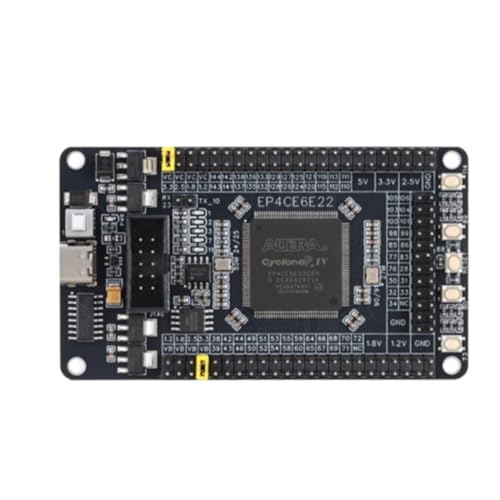 | Versatile Learning Platform | FPGA Type: Altera Cyclone IV EP4CE6E22C8N | Onboard Memory: Embedded RAM (276,480 bits) | Connectivity Ports: JTAG, GPIOs, serial port | VIEW LATEST PRICE | See Our Full Breakdown |
| Cyclone 10 FPGA Development Board – CycloFlex |  | Compact Powerhouse | FPGA Type: Altera Cyclone 10 FPGA | Onboard Memory: 128 Mbit Serial Flash | Connectivity Ports: USB-C, JTAG, I/O connectors | VIEW LATEST PRICE | See Our Full Breakdown |
| Sipeed Tang Nano 20K FPGA Development Board | 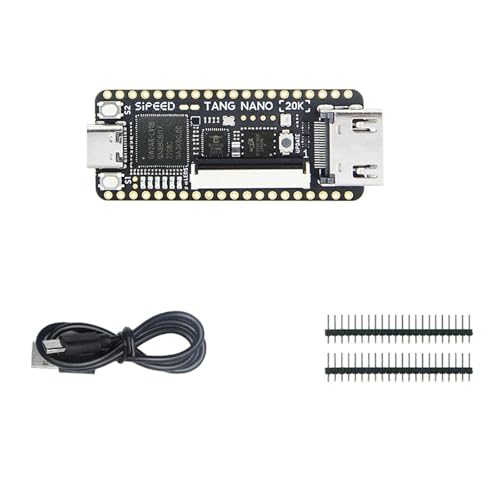 | Embedded Focus | FPGA Type: GW2AR-18 QN88 FPGA | Onboard Memory: 15,552 registers, internal PLLs | Connectivity Ports: USB, JTAG, serial, display ports | VIEW LATEST PRICE | See Our Full Breakdown |
| Getting Started with FPGAs: Digital Design & HDL |  | Beginner-Friendly Guide | FPGA Type: Not specified, focus on HDL and design | Onboard Memory: Not specified | Connectivity Ports: Not applicable (book) | VIEW LATEST PRICE | See Our Full Breakdown |
| Digilent Basys 3 Artix-7 FPGA Trainer Board |  | Educational Essential | FPGA Type: Xilinx Artix-7 FPGA | Onboard Memory: Not specified | Connectivity Ports: Pmod ports, switches, LEDs | VIEW LATEST PRICE | See Our Full Breakdown |
| Altera MAX10 FPGA Development Board – MaxProLogic |  | Scalable Development | FPGA Type: MAX10 10M04SA FPGA | Onboard Memory: 20KB SRAM, 8 analog channels | Connectivity Ports: JTAG, I/O connectors | VIEW LATEST PRICE | See Our Full Breakdown |
| Sipeed Tang Nano 20K FPGA Development Board |  | Open-Source Flexibility | FPGA Type: GW2AR-18 QN88 FPGA | Onboard Memory: 64 Mbits SDRAM | Connectivity Ports: JTAG, USB, HDMI, microSD | VIEW LATEST PRICE | See Our Full Breakdown |
More Details on Our Top Picks
-
Cyclone 10 FPGA Development Board - CycloFlex
- FPGA Model: Altera Cyclone 10CL016 with 16,000 Logic Elements
- Memory Capacity: 504 Kbits SRAM Memory
- Display Features: Three Seven Segment Displays
As an affiliate, we earn on qualifying purchases.
EP4CE6E22C8N FPGA System Board Core Board Development Board Learning Board
If you’re just starting with FPGA development, the EP4CE6E22C8N FPGA System Board is an excellent choice because it combines a powerful Cyclone IV FPGA with a complete set of onboard resources. With 6,272 logic cells, 392 LABs, and 276,480 bits of embedded RAM, it’s capable of handling complex projects. The onboard peripherals, including LEDs, buttons, and serial ports, make prototyping straightforward. Its support for external peripherals and flexible voltage options allows for versatile experimentation. Compact and lightweight, it’s perfect for learners, hobbyists, and professionals seeking a reliable, all-in-one FPGA development platform.
- FPGA Type:Altera Cyclone IV EP4CE6E22C8N
- Onboard Memory:Embedded RAM (276,480 bits)
- Connectivity Ports:JTAG, GPIOs, serial port
- Power Supply Options:Onboard power management, selectable pin voltage
- Supported Development Environment:Quartus Prime, HDL programming
- Target User/Use:Learning, experimentation, professional
- Additional Feature:Onboard serial port chip
- Additional Feature:Selectable pin voltage
- Additional Feature:Compact lightweight design
-
Sipeed Tang Nano 20K FPGA Development Board, Open Source RISCV Linux Retro Game Player with 64Mbits SDRAM 20K LUT4, Single Board Computer Support microSD RGB LCD LED JTAG HDMI Port (Not Welded)
- FPGA Chip: GW2AR-18 QN88 with 20,736 LUT4
- Onboard Debugger: JTAG, USB-Serial, SPI, MS5351 control
- RISC-V Linux: Supports retro gaming and Linux system
As an affiliate, we earn on qualifying purchases.
Cyclone 10 FPGA Development Board – CycloFlex
The Cyclone 10 FPGA Development Board – CycloFlex stands out as an excellent choice for beginners who want to explore more advanced FPGA projects without sacrificing ease of use. Powered by the Altera Cyclone 10 FPGA with 16,000 Logic Elements, it offers versatile I/O options, including 65 inputs/outputs, multiple LEDs, and pushbuttons. Its 128 Mbit Serial Flash allows it to run as a RISC-V soft processor, expanding project possibilities. Dual power options, full connectivity, and all-encompassing tutorials make setup straightforward. With support for complex applications, this board provides a perfect balance of power and user-friendliness, making it ideal for learning and developing more sophisticated FPGA projects.
- FPGA Type:Altera Cyclone 10 FPGA
- Onboard Memory:128 Mbit Serial Flash
- Connectivity Ports:USB-C, JTAG, I/O connectors
- Power Supply Options:USB-C or barrel connector
- Supported Development Environment:Quartus Prime, tutorials, software suite
- Target User/Use:Advanced projects, RISC-V, complex applications
- Additional Feature:RISC-V soft processor support
- Additional Feature:External JTAG programmer
- Additional Feature:Multiple clocking options
-
Getting Started with FPGAs: Digital Circuit Design, Verilog, and VHDL for Beginners
As an affiliate, we earn on qualifying purchases.
Sipeed Tang Nano 20K FPGA Development Board
The Sipeed Tang Nano 20K FPGA Development Board stands out as an excellent choice for beginners interested in multimedia projects and embedded systems, thanks to its powerful FPGA capabilities and user-friendly features. It uses the GW2AR-18 QN88 FPGA chip, offering over 20,000 LUT4 logic units and multiple DSP blocks for complex digital processing. The onboard BL616 chip provides JTAG for programming and USB-to-serial communication, simplifying development and debugging. Running RISC-V Linux, it supports game emulation, RGB display control, and multi-screen output. Its extensive documentation makes it accessible for newcomers enthusiastic to explore multimedia and embedded applications.
- FPGA Type:GW2AR-18 QN88 FPGA
- Onboard Memory:15,552 registers, internal PLLs
- Connectivity Ports:USB, JTAG, serial, display ports
- Power Supply Options:Not specified
- Supported Development Environment:RISC-V Linux, custom software
- Target User/Use:Multimedia, embedded, experimentation
- Additional Feature:Dual internal PLLs
- Additional Feature:USB-to-serial communication
- Additional Feature:Supports RISC-V Linux
Getting Started with FPGAs: Digital Design & HDL
Getting started with FPGAs involves understanding digital logic and hardware description languages (HDL), which can seem intimidating at first. I recommend beginning with hands-on guidance that covers digital circuit basics like logic gates, flip-flops, and state machines. Learning how to code in Verilog or VHDL lets you create digital designs such as multiplexers and FIFOs. It’s essential to grasp the FPGA build process, including simulation, synthesis, and routing. I also advise exploring FPGA primitives like DSP blocks and PLLs, which handle math and I/O efficiently. With practical projects and troubleshooting tips, you’ll develop confidence and skills to design reliable, high-speed FPGA systems.
- FPGA Type:Not specified, focus on HDL and design
- Onboard Memory:Not specified
- Connectivity Ports:Not applicable (book)
- Power Supply Options:Not applicable (book)
- Supported Development Environment:Educational book (not development environment)
- Target User/Use:Beginners, learning HDL
- Additional Feature:Focus on beginner projects
- Additional Feature:Verilog and VHDL examples
- Additional Feature:High-speed data techniques
Digilent Basys 3 Artix-7 FPGA Trainer Board
If you’re just starting out with FPGA development and want a board that’s both accessible and educational, the Digilent Basys 3 Artix-7 FPGA Trainer Board is an excellent choice. It’s designed specifically for students and beginners to learn digital logic and FPGA fundamentals. It features a Xilinx Artix-7 FPGA compatible with the free Vivado Design Suite WebPACK Edition. The board includes 16 user switches, 16 LEDs, five pushbuttons, and four Pmod ports for expansion. While it doesn’t come with a micro USB cable, it’s perfect for hands-on learning and experimentation, making FPGA concepts approachable and engaging.
- FPGA Type:Xilinx Artix-7 FPGA
- Onboard Memory:Not specified
- Connectivity Ports:Pmod ports, switches, LEDs
- Power Supply Options:Not specified
- Supported Development Environment:Vivado, FPGA design tools
- Target User/Use:Students, beginners, FPGA training
- Additional Feature:Standard Pmod ports
- Additional Feature:Free Vivado Design Suite
- Additional Feature:Educational focus
Altera MAX10 FPGA Development Board – MaxProLogic
For beginners exploring FPGA development, the Altera MAX10 FPGA Development Board—MaxProLogic stands out due to its user-friendly design and versatile features. It packs an Altera 10M04SA FPGA with 4,000 Logic Elements, along with a 12-bit ADC, 20KB SRAM, and on-chip low voltage regulators. The board includes an oscillator, 8 user-configurable LEDs, and 65 I/O connectors, making it adaptable for various projects. Its compatibility with free Quartus Prime Lite software, combined with extensive tutorials and documentation, simplifies learning. Whether you’re starting with basic digital design or progressing to advanced audio FFT analysis, MaxProLogic provides an accessible, scalable platform for hands-on FPGA development.
- FPGA Type:MAX10 10M04SA FPGA
- Onboard Memory:20KB SRAM, 8 analog channels
- Connectivity Ports:JTAG, I/O connectors
- Power Supply Options:External power, USB
- Supported Development Environment:Quartus Prime Lite, tutorials
- Target User/Use:Beginners, scalable projects, education
- Additional Feature:12-bit ADC channels
- Additional Feature:On-chip configuration flash
- Additional Feature:Scalable from basic to advanced
Sipeed Tang Nano 20K FPGA Development Board
The Sipeed Tang Nano 20K FPGA Development Board stands out as an excellent choice for beginners due to its compact size combined with powerful hardware capabilities. It uses the GW2AR-18 QN88 FPGA chip, featuring over 20,000 LUT4 logic units and multiple DSP blocks for fast digital calculations. The board includes 64MB SDRAM, microSD support, RGB LCD, and various ports like HDMI and JTAG, all pre-assembled. With onboard JTAG and USB-to-serial interfaces, debugging is straightforward. Running RISC-V Linux, it’s perfect for experimenting with soft cores, digital signal processing, or even retro gaming, making it a versatile, beginner-friendly platform.
- FPGA Type:GW2AR-18 QN88 FPGA
- Onboard Memory:64 Mbits SDRAM
- Connectivity Ports:JTAG, USB, HDMI, microSD
- Power Supply Options:External power, USB
- Supported Development Environment:RISC-V Linux, hardware resources
- Target User/Use:Embedded, multimedia, RISC-V projects
- Additional Feature:64Mbits SDRAM
- Additional Feature:HDMI port support
- Additional Feature:Supports multi-screen output
Factors to Consider When Choosing FPGA Development Boards for Beginners
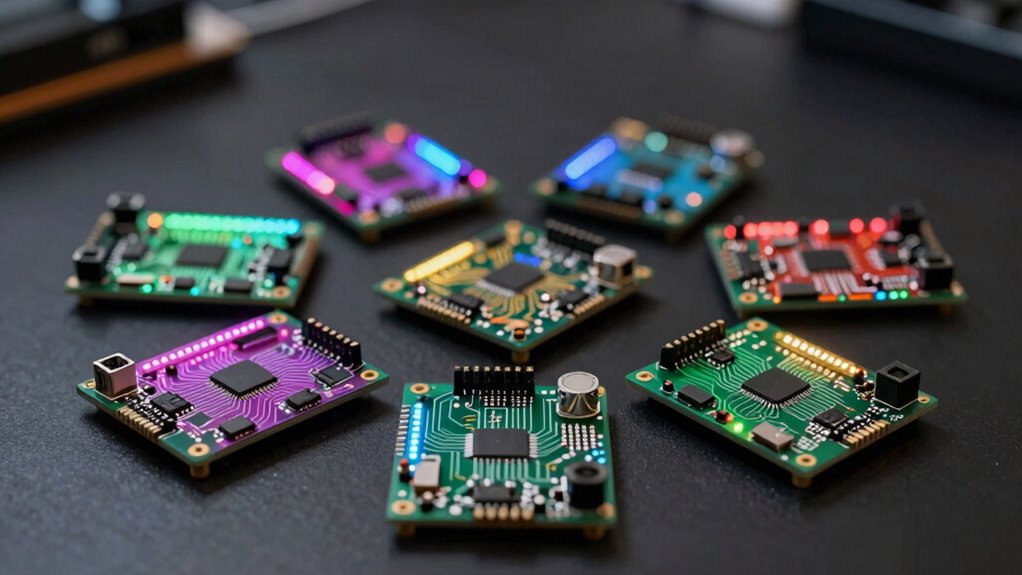
When choosing an FPGA development board, I look at factors like price, ease of use, and compatibility with software tools. Hardware features and expansion options also matter because they influence what projects I can build. Understanding these points helps me pick a board that fits my skills and goals.
Price and Budget
Choosing an FPGA development board within your budget requires careful consideration of both the initial cost and the expenses for accessories and peripherals. I always take into account the total cost, including power supplies, cables, and other necessary peripherals, since these can add up quickly. Budget-friendly boards tend to have fewer advanced features but are perfect for basic learning and experimentation. If you’re willing to invest more, higher-priced options usually offer more onboard resources, expansion options, and better support, which can be worthwhile for complex projects. Additionally, I look for boards with free or low-cost software licenses and all-encompassing documentation, helping maximize learning without extra expenses. Being mindful of these costs ensures I choose a board that fits my budget while meeting my project needs.
Ease of Use
Ease of use is a key factor I consider after narrowing down my options based on budget. A user-friendly interface and straightforward programming process make learning easier for beginners. Clear documentation, tutorials, and example projects help reduce the learning curve and boost confidence. Boards that support common development environments and languages like Verilog or VHDL make it simpler to start coding without a steep learning curve. Integrated onboard components such as LEDs, switches, and serial ports allow quick testing and understanding of FPGA functionalities. Additionally, compact and lightweight designs with simple connectivity options make setup and experimentation less intimidating. These features combined guarantee that beginners can focus on learning and experimenting without being overwhelmed by complex hardware or software configurations.
Compatibility and Software
Selecting an FPGA development board that supports compatible design software is essential for a smooth beginner experience. I recommend checking if the board works well with popular tools like Quartus Prime, Vivado, or ModelSim, which streamline programming and simulation. Make sure the firmware and drivers are compatible with your operating system—Windows, Linux, or macOS—to avoid connectivity issues. It’s also helpful if the board offers extensive support, including tutorials, documentation, and active community resources, to assist with setup and troubleshooting. Confirm the development environment supports key hardware description languages like Verilog or VHDL, critical for FPGA programming. Ultimately, look for software tools with features such as code synthesis, simulation, and debugging, which make development more efficient and less frustrating.
Hardware Features
When evaluating hardware features of FPGA development boards, it’s important to take into account the number of logic elements and LUTs they offer, as these determine the complexity of projects you can handle. More logic elements mean you can design more intricate circuits or algorithms. Additionally, check for onboard peripherals like LEDs, switches, and memory interfaces; these simplify testing and prototyping. Multiple I/O pins and expansion options are essential for connecting external sensors, displays, or modules, broadening your project scope. Make sure the board includes essential communication interfaces such as JTAG, USB, or serial ports for programming and debugging. Finally, integrated oscillators or clock sources are essential for precise timing, especially for applications requiring accurate synchronization and performance.
Expansion Options
Have you considered how the expansion options on an FPGA development board can influence your project’s flexibility? I recommend choosing a board with a variety of interfaces like Pmod, GPIO headers, or serial ports, making it easier to connect external modules. It’s also important to look at the number and types of I/O pins, support them to accommodate the peripherals and sensors you plan to use. Check if the board has dedicated expansion connectors for add-on shields or daughter cards—these simplify future hardware upgrades. Compatibility with standard protocols like JTAG, SPI, UART, or I2C is vital for seamless integration with external devices. Finally, make certain there are ample development resources and documentation available for expansion options, which can considerably speed up hardware customization and prototyping.
Frequently Asked Questions
What Is the Average Cost of Beginner FPGA Development Boards in 2026?
The average cost of beginner FPGA development boards in 2026 is around $50 to $150. I’ve found that entry-level boards like the Basys 3 or the Arty A7 fall within this range, making them affordable for newcomers. Prices vary based on features and brand, but generally, you don’t need to spend a fortune to get started. These boards are perfect for learning and experimenting without breaking the bank.
Are There Specific FPGA Boards Suitable for Mobile or Portable Projects?
Yes, there are FPGA boards ideal for mobile or portable projects. I recommend looking into compact, low-power options like the Digilent Arty S7 or the Lattice iCE40 series, which are designed for portability. These boards are lightweight, energy-efficient, and often come with integrated features suitable for embedded and mobile applications. They’re perfect if you want to build projects that need mobility without sacrificing performance.
How Do I Choose Between FPGA and CPLD for Beginner Projects?
I’d choose an FPGA over a CPLD for beginner projects if I want more flexibility and capabilities, like complex logic, reconfigurability, and high-speed processing. FPGAs are more versatile for learning digital design and experimenting with different architectures. However, if I need a simple, low-power, and cost-effective solution for straightforward tasks, a CPLD might be better. It really depends on your project’s complexity and your learning goals.
What Are the Most Common Challenges Faced by FPGA Beginners?
Imagine trying to navigate a dense forest—you’re bound to hit some obstacles. FPGA beginners often face challenges like understanding complex hardware concepts, mastering hardware description languages, and troubleshooting design errors. The steep learning curve can feel intimidating, but persistence and hands-on practice help. I’ve found that breaking projects into small steps and engaging with community forums make the journey smoother, turning a formidable forest into an exciting adventure.
Which FPGA Development Boards Have the Best Online Community Support?
I find that boards like the Xilinx FPGA development kits and Intel’s FPGA boards have the best online community support. They boast active forums, extensive tutorials, and lots of shared resources. When I had questions or needed troubleshooting help, these communities were quick to respond and incredibly helpful. If you’re starting out, choosing a board with strong community support can make your learning process much smoother and more enjoyable.
Conclusion
Choosing the right FPGA development board is like finding the perfect key to open a world of digital innovation. Whether you’re just starting your journey or aiming to build complex projects, each board is a stepping stone on your path. Remember, the right tool can turn a challenging mountain into a manageable hill. So, pick wisely, experiment fearlessly, and watch as your skills grow like a mighty oak reaching for the sky.