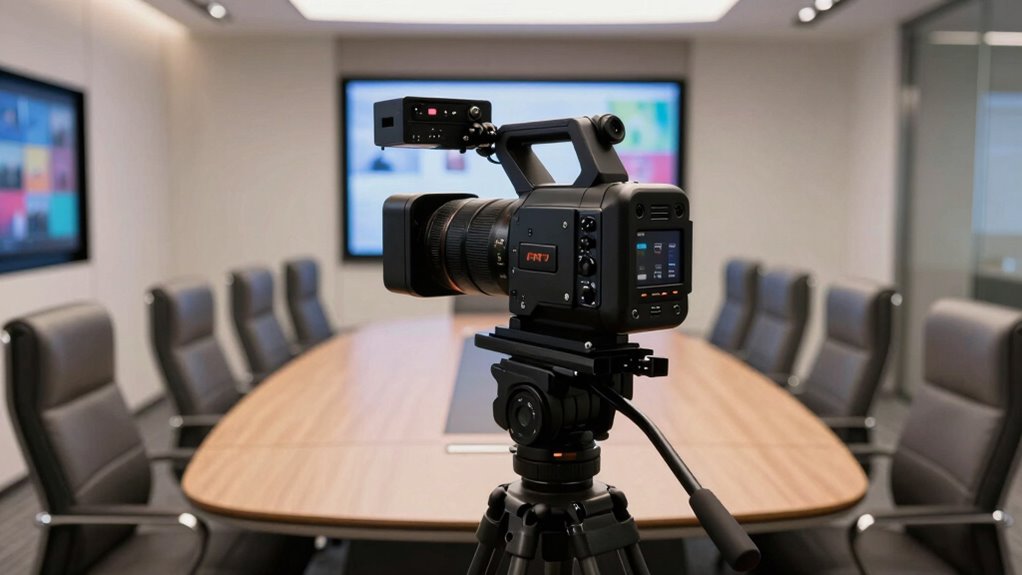

Choosing the right PTZ camera for conference room demos is essential for professional, clear, and engaging presentations. The best overall pick, the Logitech PTZ Pro 2, offers reliable 1080p video with smooth control, making it suitable for most business environments. For those seeking high resolution, the 4K UHD PTZ Camera with AI Auto-Tracking delivers crisp footage and advanced tracking features, perfect for dynamic presentations. However, tradeoffs often involve balancing camera complexity, price, and ease of use. Continue reading to explore the top options and find the best fit for your conference needs.

Get business pricing on monitors, keyboards and dev gear
- Business-only prices and quantity discounts
- Tax-exempt purchasing
- Multiple users, one account, clear invoices
Key Takeaways
- The highest zoom capabilities are paired with advanced auto-tracking features, but these often come with a higher price tag.
- Most top-performing cameras support multiple connectivity options like HDMI, USB, and LAN, ensuring compatibility with existing setups.
- 4K resolution delivers sharper images but requires more bandwidth and processing power, influencing network and hardware choices.
- Ease of use varies widely; models with auto-tracking and remote control tend to reduce setup time but can add complexity.
- Price ranges significantly, with premium models offering more features but potentially overwhelming smaller or simpler conference environments.


| ptz camera for conference room demo | Resolution | Optical Zoom | Sensor |
|---|---|---|---|
| TONGVEO Conference Room PTZ Ca | 1080P | 20X | — |
| 4K UHD PTZ Camera with AI Auto | 4K@30fps | 20X | 1/2.8 inch 8.29 MP CMOS |
| TONGVEO 4K PTZ Conference Room | 3840×2160 at 30fps | — | 1/2.8-inch CMOS |
| TONGVEO 4K PTZ Camera with 3X | 4K | 3X | — |
| Logitech PTZ Pro 2 Camera | 1080P HD | — | — |
| NexiGo Conference Room PTZ Cam | 1080p at 30 fps | 10x | 1/2.8" CMOS |
| 4K Conference Room Camera with | 4K UHD | 20X | 1/2.8" HD CMOS |
More Details on Our Top Picks
TONGVEO Conference Room PTZ Camera System with 20X Optical Zoom, AI Auto Tracking, 1080P 60fps, HDMI & USB, Remote Control
This TONGVEO model stands out for its combination of AI auto-tracking and extensive preset options, making it ideal for dynamic conference settings where multiple speakers or presenters move around. Unlike the Logitech PTZ Pro 2, which offers solid HD quality but lacks AI tracking, this system provides smarter framing that adapts to speaker movement, reducing the need for manual adjustments. Its high 60fps frame rate coupled with 20X optical zoom ensures smooth, detailed visuals suitable for professional streaming and recordings. The flexible connectivity via HDMI and USB, along with up to 255 presets, supports diverse setups, though it may require some familiarity with PTZ controls for optimal use. The main tradeoff is that full functionality depends on compatible software, and the price might be a concern for smaller organizations.
Pros:- Supports AI auto tracking and multi-person framing for professional video quality
- High-quality 1080P at 60fps with a powerful 20X zoom for detailed visuals
- Flexible connectivity options with HDMI and USB, quick setup
- Supports up to 255 preset positions for efficient operation
Cons:- Requires compatible conferencing software to leverage AI features
- Complex controls may challenge users unfamiliar with PTZ systems
Best for: Large conference rooms with multiple speakers needing flexible, automated framing
Not ideal for: Small offices or budget-conscious buyers who prefer simple plug-and-play solutions without auto-tracking
- Resolution:1080P
- Frame Rate:60fps
- Optical Zoom:20X
- Pan Range:350°
- Tilt Range:180°
- Presets:255
- Connectivity:HDMI, USB 3.0
- Auto Tracking:Yes
Our verdict“This camera is best suited for larger, dynamic conference environments that benefit from auto-tracking and flexible camera control.”
4K UHD PTZ Camera with AI Auto-Tracking, 20X Optical Zoom, USB3.0/HDMI/LAN PoE, Live Streaming for Conference and Events
This 4K UHD PTZ camera is designed for professional broadcasters and large-scale events, offering crisp 4K resolution at 30fps and advanced AI auto-tracking. Compared with the 1080P options like the Logitech PTZ Pro 2, it provides sharper, more detailed imagery that benefits high-quality streaming, especially in sizable rooms. Its multiple output options, including USB3.0, HDMI, and LAN PoE, make it adaptable to various setups, though it does require a PoE switch for power, which adds complexity. The AI auto-tracking excels at facial and figure recognition, but the remote control’s 10 preset limit may be restrictive for more demanding use cases. Overall, this model is ideal for professional live streaming and broadcasts where resolution is a priority, but less suited for smaller, simpler conference needs.
Pros:- Sharp 4K resolution with 20X optical zoom for detailed imaging
- Advanced AI auto-tracking with facial and body recognition
- Multiple output options including USB3.0, HDMI, and LAN PoE for flexible deployment
- Easy setup with various mounting options
Cons:- No built-in microphone, requiring additional audio equipment
- PoE setup adds network complexity, needing technical knowledge
- Limited 10 preset support via remote control
Best for: Broadcast-quality streaming setups and large event spaces requiring high resolution
Not ideal for: Small conference rooms or users seeking simple plug-and-play cameras without network setup
- Sensor:1/2.8 inch 8.29 MP CMOS
- Resolution:4K@30fps
- Optical Zoom:20X
- Wide-Angle Lens:63°
- Output Options:USB3.0, HDMI, LAN
- AI Tracking:Face and figure recognition
- Preset Positions:Up to 255
- Power:DC 12V (PoE supported)
Our verdict“This camera excels in high-resolution live streaming environments where detailed visuals and flexible outputs are critical.”
TONGVEO 4K PTZ Conference Room Camera System with Auto-Tracking, 20x Zoom, HDMI, USB3.0, LAN, and Bluetooth Speakerphone
This TONGVEO system combines a 4K PTZ camera with AI auto-tracking and a Bluetooth speakerphone, making it a comprehensive solution for medium to large conference rooms. Its high 4K resolution and 20X zoom ensure crisp visuals, while the integrated microphone array supports clear audio over large distances. Compared to standalone camera options like the 4K UHD model, this all-in-one package simplifies setup and reduces the need for separate components, but it involves a larger footprint and can be more complex to configure. The built-in audio system adds value, though the setup complexity and higher price point might deter smaller organizations seeking a straightforward video-only solution. This makes it ideal for organizations needing both high-quality video and integrated audio in a single package.
Pros:- High-quality 4K video with 20X optical zoom and AI auto-tracking
- Integrated Bluetooth speakerphone with four microphones for clear audio
- Multiple interfaces including HDMI, USB3.0, LAN, and Bluetooth for flexible connectivity
- Easy to set up with multiple mounting options
Cons:- Setup can be complex and may require technical expertise
- Bulkier design may not suit small or minimalist rooms
- Price may be high for organizations with limited budgets
Best for: Medium to large conference rooms needing both video and professional audio in one system
Not ideal for: Small, budget-sensitive offices that only require basic video without integrated audio features
- Resolution:3840×2160 at 30fps
- Zoom:20X
- Sensor:1/2.8-inch CMOS
- Audio:Bluetooth speakerphone with 4 microphones
- Connectivity:HDMI, USB3.0, LAN, Bluetooth
- Power:DC 12V/2A
- Microphone Range:5 meters
Our verdict“This all-in-one system is best for organizations that want integrated audio and high-quality video in larger conference environments.”
TONGVEO 4K PTZ Camera with 3X Optical Zoom and 93° FOV HDMI USB3.0 Conference Camera
This TONGVEO model offers a 4K resolution with a 93° wide-angle lens, ideal for capturing large conference tables or multiple participants in one shot. Its 3X optical zoom is less extensive than the 20X options, but the wide FOV compensates for this by covering more area. Compared with the 20X zoom models, it’s better suited for rooms where wide coverage is more important than close-up detail. The AI auto-tracking feature, combined with smooth pan-tilt-zoom, enhances dynamic meetings, though it tracks only one person at a time and isn’t designed for rapid movement. Dual HDMI and USB 3.0 outputs provide high-quality video options. This camera is best for mid-sized rooms prioritizing broad coverage over zoom range, but less suitable where close-up detail or multi-person auto-framing is required.
Pros:- High-resolution 4K video with a wide 93° field of view
- Smooth AI auto-tracking with smart PTZ features
- Dual HDMI and USB 3.0 outputs for versatile connection
- Supports up to 255 presets for easy control
Cons:- Limited to 3X optical zoom, less suited for close-up detail
- Tracks only one person at a time, limiting flexibility in dynamic meetings
- Requires compatible software for full AI capabilities
Best for: Medium-sized conference rooms needing wide-angle coverage with simple controls
Not ideal for: Large rooms or scenarios requiring high zoom levels for detailed close-ups
- Resolution:4K
- Optical Zoom:3X
- Field of View:93°
- Pan Range:±175°
- Tilt Range:-90° to +90°
- Presets:255
- Outputs:HDMI, USB 3.0
- AI Features:Auto-Tracking, Smart PTZ
Our verdict“This camera is best for rooms where broad coverage is preferred over zoom reach, offering simplicity and wide-angle clarity.”
Logitech PTZ Pro 2 Camera – USB HD 1080P Video Camera for Conference Rooms
The Logitech PTZ Pro 2 provides reliable 1080P HD video with smooth pan, tilt, and zoom, making it a dependable choice for typical conference rooms and training sessions. Unlike the higher-end 4K options, it focuses on simplicity and affordability, delivering solid image quality suitable for most video conferencing platforms. Its wide field of view helps cover large tables, but lacks AI auto-tracking or preset automation found in premium models, requiring manual control or software-based framing. Its straightforward setup and USB-only connectivity make it accessible, though the cost may be higher relative to features for some budgets. This model is perfect for organizations seeking a straightforward HD camera without complex features.
Pros:- Sharp 1080P HD video with good color accuracy
- Smooth pan, tilt, and zoom for flexible framing
- Wide field of view suitable for various room sizes
- Simple USB connection for easy setup
Cons:- Lacks auto-tracking and preset automation
- Higher cost relative to feature set for some buyers
Best for: Small to medium-sized conference rooms needing reliable HD video without advanced automation
Not ideal for: Large rooms or users requiring auto-tracking or 4K resolution for high-end production
- Resolution:1080P HD
- Connectivity:USB
- Features:Pan/tilt/zoom, wide field of view
- Application:Conference rooms, training, large events
Our verdict“This camera offers a dependable, budget-friendly HD solution ideal for basic conference room needs without automation features.”
NexiGo Conference Room PTZ Camera System with 10X Optical Zoom, Remote Control, USB Output & Autofocus for Live Streaming, Meetings, Church Services, Education, for OBS/Zoom/Skype
This NexiGo model stands out for offering a powerful 10x optical zoom combined with clear 1080p resolution, making it ideal for detailed close-ups during meetings or live streams. Unlike the 4K options, it provides a simpler setup with fewer advanced features but excels in ease of use and flexibility with multiple mounting options, including hanging, wall, or tripod. Its silent pan and tilt ensure non-disruptive operation, which is crucial for seamless presentations. Compared with higher-end 4K models, this camera is more affordable and easier to integrate, especially in small to medium-sized rooms. However, it lacks a built-in microphone and doesn’t include mounting hardware, which could require additional purchases. Its limited zoom range makes it less suitable for very large spaces or those needing extreme detail. This pick makes the most sense for users prioritizing affordability, ease of setup, and reliable HD quality in smaller conference environments.
Pros:- High-quality 10x optical zoom for detailed close-ups
- Silent pan and tilt movement for unobtrusive operation
- Flexible mounting options for various setups
- Sharp 1080p video with noise reduction in low light
Cons:- No built-in microphone included, requiring external audio solutions
- Mounting hardware not provided, adding to setup time
- Limited zoom range for very large spaces
Best for: Small to medium-sized conference rooms where detailed close-ups and quiet operation are needed without complex setup.
Not ideal for: Large auditoriums or venues that require higher resolutions or extensive integration with elaborate control systems.
- Optical Zoom:10x
- Resolution:1080p at 30 fps
- Sensor:1/2.8″ CMOS
- Pan Range:-170° to +170°
- Tilt Range:-30° to +90°
- Presets:Up to 10 IR presets, 255 RS232 presets
- Mounting Options:Hanging, wall, tripod
- Note:No built-in microphone, no mounting hardware included
Our verdict“This camera is ideal for small to medium rooms seeking reliable HD video with flexible mounting and easy operation.”
4K Conference Room Camera with 20X Optical Zoom, IP/USB3.0/HDMI/RS232/RS485 for Video Conferencing and Streaming
This 4K camera makes a strong impression for its 20X optical zoom and 4K UHD resolution, delivering crisp, detailed images suitable for large conference rooms and educational settings. Its wide-angle coverage combined with fast autofocus ensures clear visuals even when tracking multiple participants. Unlike the NexiGo, it supports a range of control protocols like VISCA, Pelco-D, and Pelco-P, making it highly versatile in complex AV setups. Its multiple output options—USB, HDMI, IP—allow seamless integration with various streaming platforms and control systems. While it offers impressive resolution, it doesn’t support resolutions beyond 4K, which might be limiting for users with 2K or 8K display needs. The absence of detailed software features may require additional configuration for advanced automation. This model suits larger rooms or organizations seeking high-end video quality with extensive control features.
Pros:- Exceptional 4K UHD image quality with 20X optical zoom
- Supports multiple control protocols for versatile integration
- Multiple output options including IP, USB3.0, and HDMI
- Plug and Play setup with straightforward installation
Cons:- Limited to 4K resolution—no support for 2K or higher like 8K
- Requires a 4K monitor to fully appreciate HDMI 4K output
- May involve a steeper learning curve for advanced controls
Best for: Organizations with large conference rooms or educational institutions needing high-resolution, flexible control, and multi-platform streaming.
Not ideal for: Small offices or setups that do not require 4K quality or extensive protocol support, as it may be overkill and more complex to operate.
- Sensor:1/2.8″ HD CMOS
- Optical Zoom:20X
- Resolution:4K UHD
- Output Resolutions:4K, 1080P, 720P
- Control Protocols:VISCA, Pelco-D, Pelco-P
- Network Protocols:ONVIF, SRT, RTSP, RTMP
- Compatibility:Windows, Mac OS 10.10 or later
- Power:DC 12V/2A
Our verdict“This camera is best suited for large, high-end conference environments where superior resolution and extensive control options are valued over simplicity.”

How We Picked
These products were evaluated based on a combination of performance, usability, build quality, connectivity options, and value. Priority was given to cameras that deliver smooth, high-quality video with reliable auto-tracking capabilities, as these are critical for effective demos. Ease of installation and control, as well as compatibility with common streaming and conferencing platforms, also influenced the rankings. The goal was to identify options suited for a range of budgets and technical needs, from basic setups to professional-grade systems.Factors to Consider When Choosing Ptz Camera For Conference Room Demos
When selecting a PTZ camera for conference room demos, it’s important to consider several factors that influence both performance and ease of use. The right choice depends on your specific environment, technical expertise, and budget. Here are key considerations to help guide your decision beyond just features listed in product descriptions.Video Resolution and Image Quality
Higher resolution cameras, such as 4K models, provide sharper images, which can be critical for detailed presentations or product demos. However, they often require more bandwidth and processing power, which might impact streaming stability. Lower-resolution options like 1080p are more affordable and easier to stream but may sacrifice some clarity. Consider your display size and audience distance to determine the optimal resolution for your space.
Zoom and Field of View
Optical zoom allows you to focus on specific presenters or objects without losing image quality, making it essential for dynamic demos. Cameras with 20X zoom or more can capture fine details from across the room, but they tend to be more expensive and complex. The field of view (FOV) also matters; wider FOVs are better for showing the whole room, while narrower FOVs focus on a single subject. Balance zoom range and FOV based on your room size and presentation style.
Auto-Tracking and Controls
Auto-tracking features enable the camera to follow a presenter or object automatically, adding professionalism and reducing manual adjustments. While highly convenient, auto-tracking can sometimes be inaccurate or overly sensitive, especially in cluttered environments. Remote control, pan-tilt, and zoom functionalities improve flexibility but may require additional learning curves or integration efforts. Weigh these features against your technical comfort level and the complexity of your demos.
Connectivity and Compatibility
Look for cameras with multiple connectivity options such as HDMI, USB, LAN, or PoE, to ensure seamless integration with existing hardware and streaming platforms. Compatibility with software like Zoom, Teams, or OBS is also crucial for smooth operation. Some models support multiple outputs simultaneously, which is useful for recording or streaming to different platforms. Confirm your setup requirements before making a choice to avoid integration headaches.
Ease of Installation and Use
Ease of setup varies among models; plug-and-play options are ideal for quick deployment, while more advanced systems might require professional installation. User interface design impacts how quickly you can operate the camera during demos—simple controls with presets are more accessible for non-technical users. Consider your team’s technical skills and whether you need features like remote operation or automation to streamline sessions.
Frequently Asked Questions
How important is 4K resolution for conference demos?
While 4K resolution offers sharper images, it’s not always necessary for effective conference demos. It benefits scenarios where detailed visuals or close-up shots are essential and where your network can handle the increased data load. However, for standard presentations or smaller rooms, 1080p models can deliver sufficient clarity at a lower cost and bandwidth requirement. Balance your resolution needs against your technical environment and budget.
Can auto-tracking features cause issues during presentations?
Auto-tracking can sometimes be overly sensitive or lose track in cluttered environments, which might disrupt your demo flow. It’s useful for hands-free operation but works best in controlled spaces with clear movement. Testing auto-tracking in your setting before critical presentations helps ensure it performs reliably. If precision is vital, manual controls or preset positions can serve as a backup.
What connectivity options should I prioritize?
Prioritize cameras with HDMI and USB outputs for compatibility with most displays and computers. LAN or PoE support can simplify cabling and enable remote control, especially for larger rooms or multi-camera setups. Check if the camera supports streaming platforms like OBS, Zoom, or Teams to avoid additional hardware or software purchases. Multiple outputs often provide greater flexibility for complex setups.
Are more expensive cameras worth the investment?
Higher-priced models typically offer better image quality, more reliable auto-tracking, and greater zoom range, which can improve the professionalism of your demos. They also tend to be more durable and easier to operate. However, if your needs are basic—such as small meetings or occasional presentations—a mid-range or budget option may suffice. Consider your specific use case and whether the added features justify the cost.
Is it better to choose a camera with a wide FOV or a narrower one?
The choice depends on your room size and presentation style. Wide FOV cameras are suitable for capturing the entire room, making them ideal for larger spaces or when multiple speakers may be present. Narrower FOV cameras focus on a specific area, providing more detail and clarity on a single subject. Combining both can be beneficial in complex setups, but for most standard demos, selecting based on your room dimensions and how you want to frame your shots is best.