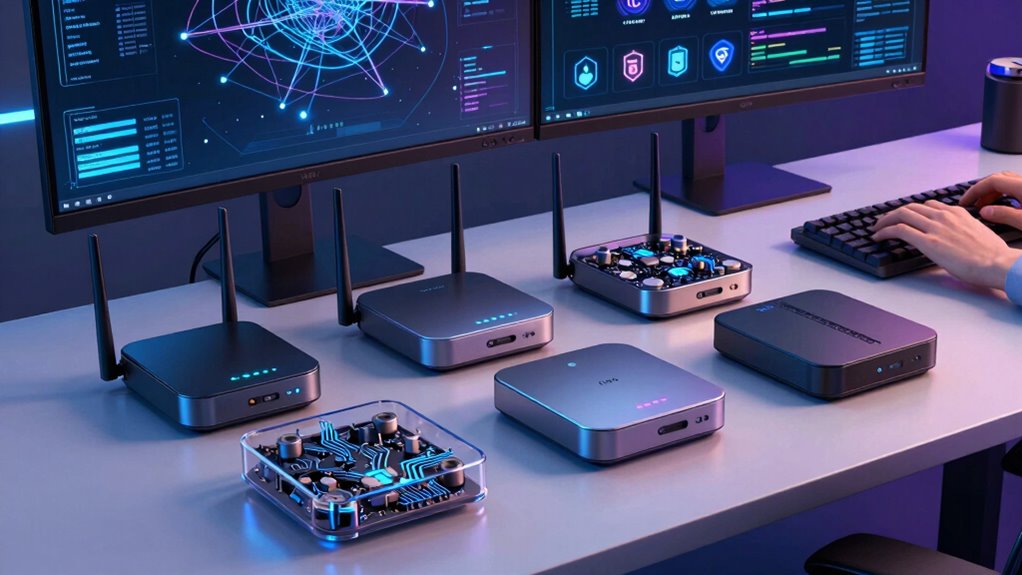

Choosing the right VPN router is essential for remote developers who need secure, reliable internet access across multiple networks. The best options balance strong encryption, fast speeds, and user-friendly setup. The TP-Link ER605 V2 stands out for its robust wired security features, while the GL.iNet GL-BE3600 Slate offers cutting-edge Wi-Fi 7 for fast, flexible connectivity. However, tradeoffs often involve complexity, price, and compatibility — making it important to pick a router that matches your specific remote work needs. Continue reading for a detailed breakdown of the top contenders and how they compare.
Open a free Amazon Business account
Business pricing, bulk buying and tax-exempt orders.
Create a free accountAs an affiliate, we earn on qualifying purchases.
Key Takeaways
- The top routers balance security features with ease of setup, important for remote developers with limited IT support.
- Wireless speed and Wi-Fi standards (like Wi-Fi 6/7) significantly impact remote work performance, especially for high-bandwidth tasks.
- Multi-WAN capabilities are valuable for developers working across multiple networks, ensuring seamless connectivity.
- Price and build quality vary widely, with premium models offering better longevity and advanced features at a higher cost.
- Portable travel routers provide flexibility but often sacrifice some security or advanced features found in wired or desktop options.
| TP-Link ER605 V2 Wired Gigabit VPN Router |  | Best Overall for Secure, Multi-WAN Wired Networks | Number of Gigabit Ports: 5 (1 WAN, 2 WAN/LAN, 2 LAN) | USB WAN Port: Yes | VPN Support: Yes, up to 20 LAN-to-LAN IPsec, 16 OpenVPN, 16 L2TP, 16 PPTP | VIEW ON AMAZON | See Our Full Breakdown |
| GL.iNet GL-BE3600 Slate 7 Wi-Fi 7 Travel Router Touchscreen 2.5G |  | Best for Tech-Savvy Travelers Needing Customization | Wireless Speed: 688Mbps (2.4G) + 2882Mbps (5G) | Ethernet Ports: 2.5G (1x WAN, 1x LAN) | USB Port: USB 3.0 | VIEW ON AMAZON | See Our Full Breakdown |
| GL.iNet GL-SFT1200 Opal Travel Router, AC1200 Dual-Band Wi-Fi | 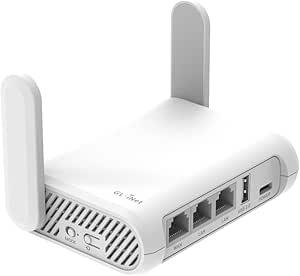 | Best Portable Dual-Band for Basic Travel VPN Needs | Wireless Speed: 300 Mbps (2.4G) + 867 Mbps (5G) | Ports: 2 Gigabit LAN, 1 Gigabit WAN | Weight: 145g | VIEW ON AMAZON | See Our Full Breakdown |
| TP-Link ER7206 Multi-WAN Professional Wired Gigabit VPN Router |  | Best for Large-Scale, Multi-WAN Enterprise Environments | WAN Ports: 1 Gbps SFP, 1 Gbps WAN, 2 Gbps WAN/LAN, 1 Gbps LAN | Maximum Clients: 700 | VPN Support: Up to 100 LAN-to-LAN IPsec, 50 OpenVPN, 50 L2TP, 50 PPTP | VIEW ON AMAZON | See Our Full Breakdown |
| GL.iNet GL-MT6000 Flint 2 Wi-Fi 6 Gaming Router Dual 2.5G Ports |  | Best High-Speed Wi-Fi 6 for Gaming and Streaming | Wi-Fi Standard: Wi-Fi 6 | Max Speed: 6 Gbps | RAM: 1GB DDR4 | VIEW ON AMAZON | See Our Full Breakdown |
| Capri CP-EL128 Server & 2 Travel Router VPN |  | Best for Portable Multi-Device VPN Flexibility | Number of routers: 2 | VPN subscription: One month free included | Compatibility: Laptops, tablets, phones | VIEW ON AMAZON | See Our Full Breakdown |
| vpn routers for remote developer | VPN Support |
|---|---|
| TP-Link ER605 V2 Wired Gigabit | Yes, up to 20 LAN-to-LAN IPsec, 16 OpenVPN, 16 L2TP, 16 PPTP |
| GL.iNet GL-BE3600 Slate 7 Wi-F | OpenVPN, WireGuard |
| GL.iNet GL-SFT1200 Opal Travel | OpenVPN, WireGuard |
| TP-Link ER7206 Multi-WAN Profe | Up to 100 LAN-to-LAN IPsec, 50 OpenVPN, 50 L2TP, 50 PPTP |
| GL.iNet GL-MT6000 Flint 2 Wi-F | — |
| Capri CP-EL128 Server & 2 Trav | — |
More Details on Our Top Picks
TP-Link ER605 V2 Wired Gigabit VPN Router
The TP-Link ER605 V2 stands out as the best choice for remote developers who prioritize security and reliable, multi-WAN connectivity. Its support for up to 20 LAN-to-LAN IPsec VPNs and multiple WAN ports makes it an excellent option for managing complex remote access setups, especially compared with the more travel-focused GL.iNet options. However, its setup can be daunting for beginners, and its wired-only design limits flexibility in mobile environments. It excels in office or fixed remote work setups where wired connections and high security are paramount, but less so for those needing wireless mobility or simple plug-and-play solutions.
Pros:- Multiple WAN ports for prioritized bandwidth management
- Supports a variety of VPN protocols for flexible remote access
- Robust security features including firewall and DoS defense
Cons:- Setup process can be complex for non-technical users
- Limited to wired connections, lacking built-in Wi-Fi
Best for: Remote developers working from a fixed office location who need secure, reliable multi-WAN connectivity and advanced VPN options.
Not ideal for: Travelers or mobile remote workers who need portable, easy-to-set-up Wi-Fi solutions without extensive configuration.
- Number of Gigabit Ports:5 (1 WAN, 2 WAN/LAN, 2 LAN)
- USB WAN Port:Yes
- VPN Support:Yes, up to 20 LAN-to-LAN IPsec, 16 OpenVPN, 16 L2TP, 16 PPTP
- Security Features:Firewall, DoS defense, filtering, VPN pass-through
- Standards and Protocols:IEEE 802.3, 802.3u, 802.3ab, 802.3x, 802.1q
Our verdict“This router suits remote developers who need a secure, wired multi-WAN setup for dedicated workspaces and can handle configuration complexity.”
GL.iNet GL-BE3600 Slate 7 Wi-Fi 7 Travel Router Touchscreen 2.5G
The GL.iNet Slate 7 offers a compelling combination of high-speed Wi-Fi 7, a touchscreen interface, and open-source firmware, making it ideal for developers who want flexible, portable internet solutions. Unlike the more traditional travel routers like the GL.iNet Opal, the Slate 7 provides Wi-Fi 7 speeds and a user-friendly touchscreen for quick adjustments, appealing to those comfortable with advanced features. Its reliance on active VPN subscriptions and complex setup may deter less technical users, but its open-source firmware allows deep customization and dual VPN client/server support. It’s a strong pick for those regularly working remotely in varied locations and needing powerful, customizable wireless connectivity.
Pros:- Wi-Fi 7 dual-band speeds for fast, stable connections
- Touchscreen interface for straightforward control
- Open-source firmware enables extensive customization
Cons:- Requires active VPN subscription for full functionality
- Setup process can be complex for non-technical users
Best for: Tech-savvy remote developers who want fast, customizable Wi-Fi during travel and are comfortable configuring advanced features.
Not ideal for: Less technical users or those seeking plug-and-play solutions, given the setup complexity and subscription requirements.
- Wireless Speed:688Mbps (2.4G) + 2882Mbps (5G)
- Ethernet Ports:2.5G (1x WAN, 1x LAN)
- USB Port:USB 3.0
- Firmware:OpenWrt 23.05
- VPN Support:OpenVPN, WireGuard
- Security Protocols:WPA3, DNS over HTTPS/TLS, IPv6
Our verdict“This router is best suited for developers who need fast, flexible, and customizable wireless connectivity in mobile environments and are comfortable with technical setup.”
GL.iNet GL-SFT1200 Opal Travel Router, AC1200 Dual-Band Wi-Fi
The GL.iNet Opal offers a straightforward, portable dual-band Wi-Fi router with reliable speeds up to 300 Mbps on 2.4GHz and 867 Mbps on 5GHz. Its full gigabit ports and retractable antennas enhance wired and wireless performance, making it suitable for remote developers who need a simple yet secure internet solution on the go. Compared with the more feature-rich Flint 2, the Opal sacrifices Wi-Fi 6 support and higher speeds but remains a compact, easy-to-carry option for basic VPN needs. Its default toggle switch, which has no default function, can cause confusion, and it doesn’t support tethering easily, limiting its flexibility in some travel scenarios.
Pros:- Portable and lightweight for easy travel
- Supports VPN protocols with pre-installed OpenVPN and WireGuard
- Full gigabit ports for wired connections
Cons:- No support for easy tethering or default toggle functions
- Lower maximum speeds compared to newer models
Best for: Travelers needing a compact, reliable VPN-enabled Wi-Fi router for basic remote work and secure internet access.
Not ideal for: Developers requiring high-speed Wi-Fi, advanced features, or easy tethering for mobile hotspots, as it’s more limited in scope.
- Wireless Speed:300 Mbps (2.4G) + 867 Mbps (5G)
- Ports:2 Gigabit LAN, 1 Gigabit WAN
- Weight:145g
- Antenna:Retractable
- VPN Support:OpenVPN, WireGuard
Our verdict“This router is best suited for travelers who need a simple, portable VPN-enabled Wi-Fi connection without demanding setup or high speeds.”
TP-Link ER7206 Multi-WAN Professional Wired Gigabit VPN Router
The TP-Link ER7206 is a high-capacity router designed for large remote teams and complex network setups. Its support for up to four WAN connections, combined with cloud management and SDN integration, makes it ideal for organizations needing centralized control and high security. Compared to the simpler ER605, the ER7206 offers greater scalability and advanced features suitable for enterprise environments. The setup complexity and potential costs of cloud management make it less appealing for individual developers or small teams seeking quick deployment. It’s a powerful choice for teams managing multiple remote sites with demanding security and performance needs, but overkill for solo developers or small startups.
Pros:- Supports up to four WAN connections for bandwidth aggregation
- High maximum client capacity suitable for large deployments
- Cloud management and SDN support for centralized control
Cons:- Complex setup requiring technical expertise
- Potential additional costs for cloud management plans
Best for: Large remote teams or organizations requiring multi-WAN setups, high device capacity, and centralized management.
Not ideal for: Solo developers or small teams needing straightforward, easy-to-configure VPN routers, due to its complexity and cost.
- WAN Ports:1 Gbps SFP, 1 Gbps WAN, 2 Gbps WAN/LAN, 1 Gbps LAN
- Maximum Clients:700
- VPN Support:Up to 100 LAN-to-LAN IPsec, 50 OpenVPN, 50 L2TP, 50 PPTP
- Security Features:Firewall, DoS defense, IP/MAC/URL filtering
- Management:Cloud access, Omada SDN
Our verdict“This router suits large organizations needing scalable, multi-WAN, secure connectivity with centralized control, but is too complex for small-scale needs.”
GL.iNet GL-MT6000 Flint 2 Wi-Fi 6 Gaming Router Dual 2.5G Ports
The GL.iNet Flint 2 offers a notable upgrade with Wi-Fi 6, supporting speeds up to 6 Gbps and accommodating numerous devices simultaneously. Its dual 2.5G ports and VPN support with fast speeds make it attractive for developers who need robust, low-latency connections for gaming, streaming, or heavy remote work. Compared with the GL-BE3600, the Flint 2 emphasizes speed and device capacity, though it requires a firmware update for optimal performance and depends heavily on your ISP’s capabilities. Its high throughput and VPN speeds are especially appealing for remote developers with bandwidth-intensive tasks, but performance can vary based on network conditions and firmware stability.
Pros:- Wi-Fi 6 with speeds up to 6 Gbps for demanding applications
- Supports over a hundred devices simultaneously
- Built-in VPN support with high-speed connections
Cons:- Requires firmware update for optimal performance
- Performance varies depending on ISP and network environment
Best for: Remote developers who need high-speed Wi-Fi 6, low latency, and VPN support for gaming, streaming, or intensive remote tasks.
Not ideal for: Developers with basic internet needs or in environments where the latest firmware updates are problematic, as performance may fluctuate without proper updates.
- Wi-Fi Standard:Wi-Fi 6
- Max Speed:6 Gbps
- RAM:1GB DDR4
- Storage:8GB eMMC
- Ports:Dual 2.5G ports
- VPN Speeds:Up to 900Mbps (Wireguard), 880Mbps (OpenVPN)
Our verdict“This router is ideal for remote developers seeking fast, reliable Wi-Fi 6 with VPN support for demanding workloads and multiple devices.”
Capri CP-EL128 Server & 2 Travel Router VPN
The Capri CP-EL128 stands out for providing a portable solution that enables multiple devices to connect securely to a home or remote network via VPN. Compared with the GL.iNet GL-BE3600 Slate, which offers a more robust Wi-Fi 7 experience, this model emphasizes ease of sharing across multiple gadgets with its dual-router setup. Its key advantage is supporting several devices simultaneously, making it ideal for developers who need flexible, on-the-go VPN access. However, it requires an active VPN subscription to unlock full functionality, which could be a hurdle for those seeking a completely plug-and-play setup. Its limited info on VPN protocols might also concern users with advanced security needs. The setup process can be complex for non-technical users, potentially limiting its appeal to those comfortable with network configurations.
Pros:- Supports multiple devices at once, ideal for multi-gadget setups
- Includes a one-month free VPN subscription, reducing initial costs
- Enables secure remote access from various locations
Cons:- Requires an active VPN subscription for full capabilities, adding ongoing costs
- Limited transparency on supported VPN protocols could hinder advanced security users
- Setup can be complex for users unfamiliar with network configurations
Best for: Remote developers who prioritize portable multi-device VPN access and are comfortable with initial setup complexity
Not ideal for: Beginners or users seeking a simple, out-of-the-box VPN router with minimal configuration
- Number of routers:2
- VPN subscription:One month free included
- Compatibility:Laptops, tablets, phones
- Functionality:Remote access, geo-restriction bypass
- VPN protocol support:Limited details
- Setup complexity:Moderate
Our verdict“This router set makes the most sense for developers needing portable, multi-device VPN access willing to handle some initial setup effort.”

How We Picked
The products in this roundup were evaluated based on their security capabilities, speed, ease of setup, build quality, and overall value for remote developers. We prioritized routers that support robust VPN options, fast Wi-Fi standards, and multi-network management, as these are critical for secure, reliable remote work. Compatibility with various VPN protocols and user interface design also weighed heavily in our rankings. Our goal was to identify options that serve both tech-savvy developers and those less familiar with network configuration, balancing performance with affordability.| vpn routers for remote developer | VPN Support |
|---|---|
| TP-Link ER605 V2 Wired Gigabit | Yes, up to 20 LAN-to-LAN IPsec, 16 OpenVPN, 16 L2TP, 16 PPTP |
| GL.iNet GL-BE3600 Slate 7 Wi-F | OpenVPN, WireGuard |
| GL.iNet GL-SFT1200 Opal Travel | OpenVPN, WireGuard |
| TP-Link ER7206 Multi-WAN Profe | Up to 100 LAN-to-LAN IPsec, 50 OpenVPN, 50 L2TP, 50 PPTP |
| GL.iNet GL-MT6000 Flint 2 Wi-F | — |
| Capri CP-EL128 Server & 2 Trav | — |
Factors to Consider When Choosing Vpn Routers For Remote Developers
When selecting a VPN router for remote development, it’s vital to consider factors that directly impact your security, connectivity, and ease of use. Not all routers are created equal, and choosing the wrong one can lead to slow speeds, security vulnerabilities, or complicated setup processes. Here are key factors to keep in mind to make an informed purchase that aligns with your remote work demands.Security and VPN Support
For remote developers, security is non-negotiable. Look for routers that support multiple VPN protocols like OpenVPN and WireGuard, which provide flexible and strong encryption. Some routers include built-in VPN servers, making it easier to connect securely from anywhere. Avoid models with limited VPN options or outdated security features, as these can expose your data to risks during sensitive tasks.
Speed and Wi-Fi Standards
High-speed connectivity ensures smooth video calls, large file transfers, and seamless collaboration. Prioritize routers supporting Wi-Fi 6 or Wi-Fi 7, which offer faster speeds and better congestion handling. Remember, a faster Wi-Fi standard alone isn’t enough if the router’s processing power is limited; look for models with robust processors to handle multiple simultaneous connections efficiently.
Multi-WAN and Network Flexibility
If you work across multiple networks or need failover options, routers with Multi-WAN support are invaluable. They allow automatic switching between different internet sources, minimizing downtime. However, these features often come with added complexity and cost, so consider whether your remote setup justifies the investment.
Ease of Setup and Management
A user-friendly interface and straightforward setup process can save hours of frustration, especially if you’re not a network expert. Routers with dedicated mobile apps or web interfaces that guide you through configuration are ideal. Be cautious of models that require extensive manual setup, which might be overwhelming for less technical users.
Build Quality and Portability
For remote developers who travel frequently, portable routers with rugged build quality are a wise choice. They typically come with compact designs and reliable connections in various environments. However, portable models often compromise on advanced features or high-speed performance compared to desktop routers, so choose based on your mobility needs.
Frequently Asked Questions
Can I set up a VPN router if I’m not very tech-savvy?
Yes, many VPN routers now include simplified setup processes and mobile apps that guide you through configuration steps. However, some models still require manual setup, which can be complex. For those less experienced, choosing a router with an intuitive interface and good customer support can make the process much smoother. Investing time in tutorials or consulting support resources can also help bridge any technical gaps.
Will a more expensive VPN router significantly improve my remote work experience?
Higher-priced routers often offer faster speeds, better security features, and more advanced management options. If your remote work involves large data transfers, high-quality video conferencing, or multiple users, investing in a premium model can reduce frustrations caused by lag or connection drops. However, for basic needs, mid-range routers can provide sufficient security and performance without breaking the bank.
Is dual-band Wi-Fi enough for remote developers, or should I consider Wi-Fi 6/7 routers?
While dual-band Wi-Fi can suffice for many remote tasks, Wi-Fi 6 and 7 offer significant improvements in speed, latency, and device capacity. For developers running bandwidth-intensive applications or multiple smart devices, upgrading to Wi-Fi 6/7 routers can improve overall network stability. Keep in mind, to fully leverage these standards, your devices also need to support them, and your internet plan should provide sufficient bandwidth.
What are the security risks of using a basic consumer router for remote work?
Basic routers often lack the latest security updates or robust VPN support, making them vulnerable to hacking attempts and data breaches. Without proper encryption and security features, your sensitive work data could be exposed. It’s essential to choose a router with up-to-date firmware, strong encryption protocols, and VPN capabilities tailored for remote development needs.
Should I prioritize portability or high performance when choosing a travel VPN router?
It depends on your travel frequency and work requirements. Portable routers excel in mobility and convenience, offering basic security and connectivity on the go. However, they might not support the highest speeds or advanced security features found in desktop models. If your remote work involves bandwidth-heavy tasks or sensitive data, a portable router with good security features can still be suitable, but for intensive tasks, a more robust, stationary router might be preferable.
Conclusion
For remote developers seeking the best overall balance of security, speed, and usability, the TP-Link ER605 V2 offers solid wired security and VPN support at a reasonable price. Those prioritizing cutting-edge wireless speed should consider the GL.iNet GL-BE3600 Slate, especially if Wi-Fi 7 is a must-have. For those new to networking or valuing portability, the GL.iNet GL-SFT1200 Opal provides an easy setup with reliable dual-band Wi-Fi. Budget-conscious buyers can find good value in models like the Capri CP-EL128, though they may sacrifice some advanced features. Ultimately, your choice should match your remote work environment, security needs, and mobility requirements, ensuring a smooth, secure connection wherever you work from.
As an affiliate, we earn on qualifying purchases.Evergreen bestsellers Picks
bestsellers