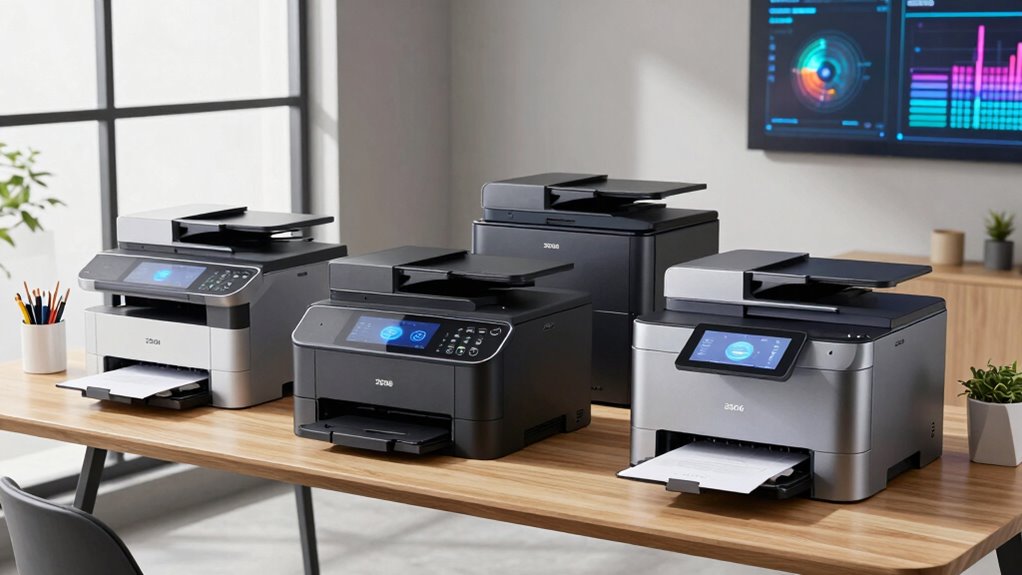
Choosing the right laser printer for a home office involves balancing speed, functionality, and budget. For those who need all-in-one features with color options, the HP Color LaserJet Pro 3301sdw stands out for its versatility. Meanwhile, if space is limited and monochrome printing suffices, the Brother HL-L2405W offers a compact, budget-friendly solution. For busy small teams requiring fast, reliable black-and-white printing, the HP LaserJet Pro MFP 3101sdw delivers excellent speed and security. Each option has distinct tradeoffs—such as cost, color capabilities, or setup complexity—that matter depending on your specific needs.

Get business pricing on monitors, keyboards and dev gear
- Business-only prices and quantity discounts
- Tax-exempt purchasing
- Multiple users, one account, clear invoices
Key Takeaways
- All-in-one models like the HP LaserJet Pro MFP 3105sdw and HP Color LaserJet Pro 3301sdw offer scanning and copying for small teams.
- Monochrome options such as Brother HL-L2405W and Brother DCP-L2640DW excel in space-saving and cost-effective printing.
- Color laser printers tend to be more expensive and require special cartridges, making them less ideal for strictly black-and-white needs.
- Wireless connectivity and mobile printing are common, but setup complexity varies, especially with multi-function models.
- Speed and paper capacity are key for productivity, with most models supporting 250-sheet trays and speeds above 30 ppm.
| HP LaserJet Pro MFP 3105sdw Wireless Printer |  | Best All-in-One for Small Teams | Print Speed: up to 33 pages per minute | Auto Duplex: Yes | Maximum Users: 7 | VIEW ON AMAZON | See Our Full Breakdown |
| HP Color LaserJet Pro MFP 3301sdw Wireless All-in-One Color Laser Printer |  | Best Color for Small Offices | Print Speed: 26 ppm | Functions: Print, Scan, Copy | Auto Duplex: Yes | VIEW ON AMAZON | See Our Full Breakdown |
| HP LaserJet Pro MFP 3101sdw Wireless Black and White All-in-One Laser Printer |  | Best for Monochrome Small Teams | Print Speed: up to 35 ppm | Input Tray Capacity: 250 sheets | Auto Document Feeder: 50 sheets | VIEW ON AMAZON | See Our Full Breakdown |
| Brother HL-L2405W Wireless Monochrome Laser Printer |  | Best Budget Monochrome for Home Use | Print Speed: 30 pages per minute | Connectivity: Wi-Fi (dual-band), USB | Paper Capacity: 250 sheets | VIEW ON AMAZON | See Our Full Breakdown |
| Brother DCP-L2640DW Wireless Monochrome Multi-Function Laser Printer |  | Best for Small Business and Multi-Function Needs | Print Speed: up to 36 ppm | Scan Speed: up to 23.6/7.9 ipm | Auto Document Feeder: 50 pages | VIEW ON AMAZON | See Our Full Breakdown |
| laser printers for home office | Print Speed | Connectivity | Auto Document Feeder |
|---|---|---|---|
| HP LaserJet Pro MFP 3105sdw Wi | up to 33 pages per minute | Wi-Fi | — |
| HP Color LaserJet Pro MFP 3301 | 26 ppm | Wireless | Yes |
| HP LaserJet Pro MFP 3101sdw Wi | up to 35 ppm | Wireless Wi-Fi | 50 sheets |
| Brother HL-L2405W Wireless Mon | 30 pages per minute | Wi-Fi (dual-band), USB | — |
| Brother DCP-L2640DW Wireless M | up to 36 ppm | Wireless (2.4GHz / 5GHz), Ethernet, USB | 50 pages |
More Details on Our Top Picks
HP LaserJet Pro MFP 3105sdw Wireless Printer
The HP LaserJet Pro MFP 3105sdw is an excellent choice for small home offices needing versatile functionality. Its all-in-one design covers printing, scanning, and copying, with speeds up to 33 ppm, making it suitable for daily workloads. Compared with monochrome-only options, this model offers the convenience of mobile printing and auto duplexing, but it requires original HP cartridges with chips, which can be costly over time. Its security features are a plus for privacy-conscious users. However, it’s less ideal for those who prioritize ultra-high-volume printing, as it’s primarily designed for small teams rather than heavy-duty use.
Pros:- Fast printing speeds of up to 33 ppm
- Easy setup with mobile app support
- Secure printing with customizable security features
- Auto duplex printing and scanning for efficiency
Cons:- Requires original HP cartridges with chips or circuitry
- Designed primarily for office use, not for high-volume workloads
- Firmware updates may be needed for security patches
Best for: Small teams requiring multifunctionality and security
Not ideal for: High-volume printing or users on a tight budget
- Print Speed:up to 33 pages per minute
- Auto Duplex:Yes
- Maximum Users:7
- Connectivity:Wi-Fi
- Security:HP Wolf Pro Security
- Mobile Printing:Yes
Our verdict“A versatile all-in-one that balances speed, security, and ease of use for small office teams.”
HP Color LaserJet Pro MFP 3301sdw Wireless All-in-One Color Laser Printer
The HP Color LaserJet Pro 3301sdw is tailored for small teams that need color printing along with scanning and copying. Its 26 ppm speed and auto document feeder streamline workflow, especially for professional documents. Compared with monochrome models, its color capabilities come at a higher price point and with more frequent toner replacements. The auto duplex feature helps save paper, but the overall cost of consumables remains a concern for budget-conscious users. It’s best suited for those who require vibrant, high-quality color output regularly.
Pros:- Fast color printing at 26 ppm
- All-in-one with scan and copy functions
- Auto duplex for efficiency
- High-yield toner options
Cons:- Requires original HP toner cartridges with chips
- Higher ongoing costs due to color toner
- Designed primarily for office use, not heavy-duty printing
Best for: Small offices needing reliable color printing
Not ideal for: High-volume black-and-white-only printing
- Print Speed:26 ppm
- Functions:Print, Scan, Copy
- Auto Duplex:Yes
- Auto Document Feeder:Yes
- Input Tray Capacity:250 sheets
- Connectivity:Wireless
Our verdict“A solid color laser printer that balances professional quality with small office productivity needs.”
HP LaserJet Pro MFP 3101sdw Wireless Black and White All-in-One Laser Printer
The HP LaserJet Pro MFP 3101sdw offers fast black-and-white printing, copying, and scanning ideal for small teams focused on text-heavy output. Its speeds up to 35 ppm keep pace with busy workflows, and the 250-sheet tray reduces frequent refills. Compared with color models, it’s more affordable to operate and simpler to maintain but lacks color options. Firmware updates are typical to keep security current, and cartridges with chips are a must. This model is perfect for those who prioritize speed and reliability over color.
Pros:- High-speed printing at 35 ppm
- Automatic duplex for saving paper
- Reliable wireless connectivity
- Large 250-sheet input tray
Cons:- Limited to monochrome only
- Requires HP chips or circuitry cartridges
- Firmware updates may be necessary for security
Best for: Black-and-white document-heavy work
Not ideal for: Color printing or creative projects
- Print Speed:up to 35 ppm
- Input Tray Capacity:250 sheets
- Auto Document Feeder:50 sheets
- Connectivity:Wireless Wi-Fi
- Functions:Print, Scan, Copy
Our verdict“A straightforward, high-speed monochrome printer that suits small team needs perfectly.”
Brother HL-L2405W Wireless Monochrome Laser Printer
The Brother HL-L2405W is an affordable, compact monochrome laser printer, perfect for basic home or small office needs. Its 30 ppm speed makes it quick enough for everyday tasks, and the 250-sheet tray supports high-volume printing without frequent refills. Compared to multifunction models, it lacks scanning and copying, but its simplicity keeps costs down. Wireless and mobile printing are supported via Brother Mobile Connect, although setup can be slightly technical for some users. This model is best for those who mainly need fast black-and-white printing without extra features.
Pros:- Fast printing at 30 ppm
- Large 250-sheet paper tray
- Wireless and mobile printing support
- Affordable toner options
Cons:- Limited to monochrome only
- No scanning or copying features
- Setup can be complex for some users
Best for: Home users or small offices on a budget
Not ideal for: Color printing or multifunction needs
- Print Speed:30 pages per minute
- Connectivity:Wi-Fi (dual-band), USB
- Paper Capacity:250 sheets
- Supported Toner:Brother Genuine TN830/TN830XL
- Warranty:1 year
Our verdict“A cost-effective monochrome laser printer that handles daily printing with ease and reliability.”
Brother DCP-L2640DW Wireless Monochrome Multi-Function Laser Printer
The Brother DCP-L2640DW combines printing, scanning, and copying in a compact design suitable for small business or home office environments. Its impressive speeds of up to 36 ppm and flexible connectivity options, including Ethernet and wireless, make it highly adaptable. The 50-sheet auto document feeder speeds up multi-page tasks, and mobile device management via Brother Mobile Connect adds convenience. The downside is that it’s limited to monochrome output, and some users find setup a bit challenging. This model is ideal for small teams that need reliable, multi-purpose functionality without extra frills.
Pros:- Fast printing and scanning speeds
- Compact design fits small spaces
- Wireless and Ethernet connectivity
- Mobile device management support
Cons:- Limited to monochrome only
- Requires compatible toner cartridges
- Setup can be complex for some users
Best for: Small businesses requiring multifunctionality
Not ideal for: Color printing or large-scale high-volume tasks
- Print Speed:up to 36 ppm
- Scan Speed:up to 23.6/7.9 ipm
- Auto Document Feeder:50 pages
- Connectivity:Wireless (2.4GHz / 5GHz), Ethernet, USB
- Includes:Refresh Subscription Trial
Our verdict“A versatile monochrome laser printer that balances speed, space, and multi-functionality for small teams.”

How We Picked
Our selection process focused on laser printers that are well-suited for small home offices, prioritizing speed, reliability, and ease of use. We considered models that offer a range of functionalities—from monochrome to color and single-function to all-in-one—ensuring options for different budgets and space constraints. Each product was evaluated based on print quality, network connectivity, security features, and user reviews, with a preference for models that balance performance and affordability. We also looked at cartridge requirements and firmware update policies to assess long-term maintenance and security.
| laser printers for home office | Connectivity |
|---|---|
| HP LaserJet Pro MFP 3105sdw Wi | Wi-Fi |
| HP Color LaserJet Pro MFP 3301 | Wireless |
| HP LaserJet Pro MFP 3101sdw Wi | Wireless Wi-Fi |
| Brother HL-L2405W Wireless Mon | Wi-Fi (dual-band), USB |
| Brother DCP-L2640DW Wireless M | Wireless (2.4GHz / 5GHz), Ethernet, USB |
Factors to Consider When Choosing Laser Printers For Home Office
Choosing the best laser printer for your home office involves understanding your specific workflow needs, space constraints, and budget. The key considerations include whether you need color or monochrome printing, the importance of multifunction features like scanning and copying, and how much space you have available. Speed is crucial for busy environments, but for occasional use, a more affordable, slower model might suffice. Compatibility with existing devices, cartridge costs, and security features also play a role in making the right choice.
Monochrome vs. Color
If your work mainly involves text documents, a monochrome laser printer offers faster speeds and lower operating costs. For presentations, marketing materials, or creative projects, a color laser printer adds vibrancy but comes with higher upfront and ongoing costs. Consider your typical print jobs to determine which type makes the most sense for your home office.
All-in-One vs. Single-Function
All-in-one models provide printing, scanning, and copying, which can be a real time-saver for small teams or those needing variety. However, they tend to be more expensive and may require more maintenance. If you primarily print documents, a dedicated printer might be simpler and more cost-effective in the long run.
Connectivity and Setup
Wireless connectivity is essential for flexible placement and mobile printing, but it can sometimes complicate setup. Ethernet options are more stable for frequent use, while USB is suitable for simpler setups. Make sure your chosen model supports the devices you plan to connect—smartphones, tablets, or multiple computers.
Cost and Consumables
Initial purchase price is only part of the story. Toner cartridges, especially for color models, can be costly and need replacement more often. Look for models with high-yield cartridges or subscription options to reduce long-term expenses. Also, check if the manufacturer’s firmware updates might impact security or compatibility over time.
Space and Volume
Measure your available space carefully. Compact models like the Brother HL-L2405W are ideal for small desks, while larger all-in-one units may require dedicated areas. Consider your expected volume—if you print frequently, choose a model with a larger paper tray and faster speeds to keep up with your workload.
Frequently Asked Questions
Are laser printers better than inkjet printers for home offices?
Laser printers generally produce sharper text and are faster than inkjet models, making them ideal for document-heavy home offices. They also tend to have higher page yields and lower cost per page, which can save money over time. However, inkjet printers are better for color photo printing and smaller, more affordable for occasional use. The decision hinges on your specific printing needs and volume.
Do I need a multifunction laser printer for my home office?
If your work involves scanning, copying, or faxing documents regularly, a multifunction laser printer offers convenience and efficiency. For simple printing tasks, a single-function model might suffice and could be more affordable. Consider how often you’ll use scanning or copying functions when making your choice.
How important is wireless connectivity in a home office laser printer?
Wireless connectivity provides flexibility in placement and allows multiple devices to print without cables, which is especially handy in a cluttered home environment. However, setting up wireless can sometimes be tricky, and wired connections tend to be more stable. If you prioritize ease of setup and mobility, opt for a model with robust wireless features.
What should I know about toner cartridges and costs?
Toner cartridges are a significant ongoing expense, especially for color laser printers. High-yield cartridges cost more upfront but last longer, reducing per-page costs. Always check the compatibility and availability of replacement cartridges, and consider subscription services if available, to keep your printing costs predictable and manageable.
Are security features important in a home laser printer?
Security features like encrypted printing, user authentication, and firmware updates help protect sensitive documents and prevent unauthorized access. If you handle confidential information or share your printer with multiple users, choosing a model with strong security options adds peace of mind and safeguards your data.
Conclusion
For home users who primarily print occasional documents, a compact monochrome model like the Brother HL-L2405W offers affordability and simplicity. Small teams or those requiring multifunctionality should consider the HP LaserJet Pro MFP 3101sdw for speed and reliability. If color printing is needed for presentations or creative projects, investing in the HP Color LaserJet Pro 3301sdw makes sense, despite higher ongoing costs. Ultimately, your choice depends on balancing your print volume, functional needs, and budget constraints.
Fall Picks
fall essentials
As an affiliate, we earn on qualifying purchases.