The best DDR3 RAM for most compatible desktop upgrades is the Timetec 16GB (2x8GB) 1600MHz kit, thanks to its practical capacity and broad DDR3/DDR3L support. For laptops, the Crucial 16GB DDR3L SODIMM kit is the standout, while the Gigastone 32GB kit suits desktops that need higher capacity and have four compatible slots. The main tradeoffs are desktop versus laptop form factor, motherboard-supported capacity, and whether higher speed or more memory matters more for your workload. Older systems can be picky about voltage, rank, and supported module sizes, so matching the motherboard matters more than choosing the fastest label. Read on for the full breakdown and a guide to checking compatibility before you buy.

Get business pricing on monitors, keyboards and dev gear
- Business-only prices and quantity discounts
- Tax-exempt purchasing
- Multiple users, one account, clear invoices
Key Takeaways
- 1600MHz kits dominate the practical choices: several desktop and laptop picks target this speed, making system fit and capacity more useful differentiators than headline frequency for many older PCs.
- Form factor separates the lineup: UDIMMs are for desktops, while the Crucial and Timetec SODIMMs are laptop memory and cannot be swapped between those systems.
- Capacity depends on the whole platform: Gigastone and Corsair offer 32GB kits, but four-module sets only make sense when the motherboard supports the total capacity and has enough slots.
- Faster is not automatically better: Corsair Vengeance Pro 2400MHz and Dominator Platinum 1866MHz target compatible systems that can use their rated speeds; older boards may run them slower or reject them.
- Timing and voltage are secondary to a confirmed match: G.SKILL RipjawsX CL9 offers tighter stated timings than many CL11 kits, while DDR3L/DDR3 compatibility claims still need to align with the system’s voltage requirements.




| DDR3 RAM | Memory type | Capacity | Speed | Voltage |
|---|---|---|---|---|
| Timetec 16GB | DDR3L / DDR3 | 16GB (2 x 8GB) | 1600MHz | 1.35V / 1.5V |
| Crucial 16GB DDR3L-1600 SODIMM | DDR3L SDRAM | 16GB (2 x 8GB) | 1600 MT/s (DDR3-1600 / PC3-12800) | 1.35V / 1.5V |
| Acclamator 16GB DDR3 RAM Kit | DDR3 | 16GB (2 x 8GB) | 1600MHz (PC3-12800) | 1.5V |
| TEAMGROUP Elite 16GB DDR3 Desk | DDR3 | 16GB (2 x 8GB) | 1600MHz (PC3-12800) | 1.5V |
| ROYEMAI 8GB | DDR3 | 8GB (2 x 4GB) | 1333MHz (PC3-10600) | 1.5V |
| Silicon Power 16GB | DDR3L | 16GB (2 x 8GB) | 1600MHz (PC3-12800) | 1.35V / 1.5V |
| Timetec 8GB DDR3L/DDR3 1600MHz | DDR3L / DDR3 | 8GB (1 x 8GB) | 1600MHz | 1.35V / 1.5V |
| Gigastone 32GB | DDR3 / DDR3L | 32GB (4 x 8GB) | 1600MHz | 1.35V / 1.5V |
| Crucial 16GB Kit | DDR3L | 16GB (2 x 8GB) | 1600 MT/s (PC3-12800) | 1.35V or 1.5V |
| G.SKILL RipjawsX 16GB | DDR3 | 16GB (2 x 8GB) | 1600 MT/s | 1.5V |
| Corsair Dominator Platinum 32G | DDR3 | 32GB (4 x 8GB) | 1866MHz | 1.5V |
| Corsair Vengeance Pro 16GB | DDR3 | 16GB (2 x 8GB) | 2400MHz | 1.65V listed; product data also lists 1.5V |
| Corsair Vengeance Pro 32GB | DDR3 | 32GB (4 x 8GB) | 1600MHz | 1.5V |
| Samsung 16GB | DDR3 | 16GB (2 x 8GB) | 1600MHz (PC3-12800) | 1.5V |
| G.SKILL RipjawsX Series 16GB D | DDR3 | 16GB (2 x 8GB) | 1600 MT/s | 1.5V |
More Details on Our Top Picks
Timetec 16GB (2x8GB) DDR3L/DDR3 1600MHz 240-Pin UDIMM Desktop Memory Kit
Dual-voltage flexibility gives this Timetec kit an advantage for desktop owners whose DDR3 motherboard supports either 1.35V or 1.5V memory. Its two 8GB modules provide 16GB in a dual-channel configuration, making it a practical capacity upgrade for compatible older PCs. Unlike the TEAMGROUP Elite 16GB, which is specified for 1.5V operation, this kit can also run at 1.35V when the system supports DDR3L. Both kits are rated at 1600MHz and CL11, so neither is a speed-focused choice. Check your motherboard’s memory requirements before buying: this is a 240-pin desktop UDIMM, not laptop memory. The lifetime warranty adds reassurance, but the PCB color can vary between production batches, and this kit cannot serve systems that require SODIMMs.
Pros:- Two 8GB modules provide 16GB total and support dual-channel operation.
- Supports both 1.35V DDR3L and 1.5V DDR3 operation.
- Compatible with Intel and AMD desktop systems that support the specified UDIMM format.
- Lifetime warranty and free technical support.
Cons:- 240-pin UDIMMs are not compatible with laptops.
- CL11 and 1600MHz are standard DDR3 specifications rather than a performance-focused upgrade.
- PCB color may vary by production batch.
Best for: Desktop owners upgrading a compatible Intel or AMD DDR3 system who want 16GB and support for either 1.35V or 1.5V operation.
Not ideal for: Laptop owners or desktop builders whose motherboard requires a different memory type, speed, or capacity.
- Capacity:16GB (2 x 8GB)
- Memory type:DDR3L / DDR3
- Speed:1600MHz
- Form factor:240-pin UDIMM
- Voltage:1.35V / 1.5V
- Latency:CL11
- ECC and buffering:Non-ECC, unbuffered
- Rank:Dual rank 2Rx8
- Warranty:Lifetime
Our verdict“Choose this kit for a compatible DDR3 desktop when dual-voltage support and 16GB capacity matter more than lower latency or higher speed.”
Crucial 16GB DDR3L-1600 SODIMM Kit (2 x 8GB)
For a laptop that takes 204-pin DDR3 SODIMMs, this Crucial kit supplies 16GB across two 8GB modules and supports both 1.35V and 1.5V operation. That combination makes it a more suitable choice for compatible notebooks than the desktop-focused Timetec 16GB UDIMM kit, whose longer modules will not fit a laptop slot. At up to 1600 MT/s and CL11, it follows the standard DDR3L upgrade path rather than aiming for unusually low latency or higher speeds. The main limit is fit: the computer must specifically support DDR3 SODIMM memory, and the product is not intended for Mac systems. Buyers replacing only one module should also confirm the system’s supported capacity and configuration before choosing a two-stick kit.
Pros:- Two 8GB SODIMMs provide 16GB for compatible laptops.
- Supports both 1.35V and 1.5V operation.
- 1600 MT/s speed and CL11 latency suit standard DDR3L notebook upgrades.
- Limited lifetime warranty.
Cons:- Not intended for Mac systems.
- Requires a laptop with compatible 204-pin DDR3 SODIMM slots.
- Not suitable for desktops that need full-size UDIMMs.
Best for: Laptop owners with two available 204-pin DDR3 SODIMM slots who want to upgrade to 16GB using matched modules.
Not ideal for: Mac owners, desktop users, and laptop owners whose systems use a different memory generation, module size, or capacity limit.
- Model:CT2KIT102464BF160B
- Capacity:16GB (2 x 8GB)
- Memory type:DDR3L SDRAM
- Speed:1600 MT/s (DDR3-1600 / PC3-12800)
- Form factor:204-pin SODIMM
- Voltage:1.35V / 1.5V
- Latency:CL11
- ECC and buffering:Non-ECC, unbuffered
- Warranty:Limited lifetime
Our verdict“Pick this Crucial kit for a compatible non-Mac laptop; desktop owners should choose a UDIMM kit such as the Timetec 16GB instead.”
Acclamator 16GB DDR3 RAM Kit (2 x 8GB), 1600MHz, CL11, 1.5V, 240-Pin UDIMM
This Acclamator kit sticks to a simple desktop specification: 16GB as two 8GB DDR3-1600 UDIMMs, running at 1.5V with CL11 latency. For a motherboard that calls for standard DDR3 rather than DDR3L, that clear specification can make it a direct replacement candidate. It shares the same capacity, speed, and latency class as the TEAMGROUP Elite 16GB, but the TEAMGROUP listing specifies a lifetime warranty while Acclamator describes its coverage as unlimited within the United States. Neither is a higher-speed alternative; check the motherboard’s supported memory before choosing between them. The 1.5V-only rating is less flexible than the dual-voltage Timetec 16GB, and this full-size 240-pin kit is for desktops, not laptops.
Pros:- Two 8GB modules provide 16GB and can support dual-channel operation.
- Standard 1.5V DDR3 specification for compatible desktop motherboards.
- Unbuffered, non-ECC, 240-pin UDIMM format.
- Unlimited warranty within the United States, according to the product data.
Cons:- Supports 1.5V only, unlike the dual-voltage Timetec 16GB kit.
- Requires a DDR3-compatible desktop motherboard.
- CL11 and 1600MHz offer standard rather than higher-speed DDR3 performance.
Best for: Desktop owners replacing or expanding memory in a DDR3 motherboard that specifies 1.5V, 240-pin unbuffered UDIMMs.
Not ideal for: Laptop owners or buyers whose system requires DDR3L operation at 1.35V, a different module format, or ECC memory.
- Capacity:16GB (2 x 8GB)
- Memory type:DDR3
- Speed:1600MHz (PC3-12800)
- Latency:CL11
- Voltage:1.5V
- Form factor:240-pin unbuffered UDIMM
- ECC:Non-ECC
- Warranty:Unlimited within the United States
Our verdict“Choose Acclamator for a compatible 1.5V DDR3 desktop replacement, but favor the Timetec kit if your board needs voltage flexibility.”
TEAMGROUP Elite 16GB DDR3 Desktop Memory Kit (2 x 8GB, 1600MHz)
The TEAMGROUP Elite kit offers a familiar DDR3 desktop setup: two 8GB modules, 1600MHz, CL11, and 1.5V. Its clearest differentiator from the similarly specified Acclamator 16GB kit is the stated lifetime warranty and free technical support, which may appeal to owners keeping an older system in service. The two-module layout also gives compatible motherboards the option of dual-channel operation. This is not a faster or lower-latency choice than the other 1600MHz CL11 kits here, and it lacks the 1.35V support listed for the Timetec 16GB DDR3L/DDR3 kit. Buyers should confirm their board accepts 240-pin DDR3 UDIMMs before ordering; this desktop kit is not a substitute for laptop SODIMMs.
Pros:- Two 8GB modules provide 16GB in a dual-module kit.
- Lifetime warranty and free technical support are stated in the product data.
- 1600MHz, 240-pin UDIMM format for compatible desktop systems.
- Meets JEDEC standards and RoHS environmental requirements.
Cons:- Runs at 1.5V only, unlike the dual-voltage Timetec kit.
- CL11 latency is standard rather than a low-latency specification.
- Not compatible with laptops or systems requiring another memory format.
Best for: Owners of a compatible DDR3 desktop who want a standard 16GB kit backed by a stated lifetime warranty and technical support.
Not ideal for: Laptop owners or desktop users who need 1.35V DDR3L support, higher memory speeds, or lower latency than CL11.
- Model:TED316G1600C11DC01
- Capacity:16GB (2 x 8GB)
- Memory type:DDR3
- Speed:1600MHz (PC3-12800)
- Latency:CL11
- Voltage:1.5V
- Form factor:240-pin UDIMM
- ECC and buffering:Non-ECC, unbuffered
- Warranty:Lifetime
Our verdict“Choose TEAMGROUP Elite for a standard 16GB DDR3 desktop upgrade when its stated warranty support matters more than DDR3L voltage flexibility.”
ROYEMAI 8GB (2 x 4GB) DDR3-1333 PC3-10600 Desktop RAM Kit
ROYEMAI takes a different approach from the 16GB kits above: its two 4GB modules provide 8GB total, and the 1333MHz rating suits older DDR3 desktop systems that do not need a 1600MHz kit. The listed CL9 latency is lower than the CL11 rating on the Timetec and TEAMGROUP 1600MHz kits, but that does not make it a universal performance upgrade; motherboard support and total capacity matter more when matching memory to an older PC. Its 1.5V, 240-pin, non-ECC UDIMM format is desktop-specific. The tradeoff is limited capacity compared with the 16GB options, and the product data notes that troubleshooting may involve reducing memory speed if boot or stability problems occur. Verify the system’s supported capacity and memory type before purchase.
Pros:- Two 4GB modules provide an 8GB kit for compatible DDR3 desktops.
- CL9 rating is lower than the CL11 ratings listed for several 1600MHz kits here.
- 1.5V, 240-pin unbuffered UDIMM format for desktop systems.
- Lifetime warranty and technical support are offered.
Cons:- 8GB total capacity is half that of the 16GB kits in this roundup.
- 1333MHz is slower than the 1600MHz Timetec, Acclamator, and TEAMGROUP kits.
- Compatibility depends on the desktop’s supported memory type, slots, and maximum capacity.
Best for: Owners of older DDR3 desktops that support 1333MHz UDIMMs and need an 8GB two-module replacement or capacity upgrade.
Not ideal for: Users who need 16GB or more, laptop owners, and desktop builders whose motherboard requires DDR3-1600 or a different memory format.
- Capacity:8GB (2 x 4GB)
- Memory type:DDR3
- Speed:1333MHz (PC3-10600)
- Form factor:240-pin UDIMM
- Voltage:1.5V
- Latency:CL9
- Rank:Dual rank
- ECC:Non-ECC
- Warranty:Lifetime
Our verdict“Pick ROYEMAI for an older DDR3 desktop that specifically suits an 8GB 1333MHz kit, not for systems needing more capacity or higher speed.”
Silicon Power 16GB (2 x 8GB) DDR3L 1600MHz Desktop Memory Kit
The Silicon Power 16GB kit makes sense for desktop owners who want a straightforward capacity upgrade with more voltage flexibility than a standard 1.5V-only kit. Its two 8GB modules run at 1600MHz and CL11, while support for both 1.35V and 1.5V broadens its fit across compatible DDR3 and DDR3L motherboards. Compared with the Crucial 16GB DDR3L kit, it offers a similar dual-voltage setup and capacity; the choice is better made by checking the exact memory support of your motherboard than by expecting a speed advantage. The lifetime warranty is a useful ownership benefit, but this remains a legacy desktop upgrade, not a universal fit: it uses 240-pin UDIMMs and will not work in laptop SO-DIMM slots. Its CL11 timing is also geared toward compatibility rather than lower latency.
Pros:- Two 8GB modules provide 16GB total capacity.
- Supports both 1.35V and 1.5V operation.
- Compatible with supported DDR3 and DDR3L desktop motherboards.
- Lifetime warranty.
Cons:- Requires a desktop motherboard with 240-pin UDIMM slots.
- CL11 timings are less focused on latency than some faster-timed DDR3 kits.
- Compatibility depends on the motherboard supporting the module capacity and memory type.
Best for: Desktop owners replacing or expanding memory in a DDR3 or DDR3L system that accepts 240-pin UDIMMs and benefits from dual-voltage support.
Not ideal for: Laptop and mini-PC owners, or anyone whose motherboard does not support DDR3/DDR3L 8GB UDIMMs.
- Capacity:16GB (2 x 8GB)
- Memory type:DDR3L
- Speed:1600MHz (PC3-12800)
- Form factor:240-pin UDIMM
- Latency:CL11
- Voltage:1.35V / 1.5V
- Compatibility:DDR3 / DDR3L desktop motherboards
- Warranty:Lifetime
Our verdict“Choose this kit for a compatible DDR3 desktop when 16GB capacity and dual-voltage flexibility matter more than tighter timings.”
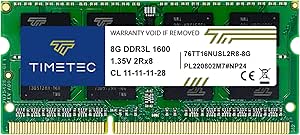
Timetec 8GB DDR3L/DDR3 1600MHz Laptop Memory, 204-Pin SO-DIMM
This Timetec 8GB SO-DIMM is the laptop-focused pick in this group, giving owners of compatible notebooks a single-module upgrade rather than a desktop kit. Its dual-voltage 1.35V/1.5V support suits systems designed for either DDR3L or DDR3 memory, and the 1600MHz CL11 specification is a common target for older laptops. Unlike the Silicon Power and Crucial desktop kits, this module uses a 204-pin SO-DIMM, so it cannot be installed in a standard 240-pin desktop slot. The single 8GB capacity can be useful when one slot is open, but buyers seeking 16GB should compare it with the Crucial DDR3L laptop kit, which supplies two 8GB modules. Check the laptop’s maximum capacity and slot configuration before choosing.
Pros:- Single 8GB module can fill an available laptop memory slot.
- Supports 1.35V and 1.5V operation.
- Designed for compatible laptops, mini PCs, notebooks, and all-in-one systems.
- Includes lifetime warranty and free technical support.
Cons:- Only 8GB is supplied, less capacity than the 16GB desktop kits in this group.
- 204-pin SO-DIMM format does not fit desktop UDIMM slots.
- Compatibility is limited to systems that support DDR3/DDR3L SO-DIMM memory.
Best for: Notebook owners with an open 204-pin DDR3/DDR3L slot who need one 8GB module and want dual-voltage support.
Not ideal for: Desktop builders or laptop owners who need a matched 16GB kit, have no free slot, or lack support for 8GB SO-DIMMs.
- Capacity:8GB (1 x 8GB)
- Memory type:DDR3L / DDR3
- Speed:1600MHz
- Module type:204-pin SO-DIMM
- Voltage:1.35V / 1.5V
- Latency:CL11
- Rank:Dual rank (2Rx8)
- Error correction and buffering:Non-ECC, unbuffered
- Warranty:Lifetime
Our verdict“Pick this module for a compatible laptop with one open SO-DIMM slot; choose a two-module kit if you need 16GB at once.”
Gigastone 32GB (4 x 8GB) DDR3/DDR3L 1600MHz Desktop RAM Kit
For a DDR3 desktop that needs more memory than a typical 16GB kit provides, Gigastone’s 32GB set delivers four 8GB modules at 1600MHz. That capacity is its defining advantage over the Silicon Power and Crucial 16GB kits, which leave less room for memory-heavy workloads. It also supports 1.35V or 1.5V, helping it suit compatible DDR3 and DDR3L desktop systems. The tradeoff is the four-module layout: the motherboard needs four open slots, and filling every slot can limit later upgrades or conflict with a board’s memory configuration rules. This is unbuffered, non-ECC CL11 memory, so it targets ordinary desktop use rather than workstation systems requiring registered or ECC modules. Its five-year warranty is shorter than the lifetime warranties on several alternatives.
Pros:- 32GB total capacity from four 8GB modules.
- 1600MHz operation for compatible desktop systems.
- Supports both 1.35V and 1.5V.
- Five-year warranty.
Cons:- Requires four available 240-pin UDIMM slots.
- Using all four slots leaves no room for straightforward expansion.
- Five-year warranty is shorter than the lifetime coverage listed for Silicon Power and Crucial kits.
Best for: Owners of compatible DDR3/DDR3L desktops with four available memory slots who need 32GB in a single kit.
Not ideal for: Users with two-slot motherboards, plans to add more memory later, or systems requiring ECC or registered memory.
- Capacity:32GB (4 x 8GB)
- Memory type:DDR3 / DDR3L
- Speed:1600MHz
- Form factor:240-pin UDIMM
- Latency:CL11
- Voltage:1.35V / 1.5V
- Configuration:2Rx8
- ECC:Non-ECC
- Warranty:5 years
Our verdict“Choose Gigastone when a compatible desktop needs 32GB now and has four free slots to accommodate the full kit.”
Crucial 16GB Kit (2 x 8GB) DDR3L-1600 CL11 UDIMM Desktop Memory
The Crucial 16GB DDR3L kit is a clear fit for desktop upgrades where standard capacity and broad voltage support are the priorities. Two 8GB, 240-pin modules run at 1600 MT/s with CL11 timings, and their 1.35V or 1.5V operation allows use in compatible DDR3L and DDR3 configurations. Compared with the G.SKILL RipjawsX, Crucial gives up the latter’s tighter CL10 timings and XMP profiles, favoring a simpler specification for a conventional memory replacement. It also matches the Silicon Power kit on capacity, speed, and dual-voltage support, so motherboard compatibility and kit availability should guide that choice. This is still desktop-only memory: it is unbuffered and non-ECC, and it cannot replace laptop SO-DIMMs or workstation memory that requires ECC.
Pros:- Two 8GB modules provide a 16GB kit.
- Supports 1.35V and 1.5V operation.
- Unbuffered, non-ECC design suits compatible standard desktops.
- Limited lifetime warranty.
Cons:- Requires a compatible 240-pin DDR3L UDIMM desktop system.
- CL11 timings are looser than the G.SKILL RipjawsX kit’s listed CL10 timings.
- Not suitable for systems that require ECC or registered memory.
Best for: Desktop owners seeking a 16GB DDR3L kit for a compatible 240-pin UDIMM system, especially when dual-voltage support is useful.
Not ideal for: Laptop owners, ECC-dependent workstation users, or desktop buyers specifically seeking tighter timings or XMP tuning features.
- Capacity:16GB (2 x 8GB)
- Memory type:DDR3L
- Speed:1600 MT/s (PC3-12800)
- Latency:CL11
- Voltage:1.35V or 1.5V
- Form factor:240-pin UDIMM
- ECC and buffering:Non-ECC, unbuffered
- Rank and configuration:2Rx8
- Warranty:Limited lifetime
Our verdict“Choose Crucial for a straightforward 16GB dual-voltage DDR3L desktop upgrade rather than a kit aimed at memory tuning.”
G.SKILL RipjawsX 16GB (2 x 8GB) DDR3-1600 Desktop Memory Kit
The G.SKILL RipjawsX 16GB kit is the performance-leaning choice among these 1600 MT/s desktop options. Its CL10-10-10-30 timings are tighter than the CL11 specifications on the Silicon Power and Crucial kits, while JEDEC and Intel XMP profiles give compatible systems more than one setup path. That distinction makes it a better fit for buyers who want a tuned DDR3 kit, though it does not guarantee a noticeable improvement in every workload. Unlike those dual-voltage DDR3L alternatives, RipjawsX runs at 1.5V, so it is a less flexible choice for systems that call for 1.35V memory. The 40mm heatsinks also need clearance, and XMP speeds may depend on BIOS settings and other hardware. Mixing it with another kit can create instability.
Pros:- Matched 16GB kit with two 8GB modules.
- CL10-10-10-30 timings are tighter than the CL11 alternatives listed here.
- Includes JEDEC and Intel XMP profiles.
- Heatsinks are included on the modules.
Cons:- Runs at 1.5V rather than offering the 1.35V option found on the Crucial and Silicon Power kits.
- XMP operation may require compatible hardware and BIOS adjustments.
- 40mm heatsinks may create clearance issues, and mixing kits can cause instability.
Best for: Desktop owners with a compatible DDR3 motherboard who want tighter 1600 MT/s timings and are comfortable checking BIOS and cooler clearance.
Not ideal for: Buyers needing 1.35V operation, low-profile modules, or a plug-in upgrade with no appetite for memory-setting checks.
- Model:F3-12800CL10D-16GBXL
- Capacity:16GB (2 x 8GB)
- Memory type:DDR3
- Speed:1600 MT/s
- Timings:CL10-10-10-30
- Voltage:1.5V
- Form factor:240-pin UDIMM
- Profiles:JEDEC and Intel XMP
- Heatsink height:40mm
Our verdict“Pick RipjawsX for a compatible desktop when tighter timings matter more than dual-voltage flexibility or low-profile clearance.”
Corsair Dominator Platinum 32GB (4 x 8GB) DDR3 1866MHz Desktop Memory
The 32GB capacity and 1866MHz speed make this the strongest fit here for a compatible older desktop that needs both substantial memory and a higher-than-baseline DDR3 rate. Compared with the Corsair Vengeance Pro 32GB 1600MHz kit, the Dominator Platinum is faster on paper and adds DHX cooling, but fills four slots and runs at the same listed 1.5V. Its polished aluminum light bar and white LED pipe also give it a more customizable look than the simpler Samsung 16GB kit. The tradeoff is platform fit: the listed compatibility centers on select Intel Z-series and X79 boards, so this is not a safe choice without checking the motherboard and CPU support. I’d pick it for a supported system where capacity, speed, and lighting all matter.
Pros:- 32GB total capacity from four 8GB modules
- 1866MHz rated speed is higher than the 1600MHz Corsair Vengeance Pro 32GB kit
- DHX cooling technology
- White LED light pipe and user-swappable light bar
Cons:- Uses all four memory slots, limiting room for later expansion
- Listed motherboard compatibility is restricted to select older Intel platforms
- The 1866MHz rating may depend on motherboard and processor support
Best for: Owners of compatible Intel Z77, X79, Z68, or P67 desktop systems who need 32GB and want 1866MHz memory with customizable lighting.
Not ideal for: Builders with newer DDR4 or DDR5 systems, limited DIMM slots, or boards not confirmed to support this four-module kit.
- Capacity:32GB (4 x 8GB)
- Memory type:DDR3
- Speed:1866MHz
- Timing:10-11-10-30
- Voltage:1.5V
- Form factor:240-pin DIMM
- Cooling:Corsair DHX
- Lighting:White LED light pipe with user-swappable light bar
- Warranty:Limited lifetime
Our verdict“Choose this kit for a compatible older desktop that needs 32GB, faster-than-1600MHz DDR3, and customizable lighting.”
Corsair Vengeance Pro 16GB (2 x 8GB) DDR3 2400MHz Desktop RAM, Red
This kit is the speed-focused pick, rated at 2400MHz with an Intel XMP 1.3 profile to simplify applying its performance settings on supported systems. Against the Samsung 16GB DDR3-1600 kit, it offers a much higher rated frequency and a matched dual-channel pair, but that extra speed is useful only when the motherboard and processor can run it. Its 1.65V specification is also higher than the 1.5V listed for the Samsung and G.SKILL RipjawsX kits, and the product data gives conflicting voltage information. The red heat spreaders make the modules visually distinctive, though they do not offset the compatibility caveat. I’d choose it for a carefully matched older gaming or enthusiast PC, not for a routine DDR3 replacement.
Pros:- 2400MHz rated speed, the highest in this five-product group
- Two 8GB modules form a dual-channel kit
- Intel XMP 1.3 support for applying rated settings on compatible systems
- Red heat spreaders provide a distinct visual finish
Cons:- Rated speed depends on compatible motherboard, processor, and BIOS settings
- Product data lists voltage inconsistently as 1.65V and 1.5V
- Higher listed 1.65V operation is less suitable for buyers prioritizing lower-voltage memory
Best for: Enthusiast desktop owners with a DDR3 motherboard and processor confirmed to support 2400MHz memory and XMP 1.3.
Not ideal for: Buyers seeking uncomplicated 1600MHz replacement memory or anyone whose board and CPU cannot support the kit’s rated speed and voltage.
- Capacity:16GB (2 x 8GB)
- Memory type:DDR3
- Speed:2400MHz
- Tested latency:11-13-13-31
- CAS latency:CL11
- Voltage:1.65V listed; product data also lists 1.5V
- Form factor:240-pin DIMM
- Memory configuration:Dual channel
- Overclocking support:Intel XMP 1.3
Our verdict“Pick this kit only when your DDR3 platform supports its 2400MHz XMP profile and you specifically want higher memory frequency.”
Corsair Vengeance Pro 32GB (4 x 8GB) DDR3 1600MHz Desktop Memory Kit, Red
For a compatible older desktop where capacity matters more than chasing peak frequency, this 32GB four-module kit offers a straightforward 1600MHz configuration with CL9 timings and 1.5V operation. Compared with the Dominator Platinum 32GB kit, it gives up 1866MHz speed and customizable lighting, but keeps the same total capacity at a more modest rated frequency. The four DIMMs suit boards with four available slots, though they leave no open slots for a simple memory expansion. Corsair lists Intel Z68 and Z77 compatibility, which is narrower than a general-purpose desktop listing such as Samsung’s 16GB kit. Its heatsinks add physical coverage, so I’d check clearance around the CPU cooler before choosing it.
Pros:- 32GB total capacity from four 8GB modules
- CL9 timing at a rated 1600MHz
- 1.5V operation
- Heatsinks are included on the modules
Cons:- Uses all four memory slots, leaving no room for easy module-based expansion
- Listed compatibility focuses on Intel Z68 and Z77 platforms
- Heatsinks may conflict with some large CPU coolers
Best for: Owners of supported Intel Z68 or Z77 desktops who want 32GB at 1600MHz for multitasking or memory-heavy workloads.
Not ideal for: People with fewer than four available DIMM slots, newer-generation systems, or a need for higher DDR3 frequency than 1600MHz.
- Capacity:32GB (4 x 8GB)
- Memory type:DDR3
- Speed:1600MHz
- CAS latency:CL9
- Voltage:1.5V
- Form factor:240-pin DIMM
- Memory type:Unbuffered
- Cooling:Heatsinks
- Warranty:2 years
Our verdict“Choose this kit for a supported Z68 or Z77 desktop that needs 32GB more than it needs the Dominator Platinum’s higher 1866MHz rating.”
Samsung 16GB (2 x 8GB) DDR3 1600 MHz Desktop Memory Kit
Samsung’s kit keeps the proposition simple: two 8GB UDIMMs, 1600MHz, and standard 1.5V operation for a desktop that accepts DDR3. Its 16GB capacity is half that of the Corsair Vengeance Pro 32GB kit, but using just two modules leaves more slots free on many boards and avoids committing to a four-stick layout. The tradeoff is a listed CL11 latency, slower than the CL9 G.SKILL RipjawsX kit at the same rated 1600 speed. It also has no XMP feature specified, so buyers looking for memory tuning should lean toward the G.SKILL or faster Corsair Vengeance Pro 2400MHz option. This is the sensible pick when standard desktop compatibility and a plain, modest configuration matter more than extra capacity or performance tuning.
Pros:- 16GB capacity in two 8GB modules
- 1600MHz PC3-12800 rating
- Standard 1.5V operation
- UDIMM format is specified for desktop use
Cons:- CL11 latency is looser than the G.SKILL RipjawsX kit’s CL9 timings
- No XMP profile or heatsink is specified
- DDR3 compatibility limits it to systems built for this memory generation
Best for: Desktop owners replacing or upgrading DDR3 memory who want a basic 16GB, two-module 1600MHz kit and have verified UDIMM compatibility.
Not ideal for: Users who need 32GB, want CL9 timings or XMP tuning, or have a system that requires DDR4, DDR5, or laptop SO-DIMMs.
- Capacity:16GB (2 x 8GB)
- Memory type:DDR3
- Speed:1600MHz (PC3-12800)
- Form factor:240-pin DIMM, UDIMM
- Voltage:1.5V
- CAS latency:CL11
- Compatible devices:Desktop
- Model:M378B1G73QH0-CK0
Our verdict“Choose Samsung for a straightforward 16GB DDR3-1600 desktop upgrade, but pick G.SKILL RipjawsX if tighter listed timings matter more.”
G.SKILL RipjawsX Series 16GB DDR3 Desktop Memory Kit (2 x 8GB, 1600 MT/s, CL9)
The RipjawsX is the better match for buyers choosing between mainstream 16GB DDR3 kits on timing rather than capacity: its CL9-9-9-24 specification is tighter than the Samsung kit’s CL11 rating at the same 1600 speed. The matched 2 x 8GB configuration supports dual-channel operation, while both JEDEC defaults and an Intel XMP profile give buyers standard settings plus a tuning option. The catch is that the top rated speed may need BIOS adjustments and depends on the rest of the system. Compared with the Corsair Vengeance Pro 16GB 2400MHz kit, RipjawsX trades headline frequency for a less ambitious 1600 MT/s rating and 1.5V operation. I’d favor it for a compatible desktop seeking a balanced, tighter-timing upgrade without pursuing extreme memory speed.
Pros:- Matched pair of 8GB modules for a 16GB dual-module configuration
- CL9-9-9-24 timings at a rated 1600 MT/s
- Supports both JEDEC defaults and Intel XMP
- 1.5V operation and a limited lifetime manufacturer warranty
Cons:- Maximum rated speed may require BIOS adjustments and compatible system components
- Mixing with other memory kits may cause instability or system failure
- 16GB capacity is less than the 32GB Corsair kits in this roundup
Best for: Desktop owners with DDR3 support who want a matched 16GB kit, CL9 timings, and both JEDEC and XMP profiles.
Not ideal for: Buyers seeking 32GB, those who do not want to adjust BIOS settings, or anyone mixing this kit with existing memory modules.
- Capacity:16GB (2 x 8GB)
- Memory type:DDR3
- Speed:1600 MT/s
- Timings:CL9-9-9-24
- Voltage:1.5V
- Form factor:240-pin UDIMM
- Profiles:JEDEC default and Intel XMP
- ECC:Non-ECC
- Warranty:Limited lifetime manufacturer warranty
Our verdict“Choose RipjawsX for a compatible desktop where tighter timings at 1600 MT/s matter more than the 2400MHz rating of Corsair’s 16GB kit.”

How We Picked
I ranked these kits around the questions that matter most when reviving a DDR3-era system: correct form factor, supported capacity, voltage, and useful speed. A laptop SO-DIMM cannot replace a desktop UDIMM, and a kit’s stated maximum capacity or frequency is only helpful if the motherboard and processor support it. I gave broad-fit 16GB 1600MHz kits a strong position because they suit common upgrade goals without relying on unusually high memory speeds.
The ranking also reflects differences in use case, not a claim that one specification wins on every system. Capacity-focused 32GB kits rank well for compatible boards, while premium or faster kits make more sense for systems that can run them as intended. I weighed stated timing and voltage alongside practical tradeoffs such as four-slot use, older-platform compatibility, and the need to verify the exact module type. Since the supplied product details do not establish universal compatibility, buyers should check their system documentation before choosing.
| DDR3 RAM | Memory type | Latency |
|---|---|---|
| Timetec 16GB | DDR3L / DDR3 | CL11 |
| Crucial 16GB DDR3L-1600 SODIMM | DDR3L SDRAM | CL11 |
| Acclamator 16GB DDR3 RAM Kit | DDR3 | CL11 |
| TEAMGROUP Elite 16GB DDR3 Desk | DDR3 | CL11 |
| ROYEMAI 8GB | DDR3 | CL9 |
| Silicon Power 16GB | DDR3L | CL11 |
| Timetec 8GB DDR3L/DDR3 1600MHz | DDR3L / DDR3 | CL11 |
| Gigastone 32GB | DDR3 / DDR3L | CL11 |
| Crucial 16GB Kit | DDR3L | CL11 |
| G.SKILL RipjawsX 16GB | DDR3 | — |
| Corsair Dominator Platinum 32G | DDR3 | — |
| Corsair Vengeance Pro 16GB | DDR3 | — |
| Corsair Vengeance Pro 32GB | DDR3 | — |
| Samsung 16GB | DDR3 | — |
| G.SKILL RipjawsX Series 16GB D | DDR3 | — |
Factors to Consider When Choosing Best DDR3 RAM
DDR3 shopping is less about chasing the biggest number and more about matching a kit to an older platform with limited support. These checks can help prevent buying memory that fits physically but fails to boot, runs below its rated speed, or exceeds the system’s capacity limit.
Confirm UDIMM or SO-DIMM Before Comparing Kits
Desktop kits in this roundup use 240-pin UDIMMs, while the laptop options use 204-pin SO-DIMMs. The modules differ in size and pin layout, so one form factor cannot substitute for the other. Check the existing module or the system’s service manual rather than relying only on a product title that says DDR3. Also distinguish standard unbuffered desktop memory from registered or ECC memory if your workstation or server requires a particular type. A physically compatible module can still fail if the system expects a different memory class. This check should come before comparing capacity, speed, or timings.
Check the Board’s Maximum Capacity and Slot Layout
A kit’s total capacity is useful only if the motherboard supports it and has the needed number of slots. A 32GB four-module kit may fill every slot, leaving no room for later expansion; a 16GB two-module kit can leave slots open on some boards. Older systems may also cap total memory or limit the capacity of each individual module. Look up the exact motherboard or computer model, since two systems using similar processors can have different limits. If the system has only two slots, a four-stick kit is not an option even if the total capacity appears appropriate. Prioritize a supported configuration over buying extra memory that the system cannot address.
Treat DDR3 and DDR3L Voltage Claims Carefully
DDR3 and low-voltage DDR3L are related standards, but compatibility depends on what the memory controller and board accept. Some systems support both voltage classes; others specify a single requirement. A product described as DDR3L/DDR3 may offer broader compatibility, but the title alone does not confirm that it suits every motherboard. Consult the system manual or original module label for voltage guidance, especially when upgrading a laptop or a system with a strict memory specification. Avoid mixing modules with different voltage needs unless the manufacturer confirms that the combination is supported. Matching the required voltage is more useful than choosing a kit solely because it advertises flexibility.
Choose a Supported Speed, Not Just the Highest Speed
The roundup includes common 1600MHz kits alongside 1333MHz, 1866MHz, and 2400MHz options. A module’s rated speed does not guarantee that the motherboard will run it at that rate; the system may default to a lower supported setting. Before paying attention to frequency, check the board and processor specifications and whether the system exposes memory-profile controls. For many older PCs, capacity and reliable compatibility have more practical impact than moving from a supported baseline to a higher rating. Faster modules are a better fit for enthusiasts with a platform that can use their rated speed, not a universal upgrade for every DDR3 computer. If you are unsure, a supported speed is the safer choice.
Balance Capacity Against Timing and Everyday Work
More memory can help when an older computer runs several applications or keeps many browser tabs open, while tighter timings such as CL9 versus CL11 describe latency rather than total capacity. Those figures are not a direct measure of overall system speed, and their effect depends on the workload and platform. For everyday multitasking, moving from an undersized configuration to a supported 16GB kit may matter more than selecting a lower-latency kit with the same capacity. For older software or light use, a smaller supported kit may be sufficient and leave the rest of the upgrade budget for storage. Check what the machine currently has and what is limiting it before deciding which specification deserves priority. Do not assume a timing label guarantees a noticeable change in every task.
Plan Around Mixing Modules and Future Expansion
Combining old and new RAM can be convenient, but mixed modules may run at the slowest shared speed and timings or create stability problems. Differences in capacity, rank, voltage, and chip organization can matter on some older boards, even when both modules are labeled DDR3. A matched kit reduces the number of variables and is usually the simpler choice when replacing memory. If you plan to keep existing modules, check the manufacturer’s guidance and confirm that the system supports the combined total. Buying two sticks now can leave expansion room, but only if the board has spare slots and supports the future capacity. When compatibility is uncertain, a matched kit that fits the system’s documented limits is the more predictable route.
Frequently Asked Questions
Can I use any DDR3 RAM in a computer that currently has DDR3?
No. The new module must match the system’s form factor and memory type, and its capacity, voltage, and speed must fall within the board’s support. A desktop UDIMM will not fit a laptop SO-DIMM slot, even though both are DDR3. Some systems also have limits on module size or supported voltage. Check the computer or motherboard manual and compare it with the existing memory before ordering. The DDR3 label is a starting point, not a full compatibility check.
Is a 32GB DDR3 kit worth choosing over a 16GB kit?
Choose 32GB only if your system supports that total and your workload can use the extra capacity. It may help with heavier multitasking or memory-intensive applications, but it will not automatically make every older PC faster. A four-stick kit also occupies all four slots, which can limit later upgrades. If the computer has a two-slot limit or a lower supported maximum, the larger kit will not be suitable. For general use, a compatible 16GB kit is often the more practical starting point.
Will 2400MHz DDR3 RAM run at 2400MHz in my older desktop?
Only if the motherboard, processor, and system settings support that speed. Otherwise, the memory may run at a lower supported frequency, or the system may not accept the configuration. Check the platform’s specifications and whether it supports the required memory profile before selecting a high-speed kit. A higher rated number does not force an older board to operate faster. If the platform’s limits are unclear, a common supported speed such as 1600MHz is a less speculative choice.
Can I mix DDR3 and DDR3L modules in the same computer?
That depends on the system’s memory controller and voltage support, so the labels alone cannot confirm a safe combination. Some platforms support both DDR3 and DDR3L, while others require a specific voltage. Mixed modules can also cause the system to use shared lower settings or become unstable. Check the computer documentation for supported voltage and module configurations before combining them. When the guidance is unclear, replacing the old memory with a matched kit avoids several compatibility variables.
Should I buy a new matched kit or add RAM to my existing DDR3 modules?
Adding a module can be a sensible upgrade if it matches the existing memory closely and the system supports the combined capacity. Different speeds or timings may make all modules run at a common lower setting, and differences in voltage or organization can complicate compatibility. A matched kit replaces those mixed variables with a pair or set designed to work together. Check how many slots are free and whether your current modules are functioning properly before deciding. If you cannot identify the existing module’s specifications, a compatible matched kit is usually the clearer path.
Conclusion
For most compatible desktop upgrades, I recommend the Timetec 16GB 1600MHz kit as the best overall because it pairs a useful capacity with a widely targeted speed. The best value-style choice is the TEAMGROUP Elite 16GB kit for buyers who want a straightforward 1600MHz desktop set without paying for enthusiast speed claims; confirm its fit against your system first. For a best premium pick, consider Corsair Dominator Platinum if your board supports its 1866MHz rating and you want a higher-capacity four-module configuration. Beginners upgrading a laptop should start with the Crucial 16GB DDR3L SODIMM kit, after verifying the laptop’s memory limits and voltage requirements. For specific needs, choose Gigastone or Corsair’s 32GB kits only when the board supports four 8GB modules, and choose the Timetec or Crucial laptop options only for the matching SO-DIMM system. The right pick is the one your older computer can actually use, not simply the kit with the largest capacity or fastest label.
Columbus Day / Indigenous Peoples' Day Picks
long weekend sales
As an affiliate, we earn on qualifying purchases.