The best LGA 1700 motherboard overall for most high-performance builds is the MSI PRO Z790-A WiFi II, pairing an upper-tier chipset and built-in wireless with a less extravagant feature set than premium gaming boards. For a feature-rich gaming system, the ASUS TUF Gaming Z790-Plus WiFi is a strong alternative; for tighter budgets, the MSI PRO B760-P WiFi DDR4 keeps costs down while retaining useful connectivity. The main tradeoffs are Z790 tuning flexibility versus B760 practicality, DDR4 affordability versus DDR5, and full-size ATX expansion versus smaller Micro-ATX layouts. I compare all 15 boards by fit, features, and the compromises each asks you to accept. Read on for the full breakdown and help choosing the right board for your build.

Get business pricing on monitors, keyboards and dev gear
- Business-only prices and quantity discounts
- Tax-exempt purchasing
- Multiple users, one account, clear invoices
Key Takeaways
- Z790 is for flexibility, not a guaranteed performance boost: Its CPU overclocking support and broader expansion options matter most when you plan to tune a compatible unlocked processor or need more connectivity.
- DDR4 boards remain useful for a targeted upgrade: The MSI PRO B760-P WiFi DDR4 and several Micro-ATX options can suit builds reusing compatible memory, but DDR4 and DDR5 are not interchangeable on the same motherboard.
- Premium features make the ASUS ROG Maximus Z790 Hero WiFi 6E a specialist pick: Its enthusiast feature set is hard to justify if you will not use the extra tuning and connectivity options.
- Micro-ATX can cut bulk without sacrificing every modern feature: Several B760 and H610 choices offer compact layouts, though their expansion capacity is more limited than ATX boards.
- Model names do not replace a socket and memory check: LGA 1700 compatibility alone does not confirm processor BIOS support, DDR generation, case fit, or the connectors and slots your build needs.
| MSI PRO H610M-G DDR4 Micro-ATX Motherboard |  | Best for Budget DDR4 Builds | Socket: LGA 1700 | Chipset: Intel H610 | Form factor: Micro-ATX | VIEW LATEST PRICE | See Our Full Breakdown |
| ASUS ROG Maximus Z790 Hero WiFi 6E ATX Gaming Motherboard | 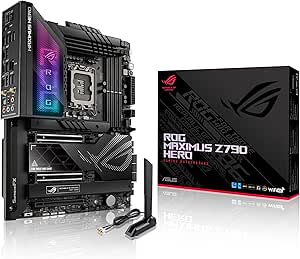 | Best Premium Feature Set | Socket and chipset: LGA 1700; Intel Z790 | Compatible processors: Intel 12th, 13th, and 14th Gen Core | Form factor: ATX | VIEW LATEST PRICE | See Our Full Breakdown |
| GIGABYTE Z790 Eagle AX ATX Motherboard for Intel LGA 1700 |  | Best for High-Capacity DDR5 | Socket and chipset: LGA 1700; Intel Z790 | Compatible processors: Intel Core 12th, 13th, and 14th Generation | Form factor: ATX | VIEW LATEST PRICE | See Our Full Breakdown |
| GIGABYTE Z790 AORUS Elite AX ATX Motherboard |  | Best for Storage Expansion | Socket and chipset: LGA 1700; Intel Z790 | Compatible processors: Intel Core 12th, 13th, and 14th generation | Form factor: ATX | VIEW LATEST PRICE | See Our Full Breakdown |
| ASUS TUF Gaming Z790-Plus WiFi ATX Motherboard |  | Best for a Balanced Gaming Build | Socket and chipset: LGA 1700; Intel Z790 | Compatible processors: Intel 12th, 13th, and 14th Gen Core | Form factor: ATX | VIEW LATEST PRICE | See Our Full Breakdown |
| MSI PRO Z790-A WiFi II ATX Motherboard |  | Best for Storage Expansion | Form factor: ATX | Socket and chipset: LGA 1700; Intel Z790 | Compatible processors: Intel Core 12th, 13th, and 14th Gen; Pentium Gold; Celeron | VIEW LATEST PRICE | See Our Full Breakdown |
| MSI PRO B760-P WiFi DDR4 ATX Motherboard |  | Best for Reusing DDR4 | Form factor: ATX | Socket and chipset: LGA 1700; Intel B760 | Compatible processors: Intel Core 12th, 13th, and 14th Gen; Pentium Gold; Celeron | VIEW LATEST PRICE | See Our Full Breakdown |
| ASUS Prime B760M-A D4 Micro-ATX Motherboard |  | Best for Compact DDR4 Builds | Form factor: Micro-ATX | Socket and chipset: LGA 1700; Intel B760 | Compatible processors: 13th and 12th Gen Intel Core; Pentium Gold; Celeron | VIEW LATEST PRICE | See Our Full Breakdown |
| GIGABYTE B760M Gaming Plus WiFi DDR4 Micro-ATX Motherboard |  | Best Compact Pick for 14th-Gen Support | Form factor: Micro-ATX | Socket and chipset: LGA 1700; Intel B760 | Compatible processors: 12th, 13th, and 14th Gen Intel Core | VIEW LATEST PRICE | See Our Full Breakdown |
| ASUS Z790-AYW WiFi W II ATX Motherboard |  | Best White DDR5 Build | Form factor: ATX | Socket and chipset: LGA 1700; Intel Z790 | Compatible processors: Intel Core 12th, 13th, and 14th Gen; Pentium Gold; Celeron | VIEW LATEST PRICE | See Our Full Breakdown |
| MSI PRO B760M-P DDR4 Micro-ATX Motherboard |  | Best for Expandable DDR4 Builds | Form factor: Micro-ATX | Chipset: Intel B760 | Processor socket: LGA 1700 | VIEW LATEST PRICE | See Our Full Breakdown |
| ASRock H610M-HDV/M.2 R2.0 Micro-ATX Motherboard |  | Best for Basic Budget Builds | Form factor: Micro-ATX | Chipset: Intel H610 | Processor socket: LGA 1700 | VIEW LATEST PRICE | See Our Full Breakdown |
| ASUS TUF Gaming B760-Plus WiFi ATX Motherboard |  | Best Gaming Upgrade with DDR5 | Form factor: ATX | Chipset: Intel B760 | Processor socket: LGA 1700 | VIEW LATEST PRICE | See Our Full Breakdown |
| ASUS Z790 MAX GAMING WIFI7 ATX Motherboard |  | Best Premium Connectivity | Form factor: ATX | Chipset: Intel Z790 | Processor socket: LGA 1700 | VIEW LATEST PRICE | See Our Full Breakdown |
| ASUS B760M-AYW WiFi D4 II MicroATX Motherboard |  | Best Compact DDR4 Board with Wi-Fi | Form factor: MicroATX | Chipset: Intel B760 | Processor socket: LGA 1700 | VIEW LATEST PRICE | See Our Full Breakdown |
| LGA 1700 motherboard | Form factor | Memory | Compatible processors | Networking |
|---|---|---|---|---|
| MSI PRO H610M-G DDR4 Micro-ATX | Micro-ATX | DDR4, up to 3200 MHz | Intel 12th, 13th, and 14th Gen Core; Pentium Gold; Celeron | — |
| ASUS ROG Maximus Z790 Hero WiF | ATX | DDR5, up to 128 GB | Intel 12th, 13th, and 14th Gen Core | Wi-Fi 6E, Bluetooth 5.2, Intel 2.5Gb Ethernet |
| GIGABYTE Z790 Eagle AX ATX Mot | ATX | Dual-channel DDR5; 4 DIMM slots | Intel Core 12th, 13th, and 14th Generation | Wi-Fi 6E; 2.5Gb Ethernet |
| GIGABYTE Z790 AORUS Elite AX A | ATX | DDR5; 4 DIMM slots; up to 128 GB | Intel Core 12th, 13th, and 14th generation | Wi-Fi 6E; 2.5Gb Ethernet |
| ASUS TUF Gaming Z790-Plus WiFi | ATX | DDR5, up to 256 GB | Intel 12th, 13th, and 14th Gen Core | Wi-Fi 6; 2.5Gb Ethernet |
| MSI PRO Z790-A WiFi II ATX Mot | ATX | 4 DDR5 DIMM slots; up to 256 GB; up to 7800+ MT/s (OC) | Intel Core 12th, 13th, and 14th Gen; Pentium Gold; Celeron | Wi-Fi 6E; Bluetooth 5.3; 2.5Gb Ethernet |
| MSI PRO B760-P WiFi DDR4 ATX M | ATX | 4 DDR4 slots; dual channel; up to 128 GB; up to 5333+ MHz (OC) | Intel Core 12th, 13th, and 14th Gen; Pentium Gold; Celeron | Wi-Fi 6E; Bluetooth 5.3; 2.5Gb LAN |
| ASUS Prime B760M-A D4 Micro-AT | Micro-ATX | DDR4; 4 memory slots | 13th and 12th Gen Intel Core; Pentium Gold; Celeron | Realtek 2.5Gb Ethernet |
| GIGABYTE B760M Gaming Plus WiF | Micro-ATX | 4 DDR4 slots; up to 128 GB; 3200 MHz listed | 12th, 13th, and 14th Gen Intel Core | — |
| ASUS Z790-AYW WiFi W II ATX Mo | ATX | 4 DDR5 slots; up to 192 GB | Intel Core 12th, 13th, and 14th Gen; Pentium Gold; Celeron | Wi-Fi 6; 2.5Gb LAN |
| MSI PRO B760M-P DDR4 Micro-ATX | Micro-ATX | Dual-channel DDR4, up to 4800+ MHz (OC) | — | — |
| ASRock H610M-HDV/M.2 R2.0 Micr | Micro-ATX | DDR4 | — | — |
| ASUS TUF Gaming B760-Plus WiFi | ATX | DDR5, 4 slots | — | Wi-Fi 6; 2.5Gb Ethernet |
| ASUS Z790 MAX GAMING WIFI7 ATX | ATX | DDR5, 4800 MHz listed | — | — |
| ASUS B760M-AYW WiFi D4 II Micr | MicroATX | DDR4, 2 slots | — | Wi-Fi 6; Realtek 2.5Gb Ethernet |
More Details on Our Top Picks
MSI PRO H610M-G DDR4 Micro-ATX Motherboard
I’d choose the MSI PRO H610M-G DDR4 for a straightforward LGA 1700 build that can reuse DDR4 memory. Its H610 chipset and two DIMM slots keep the platform simple, while support for 12th, 13th, and 14th Gen Intel processors gives it a wider CPU upgrade path than its entry-level positioning suggests. Four SATA ports also leave room for several drives. Compared with the GIGABYTE Z790 Eagle AX, this board gives up DDR5, extra memory capacity, and higher-end connectivity, but it avoids making those features part of a basic build. The tradeoff is a 64 GB memory ceiling and only two slots, so expansion is limited. I’d skip it for overclocking-focused systems or builds that need many fast add-in devices.
Pros:- Supports 12th, 13th, and 14th Gen Intel processors
- Uses DDR4 memory up to 3200 MHz
- Four SATA ports provide straightforward drive expansion
- Micro-ATX form factor fits smaller cases
Cons:- Two memory slots limit upgrade flexibility
- Maximum memory capacity is 64 GB
- H610 feature set is basic compared with the Z790 boards in this roundup
Best for: Builders using an LGA 1700 processor who want a compact, entry-level board and already own compatible DDR4 memory.
Not ideal for: People planning large memory upgrades, extensive high-speed expansion, or a feature-rich overclocking system; its two DIMM slots and H610 platform are restrictive.
- Socket:LGA 1700
- Chipset:Intel H610
- Form factor:Micro-ATX
- Compatible processors:Intel 12th, 13th, and 14th Gen Core; Pentium Gold; Celeron
- Memory:DDR4, up to 3200 MHz
- Memory capacity and slots:Up to 64 GB; 2 slots
- Storage:4 SATA ports
- USB ports:10
Our verdict“Choose it for a compact, DDR4-based LGA 1700 build, but pick a Z790 board if you need wider expansion or higher-end features.”
ASUS ROG Maximus Z790 Hero WiFi 6E ATX Gaming Motherboard
The ASUS ROG Maximus Z790 Hero is the most feature-heavy pick here, built for buyers who want premium connectivity and substantial power delivery rather than a basic route to an LGA 1700 system. Its 20+1 power stages rated for 90 A, DDR5 support, and overclocking tools suit a high-end Core build, while dual Thunderbolt 4 ports and five M.2 slots give it a broader mix of fast connections and storage than the GIGABYTE Z790 AORUS Elite AX. Wi-Fi 6E and 2.5Gb Ethernet add flexible networking. That breadth comes with a clear tradeoff: many buyers will not use enough of these features to justify choosing this over a more restrained Z790 board. It also requires DDR5 and a spacious ATX case, so I’d pass if your priority is a practical, uncomplicated build.
Pros:- 20+1 power stages rated for 90 A support demanding CPU configurations
- Five M.2 slots and six SATA ports provide extensive storage options
- Dual Thunderbolt 4 ports add high-speed peripheral connectivity
- Wi-Fi 6E, Bluetooth 5.2, and 2.5Gb Ethernet cover multiple networking needs
Cons:- Its feature set is excessive for basic gaming or general-purpose builds
- Requires DDR5 memory, so DDR4 cannot be reused
- ATX size and broad connectivity call for a roomy, well-planned build
Best for: Enthusiasts assembling a high-end LGA 1700 system who need extensive M.2 storage, dual Thunderbolt 4, and advanced tuning options.
Not ideal for: Mainstream gamers or basic desktop builders who will not use premium connectivity and overclocking features, or anyone building with DDR4 memory.
- Socket and chipset:LGA 1700; Intel Z790
- Compatible processors:Intel 12th, 13th, and 14th Gen Core
- Form factor:ATX
- Memory:DDR5, up to 128 GB
- Memory clock speed:Up to 7000 MHz
- Power stages:20+1, rated for 90 A
- Storage:5 M.2 slots; 6 SATA ports
- Networking:Wi-Fi 6E, Bluetooth 5.2, Intel 2.5Gb Ethernet
- Thunderbolt:2 Thunderbolt 4 ports
Our verdict“Pick the Maximus Z790 Hero if you will use its premium storage, Thunderbolt, and tuning features; otherwise, a less elaborate Z790 board is a better fit.”
GIGABYTE Z790 Eagle AX ATX Motherboard for Intel LGA 1700
I’d shortlist the GIGABYTE Z790 Eagle AX for a DDR5 build where memory expansion and current wireless networking matter more than a large collection of storage slots. Its four DIMM slots and listed 256 GB maximum RAM give it more headroom than the MSI H610M-G’s two-slot, 64 GB arrangement, while the Z790 chipset places it in a more feature-rich class. Wi-Fi 6E, 2.5Gb Ethernet, USB-C, and M.2 thermal guards round out a practical ATX platform. Compared with the Z790 AORUS Elite AX, it lists three M.2 slots rather than four, making it less suited to storage-heavy builds. There is also a data caveat: the product information gives conflicting maximum RAM figures and incomplete port details. I’d verify those before choosing it for a system with specific expansion needs.
Pros:- Four DDR5 DIMM slots offer more memory expansion than two-slot entry-level boards
- Listed maximum RAM capacity reaches 256 GB
- Wi-Fi 6E and 2.5Gb Ethernet provide modern network options
- M.2 thermal guards help manage heat around installed drives
Cons:- Product data gives inconsistent maximum RAM figures
- Three listed M.2 slots are fewer than the four on the Z790 AORUS Elite AX
- Port and SATA details are incomplete or inconsistent in the supplied specifications
Best for: DDR5 builders who want four memory slots, room for substantial RAM, and Wi-Fi 6E in an ATX LGA 1700 system.
Not ideal for: Buyers who need a confirmed memory-capacity specification or four M.2 slots; the listed RAM capacity is inconsistent and the board specifies three M.2 slots.
- Socket and chipset:LGA 1700; Intel Z790
- Compatible processors:Intel Core 12th, 13th, and 14th Generation
- Form factor:ATX
- Memory:Dual-channel DDR5; 4 DIMM slots
- Maximum RAM:Listed as 256 GB; product data also contains a conflicting 128 GB figure
- Storage:3 M.2 slots
- Networking:Wi-Fi 6E; 2.5Gb Ethernet
- USB-C:USB 3.2 Gen 2×2
Our verdict“Choose the Eagle AX for a four-slot DDR5 system with Wi-Fi 6E, but verify memory and port details if your build depends on exact expansion limits.”
GIGABYTE Z790 AORUS Elite AX ATX Motherboard
The GIGABYTE Z790 AORUS Elite AX is my storage-focused choice among these Z790 boards: it pairs four M.2 slots with six SATA ports, giving a builder several ways to add drives without stepping up to the more elaborate ASUS ROG Maximus Z790 Hero. Its DDR5 platform, four DIMM slots, Wi-Fi 6E, and 2.5Gb Ethernet make it a capable foundation for a current-generation Intel system. PCIe 5.0 support and thermal guards add useful headroom, while the 16+1+2-phase design with 70 A stages is aimed at a substantial desktop build. Compared with the GIGABYTE Z790 Eagle AX, this board specifies one additional M.2 slot and clearer SATA capacity. The tradeoff is that it requires DDR5 and lists a 128 GB memory limit, so it is not the pick for reusing DDR4 or maximizing RAM capacity.
Pros:- Four M.2 slots support multiple NVMe drives
- Six SATA ports add capacity for conventional drives
- Wi-Fi 6E and 2.5Gb Ethernet are built in
- Thermal guards and heatsinks help manage component temperatures
Cons:- Requires DDR5 memory
- Maximum listed memory capacity is 128 GB
- ATX form factor will not suit compact cases designed for smaller boards
Best for: LGA 1700 builders who want multiple NVMe drives, additional SATA storage, and DDR5 in a full-size ATX system.
Not ideal for: People reusing DDR4 memory or requiring more than 128 GB of RAM; this board is DDR5-only and has a stated 128 GB ceiling.
- Socket and chipset:LGA 1700; Intel Z790
- Compatible processors:Intel Core 12th, 13th, and 14th generation
- Form factor:ATX
- Memory:DDR5; 4 DIMM slots; up to 128 GB
- Power design:16+1+2 phases with 70 A power stages
- M.2 storage:4 PCIe 4.0 x4 slots
- SATA storage:6 ports
- Networking:Wi-Fi 6E; 2.5Gb Ethernet
- Expansion and USB:PCIe 5.0 support; USB 3.2 Gen 2×2 Type-C
Our verdict“Choose the AORUS Elite AX if you want four M.2 slots and six SATA ports without moving to the Maximus Hero’s broader premium feature set.”
ASUS TUF Gaming Z790-Plus WiFi ATX Motherboard
The ASUS TUF Gaming Z790-Plus WiFi makes sense for a gaming build that needs Z790 and DDR5 capabilities without the Maximus Hero’s extensive premium extras. It supports four M.2 drives, PCIe 5.0, Wi-Fi 6, and 2.5Gb Ethernet, while front-panel USB-C and a separate USB 3.2 Gen 2×2 Type-C connection offer practical options for newer cases and devices. Its listed memory support reaches 256 GB and up to 7200 MHz, giving it more stated capacity than the Z790 AORUS Elite AX. The tradeoff is four SATA ports, fewer than that GIGABYTE board’s six, and Wi-Fi 6 rather than Wi-Fi 6E. The Thunderbolt 4 connection is a header, not a built-in port, so using it calls for compatible additional hardware.
Pros:- Four M.2 slots support a multi-drive setup
- DDR5 memory support is listed up to 256 GB and 7200 MHz
- PCIe 5.0 and multiple USB-C connections support newer hardware
- Includes Wi-Fi 6 and 2.5Gb Ethernet
Cons:- Requires DDR5 memory and an LGA 1700 Intel processor
- Thunderbolt 4 support is provided through a header rather than built-in ports
- Four SATA ports are fewer than the six on the GIGABYTE Z790 AORUS Elite AX
Best for: Gamers building an LGA 1700 system with DDR5 who want four M.2 slots, PCIe 5.0, and a useful mix of USB-C connections.
Not ideal for: Buyers who need built-in Thunderbolt 4 ports, Wi-Fi 6E, or more than four SATA drives; its Thunderbolt support requires a header and add-on hardware.
- Socket and chipset:LGA 1700; Intel Z790
- Compatible processors:Intel 12th, 13th, and 14th Gen Core
- Form factor:ATX
- Memory:DDR5, up to 256 GB
- Memory clock speed:Up to 7200 MHz
- Expansion:PCIe 5.0
- Storage:4 M.2 slots; 4 SATA ports
- Networking:Wi-Fi 6; 2.5Gb Ethernet
- USB-C and Thunderbolt support:USB 3.2 Gen 2 Type-C front header; USB 3.2 Gen 2×2 Type-C; Thunderbolt 4 header
Our verdict“Choose this TUF board for a well-equipped DDR5 gaming build, but look elsewhere if built-in Thunderbolt or extra SATA connections are priorities.”
MSI PRO Z790-A WiFi II ATX Motherboard
I’d choose the MSI PRO Z790-A WiFi II when a build needs room for several fast internal drives without giving up a full-featured graphics slot. Its four M.2 Gen4 connectors outnumber the three on the ASUS Z790-AYW WiFi W II, while the PCIe 5.0 x16 slot leaves room for a current or future graphics card. Wi-Fi 6E, Bluetooth 5.3, and 2.5Gb Ethernet also cover wireless and wired networking without an add-in card. The Z790 platform and 16 Duet Rail, 80A SPS power design suit buyers who want more expansion flexibility than the B760 boards here. The tradeoffs: it uses DDR5, so existing DDR4 cannot carry over, and high memory speeds rely on overclocking. It also only fits LGA 1700 processors.
Pros:- Four PCIe Gen4 x4 M.2 slots provide more internal SSD capacity than the ASUS Z790-AYW WiFi W II.
- PCIe 5.0 x16 graphics slot supports newer graphics-card builds.
- Wi-Fi 6E, Bluetooth 5.3, and 2.5Gb Ethernet are built in.
- VRM and M.2 heatsinks help manage heat around power delivery and storage.
Cons:- DDR5-only memory support rules out reusing DDR4 kits.
- Memory speeds above standard settings require overclocking.
- LGA 1700 socket limits processor compatibility to supported Intel generations.
Best for: LGA 1700 builders planning multiple M.2 drives, a PCIe 5.0 graphics card, and DDR5 memory in an ATX case.
Not ideal for: Builders reusing DDR4, choosing a Micro-ATX case, or seeking a motherboard for processors outside the LGA 1700 platform.
- Form factor:ATX
- Socket and chipset:LGA 1700; Intel Z790
- Compatible processors:Intel Core 12th, 13th, and 14th Gen; Pentium Gold; Celeron
- Memory:4 DDR5 DIMM slots; up to 256 GB; up to 7800+ MT/s (OC)
- Graphics slot:PCIe 5.0 x16
- M.2 storage:4 PCIe Gen4 x4 slots
- Networking:Wi-Fi 6E; Bluetooth 5.3; 2.5Gb Ethernet
- Connectivity:USB 20Gbps Type-C; HDMI 2.1; DisplayPort 1.4; 6 SATA ports
Our verdict“Pick this Z790 board if four M.2 slots and PCIe 5.0 graphics support matter more than DDR4 reuse or a smaller form factor.”
MSI PRO B760-P WiFi DDR4 ATX Motherboard
The MSI PRO B760-P WiFi DDR4 makes the most sense when keeping an existing DDR4 kit is part of the build plan. Unlike the DDR5-only MSI PRO Z790-A WiFi II, this ATX board lets you reuse DDR4 while supporting 12th-, 13th-, and 14th-Gen Intel processors. Wi-Fi 6E and 2.5Gb LAN add capable networking without a separate card, and the extended heatsink and M.2 thermal protection are useful for a work or gaming PC with sustained storage activity. Its B760 chipset is a more restrained choice than Z790 if you do not need the MSI Z790 board’s PCIe 5.0 graphics slot and four M.2 connectors. The main compromises are DDR4-only memory and a 128 GB capacity ceiling; the stated 5333+ MHz memory rate also requires overclocking.
Pros:- DDR4 support makes existing memory kits reusable.
- Supports 12th-, 13th-, and 14th-Gen Intel processors.
- Includes Wi-Fi 6E, Bluetooth 5.3, and 2.5Gb LAN.
- Extended heatsink and M.2 thermal protection support sustained system use.
Cons:- DDR4-only support gives no path to installing DDR5 memory.
- Maximum memory capacity is 128 GB, below the 256 GB listed for the MSI PRO Z790-A WiFi II.
- Memory speeds above the standard rate require overclocking.
Best for: ATX builders upgrading to a supported LGA 1700 processor who want to carry over DDR4 memory and use built-in Wi-Fi.
Not ideal for: New-build buyers set on DDR5, more than 128 GB of RAM, or Z790-class PCIe 5.0 graphics expansion.
- Form factor:ATX
- Socket and chipset:LGA 1700; Intel B760
- Compatible processors:Intel Core 12th, 13th, and 14th Gen; Pentium Gold; Celeron
- Memory:4 DDR4 slots; dual channel; up to 128 GB; up to 5333+ MHz (OC)
- Networking:Wi-Fi 6E; Bluetooth 5.3; 2.5Gb LAN
- Expansion:PCIe 4.0
- Storage:M.2 support; 4 SATA 3 ports
- Power and PCB:12+1 Duet Rail power system; 8-pin + 4-pin CPU connectors; 6-layer, 2 oz copper PCB
Our verdict“Choose this board to build an ATX LGA 1700 system around DDR4 you already own, rather than paying for DDR5 and Z790 features you do not need.”
ASUS Prime B760M-A D4 Micro-ATX Motherboard
For a smaller case and a DDR4-based system, the ASUS Prime B760M-A D4 offers a practical mix of everyday connections. Its Micro-ATX layout is more compact than the MSI PRO B760-P WiFi DDR4, while two M.2 slots and PCIe 4.0 cover common storage and expansion needs. DisplayPort and two HDMI outputs are useful for a build that will use supported processor graphics, and 2.5Gb Ethernet provides a faster wired connection than basic gigabit networking. Fan controls, heatsinks, and Aura Sync lighting add flexibility for cooling and appearance. The smaller board gives up storage expansion compared with the MSI Z790-A’s four M.2 slots, and it supports 12th- and 13th-Gen processors rather than the 14th-Gen support listed for several alternatives here. It is DDR4-only, too.
Pros:- Micro-ATX form factor fits smaller compatible cases than ATX alternatives.
- Two M.2 slots and PCIe 4.0 cover typical storage and expansion needs.
- 2.5Gb Ethernet and multiple display outputs are built in.
- Heatsinks, fan controls, and Aura Sync lighting add cooling and setup options.
Cons:- DDR4-only memory support excludes DDR5 upgrades.
- Two M.2 slots provide less storage expansion than the MSI PRO Z790-A WiFi II.
- The listed processor compatibility covers 12th and 13th Gen, not 14th Gen.
Best for: Compact-case builders using a 12th- or 13th-Gen LGA 1700 processor, DDR4 memory, and wired 2.5Gb networking.
Not ideal for: Buyers who need listed 14th-Gen support, Wi-Fi, more than two M.2 drives, or DDR5 memory.
- Form factor:Micro-ATX
- Socket and chipset:LGA 1700; Intel B760
- Compatible processors:13th and 12th Gen Intel Core; Pentium Gold; Celeron
- Memory:DDR4; 4 memory slots
- Storage:2 M.2 slots
- Graphics interface:PCI Express 4.0
- Networking:Realtek 2.5Gb Ethernet
- Video and USB:DisplayPort; 2 HDMI; rear USB 3.2 Gen 2; front USB 3.2 Gen 1 Type-C
Our verdict“Choose this compact ASUS board for a 12th- or 13th-Gen DDR4 build with wired networking, but skip it if you need Wi-Fi or extra M.2 capacity.”
GIGABYTE B760M Gaming Plus WiFi DDR4 Micro-ATX Motherboard
The GIGABYTE B760M Gaming Plus WiFi DDR4 stands out among these compact boards by listing support for 12th-, 13th-, and 14th-Gen Intel Core processors. That makes it a useful alternative to the ASUS Prime B760M-A D4 for buyers planning a 14th-Gen processor, while keeping the Micro-ATX footprint and DDR4 compatibility. Two PCIe 4.0 M.2 slots handle a sensible pair of internal SSDs, and the reinforced PCIe 4.0 x16 slot adds support for a graphics-card build. Enlarged MOSFET heatsinks are another practical touch. Its listed memory clock is 3200 MHz, and it lacks the DDR5 flexibility of the MSI PRO Z790-A WiFi II. The provided specifications also do not detail Wi-Fi capability, so I would verify wireless support before choosing it over boards with explicitly listed Wi-Fi.
Pros:- Lists compatibility with 12th-, 13th-, and 14th-Gen Intel Core processors.
- Micro-ATX layout suits smaller compatible cases.
- Two PCIe 4.0 M.2 slots and six SATA ports provide storage options.
- Reinforced PCIe 4.0 x16 slot and enlarged MOSFET heatsinks support a graphics-focused build.
Cons:- DDR4 memory only, unlike the DDR5-capable MSI PRO Z790-A WiFi II.
- Only two M.2 slots are specified.
- The supplied specifications do not state a Wi-Fi standard or memory capacity beyond the 128 GB maximum.
Best for: Compact-system builders who want DDR4, a reinforced graphics slot, and listed support for 12th-, 13th-, and 14th-Gen Intel Core processors.
Not ideal for: Buyers who need DDR5, more than two M.2 drives, or confirmed onboard Wi-Fi from the listed specifications.
- Form factor:Micro-ATX
- Socket and chipset:LGA 1700; Intel B760
- Compatible processors:12th, 13th, and 14th Gen Intel Core
- Memory:4 DDR4 slots; up to 128 GB; 3200 MHz listed
- Storage:2 PCIe 4.0 M.2 slots; 6 SATA ports
- Graphics slot:1 reinforced PCIe 4.0 x16 slot
- USB:5 USB ports; front Type-C connectivity
- Warranty:3 years
Our verdict“Pick this GIGABYTE for a compact DDR4 system needing listed 14th-Gen support, but confirm wireless requirements before buying.”
ASUS Z790-AYW WiFi W II ATX Motherboard
The ASUS Z790-AYW WiFi W II is the clearest fit for builders who want a white ATX board with DDR5 and a PCIe 5.0 x16 graphics slot. It combines Z790 expansion with support for 12th-, 13th-, and 14th-Gen LGA 1700 processors, plus three M.2 slots and 2.5Gb Ethernet. Compared with the MSI PRO Z790-A WiFi II, this board offers a white design and lists up to 192 GB of memory, but it has one fewer M.2 slot and Wi-Fi 6 rather than Wi-Fi 6E. The USB4/Thunderbolt header support can help buyers planning compatible add-on connectivity, though it is header support, not a claim of built-in Thunderbolt ports. DDR5 and the LGA 1700 socket also limit reuse options.
Pros:- White ATX design suits coordinated light-colored builds.
- DDR5 support and PCIe 5.0 x16 graphics slot provide a current platform for compatible components.
- Three M.2 slots offer substantial internal SSD capacity.
- Includes Wi-Fi 6, 2.5Gb Ethernet, USB connectivity, and a Thunderbolt (USB4) header.
Cons:- Three M.2 slots are fewer than the four on the MSI PRO Z790-A WiFi II.
- Wi-Fi 6 is an older listed standard than the MSI board’s Wi-Fi 6E.
- DDR5 and LGA 1700 requirements limit reuse of DDR4 memory and non-LGA 1700 processors.
Best for: White-themed ATX builders seeking a Z790 platform, DDR5, PCIe 5.0 graphics support, and three M.2 slots.
Not ideal for: Buyers reusing DDR4, needing four M.2 drives, or prioritizing Wi-Fi 6E over Wi-Fi 6.
- Form factor:ATX
- Socket and chipset:LGA 1700; Intel Z790
- Compatible processors:Intel Core 12th, 13th, and 14th Gen; Pentium Gold; Celeron
- Memory:4 DDR5 slots; up to 192 GB
- Graphics slot:PCI Express 5.0 x16
- M.2 storage:3 M.2 slots
- Networking:Wi-Fi 6; 2.5Gb LAN
- Other connectivity:17 USB ports; 4 SATA ports; HDMI; Thunderbolt (USB4) header support
Our verdict“Choose this ASUS if a white DDR5 Z790 build matters more than having four M.2 slots or Wi-Fi 6E.”
MSI PRO B760M-P DDR4 Micro-ATX Motherboard
I’d choose the MSI PRO B760M-P DDR4 when I want a compact LGA 1700 board but don’t want to give up memory expansion. Its four DIMM slots and 128 GB DDR4 capacity give it more room to grow than the two-slot ASRock H610M-HDV/M.2 R2.0, while the B760 chipset offers a less entry-level foundation than that H610 alternative. PCIe 4.0 and an M.2 slot with Shield Frozr suit a practical everyday or work PC, and HDMI plus DisplayPort provide display options when using compatible processor graphics. The tradeoff is a restrained feature set: memory above 4800 MHz depends on overclocking, and four SATA ports may constrain builds with several drives. I’d pick the ASUS B760M-AYW WiFi D4 II instead if built-in Wi-Fi and PCIe 5.0 matter more than having four memory slots.
Pros:- Four DDR4 memory slots support up to 128 GB
- Supports Intel Core 12th, 13th, and 14th Gen processors
- PCIe 4.0 and an M.2 slot with Shield Frozr
- HDMI and DisplayPort outputs
Cons:- Memory speeds above 4800 MHz require overclocking
- Four SATA ports limit connections for multiple storage drives
Best for: LGA 1700 builders who want a Micro-ATX DDR4 board with four memory slots and room to expand up to 128 GB.
Not ideal for: Buyers who need built-in wireless networking, more than four SATA drives, or a board with PCIe 5.0 graphics support.
- Form factor:Micro-ATX
- Chipset:Intel B760
- Processor socket:LGA 1700
- Supported processors:Intel Core 12th, 13th, and 14th Gen; Pentium Gold; Celeron
- Memory:Dual-channel DDR4, up to 4800+ MHz (OC)
- Maximum memory:128 GB
- Expansion:PCIe 4.0
- Storage and display:4 SATA ports; HDMI and DisplayPort
Our verdict“Choose this MSI if you want a compact DDR4 LGA 1700 board with four memory slots; skip it if wireless networking or PCIe 5.0 is a priority.”
ASRock H610M-HDV/M.2 R2.0 Micro-ATX Motherboard
The ASRock H610M-HDV/M.2 R2.0 is the leanest choice here for a straightforward LGA 1700 system: it pairs DDR4 support with PCIe 4.0 and an Ultra M.2 slot without adding features that every basic build may not need. Its support for 12th-, 13th-, and 14th-gen Core processors also gives it broader CPU-generation coverage than a board tied to a single generation. Against the MSI PRO B760M-P DDR4, though, this H610 model has just two memory slots and a 64 GB ceiling, so upgrades have less room. Triple-display support is useful for compatible integrated graphics, but I’d treat it as a simple office or home PC board rather than a foundation for a heavily expanded system. The compact feature set and limited memory capacity are the main compromises.
Pros:- Supports 12th-, 13th-, and 14th-gen Intel Core processors
- PCIe 4.0 graphics interface and Ultra M.2 support
- Triple-display support for compatible setups
- Four SATA ports and a listed three-year manufacturer warranty
Cons:- Two memory slots limit upgrade flexibility
- Maximum memory capacity is 64 GB
Best for: Builders assembling a basic LGA 1700 office or home PC who want DDR4, an M.2 drive, and support for multiple Intel Core generations.
Not ideal for: Users planning a memory-heavy workstation or frequent upgrades, since it has two slots and supports up to 64 GB.
- Form factor:Micro-ATX
- Chipset:Intel H610
- Processor socket:LGA 1700
- Supported processors:Intel Core 12th, 13th, and 14th Gen
- Memory:DDR4
- Maximum memory:64 GB
- Memory slots:2
- Storage and expansion:PCIe 4.0; Ultra M.2; 4 SATA ports
- Warranty:3 years
Our verdict“Pick the ASRock for a basic DDR4 LGA 1700 build; choose the MSI PRO B760M-P DDR4 if you want four memory slots and support for up to 128 GB.”
ASUS TUF Gaming B760-Plus WiFi ATX Motherboard
I’d put the ASUS TUF Gaming B760-Plus WiFi on the shortlist for a gaming build where modern storage, networking, and graphics support matter more than reusing DDR4. It combines PCIe 5.0 graphics support with three M.2 slots, giving a builder flexibility for a current graphics card and several fast drives. Wi-Fi 6 and 2.5Gb Ethernet also mean the board is ready for wired or wireless networking without adding a separate adapter. Compared with the DDR4-based MSI PRO B760M-P, this ATX model asks for a DDR5 kit and a larger case, but offers a stronger set of gaming-oriented connections. It is less feature-heavy than the Z790-based ASUS Z790 MAX GAMING WIFI7, so buyers who specifically want Wi-Fi 7 or Z790 should look there instead. Its key tradeoff is the required DDR5 memory.
Pros:- PCIe 5.0 graphics support and three M.2 slots
- Wi-Fi 6 and 2.5Gb Ethernet built in
- Supports up to 128 GB of DDR5 memory across four slots
- USB 3.2 Type-C connectivity and enhanced cooling
Cons:- Requires DDR5 memory, so existing DDR4 cannot be reused
- ATX form factor needs a compatible larger case
Best for: Gamers building an ATX LGA 1700 system with DDR5, multiple M.2 drives, and built-in Wi-Fi or faster wired networking.
Not ideal for: Builders reusing DDR4 memory or working with a Micro-ATX-only case; this board requires DDR5 and ATX space.
- Form factor:ATX
- Chipset:Intel B760
- Processor socket:LGA 1700
- Memory:DDR5, 4 slots
- Maximum memory:128 GB
- Graphics interface:PCI Express 5.0
- M.2 slots:3
- Networking:Wi-Fi 6; 2.5Gb Ethernet
- USB connectivity:USB 3.2 Type-C
Our verdict“Choose this ASUS for an ATX gaming build with DDR5, three M.2 slots, and integrated networking; look elsewhere if you need DDR4 compatibility.”
ASUS Z790 MAX GAMING WIFI7 ATX Motherboard
The ASUS Z790 MAX GAMING WIFI7 is the connectivity-focused pick for an LGA 1700 build, pairing a Z790 chipset and Wi-Fi 7 with DDR5 support up to 192 GB. Its three M.2 slots, 14+1 DrMOS power stages, rear 20Gbps USB-C, and USB4 header give it a more ambitious connection set than the B760 boards in this group. That makes it a better fit for buyers who want to attach fast storage and newer peripherals, rather than simply run a basic gaming PC. There is a notable networking mismatch: the wireless standard is advanced, but wired Ethernet is listed as 1Gb LAN, below the ASUS TUF Gaming B760-Plus WiFi’s 2.5Gb Ethernet. Windows support also needs attention: the listing says full Wi-Fi 7 functionality on Windows 11 requires version 24H2 or later, and lists no Windows 10 Wi-Fi driver.
Pros:- Z790 platform supports Intel Core 12th, 13th, and 14th Gen processors
- Wi-Fi 7 and PCIe 5.0 support
- Three M.2 slots and up to 192 GB DDR5 memory
- Rear 20Gbps USB-C and USB4 header support
Cons:- Full Wi-Fi 7 functionality on Windows 11 requires version 24H2 or later
- No Windows 10 Wi-Fi driver is listed
- Listed Realtek wired networking is 1Gb LAN
Best for: LGA 1700 builders seeking a Z790 DDR5 platform with Wi-Fi 7, multiple USB-C options, and support for up to 192 GB of memory.
Not ideal for: Windows 10 users relying on built-in Wi-Fi, or buyers who prioritize faster wired networking over Wi-Fi 7 and USB-C features.
- Form factor:ATX
- Chipset:Intel Z790
- Processor socket:LGA 1700
- Supported processors:Intel Core 12th, 13th, and 14th Gen; Pentium Gold; Celeron
- Memory:DDR5, 4800 MHz listed
- Maximum memory:192 GB
- Power stages:14+1 DrMOS
- Wireless and wired networking:Wi-Fi 7; Realtek 1Gb LAN
- USB and storage:3 M.2 slots; rear 20Gbps USB-C; front 5Gbps USB-C; USB4 header
Our verdict“Choose this Z790 board for Wi-Fi 7, USB-C expansion, and high-capacity DDR5; skip it if Windows 10 wireless support or 2.5Gb Ethernet is a requirement.”
ASUS B760M-AYW WiFi D4 II MicroATX Motherboard
The ASUS B760M-AYW WiFi D4 II makes sense when a compact LGA 1700 build needs modern connectivity but should keep using DDR4. Unlike the MSI PRO B760M-P DDR4, it has built-in Wi-Fi 6 and 2.5Gb Ethernet, plus PCIe 5.0 x16 support and two M.2 slots. Those additions make it a more connected choice for a small gaming or general-purpose PC, while its Micro-ATX size suits cases that cannot take the full-size ASUS TUF Gaming B760-Plus WiFi. The compromises are its two memory slots and 96 GB maximum, both below the MSI’s four slots and 128 GB ceiling. It also uses DDR4 rather than DDR5, so it is not the pick for a new build centered on the newer memory standard.
Pros:- Micro-ATX format with Wi-Fi 6 and 2.5Gb Ethernet
- PCIe 5.0 x16 support and two M.2 slots
- Supports Intel Core 12th, 13th, and 14th Gen processors
- Front and rear USB 5Gbps connectivity
Cons:- Two memory slots limit upgrade flexibility
- DDR4-only design does not support DDR5 memory
- Maximum memory capacity is 96 GB
Best for: Compact-PC builders who want to reuse DDR4 while gaining built-in Wi-Fi 6, 2.5Gb Ethernet, PCIe 5.0 graphics support, and two M.2 slots.
Not ideal for: Buyers who need four memory slots, more than 96 GB of RAM, or DDR5 support.
- Form factor:MicroATX
- Chipset:Intel B760
- Processor socket:LGA 1700
- Supported processors:Intel Core 12th, 13th, and 14th Gen; Pentium Gold; Celeron
- Memory:DDR4, 2 slots
- Maximum memory:96 GB
- Graphics interface:PCIe 5.0 x16
- Storage:2 M.2 slots; 4 SATA ports
- Networking:Wi-Fi 6; Realtek 2.5Gb Ethernet
Our verdict“Pick this ASUS for a compact, connected LGA 1700 DDR4 build; choose the MSI PRO B760M-P DDR4 if four memory slots and a higher memory ceiling matter more.”

How We Picked
I ranked these boards by how well their features match common LGA 1700 builds, weighing chipset capability, memory type, connectivity, expansion, and form factor together rather than treating any one specification as a win on its own. Z790 boards generally lead for CPU tuning and platform flexibility, while B760 models can make more sense for stock settings and a restrained build. H610 boards sit at the basic end of the lineup, so their appeal depends on modest requirements rather than headline features.
The order also reflects practical fit: whether the board can support the intended processor and memory, whether built-in Wi-Fi is useful, and how much room remains for storage, add-in cards, and future changes. Premium boards rank highly only when their added features have a clear audience; simpler boards can rank well for buyers who do not need those extras. I treat DDR4 and DDR5 as separate build paths, since memory cannot be carried across between board types, and I call out compromises in expansion and feature headroom.
| LGA 1700 motherboard | Form factor | Socket and chipset |
|---|---|---|
| MSI PRO H610M-G DDR4 Micro-ATX | Micro-ATX | — |
| ASUS ROG Maximus Z790 Hero WiF | ATX | LGA 1700; Intel Z790 |
| GIGABYTE Z790 Eagle AX ATX Mot | ATX | LGA 1700; Intel Z790 |
| GIGABYTE Z790 AORUS Elite AX A | ATX | LGA 1700; Intel Z790 |
| ASUS TUF Gaming Z790-Plus WiFi | ATX | LGA 1700; Intel Z790 |
| MSI PRO Z790-A WiFi II ATX Mot | ATX | LGA 1700; Intel Z790 |
| MSI PRO B760-P WiFi DDR4 ATX M | ATX | LGA 1700; Intel B760 |
| ASUS Prime B760M-A D4 Micro-AT | Micro-ATX | LGA 1700; Intel B760 |
| GIGABYTE B760M Gaming Plus WiF | Micro-ATX | LGA 1700; Intel B760 |
| ASUS Z790-AYW WiFi W II ATX Mo | ATX | LGA 1700; Intel Z790 |
| MSI PRO B760M-P DDR4 Micro-ATX | Micro-ATX | — |
| ASRock H610M-HDV/M.2 R2.0 Micr | Micro-ATX | — |
| ASUS TUF Gaming B760-Plus WiFi | ATX | — |
| ASUS Z790 MAX GAMING WIFI7 ATX | ATX | — |
| ASUS B760M-AYW WiFi D4 II Micr | MicroATX | — |
Factors to Consider When Choosing Best LGA 1700 Motherboards
Before choosing among the best LGA 1700 motherboards, map the board to the parts and plans you already have. A short checklist can prevent mismatched memory, case-fit surprises, and paying for capabilities your processor or workload will not use.
Match the chipset to how you use your processor
Choose a board around the features you will actually use, not just the chipset label. Z790 supports CPU overclocking with a compatible unlocked processor, while B760 suits many users running default settings and typically offers a more grounded feature mix. H610 is aimed at basic configurations, so check its expansion and connectivity limits before pairing it with a demanding system. An unlocked CPU can still run on a B760 board, but you give up CPU multiplier overclocking. Extra chipset capability does not automatically make games or everyday tasks faster. Pay for Z790 when tuning or its particular connectivity and expansion options matter to your plan.
Pick DDR4 or DDR5 before shopping
The motherboard determines which memory generation you can install: DDR4 and DDR5 slots are physically and electrically different. Reusing DDR4 can make a DDR4 board a sensible upgrade route, while a new build may favor DDR5 if its memory capacity and speed options suit your needs. Do not assume a board supports both generations because another model in the same product family does. Check the exact model name and its supported memory specifications before buying. Also confirm memory-kit capacity and speed support against the board’s documentation. Changing memory generation later usually means replacing the motherboard as well as the RAM.
Check processor support and BIOS readiness
LGA 1700 covers more than one Intel processor generation, but socket fit does not guarantee out-of-box CPU support. A newer processor may need a BIOS version that was released after the board’s original production. Check the manufacturer’s CPU support list and note the minimum BIOS version for your exact chip. If the board has a BIOS flashback feature, it can make updating easier when the installed processor is not recognized; not every model provides that option. Ask the seller about BIOS status when buying older inventory. This check can save time and avoid building around a board that needs another compatible CPU for its update.
Choose ATX or Micro-ATX around the whole build
ATX boards usually leave more room for expansion cards and may provide more slots or connectors, while Micro-ATX makes a smaller case possible. The compact board only helps if your case supports the format and still has room for the graphics card, cooler, and intended storage. Count the PCIe slots you may need, not just the one used by your graphics card today. Check where M.2 drives sit, since a large GPU can make some locations harder to reach during installation or upgrades. A smaller board is not automatically a better fit for a small PC; case airflow and cable clearance matter too. Verify both the case’s motherboard support and the physical layout before settling on a form factor.
Buy connectivity for your actual devices
Built-in Wi-Fi can simplify a build without nearby Ethernet, but it does not replace checking the network standard, antenna arrangement, and Bluetooth needs. Count the rear USB ports and internal headers against your peripherals and case ports; a board can have modern networking yet still lack a connector you need. Storage plans deserve the same check: compare the number of M.2 and SATA connections with your drives, and look for any shared lanes or ports that may disable one another. Front USB-C requires a matching case cable and motherboard header. Read the board’s manual for connector placement and sharing notes before ordering. This is often more useful than choosing a board for a feature you may never use.
Spend extra only for features with a clear job
A premium motherboard can add stronger power delivery, more controls, extra storage options, and conveniences for tuning, but those upgrades are most useful with a build that can use them. Match board capability to CPU workload and upgrade plans, rather than buying the highest chipset tier by default. For a stock gaming PC, money spent on premium controls may bring less practical value than a better graphics card or storage. On the other hand, demanding processors, multiple add-in cards, and frequent manual tuning can make added board headroom worthwhile. Low-cost boards also deserve a careful look at power delivery and cooling when paired with a high-draw CPU. Keep the whole system balanced instead of treating the motherboard as a place to overspend or cut without checking the consequences.
Frequently Asked Questions
Can I use a 13th- or 14th-generation Intel CPU on any LGA 1700 motherboard?
No. The socket alone does not confirm support: the motherboard chipset, exact model, and installed BIOS version all matter. Check the manufacturer’s CPU support list for your specific processor and board revision before buying. If a BIOS update may be needed, find out whether the board can update without a recognized CPU or whether the seller can confirm its BIOS version. That step is especially useful when buying older stock.
Should I choose a DDR4 board to reuse my existing RAM?
That can be a sensible way to reuse a compatible kit, but only if the board is specifically a DDR4 model. A DDR4 module will not fit a DDR5 slot, and the reverse is also true; there is no motherboard setting that bridges the two standards. Compare your current memory capacity and speed with the needs of your new CPU and applications. If you are buying new memory anyway, decide on the platform generation before choosing a board so you do not pay for a path you will not use.
Is a Z790 motherboard worth choosing over B760?
Choose Z790 when you want CPU overclocking with a compatible unlocked processor or need the particular expansion and connectivity available on a specific Z790 model. B760 is a practical fit for many systems running at stock settings, including builds where an unlocked processor will not be manually overclocked. Neither chipset alone guarantees better everyday or gaming performance. Compare the exact board’s power delivery, ports, storage support, and BIOS features against your parts list. The right choice depends on the board’s features you will use, not only the chipset tier.
Will a Micro-ATX LGA 1700 board fit in my existing PC case?
It will fit only if the case supports Micro-ATX or a compatible larger motherboard size. Check the case specifications rather than relying on the motherboard’s LGA 1700 socket. Also inspect clearance for the graphics card, CPU cooler, power cables, and any drive cages, since a smaller board does not make every component fit. If your build needs several expansion cards or a large number of drives, compare slot and connector layouts before choosing a compact board. Confirm front-panel and USB-header needs with both the case and board manuals.
Can an LGA 1700 motherboard be reused for a later Intel socket generation?
Do not assume so. A future processor generation may use a different socket, even if it comes from the same manufacturer, and a physically compatible socket still needs explicit CPU and BIOS support. Treat the board as a platform choice for processors listed on that exact model’s support page. If you expect a near-term CPU change, check the supported CPU list and BIOS update options before purchase. For a longer-term upgrade plan, weigh the cost of a board replacement against the features you need today rather than relying on socket continuity.
Conclusion
For most buyers building a capable Intel system, I recommend the MSI PRO Z790-A WiFi II as the best overall balance of Z790 flexibility and useful connectivity without stepping into enthusiast-only territory. The MSI PRO B760-P WiFi DDR4 is my best value pick for a compatible DDR4 build, while the ASUS ROG Maximus Z790 Hero WiFi 6E is the best premium choice for buyers who will use its enthusiast features. Beginners should start with a straightforward B760 option such as the ASUS TUF Gaming B760-Plus WiFi, after checking CPU support and memory type. For specific needs, choose an H610 or Micro-ATX model only when its basic feature set, compact layout, or memory support fits the build; choose a Z790 board when overclocking or expansion justifies it. The final check is simple: match the exact board to your CPU, RAM generation, case, and required ports before ordering.
Columbus Day / Indigenous Peoples' Day Picks
long weekend sales
As an affiliate, we earn on qualifying purchases.