
The best mechanical keyboard for programming pairs a layout that suits your workflow with switches and controls you can comfortably use for long coding sessions. My best overall pick is the RK Royal Kludge R75, whose 75% layout keeps function keys and arrows while saving desk space. The Keychron K4 Version 2 is a strong choice if you need a number pad in a compact footprint, while the AULA F75 Pro adds wireless flexibility and hot-swappable switches. The main tradeoffs are compactness versus dedicated keys, wired simplicity versus wireless convenience, and adjustable hardware versus a ready-to-use board. Read on for the full breakdown and advice on matching a keyboard to your programming habits.

Get business pricing on monitors, keyboards and dev gear
- Business-only prices and quantity discounts
- Tax-exempt purchasing
- Multiple users, one account, clear invoices
Key Takeaways
- 75% layouts offer the strongest balance in this lineup: the RK Royal Kludge R75 and AULA F75 Pro retain arrow and function keys without taking up the space of a full-size board.
- Hot-swap support changes how long a keyboard can suit you: options such as the RK R65 and AULA F75 Pro let you change compatible switches instead of replacing the whole board when your typing preference changes.
- A number pad does not always require a full-size footprint: the Keychron K4 Version 2 and Meidosa AK96 use compact, number-pad-inclusive layouts, though tightly packed keys may take adjustment.
- Wireless is not a universal upgrade for a programming desk: wireless models suit multi-device setups and uncluttered desks, while wired options avoid charging and connection-management tasks.
- One product in the list is not mechanical: the AULA S99 is a membrane keyboard, so buyers specifically seeking mechanical switches should exclude it from their shortlist.
| Redragon K671 Wired Mechanical Gaming Keyboard with Hot-Swappable Red Switches |  | Best Value for Full-Size Customization | Layout: 104-key QWERTY, full-size | Connectivity: Wired | Switches: Hot-swappable linear red | VIEW LATEST PRICE | See Our Full Breakdown |
| Logitech G413 SE Full-Size Mechanical Gaming Keyboard |  | Best for a Sturdy, Low-Fuss Full-Size Setup | Layout: Full-size QWERTY, 108 keys | Connectivity: Wired USB 2.0 | Switches: Tactile mechanical | VIEW LATEST PRICE | See Our Full Breakdown |
| Logitech G316 X 98 Wired Mechanical Gaming Keyboard with Linear Switches |  | Best Compact Layout with a Numpad | Layout: 98% QWERTY, 96 buttons | Connectivity: Wired USB-A and USB-C | Switches: Hot-swappable linear | VIEW LATEST PRICE | See Our Full Breakdown |
| RK Royal Kludge R65 66-Key Wired Mechanical Gaming Keyboard with Volume Knob, RGB Backlighting, Hot-Swappable Cream Switches, PBT Keycaps, and QMK/VIA |  | Best for Programmable Compact Builds | Layout: 66-key compact QWERTY | Connectivity: Wired USB-C | Switches: Pre-lubed linear Cream; hot-swappable | VIEW LATEST PRICE | See Our Full Breakdown |
| RK Royal Kludge R75 Wired 75% Mechanical Gaming Keyboard with Volume Knob |  | Best Compact Layout for Everyday Coding | Layout: 75% QWERTY, 81 keys | Connectivity: Wired USB-C | Switches: Linear Silver Switch Pro | VIEW LATEST PRICE | See Our Full Breakdown |
| Meidosa AK96 96-Key Wired Mechanical Keyboard with Smart Display and Knob |  | Best for a Compact Desk with a Number Pad | Layout: 96-key QWERTY | Switches: Clicky Blue, hot-swappable | Connectivity: USB-C wired | VIEW LATEST PRICE | See Our Full Breakdown |
| AULA S99 Wireless 99-Key Membrane Keyboard with Number Pad and RGB Backlighting |  | Best for Multi-Device Macros | Layout: 96% compact, 99 keys | Keyboard type: Membrane | Connectivity: Bluetooth 5.0, 2.4GHz wireless, USB-C wired | VIEW LATEST PRICE | See Our Full Breakdown |
| ProtoArc K310 Pro Full-Size Backlit Wireless Mechanical Keyboard |  | Best for Quiet Shared Workspaces | Layout: Full-size QWERTY, 108 keys | Switches: Low-profile linear red | Connectivity: Bluetooth and 2.4GHz USB receiver | VIEW LATEST PRICE | See Our Full Breakdown |
| AULA F75 75% Wireless Mechanical Keyboard, White and Brown |  | Best Compact Mechanical Pick | Layout: 75%, 81 keys | Switches: Pre-lubricated linear | Hot-swap support: 3-pin and 5-pin switches | VIEW LATEST PRICE | See Our Full Breakdown |
| Keychron K4 Version 2 96% Wireless Mechanical Keyboard with Brown Switches and White LED Backlight |  | Best for Mac and Windows Number-Pad Users | Layout: 96%, 100-key QWERTY | Switches: Keychron Apex Brown, tactile | Connectivity: Bluetooth 5.1 and USB-C wired | VIEW LATEST PRICE | See Our Full Breakdown |
| Newmen GM325Pro Full-Size Mechanical Gaming Keyboard with Linear Red Switches |  | Best Full-Size Wired Pick | Layout: Full-size, 104 keys | Switches: Linear red | Key rollover: Full-key rollover | VIEW LATEST PRICE | See Our Full Breakdown |
| Kisnt KN85 75% Wireless Mechanical Keyboard, Tri-Mode Connectivity, Hot-Swappable Linear Switches, RGB Backlighting, Retro Beige |  | Best for Wireless Customization | Layout: 75%, 85 keys | Dimensions: 13.68 × 5.51 × 1.77 in | Connectivity: USB-C, 2.4GHz wireless, Bluetooth 5.0 | VIEW LATEST PRICE | See Our Full Breakdown |
| Redragon K552 87-Key Mechanical Gaming Keyboard with Linear Red Switches | 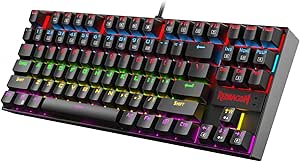 | Best Straightforward TKL | Layout: Tenkeyless, 87 keys | Switches: Linear red | Key rollover: N-key rollover with full anti-ghosting | VIEW LATEST PRICE | See Our Full Breakdown |
| AULA F75 Pro 75% Wireless Mechanical Keyboard with Knob, RGB Backlighting, Hot-Swappable Switches, and Side-Printed PBT Keycaps |  | Best Compact Feature Set | Layout: 75%, 81 keys | Key layout: QWERTZ | Connectivity: Bluetooth 5.0, 2.4GHz wireless, USB-C wired | VIEW LATEST PRICE | See Our Full Breakdown |
| AULA F2088 104-Key Typewriter-Style Mechanical Keyboard |  | Best for Clicky Tactile Feedback | Layout: QWERTY, full-size, 104 keys | Switches: Clicky blue | Connection: Wired USB | VIEW LATEST PRICE | See Our Full Breakdown |
| mechanical keyboards for programming | Layout | Switches | Connectivity | Backlighting |
|---|---|---|---|---|
| Redragon K671 Wired Mechanical | 104-key QWERTY, full-size | Hot-swappable linear red | Wired | 11 modes; five brightness and speed levels; fixed color |
| Logitech G413 SE Full-Size Mec | Full-size QWERTY, 108 keys | Tactile mechanical | Wired USB 2.0 | Single-color white LED |
| Logitech G316 X 98 Wired Mecha | 98% QWERTY, 96 buttons | Hot-swappable linear | Wired USB-A and USB-C | Customizable LIGHTSYNC RGB |
| RK Royal Kludge R65 66-Key Wir | 66-key compact QWERTY | Pre-lubed linear Cream; hot-swappable | Wired USB-C | RGB with 20+ built-in modes |
| RK Royal Kludge R75 Wired 75% | 75% QWERTY, 81 keys | Linear Silver Switch Pro | Wired USB-C | Customizable RGB |
| Meidosa AK96 96-Key Wired Mech | 96-key QWERTY | Clicky Blue, hot-swappable | USB-C wired | RGB, 17 modes |
| AULA S99 Wireless 99-Key Membr | 96% compact, 99 keys | — | Bluetooth 5.0, 2.4GHz wireless, USB-C wired | RGB, 16 preset effects |
| ProtoArc K310 Pro Full-Size Ba | Full-size QWERTY, 108 keys | Low-profile linear red | Bluetooth and 2.4GHz USB receiver | 10 effects, single-color with adjustable speed and brightness |
| AULA F75 75% Wireless Mechanic | 75%, 81 keys | Pre-lubricated linear | 2.4GHz wireless, Bluetooth 5.0, USB-C wired | RGB, 16 lighting effects |
| Keychron K4 Version 2 96% Wire | 96%, 100-key QWERTY | Keychron Apex Brown, tactile | Bluetooth 5.1 and USB-C wired | Single-color white LED, static or flashing modes |
| Newmen GM325Pro Full-Size Mech | Full-size, 104 keys | Linear red | — | — |
| Kisnt KN85 75% Wireless Mechan | 75%, 85 keys | Pre-lubed linear; 45–50 gf actuation force | USB-C, 2.4GHz wireless, Bluetooth 5.0 | — |
| Redragon K552 87-Key Mechanica | Tenkeyless, 87 keys | Linear red | — | — |
| AULA F75 Pro 75% Wireless Mech | 75%, 81 keys | Pre-lubricated LEOBOG Reaper linear switches | Bluetooth 5.0, 2.4GHz wireless, USB-C wired | — |
| AULA F2088 104-Key Typewriter- | QWERTY, full-size, 104 keys | Clicky blue | — | Rainbow LED, 19 effects, 3 customizable presets |
More Details on Our Top Picks
Redragon K671 Wired Mechanical Gaming Keyboard with Hot-Swappable Red Switches
The Redragon K671 pairs a standard 104-key layout with hot-swappable linear red switches, making it a practical pick for programmers who want a number pad and the option to replace switches without changing keyboards. Macro editing and key remapping add flexibility for repeated commands, while full-key anti-ghosting supports simultaneous inputs. Compared with the Logitech G413 SE, the K671 offers switch swapping and more backlighting modes; the Logitech counters with PBT keycaps and a metal-alloy top case. The K671’s tradeoffs are its fixed backlight color and an ABS enclosure. Product details also conflict on keycap material, listing ABS in the specs while describing PBT elsewhere, so I would not choose it on the strength of the keycaps. It makes most sense when customization matters more than a premium finish.
Pros:- Hot-swappable linear switches and included spare switches make replacement more accessible.
- Full-key anti-ghosting supports simultaneous key presses.
- Macro editing, key remapping, and multimedia shortcuts add configurable controls.
- Adjustable brightness and speed across 11 backlighting modes.
Cons:- Backlighting color is fixed rather than customizable.
- ABS enclosure is less premium than the Logitech G413 SE’s alloy top case.
- Keycap material is inconsistent across the provided product details.
Best for: Programmers who need a full-size layout, want to experiment with compatible switches, and value macro remapping.
Not ideal for: Buyers who want wireless use, changeable RGB colors, or confidently specified PBT keycaps and a metal case.
- Layout:104-key QWERTY, full-size
- Connectivity:Wired
- Switches:Hot-swappable linear red
- Backlighting:11 modes; five brightness and speed levels; fixed color
- Programmability:Macro editing, key remapping, and shortcuts
- Anti-ghosting:Full-key
- Keycaps:Material details conflict: ABS in specs, PBT stated elsewhere
- Dimensions:17.13 × 4.88 × 1.42 in
- Included accessories:4 spare switches and 2 red keycaps
Our verdict“Choose the K671 if you want a full-size programming layout with switch and macro customization, and can accept its fixed-color lighting and uncertain keycap material.”
Logitech G413 SE Full-Size Mechanical Gaming Keyboard
The Logitech G413 SE suits programmers who prefer a dependable full-size board over switch experimentation. Its tactile switches give a distinct response as you type, while PBT keycaps and a brushed aluminum-magnesium top case offer a more durable, substantial finish than the ABS construction of the Redragon K671. The Logitech also provides 108 keys and six-key rollover, which covers ordinary multi-key use but is less expansive than the Redragon’s full-key anti-ghosting. Its white-only backlight keeps the visual setup simple, though it cannot match the K671’s lighting modes or hot-swap flexibility. This is a straightforward choice for someone who wants tactile feedback and sturdier materials without remapping being the main priority. Skip it if you expect wireless connectivity or frequent switch changes.
Pros:- Tactile switches provide clear feedback while typing.
- PBT keycaps are specified as heat- and wear-resistant.
- Brushed aluminum-magnesium top case gives the board a rigid construction.
- Function-key media controls add convenient shortcuts.
Cons:- Wired USB connection limits placement flexibility.
- White LED backlighting offers no color selection.
- Six-key rollover is less extensive than the K671’s full-key anti-ghosting.
Best for: Programmers who want tactile typing, durable PBT keycaps, and a rigid full-size board for a fixed desk setup.
Not ideal for: People who need wireless connectivity, per-key or multicolor lighting, or hot-swappable switches.
- Layout:Full-size QWERTY, 108 keys
- Connectivity:Wired USB 2.0
- Switches:Tactile mechanical
- Keycaps:PBT
- Top case:Brushed aluminum-magnesium alloy
- Backlighting:Single-color white LED
- Anti-ghosting:6-key rollover
- Media controls:12 function-key controls
- Dimensions:17.13 × 1.97 × 1.43 in
Our verdict“Pick the G413 SE if a sturdy full-size board with tactile switches and PBT keycaps matters more than wireless use or switch customization.”
Logitech G316 X 98 Wired Mechanical Gaming Keyboard with Linear Switches
The Logitech G316 X 98 is aimed at programmers who use a number pad but want to reclaim some desk space: its 98% layout keeps the numpad in a more compact footprint than a conventional full-size board. Hot-swappable linear switches and double-shot PBT keycaps support a more customizable, durable setup, while the gasket-mounted, dampened construction is designed to soften typing noise. Its dial and dot-matrix display put media and brightness controls within reach, and G HUB adds further customization. Compared with the full-size Redragon K671, this Logitech saves space and adds a display, but its 96-button layout may take adjustment if you rely on familiar full-size spacing. The 8 kHz report rate is gaming-oriented; for programming, the more useful distinction is the compact numpad layout and onboard controls. It remains wired, so desk placement is less flexible.
Pros:- 98% layout retains a numpad while using less desk space than full-size models.
- Hot-swappable linear switches allow compatible switch changes.
- Double-shot PBT keycaps offer durable legends.
- Gasket-mounted dampening and onboard dial/display add typing and control options.
Cons:- Wired connection limits placement flexibility.
- The 96-button arrangement differs from a conventional full-size layout.
- G HUB and gaming-oriented reporting features may be unnecessary for a programming-focused setup.
Best for: Programmers who enter numbers regularly, want a smaller footprint than full-size, and appreciate onboard controls.
Not ideal for: Those who require a standard full-size key arrangement, wireless placement, or a simple board without gaming-focused controls.
- Layout:98% QWERTY, 96 buttons
- Connectivity:Wired USB-A and USB-C
- Switches:Hot-swappable linear
- Keycaps:Double-shot PBT
- Mounting and dampening:Gasket-mounted with silicone and foam layers
- Backlighting:Customizable LIGHTSYNC RGB
- Controls:Onboard dot-matrix display and dial
- Report rate:8 kHz
- Dimensions:15.12 × 5.51 × 1.57 in
Our verdict“Choose the G316 X 98 if you need a numpad in a tighter footprint and value switch swapping, dampening, and onboard controls.”
RK Royal Kludge R65 66-Key Wired Mechanical Gaming Keyboard with Volume Knob, RGB Backlighting, Hot-Swappable Cream Switches, PBT Keycaps, and QMK/VIA
The RK Royal Kludge R65 is the most programming-focused compact option here for people who want control over what each key does. QMK/VIA support makes remapping central to its appeal, while hot-swap support for compatible 3-pin and 5-pin switches leaves room to change the typing feel later. Its 66-key layout saves substantial desk space, and the gasket mount with sound-absorbing layers is designed to temper noise and vibration. Compared with the RK Royal Kludge R75, the R65 is smaller and offers deeper firmware customization, but gives up the R75’s 75% layout and more readily accessible function and arrow-key arrangement. That compactness can slow workflows built around dedicated keys until you configure layers or adapt. The wired connection and reduced key count make it a specialized choice, not a straightforward full-size replacement.
Pros:- QMK/VIA supports extensive key remapping and custom layouts.
- Hot-swap PCB accepts compatible 3-pin and 5-pin switches.
- Gasket mount and sound-absorbing layers are designed to reduce vibration and noise.
- Double-shot PBT keycaps and an aluminum volume knob add useful hardware features.
Cons:- 66-key layout omits many dedicated keys found on the R75 and full-size boards.
- Wired USB-C connection does not offer wireless placement.
- Compact layout may require layer configuration for common programming shortcuts.
Best for: Programmers comfortable with key layers who want QMK/VIA remapping, hot-swap support, and a very compact desk setup.
Not ideal for: People who depend on dedicated function and arrow keys, want a numpad, or prefer to avoid configuring layers.
- Layout:66-key compact QWERTY
- Connectivity:Wired USB-C
- Switches:Pre-lubed linear Cream; hot-swappable
- Switch compatibility:Compatible 3-pin and 5-pin switches
- Mounting:Gasket mount with sound-absorbing layers
- Keycaps:Double-shot PBT, MDA profile
- Programmability:QMK/VIA
- Backlighting:RGB with 20+ built-in modes
- Dimensions:12.6 × 4.6 × 1.6 in
Our verdict“Choose the R65 if programmable layers and a compact footprint matter more to you than dedicated keys and immediate familiarity.”
RK Royal Kludge R75 Wired 75% Mechanical Gaming Keyboard with Volume Knob
The RK Royal Kludge R75 offers a useful middle ground for programmers who want to reduce keyboard width without giving up the arrow keys and function row. Its 75% layout with 81 keys is easier to adapt to than the 66-key R65, while freeing more desk space than a full-size board such as the Logitech G413 SE. Linear silver switches, hot-swap support, pre-lubed stabilizers, and a gasket mount give buyers room to tune the feel and sound; double-shot PBT keycaps are another practical point in its favor. The tradeoff is that some keys found on larger layouts are condensed or absent, so check your reliance on dedicated navigation keys before choosing it. It is also wired, and the product data specifies Windows compatibility only and no water resistance. That makes it a focused desk-board pick rather than a flexible travel option.
Pros:- 75% layout retains arrow and function keys while reducing width versus full-size boards.
- Hot-swappable switches support compatible 3-pin and 5-pin options.
- Gasket mount and sound-absorbing layers are designed to reduce vibration.
- Double-shot PBT keycaps and a volume roller provide practical everyday features.
Cons:- Wired USB-C connection limits placement flexibility.
- No water resistance is specified.
- Provided compatibility information lists Windows only.
Best for: Programmers who want arrow and function keys in a smaller layout and prefer a wired, customizable desktop keyboard.
Not ideal for: People who require a numpad, wireless use, stated macOS compatibility, or a water-resistant keyboard.
- Layout:75% QWERTY, 81 keys
- Connectivity:Wired USB-C
- Switches:Linear Silver Switch Pro
- Hot-swap compatibility:Compatible 3-pin and 5-pin switches
- Mounting:Gasket mount with sound-absorbing layers
- Keycaps:Double-shot PBT, MDA profile
- Controls:Mechanical volume roller
- Backlighting:Customizable RGB
- Compatibility:Windows; not water resistant
Our verdict“Pick the R75 if you want a compact but familiar 75% layout with switch customization, and do not need a numpad or wireless connection.”
Meidosa AK96 96-Key Wired Mechanical Keyboard with Smart Display and Knob
The Meidosa AK96 keeps arrow keys and a number pad in a compact 96-key layout, a practical fit for programmers who enter data but want to save desk space. Its hot-swappable switches and PBT keycaps give it more room to adapt than the AULA S99, which uses membrane keys and cannot be swapped. The tradeoff is that the AK96’s Blue switches are clicky: they provide distinct audible feedback, but can distract coworkers or anyone sharing a room. A smart display, knob, and 17 RGB modes add controls, though they matter less to coding than the layout and switch feel. USB-C is its only connection option, so unlike the wireless Keychron K4, it cannot move between devices without a cable.
Pros:- Compact 96-key layout retains arrow keys and a number pad.
- Hot-swappable switches allow later switch changes without soldering.
- PBT keycaps and full key rollover suit regular typing.
- USB-C connection, adjustable kickstands, and non-slip pads support a steady desk setup.
Cons:- Clicky Blue switches can be noisy in shared offices or calls.
- Wired-only connectivity offers less flexibility than the Keychron K4 or ProtoArc K310 Pro.
- Plastic enclosure and lack of water resistance offer limited protection against spills.
Best for: Programmers who want a compact keyboard with a number pad and prefer audible, clicky keystrokes at a dedicated wired desk.
Not ideal for: People working in quiet shared spaces or anyone who needs wireless connectivity or water resistance.
- Layout:96-key QWERTY
- Switches:Clicky Blue, hot-swappable
- Connectivity:USB-C wired
- Keycaps:PBT
- Backlighting:RGB, 17 modes
- Rollover:Full key rollover
- Compatibility:PC and Mac
- Dimensions:5.7 × 16.9 × 1.7 inches
Our verdict“Choose the AK96 if you want a compact wired coding board with a number pad and enjoy clicky switches, but skip it for quiet rooms or wireless use.”
AULA S99 Wireless 99-Key Membrane Keyboard with Number Pad and RGB Backlighting
The AULA S99 is the lineup’s practical pick for programmers who value device switching and shortcut customization more than mechanical switch feel. Its 99-key compact layout keeps a number pad, while Bluetooth, 2.4GHz, and USB-C connections support up to five devices—more than the three-device limit on the Keychron K4 and ProtoArc K310 Pro. Full-key macro programming and dedicated M1/M2/M3 keys can make repetitive workflows easier to trigger. But this is a membrane keyboard, not a mechanical one, and it does not support hot-swapping. That makes it a weaker match for buyers choosing a board specifically for mechanical typing feedback; the Meidosa AK96 and AULA F75 offer mechanical switches instead. Its flexible connection options are the main reason to choose it.
Pros:- Three connection modes support up to five devices.
- Compact 99-key layout retains a numeric keypad.
- Full-key macro programming and three dedicated shortcut keys can support repetitive tasks.
- Adjustable stand and customizable RGB effects offer setup flexibility.
Cons:- Membrane switches do not provide the mechanical feel of the AK96, F75, or K4.
- Switches are not hot-swappable.
- The product description does not position it for users with strict response requirements.
Best for: Programmers who move among several computers or mobile devices and want programmable shortcuts with a compact number pad.
Not ideal for: Buyers who specifically want mechanical switches, hot-swappable parts, or a tactile mechanical typing feel.
- Layout:96% compact, 99 keys
- Keyboard type:Membrane
- Connectivity:Bluetooth 5.0, 2.4GHz wireless, USB-C wired
- Device capacity:Up to five devices
- Programmable controls:Full-key macros and M1/M2/M3 shortcut keys
- Backlighting:RGB, 16 preset effects
- Stand:Foldable, two-stage adjustable
- Compatibility:Windows, Mac, Android, and iOS
Our verdict“Pick the S99 for multi-device connections and macro controls, not if mechanical switches are the main reason you are shopping.”
ProtoArc K310 Pro Full-Size Backlit Wireless Mechanical Keyboard
The ProtoArc K310 Pro suits programmers who want a full-size layout and smoother, quieter typing than the clicky Meidosa AK96. Its low-profile linear red switches are designed for quiet keystrokes, while the aluminum top case and plate provide a more substantial build than the plastic AULA F75. Bluetooth and a 2.4GHz receiver let it connect to three devices, and the full-size 108-key layout keeps the number pad and navigation keys available for coding and data work. The main compromise is switch flexibility: unlike the hot-swappable F75, the K310 Pro does not list hot-swappable switches. Macro customization also requires the 2.4GHz connection, so it is less convenient when working over Bluetooth. It makes more sense for quiet, conventional full-size typing than for a compact, mod-friendly setup.
Pros:- Quiet, low-profile linear switches suit shared work areas.
- Full-size 108-key layout includes a number pad.
- Bluetooth and 2.4GHz support connections to up to three devices.
- Aluminum top case and plate, adjustable tilt legs, and USB-C recharging.
Cons:- Switches are not listed as hot-swappable, unlike those on the AULA F75.
- Macro customization works only over a 2.4GHz USB connection.
- The keyboard cannot be detected through a multi-port hub for macro customization, and Safari is not supported for that task.
Best for: Programmers in shared offices who want quiet linear switches, a number pad, and wireless access to a few devices.
Not ideal for: Compact-desk users or keyboard tinkerers who want a smaller layout and hot-swappable switches.
- Layout:Full-size QWERTY, 108 keys
- Switches:Low-profile linear red
- Connectivity:Bluetooth and 2.4GHz USB receiver
- Device capacity:Up to three devices
- Backlighting:10 effects, single-color with adjustable speed and brightness
- Macros:Recording and editing; 2.4GHz connection required
- Materials:Aluminum top case and keyboard plate
- Battery:USB-C rechargeable
- Compatibility:Windows, macOS, Android, iOS, and iPadOS
Our verdict“Choose the K310 Pro if quiet linear typing and a full-size wireless layout matter more than switch swapping or a compact footprint.”
AULA F75 75% Wireless Mechanical Keyboard, White and Brown
The AULA F75 is the compact choice for programmers willing to give up the number pad to reclaim desk space. Its 75% layout keeps arrow keys, and the hot-swappable 3-pin and 5-pin sockets make it easier to change switches than on the ProtoArc K310 Pro or Keychron K4. Pre-lubricated linear switches and stabilizers, plus a five-layer dampening structure, are aimed at a smoother, less hollow typing sound; these are useful qualities for long coding sessions, though the enclosure itself is plastic. Tri-mode connectivity supports up to five devices, exceeding the K4’s three-device Bluetooth limit. The tradeoff is fewer dedicated keys than on either 96% option, so workflows that depend on a number pad or many direct navigation keys may feel constrained.
Pros:- Compact 75% layout retains arrow keys while reducing desk footprint.
- Hot-swappable sockets accept 3-pin and 5-pin switches.
- Bluetooth, 2.4GHz, and USB-C support up to five devices.
- Pre-lubricated switches and stabilizers with a five-layer dampening structure.
Cons:- No number pad and fewer dedicated keys than the AK96 or Keychron K4.
- Plastic enclosure is less substantial than the aluminum-topped ProtoArc K310 Pro.
- Compact layout may require more function-layer use for keys omitted from the 75% arrangement.
Best for: Programmers with limited desk space who want arrow keys, wireless flexibility, and the option to swap switches.
Not ideal for: Developers who regularly use a number pad or need a full-size layout with dedicated keys.
- Layout:75%, 81 keys
- Switches:Pre-lubricated linear
- Hot-swap support:3-pin and 5-pin switches
- Connectivity:2.4GHz wireless, Bluetooth 5.0, USB-C wired
- Device capacity:Up to five devices
- Battery:4000mAh rechargeable
- Backlighting:RGB, 16 lighting effects
- Features:Programmable keys, N-key rollover, Windows key lock, multifunction knob
Our verdict“Pick the F75 if desk space and switch customization outrank having a number pad or full-size key access.”
Keychron K4 Version 2 96% Wireless Mechanical Keyboard with Brown Switches and White LED Backlight
The Keychron K4 Version 2 is a strong fit for programmers who want a number pad in a smaller footprint than a conventional full-size board. Its 96% layout combines 100 keys with Bluetooth for up to three devices and USB-C wired use, while the Mac-oriented key arrangement and included Windows keycaps make switching operating systems less awkward. Tactile Brown switches offer a more restrained feedback style than the Meidosa AK96’s clicky Blues, though they are not described as hot-swappable like the AULA F75’s switches. The white-only backlight is simpler than the F75’s customizable RGB, and wireless rollover is limited to six keys rather than the wired NKRO mode. That distinction matters for simultaneous key input: use the wired connection if rollover is a priority.
Pros:- Compact 96% layout includes a number pad and 100 keys.
- Bluetooth supports up to three devices, with USB-C wired mode as an alternative.
- Mac-oriented layout includes keycaps for Windows use.
- Wired mode offers NKRO, and battery life is listed up to 240 hours with backlighting disabled.
Cons:- Wireless mode is limited to 6-key rollover.
- Single-color white backlighting has fewer customization options than the AULA F75.
- Not water resistant and does not list hot-swappable switches.
Best for: Mac and Windows programmers who want tactile switches, a compact number pad, and the ability to connect to several devices.
Not ideal for: People seeking hot-swappable switches, RGB customization, water resistance, or NKRO while using Bluetooth.
- Layout:96%, 100-key QWERTY
- Switches:Keychron Apex Brown, tactile
- Connectivity:Bluetooth 5.1 and USB-C wired
- Bluetooth device capacity:Up to three devices
- Backlighting:Single-color white LED, static or flashing modes
- Rollover:NKRO wired; 6-key rollover wireless
- Battery:4000mAh; up to 240 hours with backlight disabled
- Compatibility:macOS and Windows
Our verdict“Choose the K4 if you want a tactile, compact number-pad keyboard for Mac and Windows, and can accept limited wireless rollover and basic lighting.”
Newmen GM325Pro Full-Size Mechanical Gaming Keyboard with Linear Red Switches
The Newmen GM325Pro suits programmers who want a conventional full-size layout, including a number pad, without giving up programmable controls. Its linear red switches move smoothly without a click, while full-key rollover helps register simultaneous shortcuts and key presses. Compared with the compact Redragon K552, it takes more desk space but keeps the number pad and adds software-based remapping and macros—useful for repetitive workflows. A metal top panel and detachable cable also give it a more flexible setup than a permanently wired design.
The tradeoffs are its wired-only connection and lighting that is less configurable than the Kisnt KN85’s customizable RGB. Check the layout before ordering: the listing names AZERTY in the specifications but QWERTY in the title, a significant issue for touch typists.
Pros:- Full-size 104-key layout includes a dedicated number pad.
- Linear red switches provide smooth keystrokes without clicky switch noise.
- Full-key rollover supports simultaneous shortcut combinations.
- Detachable cable and software remapping add setup flexibility.
Cons:- The wired USB connection does not suit wireless desks or multi-device switching.
- The listed AZERTY and QWERTY layouts conflict, so the actual layout needs confirmation.
- Main lighting is described as preset rainbow effects rather than fully customizable RGB.
Best for: Programmers who prefer a full-size keyboard with a number pad, wired reliability, and Windows-based remapping or macros.
Not ideal for: Touch typists who need a confirmed QWERTY layout, or anyone who wants wireless use or more flexible per-key lighting.
- Layout:Full-size, 104 keys
- Switches:Linear red
- Key rollover:Full-key rollover
- Connection:Wired USB
- Cable:Detachable, 1.8 m
- Lighting:13 preset rainbow effects; RGB side lighting
- Top panel:Metal
- Software:Windows software supports remapping, macros, and lighting adjustments
- Layout listing:AZERTY in specifications; QWERTY in product title
Our verdict“Choose the GM325Pro if you want a full-size wired programming keyboard with smooth switches, but verify the layout before buying.”
Kisnt KN85 75% Wireless Mechanical Keyboard, Tri-Mode Connectivity, Hot-Swappable Linear Switches, RGB Backlighting, Retro Beige
The Kisnt KN85 is a strong fit for programmers who want a compact board they can use across a desk and mobile devices. Its 85-key layout keeps the function and arrow keys while freeing space by omitting the number pad. Bluetooth, 2.4GHz wireless, and USB-C give it more connection choices than the wired Redragon K552, and hot-swap sockets let owners change compatible switches without soldering. The gasket-mounted construction and pre-lubed linear switches are aimed at a softer typing feel, while the 4000mAh battery supports wireless use.
The main compromise is software: remapping and macros are limited to Windows and require USB or 2.4GHz mode. Unlike the full-size Newmen GM325Pro, it has no number pad, and it is not water resistant. This is the better match for flexible setups, not users who want a simple, spill-tolerant office board.
Pros:- 85-key layout retains function and arrow keys while reducing desk footprint.
- Bluetooth 5.0, 2.4GHz wireless, and USB-C support several connection setups.
- Hot-swap sockets accept compatible 3-pin and 5-pin switches without soldering.
- Gasket mount, pre-lubed linear switches, and a 4000mAh battery suit extended wireless typing.
Cons:- No dedicated number pad.
- Remapping and macro software is limited to Windows and USB or 2.4GHz connections.
- Not water resistant.
Best for: Programmers who switch among a computer, tablet, or phone and want a compact layout with hot-swappable switches.
Not ideal for: Number-heavy workflows that rely on a dedicated numpad, or users who need remapping software on macOS or Linux.
- Layout:75%, 85 keys
- Dimensions:13.68 × 5.51 × 1.77 in
- Connectivity:USB-C, 2.4GHz wireless, Bluetooth 5.0
- Switches:Pre-lubed linear; 45–50 gf actuation force
- Hot-swap support:Compatible with 3-pin and 5-pin switches
- Mounting:Gasket mount
- Battery:4000mAh rechargeable
- Compatibility:Android, Linux, macOS, and Windows
- Water resistance:Not water resistant
Our verdict“Pick the KN85 for a compact, customizable keyboard that can move between devices, provided you can work without a number pad.”
Redragon K552 87-Key Mechanical Gaming Keyboard with Linear Red Switches
The Redragon K552 makes sense for programmers who want a no-fuss wired tenkeyless board and do not need a number pad. Its 87-key layout frees desk space while keeping the function row and arrows, and linear red switches suit repeated typing without the audible click of the AULA F2088’s blue switches. N-key rollover and anti-ghosting support simultaneous shortcuts, while the metal top plate adds a firmer base than a plain plastic enclosure. Unlike the wireless Kisnt KN85, the K552 keeps the setup simple with one USB connection and works with Windows, macOS, and Linux.
That simplicity also limits customization: its rainbow lighting uses fixed patterns, with no software control. It also lacks wireless connectivity and hot-swap support listed on the KN85. Choose it for a compact, direct typing setup rather than a board to tune or carry between devices.
Pros:- Tenkeyless 87-key layout saves desk space while retaining function and arrow keys.
- Linear red switches offer smooth typing without clicky switch noise.
- N-key rollover and full anti-ghosting support simultaneous key presses.
- Metal top plate and braided USB cable provide a sturdy wired setup.
Cons:- No dedicated number pad.
- Rainbow lighting has fixed patterns and cannot be customized through software.
- Wired USB connection offers no wireless or multi-device flexibility.
Best for: Programmers who want a compact, wired keyboard with linear switches and broad desktop operating-system compatibility.
Not ideal for: Users who need a number pad, wireless connections, hot-swappable switches, or customizable lighting.
- Layout:Tenkeyless, 87 keys
- Switches:Linear red
- Key rollover:N-key rollover with full anti-ghosting
- Connection:USB wired
- Lighting:Rainbow LED with 6 preset modes
- Frame:Metal top plate; ABS enclosure
- Dimensions:13.94 × 4.86 × 1.46 in
- Compatibility:Windows, macOS, Linux, and most gaming systems
- Water resistance:Water resistant
Our verdict“Choose the K552 if you want a straightforward, compact wired board and can do without a numpad or lighting customization.”
AULA F75 Pro 75% Wireless Mechanical Keyboard with Knob, RGB Backlighting, Hot-Swappable Switches, and Side-Printed PBT Keycaps
The AULA F75 Pro packs a useful mix of programming-friendly controls into an 81-key layout: arrow keys, hot-swap sockets, programmable keys, and a multi-function knob that can make volume adjustments or other assigned controls easier to reach. Its USB-C, 2.4GHz, and Bluetooth connections support up to five devices, unlike the wired Redragon K552. Pre-lubricated linear switches, layered sound-dampening construction, and side-printed PBT keycaps distinguish it from the Kisnt KN85, particularly for buyers who want a more finished compact setup rather than a basic wireless board.
Its most consequential caveat is the listed QWERTZ layout, which may not match a buyer’s preferred key arrangement. The compact format also drops the number pad, and some lighting or programmable functions may require driver software. It suits feature-focused desk setups better than plug-and-play minimalists.
Pros:- 75% layout retains arrow keys and adds a multi-function knob.
- Bluetooth, 2.4GHz, and USB-C connectivity support up to five devices.
- Hot-swap sockets accept compatible 3-pin and 5-pin switches.
- Side-printed PBT keycaps and layered sound-dampening construction support a more durable, softened typing setup.
Cons:- The listed QWERTZ layout may not suit users accustomed to QWERTY or other layouts.
- No dedicated number pad.
- Some lighting and programmable functions may require driver software.
Best for: Programmers who want a compact board with a control knob, multi-device wireless connections, hot-swap switches, and durable PBT keycaps.
Not ideal for: QWERTY typists who do not want to adapt to QWERTZ, or users who need a number pad and minimal software setup.
- Layout:75%, 81 keys
- Key layout:QWERTZ
- Connectivity:Bluetooth 5.0, 2.4GHz wireless, USB-C wired
- Device support:Up to 5 connected devices
- Switches:Pre-lubricated LEOBOG Reaper linear switches
- Hot-swap support:Compatible with 3-pin and 5-pin switches
- Keycaps:Side-printed PBT
- Battery:4000mAh rechargeable
- Additional features:Programmable keys, N-key rollover, Win key lock, multi-function knob
Our verdict“Pick the F75 Pro for a compact, feature-rich workspace board if its QWERTZ layout matches your typing needs.”
AULA F2088 104-Key Typewriter-Style Mechanical Keyboard
The AULA F2088 is the distinctive full-size option for programmers who like an audible, clicky keystroke and want a number pad. Its blue switches provide clear sound and tactile feedback, unlike the quieter linear reds in the Newmen GM325Pro or Redragon K552. The 104-key QWERTY layout, media controls, and backlight knob keep common functions close at hand, while anti-ghosting supports simultaneous key presses. A removable wrist rest and aluminum-alloy panel add practical support to its typewriter-inspired round keycaps.
The style and sound are not for every desk: loud clicks can distract nearby coworkers or people on calls, and the round keycaps may not suit typists who prefer conventional profiles. Compared with the Newmen, it offers more lighting effects and explicit QWERTY listing, but lacks a detachable cable and is not water resistant.
Pros:- Full-size QWERTY layout includes a dedicated number pad.
- Clicky blue switches provide audible feedback and a distinct keystroke response.
- Media and lighting controls, plus a removable wrist rest, add practical desk features.
- Aluminum-alloy panel and anti-ghosting support a stable typing setup.
Cons:- Clicky switches are loud and may distract coworkers or call participants.
- Round typewriter-style keycaps may not suit typists who prefer standard key shapes.
- Not water resistant.
Best for: Programmers who want a full-size QWERTY board with clicky tactile feedback, a number pad, and a removable wrist rest.
Not ideal for: Shared offices, quiet rooms, or users who prefer subdued linear switches, conventional keycaps, or spill resistance.
- Layout:QWERTY, full-size, 104 keys
- Switches:Clicky blue
- Connection:Wired USB
- Keycaps:Round, typewriter-style
- Backlighting:Rainbow LED, 19 effects, 3 customizable presets
- Controls:Media and backlight control knob
- Wrist rest:Removable
- Panel:Aluminum alloy
- Compatibility:Windows, macOS, Linux, and ChromeOS
Our verdict“Choose the F2088 if you want a full-size keyboard with pronounced clicky feedback and can accommodate its sound and unconventional keycaps.”

How We Picked
I compared these keyboards by how well their layout, connection options, and switch flexibility suit common programming workflows. I gave priority to practical access to arrows, function keys, navigation keys, and number-pad input, since saving desk space can make routine editing and shortcuts less convenient if important keys disappear. I also looked at whether a board is wired or wireless, whether its switches are hot-swappable, and whether features such as a volume knob or backlighting add useful control rather than just visual appeal.
The ranking favors keyboards that balance coding access, adaptable use, and a manageable footprint, rather than treating gaming branding or lighting as proof of programming value. Compact boards rank well when they preserve essential keys; full-size boards make more sense for number-heavy work or users who rely on dedicated navigation keys. I also account for meaningful limitations, including fixed switches, wired-only operation, less conventional layouts, and the fact that the AULA S99 is membrane rather than mechanical. Because the listed products span very different layouts and connection types, the best fit depends on how each buyer works.
| mechanical keyboards for programming | Keycaps |
|---|---|
| Redragon K671 Wired Mechanical | Material details conflict: ABS in specs, PBT stated elsewhere |
| Logitech G413 SE Full-Size Mec | PBT |
| Logitech G316 X 98 Wired Mecha | Double-shot PBT |
| RK Royal Kludge R65 66-Key Wir | Double-shot PBT, MDA profile |
| RK Royal Kludge R75 Wired 75% | Double-shot PBT, MDA profile |
| Meidosa AK96 96-Key Wired Mech | PBT |
| AULA S99 Wireless 99-Key Membr | — |
| ProtoArc K310 Pro Full-Size Ba | — |
| AULA F75 75% Wireless Mechanic | — |
| Keychron K4 Version 2 96% Wire | — |
| Newmen GM325Pro Full-Size Mech | — |
| Kisnt KN85 75% Wireless Mechan | — |
| Redragon K552 87-Key Mechanica | — |
| AULA F75 Pro 75% Wireless Mech | Side-printed PBT |
| AULA F2088 104-Key Typewriter- | Round, typewriter-style |
Factors to Consider When Choosing Mechanical Keyboards For Programming
Product features matter less than whether a keyboard supports the way you edit, navigate, and switch between tasks. Use these broader checks to avoid choosing a board for a spec that sounds appealing but adds little to your actual coding routine.
Choose a layout around your daily shortcuts
Start by noting which keys you reach for without thinking: arrows, Home and End, Page Up and Page Down, function keys, or a number pad. A compact layout can free mouse space, but keys may be layered behind Fn combinations, which can interrupt workflows built around navigation or function-key shortcuts. A 75% board often keeps a familiar cluster of essential keys while removing the number pad. Full-size and near-full-size layouts are a safer choice if you enter numeric data often or use dedicated navigation keys throughout the day. Before buying, check the physical layout and the location of keys, not only the percentage label. Layout names are not guarantees that every board places keys identically.
Treat switch feel as a comfort choice, not a speed contest
Linear, tactile, and clicky switches describe different feedback, not a universal ranking of typing quality. Linear switches move without a tactile bump, while tactile switches give a physical signal that a key has actuated; audible clicky switches can be disruptive in shared rooms. If you are unsure, think about your work setting and whether you prefer feedback through sound, touch, or neither. A keyboard’s switch type also does not tell the whole story: keycap shape, board angle, and your typing force affect comfort. Avoid assuming that a switch marketed for gaming is automatically better for long coding sessions. Comfort over repeated work matters more than claims about speed.
Decide whether hot-swapping is worth the extra flexibility
Hot-swappable boards let you replace compatible switches without soldering, which can help if you want to tune feel or repair a failed switch later. That flexibility is most useful when you already have a clear reason to change switches or expect your preference to evolve. It may add little value if you are happy with the included switches and want a straightforward keyboard. Check compatibility before buying replacement parts; hot-swap support does not mean every switch fits every socket. Also remember that changing switches cannot fix an uncomfortable layout or poor desk setup. For many programmers, choosing the right layout first has a larger day-to-day impact than switch customization.
Pick wired or wireless based on how your desk is used
A wired keyboard keeps the desk connection simple and avoids battery upkeep, making it a practical choice for a stationary work setup. Wireless can be useful when one keyboard moves between a work computer, personal device, or different locations, but connection modes and charging become part of ownership. Check which devices and connection methods you need rather than choosing wireless solely because it sounds more flexible. If you depend on a consistent desk arrangement, a cable may be one less thing to manage. For a shared or frequently rearranged workspace, wireless convenience may outweigh that simplicity. Neither connection type makes a keyboard inherently better for coding.
Account for noise, fatigue, and your work environment
Typing sound can affect housemates, coworkers, or concentration during calls, so consider the room where you work before choosing a switch style. A board that feels satisfying in a quiet personal space may be a poor fit for a shared office if its keypresses are loud. Long sessions also make wrist position and desk height relevant; a new keyboard cannot compensate for an awkward chair, a high desk, or wrists held at an uncomfortable angle. Look at the keyboard’s shape and placement alongside your existing setup, and plan to adjust the monitor, chair, or keyboard position if needed. Do not assume backlighting or a large collection of controls improves comfort. Practical fit matters more than decorative extras.
Pay for features you will use, not a specification checklist
Extra controls, wireless modes, displays, lighting effects, and customization can make a keyboard more adaptable, but each feature adds something to learn or maintain. A volume knob is useful if you change audio levels often; it is less compelling if your hands rarely leave the keyboard for media controls. Backlighting helps in dim workspaces, while elaborate effects may not improve daytime coding. Consider whether you want a board that works well immediately or one you can modify over time. A simpler model can be the better choice when it preserves the keys you need and avoids unused extras. Spend attention on layout, switch comfort, and connection needs before comparing secondary features.
Frequently Asked Questions
Is a 75% keyboard practical if I use function keys and arrow keys every day?
Usually, yes: a 75% layout is designed to retain the arrow keys and a function row while using less desk width than a full-size board. The exact arrangement can still vary, so check whether navigation keys such as Home, End, and Page Up have dedicated positions or require an Fn layer. That difference matters if you use them constantly while editing code. If you depend on a number pad, a 75% board will require an external pad or a different layout. Choose by checking the actual key map, not just the layout percentage.
Should I buy a hot-swappable keyboard if I have never changed switches?
Hot-swap support can be useful even for a first-time buyer, but it is not required for a good programming setup. It gives you the option to replace compatible switches later if your preference changes or a switch stops working. If you do not expect to modify the keyboard, a fixed-switch model may be simpler and still serve you well. Before treating hot-swap as a deciding feature, confirm switch compatibility and consider whether you would actually make the change. Layout and comfort should usually come first.
Is a wireless keyboard a good choice for a main programming workstation?
It can be, especially if you share one keyboard among multiple devices or regularly rearrange your desk. For a stationary workstation, a wired keyboard avoids charging and wireless connection management. Think about how often you switch devices and whether the listed connection options support your computers before choosing. Wireless convenience does not compensate for a layout that lacks keys you use every day. If your setup rarely moves, wired simplicity may be the more practical fit.
Do I need a number pad for programming?
Most programming does not require a number pad, but it can help if you enter numeric data, use spreadsheets, or rely on keypad shortcuts in other work. A full-size board provides a dedicated pad but takes up more desk width. Compact layouts that include a number pad can save space, though their key spacing and arrangement may feel less familiar. Consider how often you use the pad rather than keeping it only because your current keyboard has one. If it is an occasional need, a separate number pad can preserve more layout options.
Which listed keyboard should I avoid if I specifically want mechanical switches?
The AULA S99 is described as a membrane keyboard, so it does not meet a strict requirement for mechanical switches. Its number pad and wireless design may still suit someone prioritizing those features over mechanical switch construction, but it belongs in a different comparison. Check the product type carefully when a listing combines gaming language, RGB lighting, or keyboard styling with the word mechanical. Those details do not establish the switch mechanism. For this roundup’s mechanical options, shortlist the boards explicitly identified as mechanical.
Conclusion
For most programmers who want a practical balance of key access and desk space, my best overall pick is the RK Royal Kludge R75. The best value fit is the Redragon K552 for buyers who want a straightforward wired, compact board, while the best premium-style choice is the AULA F75 Pro for those who value wireless flexibility, a knob, and switch customization. Beginners who want a familiar full-size layout can start with the Logitech G413 SE; its simpler wired setup avoids the extra decisions that come with multi-mode wireless boards. For specific needs, choose the Keychron K4 Version 2 if you want a number pad in a compact layout, or the Meidosa AK96 if its display-and-knob approach appeals to your desk workflow. Skip the AULA S99 if mechanical switches are a firm requirement, and choose your final board by the keys and connection options you will use every day.