In 2026, the best fanless mini PCs for developers include models like MINIX, KINGDEL, and MeLE, which combine powerful processors like Intel Core i7 and Alder Lake-N150 with ample RAM and fast SSDs. These devices support 4K outputs, multiple connectivity options, and operate silently, perfect for long coding sessions. They’re compact, reliable, and ideal for a quiet, efficient workspace. Keep exploring to discover even more about the top picks and their features.
Key Takeaways
- Prioritize models with Intel Core i7 or Alder Lake-N150 processors for high performance and multitasking capabilities.
- Ensure support for 4K UHD output, multiple USB-C/USB 3.0 ports, and reliable connectivity options.
- Opt for fanless designs with efficient heat dissipation to maintain silent operation and hardware longevity.
- Confirm compatibility with Windows or Linux, along with robust firmware and BIOS updates for stability.
- Consider size, portability, and expandability features like M.2 and Micro SD slots for flexible development setups.
| MINIX Fanless Mini PC 12th Gen 16GB 512GB SSD |  | Best Quiet Performance | Processor Type: Intel Alder Lake-N N300 | RAM Capacity: 16GB DDR4 | Storage Type: 512GB SSD | VIEW LATEST PRICE | See Our Full Breakdown |
| KINGDEL Fanless Mini PC with i7 16GB RAM 4K Ports |  | Industrial Strength | Processor Type: Intel Core i7 8th Gen | RAM Capacity: 16GB DDR4 | Storage Type: 512GB NVMe SSD | VIEW LATEST PRICE | See Our Full Breakdown |
| Mini PC Stick with WiFi HDMI Ethernet 4K Support | Versatile Connectivity | Processor Type: Intel Pentium N4200 | RAM Capacity: 8GB DDR4 | Storage Type: 128GB SSD + MicroSD support | VIEW LATEST PRICE | See Our Full Breakdown | |
| MeLE Fanless Mini PC Stick with Windows 11 Pro | 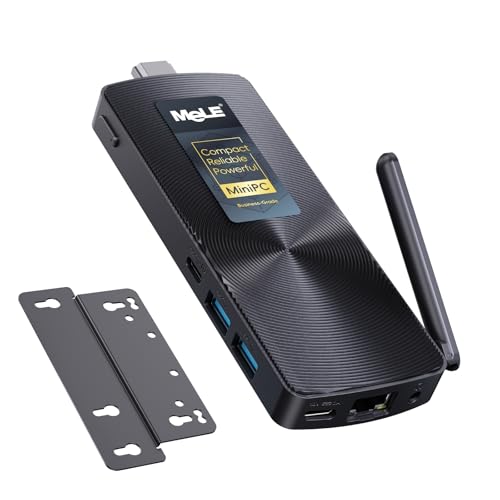 | Compact Powerhouse | Processor Type: Intel Celeron N100 | RAM Capacity: 8GB LPDDR4 | Storage Type: 128GB SSD + MicroSD support | VIEW LATEST PRICE | See Our Full Breakdown |
| MINIX Fanless Mini PC Windows 11 16GB 512GB SSD |  | Reliable Multi-Tasker | Processor Type: Intel Twin Lake-N N350 | RAM Capacity: 16GB DDR4 | Storage Type: 512GB SSD | VIEW LATEST PRICE | See Our Full Breakdown |
| MeLE Mini PC Cyber X1 16GB RAM 512GB Storage |  | Enterprise-Ready | Processor Type: Intel Alder Lake-N150 | RAM Capacity: Up to 16GB LPDDR4x | Storage Type: Up to 1TB M.2 SSD | VIEW LATEST PRICE | See Our Full Breakdown |
More Details on Our Top Picks
-
KINGDEL Fanless Industrial Computer, Mini PC, core i7 8th Gen. CPU, 16GB RAM 512GB NVMe SSD, 4K: 4096x2304, HD Port, VGA, 4xUSB 3.0, 2xCOM RS232, WiFi+Bluetooth, Metal Case
- Processor: Intel Core i7 8th Gen, 4 cores
- RAM & Storage: 16GB DDR4 RAM, 512GB NVMe SSD
- Graphics: UHD Graphics 620, 4K support
As an affiliate, we earn on qualifying purchases.
MINIX Fanless Mini PC 12th Gen 16GB 512GB SSD
The MINIX Fanless Mini PC with 12th Gen Intel processor is an excellent choice for developers who need a quiet, reliable machine for daily tasks. Its octa-core Intel Alder Lake-N N300 processor and UHD Graphics handle office work and web browsing efficiently. With 16GB DDR4 RAM and a 512GB SSD, data access is fast, and multitasking is smooth. The fanless design guarantees silent operation, perfect for quiet workspaces. Built for 24/7 use, it’s durable and stable, with dual 4K display support and 2.5G LAN for high-quality visuals and fast networking. Compact and sturdy, it’s ideal for any professional environment.
- Processor Type:Intel Alder Lake-N N300
- RAM Capacity:16GB DDR4
- Storage Type:512GB SSD
- Video Output Support:Dual 4K Displays
- Cooling System:Fanless, passive
- Network Connectivity:2.5G LAN, Wi-Fi 6
- Additional Feature:Supports dual 4K displays
- Additional Feature:2.5G LAN connectivity
- Additional Feature:Designed for 24/7 operation
-
B0DKSRFSBG
KINGDEL Fanless Mini PC with i7 16GB RAM 4K Ports
For developers seeking a reliable, silent workstation that can handle demanding tasks, the KINGDEL Fanless Mini PC with i7, 16GB RAM, and 4K support stands out. It features an 8th Gen Intel Core i7 processor with a turbo boost up to 4.0GHz, ensuring strong performance. With 16GB DDR4 RAM and a fast 512GB NVMe SSD, multitasking and data access are seamless. The device supports 4K UHD graphics, perfect for high-resolution workflows, and offers dual display options via HDMI and VGA. Its durable, fanless metal case, along with multiple USB and serial ports, makes it ideal for industrial and professional use.
- Processor Type:Intel Core i7 8th Gen
- RAM Capacity:16GB DDR4
- Storage Type:512GB NVMe SSD
- Video Output Support:4K via HDMI/VGA
- Cooling System:Fanless, passive
- Network Connectivity:Wi-Fi, Bluetooth, Gigabit Ethernet
- Additional Feature:Supports UHD Graphics 620
- Additional Feature:Multiple video output ports
- Additional Feature:Serial communication ports
-
MeLE PCG02 Mini PC Stick, N100 8GB LPDDR5 128GB eMMC Fanless PC Win11 Pro
- Processor: Latest Celeron N100 Quad-Core
- Performance Boost: 45% performance increase over J4125
- Portability: Compact design for travel and on-the-go use
As an affiliate, we earn on qualifying purchases.
Mini PC Stick with WiFi HDMI Ethernet 4K Support
A mini PC stick with WiFi, HDMI, Ethernet, and 4K support offers a compact yet powerful solution for developers who need reliable connectivity and high-quality visuals in tight spaces. Powered by an Intel Pentium N4200 processor, it runs Windows 10 Pro and Linux Ubuntu, making it versatile for various projects. It features dual USB 3.0 ports, Gigabit LAN, HDMI 4K output at 60Hz, and a TF card reader, simplifying connections. Its fanless aluminum design guarantees silent operation and durability for 24/7 use. With dual-band Wi-Fi, Bluetooth 5.0, and Intel UHD graphics, it handles presentations and media seamlessly, backed by a one-year warranty and dedicated support.
- Processor Type:Intel Pentium N4200
- RAM Capacity:8GB DDR4
- Storage Type:128GB SSD + MicroSD support
- Video Output Support:4K HDMI Output
- Cooling System:Fanless, passive
- Network Connectivity:Gigabit LAN, Wi-Fi, Bluetooth
- Additional Feature:Supports Windows 10 Pro and Linux Ubuntu
- Additional Feature:USB PD 3.0 fast charging
- Additional Feature:Built-in TF card reader
MeLE Fanless Mini PC Stick with Windows 11 Pro
If you’re looking for a compact, silent mini PC that delivers solid performance without overheating or noise, the MeLE Fanless Mini PC Stick with Windows 11 Pro is an excellent choice. It features the latest Celeron N100 Quad-Core Processor, boosting performance by 45% over previous models. With 8GB of RAM and 128GB storage, expandable via Micro SD up to 1TB, it supports multitasking easily. Dual-band WiFi, Bluetooth 4.2, and Gigabit Ethernet ensure reliable connectivity. Its fanless design offers silent operation and dust resistance, perfect for 24/7 use in industrial or business environments.
- Processor Type:Intel Celeron N100
- RAM Capacity:8GB LPDDR4
- Storage Type:128GB SSD + MicroSD support
- Video Output Support:4K HDMI at 60Hz
- Cooling System:Fanless, passive
- Network Connectivity:Gigabit Ethernet, Wi-Fi 5/6
- Additional Feature:Supports Wake on LAN
- Additional Feature:Supports PXE boot
- Additional Feature:Designed for digital signage
MINIX Fanless Mini PC Windows 11 16GB 512GB SSD
The MINIX Fanless Mini PC with Windows 11, 16GB RAM, and a 512GB SSD stands out as an ideal choice for developers who need a reliable, silent computing solution. Its powerful Intel N350 octa-core processor handles multitasking and daily tasks smoothly, while Intel UHD Graphics ensure crisp visuals. The fanless design provides quiet operation, making it perfect for noise-sensitive environments. With dual 4K display support and fast 2.5G LAN, it offers immersive visuals and quick network connectivity. The 16GB RAM and speedy SSD enable efficient multitasking and quick data access, guaranteeing consistent performance 24/7 for demanding workloads.
- Processor Type:Intel Twin Lake-N N350
- RAM Capacity:16GB DDR4
- Storage Type:512GB SSD
- Video Output Support:Dual 4K at 60Hz
- Cooling System:Fanless, passive
- Network Connectivity:2.5G LAN, Wi-Fi 6
- Additional Feature:Supports dual 4K displays at 60Hz
- Additional Feature:2.5G LAN network
- Additional Feature:Built for continuous use
MeLE Mini PC Cyber X1 16GB RAM 512GB Storage
For developers seeking a reliable, silent mini PC with ample memory and storage, the MeLE Mini PC Cyber X1 stands out. It’s powered by an efficient Intel Alder Lake-N150 processor with 4 cores, supporting up to 16GB of LPDDR4x RAM and 512GB of M.2 SSD storage, making multitasking smooth. Its compact size (131 × 81 × 24 mm) packs extensive connectivity, including dual 4K HDMI outputs, USB-C, USB 3.2, Gigabit Ethernet, Wi-Fi, and Bluetooth 5.2. Completely fanless, it operates below 20 dB, ensuring a quiet environment. Plus, its enterprise features and high reliability make it perfect for demanding, always-on development setups.
- Processor Type:Intel Alder Lake-N150
- RAM Capacity:Up to 16GB LPDDR4x
- Storage Type:Up to 1TB M.2 SSD
- Video Output Support:Dual 4K@60Hz HDMI
- Cooling System:Fanless, passive
- Network Connectivity:Gigabit LAN, Wi-Fi 5/6
- Additional Feature:Supports enterprise BIOS features
- Additional Feature:Ultra-compact size
- Additional Feature:Supports Wi-Fi 6 and Bluetooth 5.2
Factors to Consider When Choosing a Fanless Mini PC for Developers
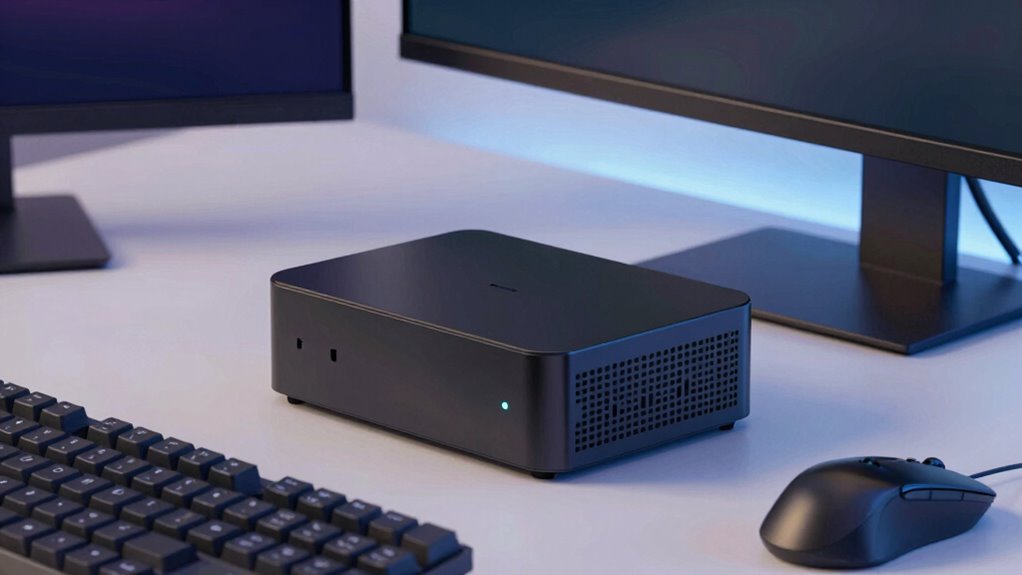
When choosing a fanless mini PC, I look at several key factors to guarantee it meets my needs. I consider the processing power, cooling system, RAM, storage, connectivity options, and portability. These points help me find a device that’s powerful, efficient, and easy to carry around.
Processing Power Needs
Choosing a fanless mini PC that meets the processing power demands of developers requires careful consideration of the CPU. I look for at least an Intel Core i5 or higher, as this handles coding, compiling, and multitasking efficiently. For more intensive tasks like virtualization or complex builds, a quad-core or hexa-core processor ensures smooth operation and quicker processing. If I need to run resource-heavy applications, a multi-threaded CPU with 8 or more cores makes a significant difference. Faster clock speeds, around 3.0 GHz or above, help reduce lag and improve responsiveness during development work. Investing in a capable CPU guarantees that the mini PC remains useful as my projects grow more complex, providing the power needed for evolving software development requirements.
Cooling System Type
Since fanless mini PCs rely entirely on passive cooling, the design of their cooling system plays a essential role in ensuring reliable performance. These systems depend on heat sinks and natural airflow to dissipate heat effectively. The effectiveness hinges on the size, material, and placement of heat sinks, as well as overall airflow management within the device. A well-designed cooling system keeps temperatures in check, preventing thermal throttling and potential hardware damage during extended use. Because they operate silently, fanless PCs are ideal for noise-sensitive environments like offices or studios. However, the cooling system’s capacity influences how well the mini PC handles demanding tasks or high temperatures, making it a fundamental factor in choosing a reliable, durable device that can operate continuously without overheating.
RAM and Storage Capacity
Ensuring a fanless mini PC has enough RAM and storage is essential for smooth development workflows. I recommend at least 16GB of RAM to handle multitasking, virtual machines, and resource-heavy IDEs efficiently. Faster RAM types like DDR4 or DDR5 can boost responsiveness during demanding tasks. Storage capacity is equally important; a 512GB SSD provides quick data access and ample space for large codebases, tools, and project files. For scalability, opt for models with expandable storage options like M.2 slots, so you can upgrade as your needs grow. Balancing RAM and storage based on your specific development workload guarantees ideal performance and productivity, preventing bottlenecks and keeping your workflow seamless and efficient.
Connectivity Options
Having the right amount of RAM and storage is just part of building an effective development setup; equally important is the connectivity options a fanless mini PC offers. I look for multiple USB ports, especially USB 3.0 or USB-C, to connect peripherals like keyboards, mice, and external drives without hassle. Reliable network connectivity is key, so I prioritize high-speed Ethernet—preferably 2.5G LAN—and Wi-Fi capabilities like Wi-Fi 6 or dual-band to ensure fast, stable internet. Video output options such as HDMI and VGA that support 4K resolution are essential for smooth display performance. If I need to connect legacy or industrial devices, serial ports like RS232 come in handy. Ultimately, expandable storage options like MicroSD or M.2 slots give me flexibility for data management and backups.
Size and Portability
When choosing a fanless mini PC, size and portability are vital factors that can markedly impact your workflow. Smaller devices are easier to carry between work environments or client sites, making them ideal for developers on the go. Compact size helps save desk space, especially in limited or shared workspaces, keeping your setup clean and efficient. A lightweight design reduces physical strain when transporting the device frequently, enhancing convenience. The mini PC’s size also influences the number and type of ports available, which can affect connectivity options. Portability is further improved when the device supports single-cable setups, like USB Power Delivery or HDMI, simplifying movement and setup without sacrificing functionality. Overall, size and portability are crucial in choosing a mini PC that adapts seamlessly to your work style.
Operating System Compatibility
Are you confident that the fanless mini PC you choose will support your preferred operating system without issues? It’s crucial to verify compatibility with Windows, Linux, or any specialized developer environments you rely on. Check that the hardware aligns with the OS requirements, including processor architecture and driver support, to avoid headaches down the line. Look for official OS support or certifications from the manufacturer, which can save you from installation and update problems. Ensure the device can handle OS updates and security patches smoothly, without hardware conflicts. Additionally, review firmware and BIOS settings to confirm they’re compatible with the OS features you need for your development tasks. Being thorough here prevents compatibility issues that could hinder your workflow.
Reliability and Durability
Ensuring reliability and durability is essential when selecting a fanless mini PC for development work, especially since these devices often operate continuously. High-quality components are crucial to reduce the risk of hardware failure and guarantee long-term performance. Reliable mini PCs should support 24/7 operation without issues, which is critical for maintaining uptime during essential development tasks. Devices with anti-static and electromagnetic interference protection help extend hardware lifespan and keep performance stable over time. Durability is further enhanced when housed in robust, sealed casings that prevent dust and debris ingress, especially in industrial or high-traffic environments. Opting for models with proven low defect and return rates gives added confidence that your mini PC will withstand the rigors of daily development use.
Noise Level Considerations
Choosing a fanless mini PC for development often means prioritizing a quiet workspace, as these devices operate silently thanks to their passive cooling systems. Without fans, noise from moving parts is eliminated, creating a peaceful environment that minimizes distractions. Most fanless models produce noise levels below 20 dB—comparable to a whisper or rustling leaves—which is ideal for long coding sessions. While extended use can cause the top cover to warm slightly, it usually doesn’t impact noise levels. This low noise profile helps maintain focus and comfort, especially in noise-sensitive environments like shared offices or recording studios. Overall, a fanless design not only keeps your workspace quiet but also reduces mechanical noise, making it a smart choice for developers who value a tranquil work setting.
Frequently Asked Questions
How Energy-Efficient Are Fanless Mini PCS for Prolonged Development Tasks?
Fanless mini PCs are highly energy-efficient for prolonged development tasks because they generate less heat and require less power to operate without cooling fans. I’ve noticed they consume notably less electricity compared to traditional desktops, which not only saves on energy bills but also reduces noise. Their efficient design allows them to run smoothly over long periods, making them a reliable choice for continuous development work without overheating or excessive power usage.
Can Fanless Mini PCS Handle Intensive Programming and Compilation Workloads?
Think of a fanless mini PC as a quiet river—calm but capable of powerful currents. While they excel at steady tasks, handling intense programming and heavy compilation can be tricky. I’ve found that for prolonged, demanding workloads, their limited thermal capacity might cause throttling or slowdowns. So, for heavy-duty development, I’d recommend a more robust system, but for lighter coding, a fanless mini PC can be a surprisingly capable companion.
What Are the Security Features of Fanless Mini PCS for Sensitive Projects?
Fanless mini PCs for sensitive projects often include robust security features like hardware-based encryption, secure boot, TPM modules, and BIOS protection. I appreciate these protections because they help keep my data safe from tampering and unauthorized access. When choosing one, I look for models with all-encompassing security options, as they give me peace of mind that my sensitive work stays secure even in compact, fanless designs.
Are Fanless Mini PCS Compatible With All Major Development Software?
Imagine a sleek, silent workspace where your code flows smoothly—yes, fanless mini PCs are compatible with all major development software. I’ve used mine for everything from IDEs to virtual machines, and it handles each task effortlessly. The key is choosing a model with the right specs—ample RAM, modern CPU, and good connectivity. So, rest assured, these mini PCs support your development needs without missing a beat.
How Easy Is Upgrading Hardware in Fanless Mini PCS Over Time?
Upgrading hardware in fanless mini PCs can be quite challenging. I find that many models have limited upgrade options because their components are often soldered onto the motherboard. If you’re planning future upgrades, you might need to choose a mini PC with accessible RAM slots or storage bays. Overall, I’d recommend selecting a model that prioritizes upgradeability if you want to extend its lifespan easily.
Conclusion
Choosing the right fanless mini PC is like finding the perfect compass for your coding journey—each one guides you through the tech wilderness silently and reliably. Whether you need power, portability, or a sleek design, these options are your steadfast allies in the quest for seamless development. Trust in their quiet strength to fuel your creativity, and let your ideas soar without the hum of a fan. Your perfect mini PC awaits—ready to light your path forward.