TL;DR
A November 19, 2026 hardware guide maps common AI jobs to a Mac mini, Mac Studio, Nvidia GPU PC or cloud API. Its central point is that memory and software compatibility matter more than choosing the most powerful-looking machine; the recommendations are based on specifications and documentation, not independent performance tests.
A guide published by Thorsten Meyer AI on November 19, 2026, matches five common AI workloads to a Mac mini, Mac Studio, Nvidia GPU PC or cloud API. The report says the right choice depends on where the model runs, how much memory it needs and which software supports the hardware; its comparisons use published specifications and tool documentation rather than independent speed tests.

Get business pricing on monitors, keyboards and dev gear
- Business-only prices and quantity discounts
- Tax-exempt purchasing
- Multiple users, one account, clear invoices
For an agent that calls a cloud model, the computer mainly runs the agent loop, files and tools. The guide says a Mac mini can suit that always-on role, and cites Apple’s listed 4-watt idle draw for the base model. But the model and prompts still go to the cloud, so this setup does not keep those interactions on the local machine.
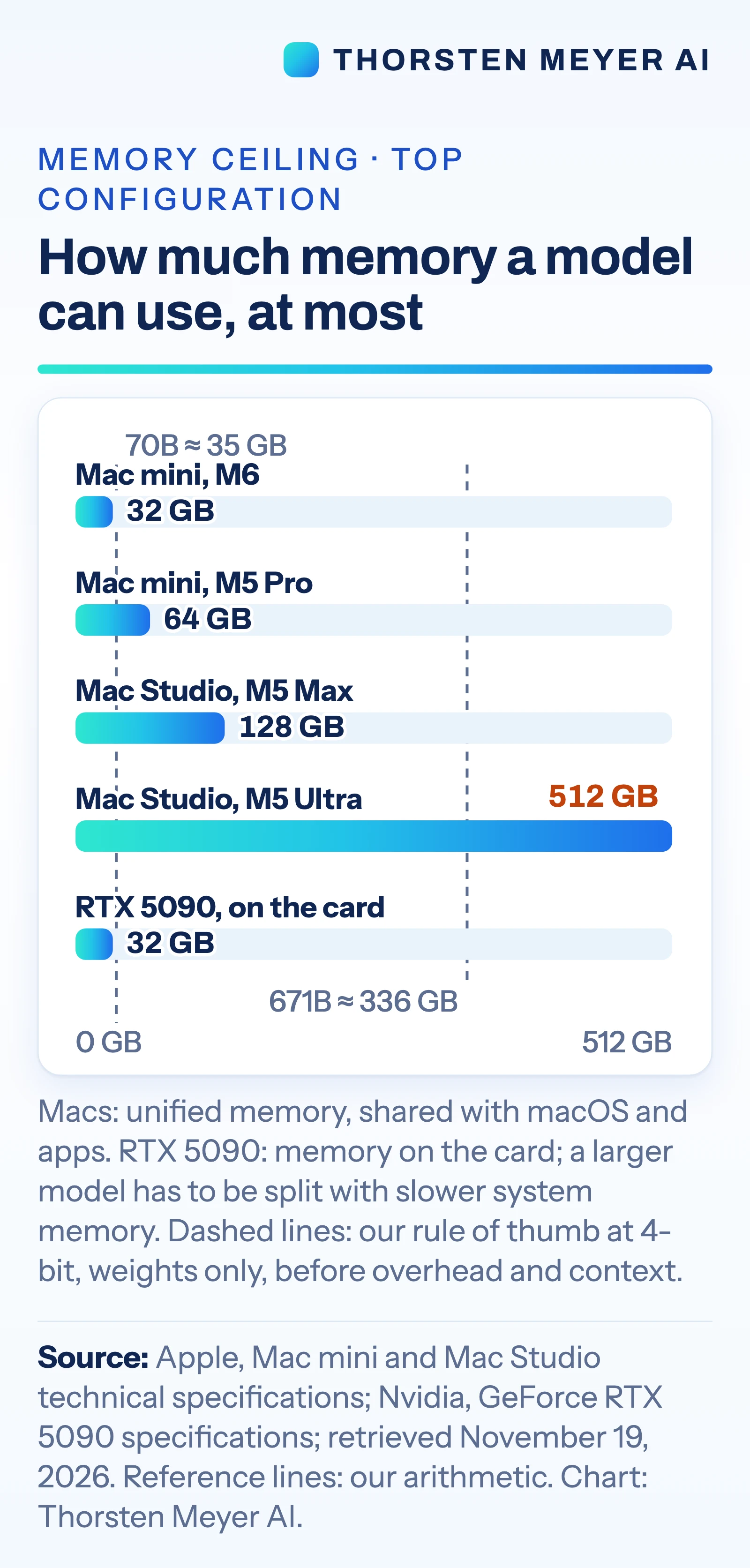
For local models, the report puts memory capacity first. It lists the Mac mini at up to 64 GB of unified memory, the Mac Studio at up to 128 GB with M5 Max or 512 GB with M5 Ultra, and Nvidia’s GeForce RTX 5090 at 32 GB of graphics memory. As a rough estimate, it says 4-bit model weights require about 0.5 GB per billion parameters before overhead and conversation context. That estimate would put a 70-billion-parameter model’s weights at about 35 GB and a 671-billion-parameter model’s at about 336 GB.
The guide favors an Nvidia PC when software is built around CUDA, Nvidia’s GPU platform. It says the vLLM serving engine distributes CUDA binaries, while Apple silicon support relies on a community-maintained plugin. For small fine-tunes, it points to Apple’s MLX support for LoRA and QLoRA and PyTorch’s GPU support on Mac. It cautions that fine-tuning takes more memory than running the same model.
Choosing Hardware by AI Workload
The choice affects what can run locally, how responsive it feels and whether a project depends on cloud services. A small computer may be enough when an agent sends requests to a hosted model; a larger memory pool matters when loading open models locally. Teams that rely on CUDA-specific tools may face extra setup or compatibility work on Apple silicon.
Power and purchase costs also vary. The source lists the M5 Ultra Mac Studio at up to 385 watts for the whole system, while the RTX 5090 card alone is rated at 575 watts and Nvidia recommends a 1,000-watt system power supply. The guide gives a US list price of $5,499 for the M5 Ultra Mac Studio, as listed on Apple’s site on November 19. These figures help frame the trade-offs, but they do not establish which machine is faster or cheaper for a particular workload.
Products Worth Considering

Logitech MX Mechanical Wireless Illuminated Keyboard, Tactile Quiet, Graphite

Samsung Odyssey G55C 32-Inch QHD Curved Gaming Monitor

LG UltraGear 34G600A-B 34-Inch Curved WQHD Gaming Monitor
As an affiliate, we earn on qualifying purchases.
From Mac Mini to Model Server
The guide follows an earlier Thorsten Meyer AI article about which models fit within the Mac mini’s 16 GB to 64 GB memory range. It broadens the question from one computer to several kinds of AI work, including private chat, large open models, multi-user serving and training.
Its recommendations draw on specifications from Apple and Nvidia and documentation for tools including MLX, PyTorch and vLLM, checked on November 19, 2026. The source describes the job-to-machine matches as the author’s reading of those materials, not a buying recommendation. It also says the strongest closed models cannot be downloaded, making a cloud API necessary for access to those models.
“Memory first”
— Thorsten Meyer AI
Performance Depends on the Task
The guide does not provide independent speed tests for the listed machines, including for very large models. Actual performance will depend on the model, software, settings and workload. Its memory estimates cover model weights alone; extra memory is needed for overhead and conversation context.
The source does not quantify total ownership costs, compare response speeds across cloud services and local hardware, or test how well individual workflows perform. It also says clustering Macs requires setup, including Thunderbolt 5 connections between each pair and a setting changed in macOS Recovery. The base M6 Mac mini it describes has Thunderbolt 4. The exact limits and practical performance of a given cluster are not established in the material.
Test the Intended Workflow
The next step for a buyer or team is to check the memory needs and software requirements of the model and tools they plan to use, then test that workload on the proposed machine. For a cloud-based agent, that also means accounting for per-token charges and the fact that prompts and data leave the computer.
The source gives no announced follow-up benchmark or product milestone. Its specifications are dated November 19, 2026, so buyers should check current product listings and tool documentation before making a decision.
Key Questions
Which machine does the guide suggest for an agent that uses cloud models?
It says a Mac mini, or a Mac the user already owns, may be enough because the computer runs the agent and its tools while the model runs remotely. Prompts and model requests still go to the cloud.
Why does memory matter for running an AI model locally?
The model’s weights need to fit in memory, along with room for overhead and conversation context. The guide estimates about 0.5 GB per billion parameters for weights at 4-bit precision, before those additional needs.
When does the report favor an Nvidia GPU PC?
It favors one when the workflow depends on software built for Nvidia CUDA, including serving tools such as vLLM. The source notes that Apple silicon support for vLLM relies on a community-maintained plugin.
Can a Mac be used to fine-tune a model?
The guide says Apple’s MLX tools support LoRA and QLoRA, and PyTorch supports GPU training on Mac. It cautions that fine-tuning requires more memory than running the same model.
Does the guide show which machine is fastest?
No. It matches machines to workloads using specifications and software documentation, but reports no independent performance tests for the comparisons.
Source: Thorsten Meyer AI