
Modern browser features like Progressive Web Apps and Service Workers are quietly transforming frontend development. You can now create faster, more reliable web experiences that work offline and load instantly, even on flaky networks. Push notifications and background sync help you engage users effortlessly, while simplified deployment reduces manual updates. If you want to understand how these tools are reshaping your projects and future-proof your skills, there’s much more to explore.
Key Takeaways
- Progressive Web Apps (PWAs) leverage Service Workers to enable offline access, faster load times, and app-like experiences directly in browsers.
- Browser support for features like caching, push notifications, and background sync enhances user engagement and reduces reliance on native apps.
- Developers can push updates seamlessly without manual downloads, streamlining deployment and minimizing manual maintenance efforts.
- Emphasis on performance and resilience leads to more robust frontend architectures focused on speed and reliability.
- Progressive enhancement allows features to work across diverse browsers, ensuring broader accessibility and improved user experience.
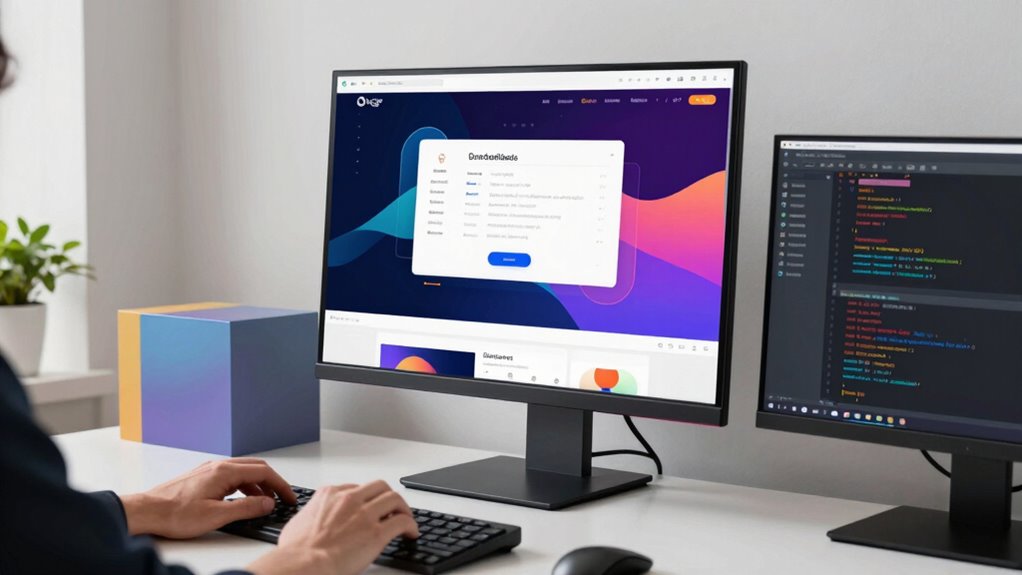
Recent advances in browser technology are transforming how frontend developers build and optimize web applications. One of the most significant shifts comes from the rise of Progressive Web Apps (PWAs) and the integration of Service Workers. These features are quietly revolutionizing user experiences by making web apps more reliable, fast, and engaging, all without requiring users to download traditional software updates or install native apps from app stores.
Browser advancements like PWAs and Service Workers are transforming web apps into faster, more reliable, and engaging experiences without downloads.
As a developer, you now have the power to create web applications that feel like native apps. Progressive Web features enable your site to load instantly, even on flaky networks, thanks to caching strategies employed by Service Workers. These scripts run in the background, intercepting network requests and serving cached content when the network is unavailable. This means your users can access critical features offline or during poor connectivity, without frustration. Service Workers also facilitate background sync, push notifications, and other advanced capabilities that keep your app dynamic and responsive.
You might notice that the boundaries between web and native app experiences are blurring. With PWAs, you can deliver a seamless, app-like experience directly through the browser, reducing the need for users to visit app stores or download large files. This shift not only simplifies distribution but also accelerates your development cycle. Since Service Workers handle caching and background tasks, you can push updates instantly, ensuring users always have the latest version without manual refreshes or downloads.
Browser support for Progressive Web features is rapidly expanding, making them a practical choice for most projects. You can leverage these tools to improve load times, increase engagement, and reduce bounce rates. For instance, by implementing a Service Worker, you can cache assets during the initial visit and serve them instantly on subsequent visits, delivering near-instant load times that enhance user satisfaction. Additionally, offline functionality becomes straightforward, allowing users to continue interacting with your app even when offline or on unreliable connections.
These browser features also influence your development process. With Service Workers and PWAs, you shift towards a more modular, service-oriented architecture that emphasizes performance and resilience. You can implement push notifications to re-engage users, or background sync to ensure data consistency, all while maintaining a lightweight codebase. This approach encourages you to think about progressive enhancement—building features that enhance usability without compromising the core experience—making your applications more adaptable to diverse environments. Moreover, embracing these browser capabilities can reduce the need for frequent manual updates, streamlining your deployment process. Additionally, understanding browser support for these features helps you plan your development strategy more effectively.

PROGRESSIVE WEB DEVELOPMENT WITH IONIC AND ANGULAR: Offline apps push notifications and modular architecture
As an affiliate, we earn on qualifying purchases.
As an affiliate, we earn on qualifying purchases.
Frequently Asked Questions
How Do These Features Impact Browser Compatibility?
These new browser features can challenge your web development process by affecting browser compatibility. You need to guarantee your sites adhere to current Web standards and perform thorough Compatibility testing across different browsers. While some features may be supported universally, others might cause inconsistencies. Staying updated with browser updates and testing regularly helps you identify issues early, ensuring your website functions smoothly regardless of the browser your users choose.
Are There Security Concerns With New Browser APIS?
Yes, there are security concerns with new browser APIs. You should be cautious because these APIs can introduce privacy concerns, such as data leaks or unauthorized access to user information. Additionally, API stability can be an issue, as new features might change or break over time, potentially exposing vulnerabilities. Staying informed about updates, following best practices, and testing thoroughly can help you mitigate these risks and guarantee your app remains secure.
How Do These Features Affect Performance Optimization?
Like a skilled conductor, these new browser features fine-tune your frontend symphony, boosting performance. They improve code efficiency by enabling smarter resource management, reducing load times, and minimizing unnecessary processes. As a result, your app runs smoother and faster. Embracing these features helps you optimize performance, making your website more responsive and efficient, much like a well-orchestrated performance that leaves users impressed and engaged.
What Are the Best Practices for Adopting These Features?
To adopt these new browser features effectively, focus on progressive enhancement, ensuring your website remains functional across all browsers. Stay updated through developer education, attending workshops, reading documentation, and participating in forums. Test features thoroughly, fallback gracefully where needed, and avoid relying solely on cutting-edge capabilities. This approach helps you build resilient, accessible interfaces that leverage new features while maintaining broad compatibility.
Do These Features Require Updates to Existing Frameworks?
These features don’t require a complete overhaul of your existing frameworks, but they do demand attention to framework compatibility and API stability. You might need minor updates or polyfills to guarantee seamless integration. Think of it as tuning an already powerful engine—you won’t need a new car, just the right adjustments. Staying updated guarantees your app remains compatible and leverages the latest browser innovations without sacrificing stability.
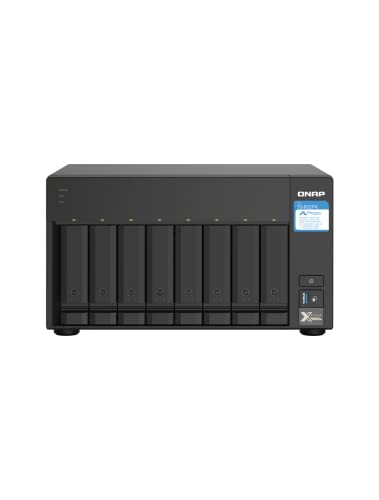
QNAP TS-832PX-4G 8 Bay High-Capacity NAS with 10GbE SFP+ and 2.5GbE
- Processor: Quad-core 1.7GHz ARM Cortex-A57
- Memory: 4GB DDR4 RAM, expandable to 16GB
- Drive Bays: 8 x 3.5-inch SATA bays
As an affiliate, we earn on qualifying purchases.
As an affiliate, we earn on qualifying purchases.
Conclusion
As you embrace these new browser features, you might find your development process transforming silently, like a quiet revolution. While the tools evolve, the fundamentals stay rooted in creativity and problem-solving. These updates subtly shift what’s possible, yet remind you that innovation isn’t just about new tech—it’s about reimagining how you build, connect, and serve users. In this delicate dance of progress, change whispers softly, encouraging you to adapt and thrive amid the evolving landscape.
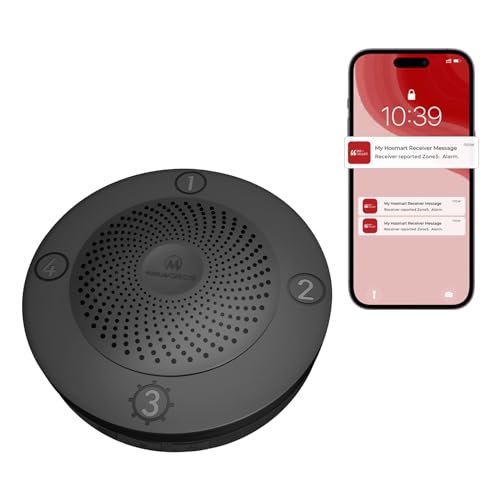
eMACROS Pro 3 Smart Solar Driveway Alarm System (2.4G Wi-Fi), App Push Notifications, 1/2 Mile (2600 ft) Wireless Range Motion Sensor & Plug-in Receiver, Weatherproof Property Alert (Single Receiver)
- Wi-Fi and App Alerts: Real-time notifications via smartphone app
- Long Wireless Range: Up to 1/2 mile (2600 ft) range
- Solar-Powered & Weatherproof: Solar panel with durable outdoor design
As an affiliate, we earn on qualifying purchases.
As an affiliate, we earn on qualifying purchases.

YDuupxe S3 Engraving Motherboard 3 Axis CNC Controller with 5W 60W Optical Support, Offline Control Mobile APP Web LAN for 3018 1610 2418 DIY Engraving Machine
- High Performance S3 Chip: 240MHz for fast engraving and optical tasks
- Supports CNC and Optical Engraving: Enables versatile 3D control projects
- High-Speed Engraving: Up to 30000mm/min speed
As an affiliate, we earn on qualifying purchases.
As an affiliate, we earn on qualifying purchases.