The best microcontroller development boards balance an approachable setup with the features your project actually needs. I rank the Arduino UNO Q 2GB as the strongest overall choice for buyers who want a more capable hybrid platform, while the ELEGOO UNO R3 is a straightforward starting point and the ESP32-S3 N16R8 suits projects that need more room for wireless and connected features. The main tradeoffs are simplicity versus processing and connectivity, and a single versatile board versus a multipack for experiments. Some boards also need more setup knowledge or extra hardware than their names suggest. Read on for the full breakdown, selection criteria, and guidance for matching a board to your project.

Get business pricing on monitors, keyboards and dev gear
- Business-only prices and quantity discounts
- Tax-exempt purchasing
- Multiple users, one account, clear invoices
Key Takeaways
- The UNO Q 2GB leads for broad capability, while the UNO R3 is the more direct choice for basic learning and classic Arduino-style projects.
- ESP32 boards dominate the wireless options, but their shared Wi-Fi and Bluetooth focus means buyers should compare memory, board layout, USB connection, and included accessories rather than assume every ESP32 model is interchangeable.
- Multipacks favor experimentation and repeat builds: the RP2040-Zero, Nano V3.0, and ESP32 bundles provide spares, while their smaller or simpler boards may require more wiring or setup work.
- Specialist boards have clearer limits: the ESP32-S3-CAM targets camera projects, the STM32 Nucleo-F446RE suits more structured embedded development, and the Pro Micro favors compact USB-oriented builds.
- Included learning materials and breakout hardware can matter as much as the chip; starter-kit contents and the LAFVIN ESP32-S3 breakout board may reduce setup friction, but buyers should still check what peripherals and cables are included.
| ELEGOO UNO R3 Microcontroller Board with USB Cable |  | Best for Beginners | Microcontroller: ATmega328P | USB interface: ATmega16U2 | Clock speed: 16 MHz | VIEW LATEST PRICE | See Our Full Breakdown |
| Arduino UNO Q 2GB Hybrid Development Board |  | Best for Linux and Microcontroller Projects | Application processor: Qualcomm Dragonwing QRB2210, quad-core Arm Cortex-A53 | Processor speed: 2 GHz | Microcontroller: STM32U585 | VIEW LATEST PRICE | See Our Full Breakdown |
| ESP32-S3-CAM Development Board with OV3660 Camera |  | Best for Camera-Based IoT | Processor: Dual-core Xtensa 32-bit LX7 | Module: ESP32-S3 N16R8 | Camera: OV3660, 3 megapixels | VIEW LATEST PRICE | See Our Full Breakdown |
| STM32 Nucleo-F446RE Development Board |  | Best for Embedded Firmware Development | Microcontroller: STM32F446RE | Processor core: ARM Cortex-M4 with DSP and FPU | Processor speed: 180 MHz | VIEW LATEST PRICE | See Our Full Breakdown |
| AITRIP ESP32 30-Pin Development Board with Wi-Fi and Bluetooth |  | Best for Wireless Arduino Prototypes | Model: ESP-WROOM-32 / ESP-32S | Pins: 30 | Wi-Fi: 2.4 GHz, 802.11 b/g/n | VIEW LATEST PRICE | See Our Full Breakdown |
| DWEII RP2040-Zero USB-C Microcontroller Development Boards, 3-Pack |  | Best for Compact RP2040 Projects | Package quantity: 3 boards | Processor: Dual-core Arm Cortex-M0+ | Maximum processor speed: Up to 133 MHz | VIEW LATEST PRICE | See Our Full Breakdown |
| AYWHP Pro Micro ATmega32U4 Development Board, 5V/16MHz, USB Type-C |  | Best for Small Arduino HID Projects | Processor: Atmel ATmega32U4 | Processor speed: 16 MHz | Operating voltage: 5 V | VIEW LATEST PRICE | See Our Full Breakdown |
| LAFVIN Nano V3.0 ATmega328P Microcontroller Boards, 5V 16MHz, 3-Pack with USB Cable |  | Best Value for Breadboard Prototypes | Model: Nano V3.0 | Microcontroller: ATmega328P-AU | Voltage: 5 V | VIEW LATEST PRICE | See Our Full Breakdown |
| ESP32 ESP-WROOM-32 Development Board, Dual-Core Wi-Fi and Bluetooth, 3-Pack |  | Best for Wireless Prototypes | Processor: Dual-core Tensilica LX6 | Maximum clock speed: 240 MHz | Listed installed RAM: 512 MB | VIEW LATEST PRICE | See Our Full Breakdown |
| LAFVIN ESP32-S3 N16R8 Development Board with Multi-in-One Breakout Board |  | Best for Flexible ESP32-S3 Prototyping | Flash: 16 MB | PSRAM: 8 MB | Connectivity: Wi-Fi and Bluetooth | VIEW LATEST PRICE | See Our Full Breakdown |
| ELEGOO ESP-32 Super Starter Kit with Tutorial |  | Best ESP32 Starter Kit | Processor: Dual-core Espressif | RAM: 520 KB SRAM | Connectivity: Wi-Fi, Bluetooth 4.2, GPIO, I2C, USB | VIEW LATEST PRICE | See Our Full Breakdown |
| AITRIP ESP32 ESP-WROOM-32 USB-C Development Board, 30-Pin, Wi-Fi and Bluetooth, CP2102, Arduino Compatible | 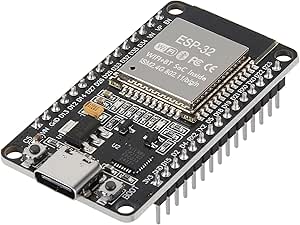 | Best Single-Board ESP32 Value | Module: ESP-WROOM-32 | Processor: Dual-core 32-bit, 240 MHz | Pins and I/O: 30 pins; 22 I/O ports | VIEW LATEST PRICE | See Our Full Breakdown |
| STM32F103C8T6 Mini Development Board with CH340 |  | Best for Embedded Control and SWD Debugging | Microcontroller: STM32F103C8T6 | Clock speed: 72 MHz | Flash storage: 64 KB | VIEW LATEST PRICE | See Our Full Breakdown |
| ELEGOO 3-Pack ESP32 Development Boards with ESP-WROOM-32, USB‑C, Wi‑Fi & Bluetooth 4.2 |  | Best Multi-Board Pack for IoT Prototypes | Number of boards: 3 | Processor: Dual-core, up to 240 MHz | RAM: 520 KB | VIEW LATEST PRICE | See Our Full Breakdown |
| microcontroller development board | Processor |
|---|---|
| ELEGOO UNO R3 Microcontroller | — |
| Arduino UNO Q 2GB Hybrid Devel | — |
| ESP32-S3-CAM Development Board | Dual-core Xtensa 32-bit LX7 |
| STM32 Nucleo-F446RE Developmen | — |
| AITRIP ESP32 30-Pin Developmen | Dual-core, 240 MHz |
| DWEII RP2040-Zero USB-C Microc | Dual-core Arm Cortex-M0+ |
| AYWHP Pro Micro ATmega32U4 Dev | Atmel ATmega32U4 |
| LAFVIN Nano V3.0 ATmega328P Mi | — |
| ESP32 ESP-WROOM-32 Development | Dual-core Tensilica LX6 |
| LAFVIN ESP32-S3 N16R8 Developm | — |
| ELEGOO ESP-32 Super Starter Ki | Dual-core Espressif |
| AITRIP ESP32 ESP-WROOM-32 USB- | Dual-core 32-bit, 240 MHz |
| STM32F103C8T6 Mini Development | — |
| ELEGOO 3-Pack ESP32 Developmen | Dual-core, up to 240 MHz |
More Details on Our Top Picks
ELEGOO UNO R3 Microcontroller Board with USB Cable
The ELEGOO UNO R3 is the most approachable starting point here for learning conventional microcontroller projects. Its ATmega328P, clearly labeled headers, and Arduino IDE compatibility make it easier to follow lessons built around sensors, motors, and displays than the more specialized ESP32-S3-CAM. The included USB-A to USB-B cable covers programming and serial communication, so there is one less accessory to source before getting started. Its tradeoff is capability: it has no listed wireless connectivity and is less suited to connected or camera-based projects than the ESP32 boards in this roundup. The board also arrives without sensors, shields, a breadboard, or a power adapter, so the included board and cable are only the starting point for a complete project.
Pros:- Arduino IDE compatibility and UNO shield support suit a wide range of learning projects
- Labeled headers make connections easier to follow
- USB-A to USB-B cable is included for programming and serial communication
- 14 digital I/O pins include six PWM outputs, alongside six analog inputs
Cons:- No wireless connectivity is listed
- Sensors, shields, breadboard, and external power adapter are not included
- Less capable for demanding computation than the STM32 Nucleo-F446RE
Best for: New Arduino learners, classroom instructors, and makers following projects that use standard UNO-compatible shields and modules
Not ideal for: Buyers who need built-in Wi-Fi, Bluetooth, camera features, or a board ready to run a project without sourcing additional components
- Microcontroller:ATmega328P
- USB interface:ATmega16U2
- Clock speed:16 MHz
- Flash memory:32 KB
- Digital I/O:14 pins, including 6 PWM outputs
- Analog inputs:6
- Power options:USB or recommended 7–12 V external supply
- Included:UNO R3 board and USB-A to USB-B data cable
Our verdict“Choose this UNO R3 for a straightforward introduction to Arduino projects, but pick an ESP32 board if wireless features are part of the plan.”
Arduino UNO Q 2GB Hybrid Development Board
The Arduino UNO Q takes a different approach from the simpler UNO R3: it pairs a Linux-capable quad-core processor with an STM32U585 microcontroller, letting one board handle Linux software and microcontroller tasks. Debian, Arduino sketches, Python, and lightweight AI projects make it the broadest software platform in this group. Compared with the STM32 Nucleo-F446RE, it adds wireless connectivity and Linux, while the Nucleo is the more direct choice for focused Cortex-M development. The UNO Q’s 2 GB RAM and 16 GB eMMC support modest workloads, not heavy multitasking, and its added complexity may be unnecessary for basic sensor projects. It is best treated as a development platform: projects may need additional peripherals beyond its LED matrix and expansion connections.
Pros:- Combines a quad-core Linux-capable processor with a separate STM32 microcontroller
- Supports Debian Linux, Arduino sketches, Python, and lightweight AI applications
- Wi-Fi 5, Bluetooth 5.1, and USB-C provide modern connectivity
- UNO shield-compatible headers, Qwiic connector, and LED matrix offer several expansion paths
Cons:- 2 GB RAM is aimed at lightweight workloads rather than heavy multitasking
- Additional peripherals may be needed for a finished project
- More complex than the UNO R3 for straightforward introductory microcontroller lessons
Best for: Developers prototyping projects that combine Linux applications, Arduino firmware, wireless connections, and lightweight AI on one UNO-form-factor board
Not ideal for: Beginners seeking a low-complexity board for basic sensor exercises, or developers who need substantial RAM for demanding Linux workloads
- Application processor:Qualcomm Dragonwing QRB2210, quad-core Arm Cortex-A53
- Processor speed:2 GHz
- Microcontroller:STM32U585
- RAM:2 GB LPDDR4
- Storage:16 GB eMMC
- Operating system:Debian Linux
- Wireless:Wi-Fi 5 (2.4/5 GHz) and Bluetooth 5.1
- Expansion:UNO shield-compatible headers, Qwiic connector, 8 × 13 LED matrix
Our verdict“Pick the UNO Q when a project benefits from Linux and microcontroller control together; choose a simpler board for basic Arduino learning.”
ESP32-S3-CAM Development Board with OV3660 Camera
For projects where image capture is central, this ESP32-S3-CAM is more purpose-built than the general-purpose AITRIP ESP32 board: it includes an OV3660 3-megapixel camera and 8 MB of PSRAM for camera-oriented work. Wi-Fi and Bluetooth 5.0 also make it a fit for connected image capture and streaming prototypes. That specialization narrows its appeal; the ELEGOO UNO R3 is a clearer choice for learning basic sensor and motor control, while this board adds camera setup and driver requirements. The required SH344 driver can add friction during configuration, and using the external antenna requires modifying its interface. Buyers should choose it for camera projects specifically, not assume it is the easiest all-purpose ESP32 starting point.
Pros:- OV3660 3-megapixel camera supports image capture and video streaming
- 8 MB PSRAM and 16 MB flash provide resources for camera-oriented projects
- Wi-Fi and Bluetooth 5.0 support connected prototypes
- ESP32-S3 platform suits IoT and camera-based AI experimentation
Cons:- Requires the SH344 driver
- External antenna use requires manual modification of the antenna interface
- More specialized for camera work than the AITRIP ESP32 board
Best for: Makers prototyping Wi-Fi-connected image capture, video streaming, or camera-based AI projects who can handle driver and antenna setup
Not ideal for: Beginners seeking a simple general-purpose board for basic I/O projects, or buyers who want an external antenna to work without interface modification
- Processor:Dual-core Xtensa 32-bit LX7
- Module:ESP32-S3 N16R8
- Camera:OV3660, 3 megapixels
- Flash:16 MB
- PSRAM:8 MB
- Wi-Fi:802.11 b/g/n
- Bluetooth:Bluetooth 5.0
- Driver requirement:SH344 driver
Our verdict“Choose this board for ESP32-S3 camera prototypes, but select a general-purpose ESP32 if camera functions are not needed.”
STM32 Nucleo-F446RE Development Board
The STM32 Nucleo-F446RE is aimed at firmware work where processor capability and debugging matter more than wireless convenience. Its 180 MHz Cortex-M4 includes DSP and FPU support, while onboard ST-LINK/V2-1 provides programming and debugging without requiring a separate debugger. That makes it a stronger fit for embedded development than the entry-level ELEGOO UNO R3, whose simpler ATmega328P is better suited to introductory projects. The Nucleo also supports several development environments, which gives developers room to work beyond one Arduino-style workflow. Its main limitation is connectivity: no wireless features are specified, unlike the ESP32 options in this roundup. It is also larger than the compact boards listed here, so it is less suited to projects where a small physical footprint is the priority.
Pros:- 180 MHz Cortex-M4 includes DSP and FPU support
- Onboard ST-LINK/V2-1 handles programming and debugging
- Supports several development environments
- USB power simplifies connection during development
Cons:- No wireless connectivity is specified
- Larger than compact options such as the ESP32-S3-CAM
- More focused on embedded firmware development than entry-level Arduino projects
Best for: Embedded developers and students working on Cortex-M firmware who want onboard debugging and a faster processor for signal-processing tasks
Not ideal for: Makers who need built-in Wi-Fi or Bluetooth, or anyone prioritizing a small board for a compact final installation
- Microcontroller:STM32F446RE
- Processor core:ARM Cortex-M4 with DSP and FPU
- Processor speed:180 MHz
- Flash memory:512 KB
- Debugger/programmer:Onboard ST-LINK/V2-1 with SWD connector
- Connectivity:USB
- LEDs:3
- Push-buttons:2
Our verdict“Pick the Nucleo-F446RE for Cortex-M firmware development with onboard debugging, and choose an ESP32 model if wireless is required.”
AITRIP ESP32 30-Pin Development Board with Wi-Fi and Bluetooth
This AITRIP ESP32 board is the straightforward wireless pick for Arduino IDE users building connected prototypes. Dual-core processing, an integrated antenna, and 2.4 GHz Wi-Fi with AP, STA, and AP+STA modes give it flexibility for devices that join a network, create one, or do both. Bluetooth is also listed, unlike the wired-only ELEGOO UNO R3, so it suits projects that need more than standard sensor and motor control. The tradeoff is uncertainty in the supplied memory data: the listing claims 512 MB RAM and 512 KB storage, figures that may be inaccurate for this ESP32 board. That makes it harder to plan memory-heavy work from the specifications alone. It is a better general wireless choice than the camera-focused ESP32-S3-CAM when no camera is needed.
Pros:- Supports 2.4 GHz Wi-Fi and Bluetooth
- AP, STA, and AP+STA modes suit different network setups
- Dual-core processor and integrated antenna support wireless prototyping
- Compatible with the Arduino IDE
Cons:- The listed 512 MB RAM and 512 KB storage specifications may be inaccurate
- No camera is listed, unlike the ESP32-S3-CAM
- Wi-Fi is limited to 2.4 GHz
Best for: Arduino IDE users prototyping Wi-Fi-connected devices or Bluetooth projects that benefit from access point and station modes
Not ideal for: Developers who need verified memory specifications for capacity planning, or makers whose project depends on an integrated camera
- Model:ESP-WROOM-32 / ESP-32S
- Pins:30
- Wi-Fi:2.4 GHz, 802.11 b/g/n
- Connectivity:Wi-Fi, Bluetooth, UART, USB
- Processor:Dual-core, 240 MHz
- Listed RAM:512 MB; specification may be inaccurate
- Listed storage:512 KB; specification may be inaccurate
- Access point modes:AP, STA, AP+STA
Our verdict“Choose this ESP32 for Arduino-based wireless prototypes, but verify the memory details before planning around its listed capacity.”
DWEII RP2040-Zero USB-C Microcontroller Development Boards, 3-Pack
The DWEII three-pack suits builders who want RP2040 performance in a small, solder-ready format. Its dual-core processor, 264 KB of SRAM, and eight PIO state machines give it more room for custom timing and peripheral work than the ATmega328P-based LAFVIN Nano V3.0, while USB-C drag-and-drop programming can make quick firmware changes straightforward. Each board also supports C/C++ and MicroPython, so it can fit both lower-level projects and faster experiments.
The tradeoff is its castellated, compact layout: some GPIO access requires soldering, which is less convenient for repeated breadboard changes than the LAFVIN Nano’s breadboard-friendly shape. Choose this set for embedded installations or carrier-board builds, not as the easiest first board for plug-and-play prototyping.
Pros:- Dual-core Arm Cortex-M0+ runs at up to 133 MHz with 264 KB SRAM
- Supports C/C++, MicroPython, and USB drag-and-drop programming
- USB-C connector simplifies connecting the board to compatible computers
- Castellated edges suit direct soldering onto a carrier board
Cons:- Some GPIO pins require soldering for access
- Compact castellated layout is less convenient for frequent breadboard rewiring
- Product information gives conflicting RAM figures in one section
Best for: Makers building compact custom carrier boards who want several RP2040 boards for C/C++ or MicroPython projects.
Not ideal for: Beginners who need easy breadboard access to every pin or want to avoid soldering.
- Package quantity:3 boards
- Processor:Dual-core Arm Cortex-M0+
- Maximum processor speed:Up to 133 MHz
- SRAM:264 KB
- Flash storage:2 MB
- Connector:USB-C
- GPIO and interfaces:29 GPIO; 2 SPI, 2 I2C, 2 UART
- Programming support:C/C++, MicroPython, USB drag-and-drop
Our verdict“Choose this three-pack for compact RP2040 builds and carrier-board soldering, but pick the LAFVIN Nano V3.0 for easier breadboard prototyping.”
AYWHP Pro Micro ATmega32U4 Development Board, 5V/16MHz, USB Type-C
This single-board Pro Micro is a fit for compact 5 V Arduino projects that benefit from a small ATmega32U4 board and USB connectivity. Arduino IDE compatibility gives it a familiar development path, and its SPI, I2C, and PWM support covers common control tasks. Compared with the LAFVIN Nano V3.0, the ATmega32U4-based design is a different option for projects where the microcontroller’s USB connectivity matters; the Nano, by contrast, comes as a three-pack and includes a cable.
Limited memory and a 16 MHz clock make this a better match for modest control jobs than wireless or compute-heavy work, where the ESP32 ESP-WROOM-32 offers far more processing headroom and built-in connectivity. The listing also conflicts on the digital I/O count, and some computers may need a driver. I’d choose it for a specific compact Arduino build, not as a general-purpose starter bundle.
Pros:- ATmega32U4 board is compatible with the Arduino IDE
- USB Type-C connectivity
- Includes PWM, SPI, and I2C support
- Works with Windows, macOS, and Linux
Cons:- Only 2.5 KB SRAM and 32 KB storage limit larger programs
- Listing gives conflicting digital I/O counts
- A driver may be needed if the board is not detected
Best for: Arduino users making compact 5 V controller or USB-connected projects who need one small board rather than a multi-board pack.
Not ideal for: Buyers needing Wi-Fi, Bluetooth, plentiful memory, or a clearly specified high pin count.
- Processor:Atmel ATmega32U4
- Processor speed:16 MHz
- Operating voltage:5 V
- SRAM:2.5 KB
- Storage:32 KB
- Analog inputs:4 × 10-bit ADC
- Connectivity:USB Type-C
- Package quantity:1 board
Our verdict“Pick this board for a small, wired 5 V Arduino project, but choose the LAFVIN Nano V3.0 for a three-board breadboard bundle or an ESP32 for wireless work.”
LAFVIN Nano V3.0 ATmega328P Microcontroller Boards, 5V 16MHz, 3-Pack with USB Cable
The LAFVIN Nano V3.0 is the straightforward choice when a project needs small, breadboard-friendly Arduino boards rather than wireless features or extra processing power. Its ATmega328P-AU runs at 5 V and 16 MHz, and USB or ISP programming supports both everyday code uploads and a direct programming route. The three-board pack also means a learner can keep one board for experiments and dedicate others to separate builds. Compared with the single AYWHP Pro Micro, this set supplies more boards and a USB cable; the Pro Micro is the alternative for a compact ATmega32U4 design.
Its limits are the familiar 8-bit constraints: it lacks built-in Wi-Fi and Bluetooth, and its processing resources are modest beside the ESP32 ESP-WROOM-32. The CH340G USB interface may require a driver on some computers. This is a practical fit for basic sensors, LEDs, and control circuits, not connected or memory-intensive projects.
Pros:- Three compact boards support separate prototypes or replacement boards
- Breadboard-friendly Nano V3.0 form factor
- Supports USB and ISP programming
- Includes a USB cable and works with the Arduino IDE on Windows, Mac, and Linux
Cons:- CH340G USB interface may require a driver on some computers
- ATmega328P-AU platform lacks built-in Wi-Fi and Bluetooth
- 16 MHz processor and 5 V design are less suited to demanding modern projects
Best for: Students and hobbyists learning Arduino who want several small boards for breadboard exercises and simple 5 V circuits.
Not ideal for: Builders who need built-in wireless connectivity, greater processing headroom, or a board that avoids possible USB driver setup.
- Model:Nano V3.0
- Microcontroller:ATmega328P-AU
- Voltage:5 V
- Clock speed:16 MHz
- USB interface:CH340G
- Programming:USB and ISP download
- Package quantity:3 boards
- Included accessory:USB cable
Our verdict“Choose this pack for basic Arduino learning and repeatable breadboard builds, but select an ESP32 board if your project needs wireless connectivity or more processing capacity.”
ESP32 ESP-WROOM-32 Development Board, Dual-Core Wi-Fi and Bluetooth, 3-Pack
This ESP32 three-pack makes the most sense when Wi-Fi or Bluetooth is part of the project, not an add-on to be wired separately. Its dual-core Tensilica LX6 processor is listed at up to 240 MHz, and Arduino IDE compatibility gives many makers a familiar way to build connected prototypes. Compared with the DWEII RP2040-Zero, this set prioritizes onboard wireless networking and Bluetooth over a tiny castellated form factor and RP2040 PIO features. Having three boards also helps when building or testing multiple connected devices.
Specification uncertainty is the main caution: the listing reports 512 MB of RAM, but its memory and storage information appears inconsistent, so I would verify the memory details before choosing it for a project with strict requirements. It is also larger than a compact board like the AYWHP Pro Micro. Buy this for wireless experiments; skip it when exact memory documentation or minimal board size matters more.
Pros:- Built-in 2.4 GHz Wi-Fi and Bluetooth Classic and LE
- Dual-core Tensilica LX6 processor listed at up to 240 MHz
- Compatible with the Arduino IDE
- Three boards support multiple connected prototypes
Cons:- RAM and storage details in the listing appear inconsistent
- Board dimensions are larger than compact options such as the AYWHP Pro Micro
- Listed memory information should be checked before committing to a resource-specific design
Best for: Makers prototyping Wi-Fi or Bluetooth devices in Arduino IDE who want three boards for parallel builds or testing.
Not ideal for: Engineers whose design depends on verified memory and storage figures, or builders needing an especially compact board.
- Processor:Dual-core Tensilica LX6
- Maximum clock speed:240 MHz
- Listed installed RAM:512 MB
- Wireless connectivity:2.4 GHz Wi-Fi 802.11b/g/n; Bluetooth Classic and LE
- Supported Wi-Fi modes:AP, STA, AP+STA
- Compatible IDE:Arduino IDE
- Package quantity:3 boards
- Dimensions:2.05 × 1.18 × 0.59 in
Our verdict“Choose this pack for Arduino-based wireless prototypes, but favor the DWEII RP2040-Zero for compact solder-in builds or a board with clearer memory requirements.”
LAFVIN ESP32-S3 N16R8 Development Board with Multi-in-One Breakout Board
The LAFVIN ESP32-S3 N16R8 pairs a wireless-capable board with a 24-channel breakout board, making it the most setup-oriented option here for circuits that need accessible GPIO and power connections. Its 16 MB of flash and 8 MB of PSRAM offer more stated memory capacity than the ESP32 ESP-WROOM-32 listing, whose RAM and storage figures are unclear. It also supports Arduino IDE, ESP-IDF, PlatformIO, and MicroPython, so it accommodates different development workflows rather than steering buyers toward Arduino alone.
The breakout board is both its advantage and its tradeoff: voltage selection and an on-off switch can make bench prototyping easier, but output voltage selection requires jumper caps. Compared with the DWEII RP2040-Zero, this kit offers Wi-Fi and Bluetooth plus expanded connections, while the RP2040 is smaller and suited to soldered carrier-board builds. Choose LAFVIN for flexible ESP32-S3 prototyping, not for the smallest finished design.
Pros:- Includes both an ESP32-S3 board and a Multi-in-One breakout board
- 16 MB flash and 8 MB PSRAM are stated in the product data
- Breakout offers 24 channels, GPIO connections, and an on-off switch
- Supports Arduino IDE, ESP-IDF, PlatformIO, and MicroPython
Cons:- Jumper caps are required to select the breakout board output voltage
- Breakout board adds bulk compared with compact boards such as the DWEII RP2040-Zero
- The included breakout setup may be unnecessary for projects needing only a bare development board
Best for: Makers developing ESP32-S3 projects who want an included breakout board, selectable 3.3 V or 5 V output, and support for multiple development environments.
Not ideal for: Builders prioritizing a minimal board footprint or wanting to change breakout output voltage without jumper caps.
- Flash:16 MB
- PSRAM:8 MB
- Connectivity:Wi-Fi and Bluetooth
- USB:Type-C
- GPIO protocols:UART, SPI, I²C, PWM, ADC
- Selectable output voltage:3.3 V or 5 V
- Breakout channels:24
- Development environments:Arduino IDE, ESP-IDF, PlatformIO, MicroPython
Our verdict“Pick this package for ESP32-S3 bench prototyping with flexible GPIO and power access, but choose the DWEII RP2040-Zero for a smaller solder-in board.”
ELEGOO ESP-32 Super Starter Kit with Tutorial
I’d choose this kit when the goal is to learn by building, rather than simply add an ESP32 board to an existing workbench. The dual-core board brings Wi-Fi and Bluetooth 4.2 to connected projects, while more than 35 modules and components give the tutorial’s 30-plus projects practical reach. Compared with the AITRIP ESP32 ESP-WROOM-32 USB-C Development Board, this package costs less desk space in setup decisions—not because of its size, but because many project parts arrive together; the AITRIP is the simpler choice if you already own components and want one board. Arduino IDE support lowers the software barrier, but beginners still need to sort and identify a sizable component collection. The instructions are online rather than included as a printed guide, so this is less convenient where internet access is limited.
Pros:- Includes more than 35 modules and electronic components for varied experiments
- Wi-Fi and Bluetooth support connected IoT projects
- Arduino IDE compatibility suits a familiar maker workflow
- Online tutorial supplies code, circuit diagrams, and step-by-step projects
Cons:- The broad component assortment can be difficult for complete beginners to organize
- Project instructions depend on online tutorial access
Best for: New makers and classroom learners who want an ESP32 board, a range of project components, and guided Arduino IDE exercises in one kit.
Not ideal for: Experienced developers who already have a parts assortment and need only a standalone board, or learners who need printed instructions.
- Processor:Dual-core Espressif
- RAM:520 KB SRAM
- Connectivity:Wi-Fi, Bluetooth 4.2, GPIO, I2C, USB
- Wireless compatibility:802.11b/g/n and Bluetooth
- Compatible software:Arduino IDE
- Kit contents:More than 35 modules and components
- Tutorial projects:30+
Our verdict“Choose this kit for guided, hands-on ESP32 learning; pick the AITRIP board instead if you only need a single development board.”
AITRIP ESP32 ESP-WROOM-32 USB-C Development Board, 30-Pin, Wi-Fi and Bluetooth, CP2102, Arduino Compatible
This board is a practical pick for a project builder who needs an ESP32 without buying a starter bundle. Its 30-pin layout and 22 I/O ports provide room for sensors and peripherals, while UART, SPI, SDIO, I2C, PWM, I2S, IR, ADC, and DAC cover a broad range of common interfaces. The CP2102 USB-to-serial chip and onboard reset and programming buttons make setup and firmware uploads more direct. Compared with the ELEGOO ESP-32 Super Starter Kit, the AITRIP gives you a focused board rather than a supply of components and lessons; choose ELEGOO if you need those extras. The USB-C connector is convenient, but the package contains only one board and no cable, so it is less suited to classrooms or builds that need several nodes.
Pros:- Dual-core 32-bit processor specified at 240 MHz
- Wi-Fi and Bluetooth support wireless projects
- Broad interface selection includes ADC, DAC, I2S, and SDIO
- Reset and programming buttons simplify board handling
Cons:- Package contains only one development board
- USB-C cable and development setup are not included
Best for: Makers who already own sensors and wiring and want one Arduino-compatible ESP32 board with a broad mix of interfaces.
Not ideal for: Beginners seeking guided projects and a parts collection, or teams needing multiple boards from one package.
- Module:ESP-WROOM-32
- Processor:Dual-core 32-bit, 240 MHz
- Pins and I/O:30 pins; 22 I/O ports
- Flash storage:32 Mbit (4 MB)
- Wireless:2.4 GHz Wi-Fi and Bluetooth
- USB connection:USB-C
- USB-to-serial chip:CP2102
- Interfaces:UART, SPI, SDIO, I2C, PWM, I2S, IR, ADC, DAC
Our verdict“Pick this board for a versatile, standalone ESP32 platform, but choose the ELEGOO starter kit if you need components and guided projects too.”
STM32F103C8T6 Mini Development Board with CH340
I’d put this STM32 board on the shortlist for embedded learners who want to work with SWD debugging and conventional control interfaces, not built-in wireless features. Its 72 MHz STM32F103C8T6 pairs 64 KB of flash with 20 KB of SRAM, and the listed 12-bit ADC and PWM support suit sensor-reading and timing-focused projects. The USB, UART, SPI, and I²C connections make it a more control-oriented alternative to the Wi-Fi-and-Bluetooth AITRIP ESP32 board. That difference matters: choose the AITRIP for connected IoT experiments, while this model favors a wired embedded workflow. Its stated 4.5–36 V DC input range offers power flexibility, but the wide range calls for careful setup; the listing also leaves included accessories and headers unclear.
Pros:- SWD interface supports debugging workflows
- Includes USB, UART, SPI, I²C, PWM, and multi-channel ADC support
- USB or external power input with stated reverse-polarity protection
- Low-power standby and a stated -40°C to +85°C operating range
Cons:- No onboard Wi-Fi or Bluetooth is listed
- The stated 4.5–36 V input range requires careful power planning
- Included accessories and headers are not clearly specified
Best for: Embedded-systems students and hobbyists learning STM32 firmware, SWD debugging, ADC, and peripheral control.
Not ideal for: Makers who want onboard Wi-Fi or Bluetooth, or buyers who need a clearly documented accessory and header package.
- Microcontroller:STM32F103C8T6
- Clock speed:72 MHz
- Flash storage:64 KB
- RAM:20 KB SRAM
- ADC:12-bit, 1 µs conversion time
- Debug interface:SWD
- USB interface:CH340C
- Power input:USB or external; stated operating voltage 4.5–36 V DC
Our verdict“Choose this board for wired STM32 control projects and SWD practice; select an ESP32 option when wireless connectivity is a requirement.”
ELEGOO 3-Pack ESP32 Development Boards with ESP-WROOM-32, USB‑C, Wi‑Fi & Bluetooth 4.2
When a project needs several wireless nodes, this three-board pack is a more natural fit than a single-board purchase. Each ESP32 offers dual-core processing up to 240 MHz, 2.4 GHz Wi-Fi, and Bluetooth 4.2, making the set suitable for prototypes that divide sensing, control, or communication across multiple boards. Compared with the AITRIP ESP32 ESP-WROOM-32 USB-C Development Board, the ELEGOO package supplies three units and lists power-saving modes and OTA update support, which can help when iterating on connected devices. The tradeoff is that neither option supplies a component kit, so sensors and wiring remain separate purchases. The 4 MB of storage also limits room for larger firmware or data needs, and the USB-C cable is not included despite the USB-C interface.
Pros:- Three ESP32 development boards support multi-device prototyping
- Dual-core processor specified at up to 240 MHz
- Built-in 2.4 GHz Wi-Fi and Bluetooth 4.2
- Power-saving modes and OTA update support suit connected-device development
Cons:- USB-C cable is not included
- 4 MB onboard storage may constrain larger firmware or data needs
- External sensors and other project components are required
Best for: IoT makers prototyping multi-node sensor networks or building several ESP32 devices that need Wi-Fi and Bluetooth.
Not ideal for: Buyers who need a complete guided project kit, larger onboard storage, or a USB-C cable in the package.
- Number of boards:3
- Processor:Dual-core, up to 240 MHz
- RAM:520 KB
- Memory storage:4 MB
- Wireless:2.4 GHz Wi-Fi and Bluetooth 4.2
- Connectivity:Bluetooth, GPIO, I2C, USB, Wi-Fi
- USB interface:USB-C
- Listed features:Power-saving modes and OTA update support
Our verdict“Choose this pack when you need several wireless ESP32 nodes; choose the AITRIP single board if one unit is enough.”
How We Picked
I compared these 14 boards as development tools, not simply by processor names. The main criteria were how clearly each board fits a project type, the usefulness of its connectivity and onboard features, the likely learning and setup burden, and whether its package supports prototyping through useful accessories, tutorials, or multiple boards. I also looked at practical tradeoffs such as compactness, interface compatibility, and the added work that can come with specialist platforms.
The ranking puts the most broadly useful choices first, then gives credit to boards that are especially strong for a defined buyer or project. That is why an accessible UNO-style board and a more capable hybrid board can both rank highly for different reasons, while camera, STM32, and tiny USB-focused options are positioned for narrower needs. Multipacks can be strong value for repeated experiments, but quantity alone does not outrank a better fit, clearer setup path, or more useful feature set.
Factors to Consider When Choosing Microcontroller Development Boards
Board names can hide meaningful differences in workflow, compatibility, and how much extra hardware a project needs. I recommend starting with the job the board must do, then checking the toolchain and physical setup before choosing a chip family.
Match the Board to the Project Before Comparing Processor Specs
Write down the project’s must-haves before focusing on clock speed or core count. A basic sensor lesson, a wireless controller, a camera device, and a USB-input gadget place very different demands on a board. A board with more capability can add setup and software complexity without improving a simple project. Conversely, a beginner board may become frustrating if the design needs wireless communication or specialized peripherals. Check whether the board has the needed interfaces and whether those pins remain available after connecting other hardware. Choosing for the project’s actual requirements avoids paying in complexity for unused features.
Check Software, Libraries, and Community Examples
Development-board convenience depends heavily on whether its software environment matches the project and the learner. Before buying, check that the board is supported by the IDE, libraries, and example code you plan to use. Similar-looking boards can differ in pin labels, USB interfaces, and configuration, so a tutorial for one model may not transfer cleanly to another. A widely taught platform can be easier to learn from, while a more specialized board may offer capabilities that justify a steeper start. Confirm that examples target the exact chip and board variant, especially for camera, wireless, and STM32 projects. This check can prevent hours spent adapting code that was written for different hardware.
Treat Voltage and Logic Levels as a System-Wide Choice
Board voltage affects more than how it is powered; it also shapes how safely it connects to sensors, displays, and other controllers. Do not assume a 5V board and a 3.3V peripheral can connect directly just because their pin labels look compatible. Check logic-level requirements, regulator limits, and the power demands of attached parts in each device’s documentation. A level shifter or separate supply may be needed, and some projects require a shared ground between components. USB power can be convenient for development but may not suit a final installation with motors or radios drawing more current. Planning the whole power path is safer than choosing a board in isolation.
Choose Between a Single Board and a Multipack Based on Your Workflow
Multipacks make sense when you expect to build several devices, keep a spare, or use one board for experiments and another for a finished prototype. They are less useful if each board requires separate accessories or if you only need one carefully chosen platform. Compare what is actually in the package: USB cables, breakout boards, headers, and learning materials can change the amount of extra setup needed. A compact board may also need a breadboard adapter or soldered connections, reducing its apparent convenience. For a first project, one well-supported board and a clear tutorial can be more useful than several boards with no guided path. Buy quantity to match a real build plan, not just to have options.
Plan for Physical Connections and the Finished Enclosure
Development boards are often evaluated on their chips, yet pin spacing and connector placement can decide whether they fit the build. Check board dimensions, mounting holes, USB connector orientation, and whether the pins are already populated. A tiny module may work well inside a compact enclosure but be awkward to prototype on a standard breadboard. A larger breakout can make wiring easier while taking more space in the final device. Also account for access to the USB port and any camera, antenna, or programming connections after installation. Thinking about the finished form early can save a redesign when a working prototype is ready to leave the bench.
Decide When Added Capability Is Worth the Setup Cost
Paying for a board with more memory, wireless features, or a specialized interface makes sense only when those capabilities serve the project. Extra resources can support more complex firmware and connected functions, but they do not automatically make code easier to write or debugging simpler. A starter kit may justify its package if tutorials and useful components help a learner complete projects, while a bare board may suit someone who already owns the tools. Specialist hardware can reduce the need for add-on modules but may narrow library choices or demand more configuration. Compare the total build requirements, not just the board itself. The best choice is the one that removes the biggest obstacle in your workflow.
Frequently Asked Questions
Should I start with an Arduino UNO-style board or an ESP32 board?
I would choose an UNO-style board when the priority is learning basic inputs, outputs, and simple control with a familiar development path. An ESP32 board makes more sense when the project calls for built-in Wi-Fi or Bluetooth, or when you want to explore connected devices. The wireless option can add configuration and power-management work that a first project may not need. Check which tutorials and peripherals you already plan to use, since compatibility can matter more than headline features. If you are unsure, begin with the project requirements rather than trying to future-proof with capabilities you may never use.
Does a multipack make sense if I am new to embedded programming?
A multipack is useful if you expect to build several prototypes, want a spare, or plan to learn by trying different circuits in parallel. It does not replace clear instructions, compatible cables, or the other components needed for a complete project. For a new learner, a single board bundled with a useful tutorial or starter components may provide a smoother first step. Also check whether the boards need soldering, adapters, or separate USB cables before comparing package contents. Buy a multipack when you have a reason to use the extra boards, not simply because several are included.
Can I use a 5V development board with 3.3V sensors?
Sometimes, but you should verify the electrical specifications of both devices before connecting their signal pins. A sensor may accept a 5V supply while still using 3.3V logic, or it may have limits that make direct connection unsafe. Check whether the board or sensor includes level shifting and confirm the permitted voltage on each input and output. A level shifter may be needed for signals, while power requirements and shared ground need separate attention. Do not rely on connector fit or pin names alone to establish compatibility.
What should I check before choosing a camera-focused development board?
Check that the camera sensor and its software libraries support the image or streaming task you have in mind. Camera projects can place heavier demands on memory, storage, power, and wireless performance than basic sensor builds. Confirm whether the package includes the camera and any breakout or antenna hardware required for operation. Review pin availability too, since camera connections can occupy resources you might otherwise use for sensors or controls. If the project only needs ordinary Wi-Fi sensing, a camera-specific board may add complexity without a useful benefit.
When is an STM32 board a better choice than an Arduino-style or ESP32 board?
An STM32 board can be a good fit when your project, course, or workplace targets the STM32 ecosystem and you want to develop around that toolchain. It may also suit buyers who need a more structured embedded workflow than a simple introductory build. The tradeoff is that setup, examples, and library assumptions may differ from familiar Arduino tutorials. Check the exact board’s programming method, supported tools, and peripheral documentation before committing. If broad beginner guidance or built-in wireless is your main priority, another board family may be a more direct route.
Conclusion
For the best overall, I recommend the Arduino UNO Q 2GB for buyers seeking a broader platform, while the best beginner fit is the ELEGOO UNO R3 for straightforward Arduino-style learning. The best value for repeat prototyping depends on your project: the DWEII RP2040-Zero, LAFVIN Nano V3.0, and ESP32 multipacks offer multiple boards, but each serves a different workflow. For a premium, feature-focused option, consider the LAFVIN ESP32-S3 N16R8 with its breakout board; for camera work, choose the ESP32-S3-CAM. The STM32 Nucleo-F446RE is the better match for STM32-centered development, while the Pro Micro suits compact USB-oriented builds. Choose by project, toolchain, and wiring needs first, then use package size and added features to settle close calls.
Halloween Picks
halloween
As an affiliate, we earn on qualifying purchases.