
Finding a quality mechanical keyboard on a budget can be challenging, as many options compromise on features or build quality. The Newmen GM325Pro stands out as the overall best for its balanced performance and affordable price. For those prioritizing tactile feedback, the WeGear Wired Mechanical Gaming Keyboard offers clicky blue switches at a low cost. Meanwhile, compact options like the AULA WIN60 HE provide portability without sacrificing mechanical feel. The main tradeoffs in this category often involve build quality, switch variety, and features like backlighting or programmability. Keep reading for a detailed breakdown of these 15 options to find the best fit for your needs.

Get business pricing on monitors, keyboards and dev gear
- Business-only prices and quantity discounts
- Tax-exempt purchasing
- Multiple users, one account, clear invoices
Key Takeaways
- Top picks balance affordability with decent build quality and switch options.
- Compact 60% keyboards are great for portability but may lack dedicated function keys.
- Hot-swappable switches remain a key feature for customizing without soldering.
- Backlighting and extra features often come at a small price premium, even in budget models.
- Wired keyboards generally offer better latency and reliability, important for gaming.


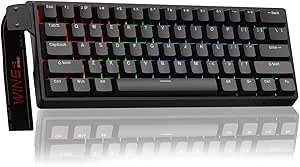


| budget mechanical keyboard | Switch Type |
|---|---|
| Newmen GM325Pro Mechanical Gam | Red switches |
| WeGear Wired Mechanical Gaming | Blue |
| AK96 Mechanical Keyboard with | Blue |
| Redragon Mechanical Gaming Key | Red, hot-swappable |
| Logitech G413 SE Full-Size Mec | Tactile mechanical switches |
| Rii RK100+ Rainbow LED Backlit | — |
| AULA F75 75% Wireless Mechanic | Linear, pre-lubricated, hot-swappable |
| Kisnt KN85 Wireless Mechanical | Pre-lubed linear |
| RisoPhy Mechanical Gaming Keyb | Blue |
| Redragon K668 108-Key Hot-Swap | — |
| GEODMAER 65% Wired Gaming Keyb | — |
| Redragon K521 Upgrade Rainbow | — |
| Aula WIN60 HE 60% Mechanical G | Magnetic Hall Effect |
| AULA WIN68 HE Mechanical Gamin | Hall Effect Magnetic |
| Wired Portable 60% Mechanical | Red |
More Details on Our Top Picks
Newmen GM325Pro Mechanical Gaming Keyboard, 104 Keys, Red Switches
The Newmen GM325Pro stands out for its durable metal construction and vivid RGB side lighting, which creates an engaging gaming atmosphere. Compared with the Logitech G413 SE, it offers a more customizable aesthetic with multiple lighting effects, though its RGB is limited to side illumination. Its responsive red switches ensure fast, quiet keystrokes, making it suitable for gamers who prioritize performance. The detachable USB cable adds portability, ideal for LAN parties or moving between setups. However, the lighting customization options are limited without software, and the full-size design may feel bulky for some users. This model is best suited for gamers or users who want a reliable, visually appealing keyboard without complex customization.
Pros:- Vivid RGB side lighting and rainbow effects enhance visual appeal
- Durable metal construction ensures long-lasting reliability
- Responsive red switches provide fast and quiet keystrokes
- Detachable USB cable offers portability and easy management
Cons:- RGB lighting only available for side illumination, not full backlit
- Limited customization options without software
Best for: Budget-conscious gamers who want a durable, full-size keyboard with eye-catching lighting.
Not ideal for: Users seeking full backlit RGB or advanced software customization, as this model’s lighting is limited and lacks software support.
- Keys:104
- Switch Type:Red switches
- Lighting:RGB side lighting with 13 preset effects
- Connectivity:Wired with 1.8-meter detachable USB cable
- Build Material:Full size metal panel
- Full-Key Rollover:Yes
Our verdict“This keyboard is a solid pick for gamers who want durability and style on a budget, with some limitations in lighting customization.”
WeGear Wired Mechanical Gaming Keyboard with Clicky Blue Switches, 104-Key, Black
The WeGear Wired Mechanical Keyboard excels in providing satisfying tactile clicks with its Blue switches, making it ideal for typists and gamers who enjoy auditory feedback. Unlike the Newmen GM325Pro, which emphasizes aesthetics and durability, this model focuses on tactile response and customizable lighting modes, offering 11 different backlight modes and adjustable brightness. Its ergonomic design, with tilt adjustment and anti-slip pads, ensures comfort for extended sessions. The keycaps are rated for over 50 million keystrokes, promising durability. The louder Blue switches may be a drawback for quiet environments, and its Windows-only compatibility limits flexibility. This keyboard makes the most sense for users who prioritize tactile feel and lighting versatility over sleek aesthetics.
Pros:- Responsive Blue switches with satisfying tactile feedback
- Vibrant multi-color backlighting with multiple modes
- Ergonomic design with adjustable tilt and anti-slip pads
- Durable keycaps rated for over 50 million keystrokes
Cons:- Mechanical switches may be loud for shared spaces
- Limited to Windows compatibility
- Backlighting may drain battery faster if wireless (though wired mitigates this)
Best for: Typists and gamers who value tactile feedback and customizable lighting in a wired setup.
Not ideal for: Quiet office environments or users seeking wireless keyboards, as the Blue switches are loud and it’s wired-only.
- Switch Type:Blue
- Number of Keys:104
- Backlight Modes:11
- Brightness Levels:5
- Tilt Adjustment:7°
- Keycap Material:Double-shot
Our verdict“This model suits users who want tactile, clicky feedback and customizable lighting in a wired gaming or typing keyboard.”
AK96 Mechanical Keyboard with Smart Display & Knob, 96% Wired, Hot Swappable, USB-C, RGB Backlighting, Creamy Sounding, Grey
The AK96 offers a compact 96% layout that balances functionality with space-saving design. Its RGB backlighting with 17 modes and hot-swappable blue switches provide vibrant visuals and easy customization, perfect for users who want a personalized experience without sacrificing keys. Compared to the larger Logitech G413 SE, the AK96’s smaller footprint makes it better for limited desk space, yet it may be too tight for users needing dedicated function or macro keys. The inclusion of a smart display and knob adds unique utility, but the sound profile, described as ‘creamy,’ might not appeal to those preferring quieter typing. This keyboard is best suited for enthusiasts who value customization and space efficiency.
Pros:- Vivid RGB backlighting with multiple modes
- Hot-swappable switches for easy upgrades
- Ergonomic with adjustable kickstands
- Compact 96% layout saves desk space
Cons:- Limited color options and aesthetics
- Sound may be loud for shared environments
- No dedicated macro keys or full-sized layout
Best for: Users seeking a compact, customizable keyboard with multimedia controls and visual flair.
Not ideal for: Users who need a full-sized keyboard or prefer quieter switches, as blue switches and compact design may limit comfort and sound preferences.
- Layout:96%
- Keycaps:PBT
- Backlighting:RGB with 17 modes
- Switch Type:Blue
- Connectivity:USB-C
- Hot Swappable:Yes
Our verdict“Ideal for space-conscious users who want a feature-rich, customizable keyboard with vibrant lighting.”
Redragon Mechanical Gaming Keyboard Wired, 11 Programmable Backlit Modes, Hot-Swappable Red Switch, Anti-Ghosting, Double-Shot PBT Keycaps, Light Up Keyboard for PC Mac
The Redragon Wired Gaming Keyboard provides extensive lighting options with 11 programmable modes and hot-swappable red switches, making it flexible for gamers who want to personalize their setup. Unlike the AK96, which emphasizes compactness and visual effects, this model focuses on macro support and compatibility with both PC and Mac. Its anti-ghosting feature ensures reliable performance during fast-paced gameplay. The double-shot PBT keycaps boost durability, though the fixed backlight color limits aesthetic flexibility. The need for software to adjust lighting can be inconvenient, and being wired-only restricts placement options. This keyboard is a good choice for gamers who want a customizable, cross-platform keyboard at a budget price.
Pros:- Extensive customizable backlit modes
- Hot-swappable red switches for easy upgrades
- Reliable anti-ghosting and macro support
- Durable double-shot PBT keycaps
Cons:- Backlight color cannot be changed manually
- Requires software for some lighting adjustments
- Limited to wired connection
Best for: Gamers and power users who need customizable lighting, macro support, and cross-platform compatibility.
Not ideal for: Users seeking wireless convenience or full aesthetic control without software dependencies, as lighting is limited without software and it’s wired only.
- Backlit Modes:11
- Switch Type:Red, hot-swappable
- Keycaps:Double-Shot PBT
- Anti-Ghosting:Yes
- Macro Support:Yes
- Compatibility:PC, Mac
Our verdict“Great for gamers who want extensive lighting customization and macro capabilities without breaking the bank.”
Logitech G413 SE Full-Size Mechanical Gaming Keyboard – Black
The Logitech G413 SE emphasizes durability with its PBT keycaps and brushed aluminum top case, making it a sturdy choice for everyday use and gaming. Its tactile mechanical switches deliver reliable feedback, and the white LED backlit offers a subtle glow suitable for various environments. Compared with the Redragon, which offers more lighting modes and customization, the G413 SE is simpler but more refined in build quality. Its lack of wireless options and size might be a downside for users with limited space or those who prefer wireless setups. The inclusion of media controls and anti-ghosting makes it a balanced choice for those seeking straightforward reliability. This keyboard works well for users who want a durable, no-fuss mechanical keyboard with basic lighting features.
Pros:- Durable PBT keycaps and sturdy aluminum construction
- Responsive tactile mechanical switches
- Simple, effective backlit lighting and media controls
- Reliable anti-ghosting performance
Cons:- Lacks wireless connectivity options
- Limited to basic backlit lighting without advanced customization
- Size may be large for very small desks
Best for: Users prioritizing durability, straightforward performance, and a classic design at a budget price.
Not ideal for: Those seeking extensive lighting customization or wireless convenience, as it’s wired-only and offers limited aesthetic options.
- Keycaps:PBT, heat- and wear-resistant
- Switch Type:Tactile mechanical switches
- Lighting:White LED backlit
- Layout:Full-size
- Material:Brushed aluminum-magnesium alloy
- Features:6-Key rollover, anti-ghosting, media controls
Our verdict“A dependable, durable choice for users who want a straightforward mechanical keyboard with minimal fuss and good build quality.”
Rii RK100+ Rainbow LED Backlit USB Wired Mechanical Feeling Gaming Keyboard
The Rii RK100+ stands out for its vibrant rainbow backlit and breathing effects, making it appealing for users who want visual flair without the higher cost of true mechanical keyboards. Unlike dedicated gaming or mechanical models like the Redragon K668, this keyboard offers a full-size layout with multimedia keys, compatible across multiple operating systems. However, it doesn’t feature genuine mechanical switches, so tactile feedback is less pronounced, and the backlight cannot be turned off individually, which might be distracting. This makes it suitable for casual gamers or office users who prioritize aesthetics and basic functionality over tactile feel.
Pros:- Vivid rainbow backlit with breathing effects enhances visual appeal
- Full-size layout with multimedia keys adds convenience
- Compatible with multiple OS platforms broadens usability
Cons:- Lacks true mechanical switches, reducing tactile feedback
- Backlight cannot be turned off separately, which could be distracting
Best for: Budget-conscious users seeking a colorful, full-size keyboard for casual gaming or office tasks
Not ideal for: Gamers or typists who prefer authentic mechanical switches and customizable lighting effects
- Connectivity:Wired USB
- Backlight:Rainbow LED with breathing light
- Size:17.1 x 5.3 x 0.9 inches
- Keys:105 full-size keys
- Compatibility:Windows, Linux, Mac OS, Android, Chrome OS
- Additional Features:Multimedia keys, sleep mode
Our verdict“This keyboard is ideal for users who want a colorful, full-size wired setup without the cost of true mechanical switches.”
AULA F75 75% Wireless Mechanical Keyboard, Hot Swappable, RGB Backlit, 2.4GHz/Type-C/BT5.0, Creamy Linear Switches, Compact Gaming Keyboard
The AULA F75 makes a strong impression for its versatile connectivity options, supporting Bluetooth 5.0, 2.4GHz, and wired USB, making it more adaptable than the Kisnt KN85, which relies heavily on Bluetooth. Its hot-swappable switches allow for easy customization, a feature not offered by many budget options, and the RGB lighting with multiple effects boosts its gaming aesthetic. The tradeoff here is a complex setup process that might challenge beginners and limited info on software customization. This keyboard suits gamers and productivity users who need flexibility across multiple devices and easy switch customization.
Pros:- Supports multiple connection modes including Bluetooth, 2.4GHz, and wired USB
- Hot-swappable switches allow easy customization without soldering
- Rich RGB lighting with multiple effects enhances gaming atmosphere
Cons:- Setup process can be complex for less tech-savvy users
- Limited information on software for advanced customization
- Battery life details are not specified, potentially affecting portability
Best for: Gamers and multitaskers who want a compact wireless keyboard with customizable switches and lighting
Not ideal for: Beginners or users seeking plug-and-play simplicity, due to setup complexity
- Connection Modes:Bluetooth 5.0, 2.4GHz, USB wired
- Battery Capacity:4000mAh
- Layout:75%
- Number of Keys:81
- Switch Type:Linear, pre-lubricated, hot-swappable
- Backlight:RGB, 16.8 million colors, 16 effects
Our verdict“This keyboard is well-suited for users needing multi-device connectivity and switch customization, despite a steeper setup curve.”
Kisnt KN85 Wireless Mechanical Keyboard, 75% Layout, Bluetooth/2.4GHz/USB-C, Custom RGB Backlit, Hot-Swappable Linear Switch, Creamy Sound for Gaming/Typing
The Kisnt KN85 offers a highly portable, compact 75% layout with Bluetooth, 2.4GHz, and USB-C connectivity, making it ideal for users who need a lightweight, versatile keyboard. Its gasket-mounted design and pre-lubed linear switches provide a satisfying typing experience that rivals pricier models, and the customizable RGB lighting adds aesthetic flair. Compared with the AULA F75, it emphasizes a slightly more minimalist build and sound dampening, though full key programming requires software on Windows, which could hinder Mac or Linux users. It’s perfect for gamers or minimalists who want a sleek, customizable, and quiet experience on the go.
Pros:- Compact 75% layout saves desk space and portability
- Multiple connectivity options including Bluetooth, 2.4GHz, and USB-C
- Hot-swappable linear switches and sound-dampening layers for a quiet, satisfying experience
Cons:- Requires software for full key programming, limited to Windows
- Bluetooth pairing can be slow for new users
- Not completely silent—some noise persists during typing
Best for: Travelers, minimalists, and gamers who need a compact, portable wireless keyboard
Not ideal for: Users who require full software customization or use non-Windows systems without software support
- Layout:75% (85 keys)
- Connectivity:Bluetooth 5.0, 2.4GHz, USB-C
- Battery:4000mAh rechargeable
- Dimensions:13.68″ x 5.51″ x 1.77″
- Switch Type:Pre-lubed linear
- Backlighting:RGB with 20 preset effects
Our verdict“This keyboard is ideal for minimalists and on-the-go users who want a quiet, customizable, and space-efficient setup.”
RisoPhy Mechanical Gaming Keyboard, RGB Backlit, 104 Keys, Blue Switch, USB Wired
The RisoPhy excels with its blue switches, delivering tactile feedback and an audible click that appeals to gamers and fast typists. While the full-size layout offers a familiar setup, it faces stiff competition from the Redragon K668, which provides more features like macro keys and adjustable height. The RisoPhy’s customizable RGB lighting adds flair, but its noise level may be unsuitable for shared spaces or quiet environments. Its ergonomic design and spill resistance make it durable for long-term use, but the clicky switches could be a turnoff for some users preferring quieter typing.
Pros:- Responsive blue switches with tactile, clicky feel
- Customizable RGB lighting with multiple modes
- Full-size keys with anti-ghosting support for fast typing
Cons:- Clicky switches generate noise that may disturb others
- Wired connection limits mobility
- RGB lighting might be distracting in quiet settings
Best for: Gamers and typists who value tactile feedback and clicky sound for focused performance
Not ideal for: Office workers or shared space users seeking a quieter experience
- Switch Type:Blue
- Backlight:RGB, 9 modes, adjustable brightness and speed
- Number of Keys:104
- Connectivity:USB Wired
- Keycap Material:Double injection ABS
- Water Resistance:Hydrophobic holes for water flow
Our verdict“This keyboard suits gamers and typists who prioritize tactile feedback over noise sensitivity.”
Redragon K668 108-Key Hot-Swap Wired RGB Gaming Keyboard with Extra Hotkeys
The Redragon K668 offers a comprehensive feature set for gamers, including hot-swappable switches and dedicated hotkeys, setting it apart from simpler budget models like the Kisnt KN85. Its 108-key full layout with anti-ghosting and multiple RGB modes provides a customizable experience that can be tailored to personal preferences. The inclusion of extra hotkeys for quick access to functions adds convenience. The main tradeoff is that its stock switches are quite basic, and the software for advanced customization can be complex for first-time users. This makes it an excellent choice for gamers who want to upgrade switches later and prefer an adjustable, feature-rich wired keyboard.
Pros:- Hot-swappable switches for easy customization
- Vibrant RGB lighting with multiple preset modes
- Dedicated hotkeys for quick access to common functions
Cons:- Stock switches are basic and may need upgrading for advanced users
- Software for macro programming can be complex
- Limited to wired connection
Best for: Gamers seeking a highly customizable wired keyboard with extra hotkeys and RGB lighting
Not ideal for: Users who prefer wireless setups or simple plug-and-play functionality
- Number of Keys:108
- Hotkeys:4 extra hotkeys (mute, calculator, screen lock, desktop)
- Switch Compatibility:3-pin and 5-pin switches
- Lighting:RGB with 19 preset modes
- Features:Anti-Ghosting, hot-swappable, macro support
- Keycap Sets:2 sets of mixed color keycaps
Our verdict“This keyboard is perfect for gamers who want a customizable wired setup with extra shortcut options and RGB flair.”
GEODMAER 65% Wired Gaming Keyboard, Backlit Mini Mechanical Membrane Keyboard for PC and Laptop
The GEODMAER 65% stands out for its ultra-compact design, making it ideal for users with limited desk space or those who prefer minimal setups. Unlike larger keyboards like the Redragon K521, it lacks dedicated function keys and a numpad, which might be a drawback for users needing full key access. Its membrane keys provide a softer, quieter typing experience, but fall short of the tactile feedback found in true mechanical models. The customizable backlit modes enhance aesthetics without adding complexity, yet the absence of wireless connectivity limits flexibility. This keyboard is best suited for gamers or office workers prioritizing size and style over tactile feel or wireless convenience.
Pros:- Extremely compact and space-saving design
- Customizable LED backlit with multiple modes
- Durable with over 10 million keystrokes
Cons:- Membrane keys lack tactile feedback of mechanical switches
- No wireless or Bluetooth option
Best for: Users with small desks or those who want a space-efficient gaming or office keyboard
Not ideal for: Typing enthusiasts or gamers who need true mechanical feel and wireless freedom
- Design:65% compact
- Connection:Wired via Type-C
- Keys:68 keys, no numpad, anti-ghosting
- Backlit:LED backlit with adjustable modes
- Material:Membrane with imitation mechanical feel
- Lifespan:Over 10 million keystrokes
Our verdict“This keyboard suits those who need a minimal footprint but can accept softer key feel and wired-only operation.”
Redragon K521 Upgrade Rainbow LED Gaming Keyboard, 104 Keys Wired Mechanical Feeling Keyboard with Multimedia Keys, One-Touch Backlit, Anti-Ghosting, Compatible with PC, Mac, PS4/5, Xbox
The Redragon K521 offers a full 104-key layout with vibrant rainbow backlighting and multimedia controls, making it a versatile choice for gamers and multi-platform users. Compared with the GEODMAER 65%, it provides a complete keyboard experience with dedicated function keys and a numpad, appealing to those who need more functionality. Its anti-ghosting technology with 19-key rollover supports fast, accurate inputs during gaming sessions. The adjustable lighting modes add visual flair, but the wired connection might limit mobility for some users. No wrist rest is included, which could impact comfort during long use. Overall, this model makes sense for those who want a budget-friendly, feature-rich keyboard for gaming and everyday tasks across multiple devices.
Pros:- Vivid rainbow LED backlighting with adjustable modes
- Mechanical-feel keys for responsive gaming
- Anti-ghosting with 19-key rollover for accuracy
Cons:- Wired only, limiting movement
- No included wrist rest
Best for: Gamers or users who need a full-size, multi-platform compatible keyboard with vivid lighting
Not ideal for: Desk users seeking wireless convenience or minimalistic setups
- Keys:104
- Backlight:Rainbow LED with adjustable modes
- Connectivity:Wired
- Anti-Ghosting:19 keys
- Multimedia Keys:12
- Compatibility:PC, Mac, PS4/5, Xbox
Our verdict“This keyboard is ideal for budget-conscious gamers who want full-size features and multi-platform compatibility without sacrificing aesthetics.”
Aula WIN60 HE 60% Mechanical Gaming Keyboard Wired, Magnetic Switch Hot Swappable, RGB Backlit, Compact Design for PC
The Aula WIN60 HE is tailored for gamers and power users who prioritize response speed and customization. Its magnetic hall effect switches and 8000Hz polling rate deliver ultra-fast input, surpassing the responsiveness of membrane or traditional mechanical keyboards like the GEODMAER. The hot-swappable switches allow easy customization but may feel different from standard mechanical switches, which could be a concern for some users. Its compact 60% layout saves space, yet the limited key set might not suit users needing dedicated function or navigation keys. The RGB lighting and macro capabilities via web driver make it highly customizable but require internet access for setup. This pick is best for experienced gamers comfortable with advanced features and willing to adapt to magnetic switch feel.
Pros:- Ultra-fast 8000Hz polling rate for quick response
- Magnetic hall effect switches for durability and precision
- Hot-swappable switches for easy customization
Cons:- Requires internet for driver setup
- Limited key layout may restrict some users
Best for: Experienced gamers or tech-savvy users seeking ultra-fast response and extensive customization
Not ideal for: Casual users or those preferring plug-and-play simplicity without internet dependency
- Switch Type:Magnetic Hall Effect
- Polling Rate:8000Hz
- Layout:60%
- Backlight:RGB, 16.8 million colors
- Hot Swappable:Yes
- Compatibility:PC
Our verdict“This keyboard suits experienced gamers who want maximum speed and customizability at a budget-friendly price point.”
AULA WIN68 HE Mechanical Gaming Keyboard 60% with Hall Effect Magnetic Switches, RGB Backlit, Wired
The AULA WIN68 HE emphasizes speed and personalization, boasting 8,000Hz polling rate and adjustable actuation points thanks to hall effect magnetic switches. Its 60% layout makes it ideal for tight spaces or mobile setups, but the limited key count may not satisfy users who need function or arrow keys, unlike the full layout of the Redragon K521. The RGB lighting offers 14 preset effects, which can be customized, yet the Windows-only system restricts users on other platforms. Magnetic switches provide durability and a distinct feel, which might be less familiar to those accustomed to traditional mechanical switches. This model works best for gamers or tech enthusiasts who value speed, compactness, and extensive lighting options.
Pros:- High 8000Hz polling rate for responsive gameplay
- Magnetic hall effect switches for longevity and consistent performance
- Customizable RGB with multiple effects
Cons:- Windows-only customization limits versatility
- Limited key layout may not suit all users
Best for: Gamers or tech enthusiasts seeking ultra-fast response and aesthetic customization on Windows
Not ideal for: Users needing a full-sized keyboard or cross-platform compatibility
- Switch Type:Hall Effect Magnetic
- Polling Rate:8000Hz
- Layout:60%
- Backlit:RGB, 14 effects
- Compatibility:Windows
Our verdict“This keyboard is a strong choice for speed-focused gamers who want a compact, customizable setup on Windows systems.”
Wired Portable 60% Mechanical Gaming Keyboard with RGB Backlit, 68 Keys, Red Switch, White
The Wired Portable 60% offers a highly portable solution with a durable splash-proof design and RGB backlit keys. Its 68-key layout is ideal for users who need a lightweight, travel-friendly keyboard without sacrificing gaming features like conflict-free multi-key input. The Red switches provide a clicky, satisfying feel but can be loud, which might be disruptive in quiet environments. Compatibility across Windows, Mac, Linux, and gaming consoles broadens its usability, making it a flexible choice for on-the-go use. However, its smaller size means fewer keys for complex tasks, and the loud click may bother some users in shared spaces. This model fits best for mobile gamers or professionals who need a compact yet versatile keyboard.
Pros:- Compact and lightweight for portability
- RGB backlit keys enhance aesthetics and usability
- High-speed multi-key conflict-free input
Cons:- Loud clicking sound may be disruptive
- Limited keys reduce functionality for some tasks
Best for: Travelers, commuters, or mobile gamers needing a compact, multi-platform keyboard
Not ideal for: Users who prefer quieter typing or require a full-sized keyboard for complex workflows
- Keys:68
- Backlit:RGB LED
- Switch Type:Red
- Connectivity:Wired
- Design:Compact, splash-proof
- Compatibility:Windows, Mac, Linux, Android, iOS, PS4/5
Our verdict“This keyboard is well-suited for users who prioritize portability and broad device compatibility over extensive key functions.”

How We Picked
The selection process focused on identifying budget-friendly mechanical keyboards that deliver reliable performance, durability, and user comfort. We prioritized models with proven switch quality, solid build materials, and features that enhance usability such as backlighting, hot-swappability, or compact layouts. Price point was a core factor, but we also considered user reviews and popular opinions to gauge real-world value. Products were ranked based on a combination of performance, versatility, and overall value, with a clear distinction between those offering the best features for the price and those that fall short in key areas.Factors to Consider When Choosing Budget Mechanical Keyboards
Choosing a budget mechanical keyboard involves balancing several factors. While price is primary, it’s important to consider the type of switches, build quality, layout, and additional features like backlighting or programmability. Understanding these elements can help you avoid common pitfalls such as sacrificing durability or comfort for a lower cost. This section will guide you through key considerations to help you find a keyboard that matches your needs without overspending.Switch Type and Feel
Switches are the core of any mechanical keyboard, affecting both typing experience and noise level. Budget models typically offer red, blue, or brown switches, each with distinct feels. Blue switches are clicky and tactile, ideal for typing, while red switches are linear and quieter, favored by gamers. Choosing the right switch depends on your primary use—if you want feedback and sound, go for clicky; if you prefer smooth, quiet keystrokes, linear switches are better. Many affordable keyboards now offer hot-swappable switches, enabling upgrades without soldering, which adds long-term value.
Build Quality and Durability
At a budget level, build quality varies significantly. Key factors include the materials used—plastic cases are common but can feel cheap, while metal or reinforced plastic offers better durability. Double-shot PBT keycaps tend to last longer and resist shine, enhancing the overall feel. Be wary of overly flimsy structures or low-quality keycaps that wear out quickly. A sturdy frame and quality keycaps can make a budget keyboard feel more premium without increasing the cost, especially if you plan to use it daily.
Layout and Size
Layout choices impact both functionality and portability. Full-size keyboards include a number pad and extra keys, suitable for productivity tasks. Compact layouts like 60% or 75% save space, ideal for smaller desks or portable use, but may require remapping or sacrificing dedicated keys. Consider your typical use—if gaming or programming, a larger layout might be more practical; for casual use or travel, a smaller form factor is preferable. Keep in mind that some compact models lack features like media keys or arrow keys, which could be a dealbreaker for some users.
Additional Features and Customization
Features like RGB backlighting, programmable keys, or software customization can enhance your experience but often come at a slight premium. In budget models, backlighting may be limited to single-color or basic effects, which still add visual flair. Hot-swappable switches increase customization options, extending the lifespan and personal feel of your keyboard. However, extra features sometimes compromise durability or add complexity, so prioritize features that truly add value for your specific use case.
Price vs. Value
While it’s tempting to go for the cheapest option, a slightly higher budget can unlock better switches or more durable construction. Focus on the features that matter most—such as switch type, build quality, and layout—rather than just price alone. Look for models with good user feedback and positive reviews, indicating they deliver genuine value. Remember that a well-chosen budget keyboard can last years if it balances performance and durability effectively.
Frequently Asked Questions
Are mechanical keyboards worth it at a budget price?
Yes, budget mechanical keyboards can offer a satisfying typing experience and decent durability at a lower cost. While they might not have all the premium features of high-end models, many budget options provide reliable switches, solid construction, and customizable features like backlighting or hot-swappability. These models are perfect for users who want the mechanical feel without overspending, especially if you’re just starting or on a tight budget.
Should I prioritize switch type or build quality in a budget keyboard?
Both matter, but if you need a keyboard for daily use, switch type often has a more immediate impact on your experience. Linear red switches are smooth and quiet, suitable for gaming, while clicky blue switches offer tactile feedback for typing. However, a poor build quality can diminish the feel and longevity of your keyboard. Ideally, choose a model with decent build materials and your preferred switch type, especially if you plan to use it extensively.
Are wireless budget mechanical keyboards reliable?
Wireless options in the budget segment are improving, but they may still have limitations like higher latency or shorter battery life. For gaming or typing that demands quick response times, wired keyboards tend to be more reliable and consistent. Wireless models are more portable and convenient but often come with tradeoffs in responsiveness. If you prioritize performance, a wired model is usually the safer choice within a budget.
What layout should I choose in a budget mechanical keyboard?
Layout choice depends on your space and usage needs. Full-size keyboards provide all keys, including a number pad, which is useful for productivity tasks. Compact layouts like 60% or 75% save space and are easier to carry but may lack dedicated function or arrow keys. For gaming or minimal desk setups, smaller layouts work well; for work or detailed tasks, a larger layout might be more comfortable. Consider what keys you use daily before choosing a layout.
Can I upgrade or customize a budget mechanical keyboard?
Many budget mechanical keyboards now feature hot-swappable switches, making upgrades straightforward without soldering. Customizable keycaps are also often available, allowing you to change the look and feel of your keyboard. These features extend the lifespan and personalize your setup without significantly increasing the cost. However, not all budget models support these upgrades, so check for compatibility if customization is a priority.
Conclusion
For casual users or newcomers, the Newmen GM325Pro offers a balanced mix of features and affordability, making it the best overall choice. Gamers looking for tactile feedback and reliability should consider the WeGear Wired Mechanical Keyboard. If space-saving design is key, the AULA WIN60 HE provides excellent portability. Budget buyers seeking long-term value should prioritize models with hot-swappable switches and durable keycaps, while those wanting a premium experience might find small upgrades worthwhile. Your ideal pick depends on your specific needs—whether for gaming, typing, portability, or customization.
Evergreen bestsellers Picks
bestsellers
As an affiliate, we earn on qualifying purchases.