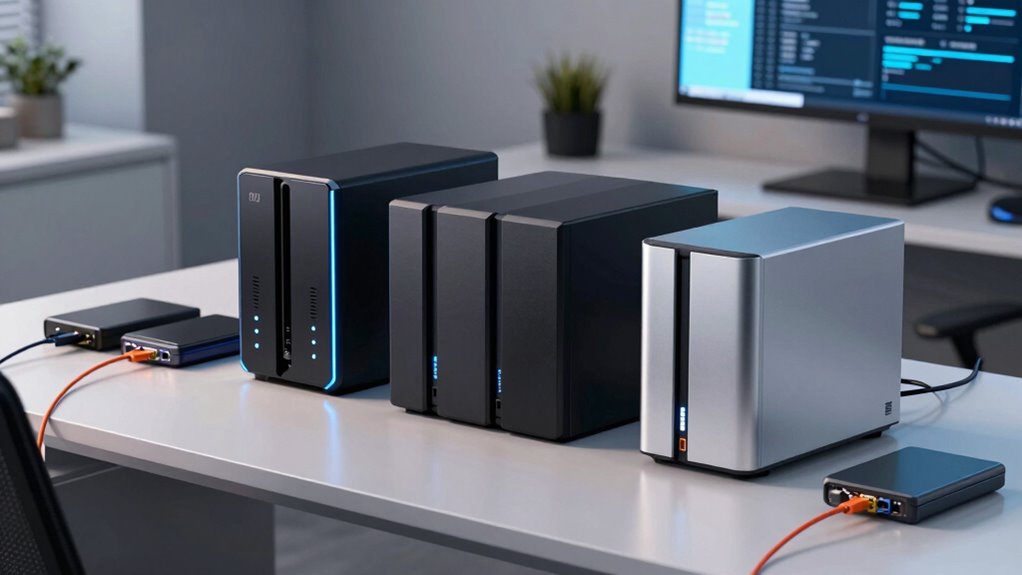
When choosing NAS and backup storage, the key considerations are performance, ease of use, expandability, and value. The Synology DS223 stands out as the best overall for its balance of features and user-friendly setup. For those seeking simplicity, the UGREEN NAS DH2300 offers straightforward, reliable storage ideal for beginners. Meanwhile, the Yxk Zero1 caters to advanced users needing high capacity and flexible features like Docker support. Buyers face tradeoffs between raw performance, ease of configuration, and cost—continue reading for a full breakdown of the top contenders and what suits your needs best.

Get business pricing on monitors, keyboards and dev gear
- Business-only prices and quantity discounts
- Tax-exempt purchasing
- Multiple users, one account, clear invoices
Key Takeaways
- The best NAS solutions balance ease of setup with reliable performance, especially for home and small office use.
- High capacity and advanced features like Docker support are mostly found in premium or enterprise-grade models.
- Diskless NAS options offer flexibility but require compatible drives and more technical knowledge to set up properly.
- Value-packed models like UGREEN’s offerings provide good performance at budget-friendly prices, but may lack some advanced features.
- Prioritizing hardware transcode or remote access features makes sense only if those are core to your backup or media needs.
| Synology DS223 2-Bay Diskless NAS Home & Office Backup Hub |  | Best Overall for Versatile Home & Office Backup | Model: DS223 | Type: 2-Bay Diskless NAS | Features: File sharing, automated backups, surveillance support | VIEW ON AMAZON | See Our Full Breakdown |
| UGREEN NAS DH2300 2-Bay Personal Storage for Beginners & Home Use |  | Best Value for Easy, Secure Personal Storage | Capacity: Up to 64TB (drives not included) | Processor: High-performance | RAM: 4GB | VIEW ON AMAZON | See Our Full Breakdown |
| Synology 2-Bay DiskStation DS223j (Diskless) |  | Best for Private Cloud Storage and Easy File Sharing | Storage Bays: 2 | Model: DS223j | Type: Diskless NAS | VIEW ON AMAZON | See Our Full Breakdown |
| BUFFALO LinkStation 210 6TB 1-Bay NAS Network Attached Storage with HDD Included |  | Best for Simple, Ready-to-Use Centralized Storage | Capacity: 6TB | Number of Bays: 1 | Included Hard Drives: Yes | VIEW ON AMAZON | See Our Full Breakdown |
| UGREEN NAS DXP2800 2-Bay for Advanced Home Users, Remote Workers & Creators |  | Best for Power Users with Demanding Storage Needs | Processor: Intel N100 Quad-Core | RAM: 8GB DDR5 | Network: 2.5GbE | VIEW ON AMAZON | See Our Full Breakdown |
| Yxk Zero1 2-Bay Desktop NAS with 2.5GbE, Support for Docker, 60TB Capacity (Diskless), Remote Access, 4GB RAM, 4K HDMI |  | Best for Beginners and Media Enthusiasts | Maximum Capacity: 60TB (Diskless) | Number of Bays: 2 | Network Speed: 2.5GbE | VIEW ON AMAZON | See Our Full Breakdown |
| Synology DS225+ Private Cloud Media Server – 2-Bay Diskless NAS with Intel CPU for Hardware Transcoding |  | Best for Media Streaming and Small-Scale Cloud Storage | Model: DS225+ | Type: 2-Bay Diskless NAS | Processor: Intel CPU | VIEW ON AMAZON | See Our Full Breakdown |
| Synology BeeStation 4TB Personal Cloud Storage Device |  | Best for Simple, Family-Oriented Cloud Storage | Storage Capacity: 4TB | Device Type: Personal Cloud Storage | Connectivity: Web, Desktop, Mobile | VIEW ON AMAZON | See Our Full Breakdown |
| UGREEN NAS DH2300 2-Bay Desktop Network Attached Storage (Diskless) Bundle with Cat8 Ethernet Cable |  | Best for Beginners Seeking Large Capacity and AI Features | Type: 2-Bay NAS | Connectivity: 1GbE port | RAM: 4GB LPDDR4X | VIEW ON AMAZON | See Our Full Breakdown |
More Details on Our Top Picks
Synology DS223 2-Bay Diskless NAS Home & Office Backup Hub
The Synology DS223 stands out for its ability to serve both home and small office environments with a focus on data centralization and surveillance. Compared to the Ugreen NAS DH2300, it offers more advanced surveillance features and better multi-device collaboration, making it a more comprehensive backup hub. However, it requires initial setup and additional drives, which could be a hurdle for less tech-savvy users. This model is ideal for those who want a flexible, all-in-one solution that combines file sharing, backup automation, and DIY security monitoring. Its main tradeoff is the setup complexity, especially for surveillance, which might be too involved for casual users.
Pros:- Supports multiple device backups and file collaboration
- Includes DIY IP camera surveillance with remote monitoring
- Flexible configuration with no pre-installed drives
Cons:- Requires setup and configuration, especially for surveillance
- Additional cost for drives and setup time
Best for: Small businesses or tech-savvy home users needing a flexible, multi-purpose NAS with surveillance capabilities
Not ideal for: Non-technical users or those seeking an out-of-the-box, plug-and-play backup solution without surveillance features
- Model:DS223
- Type:2-Bay Diskless NAS
- Features:File sharing, automated backups, surveillance support
- Warranty:2 years
Our verdict“This is best for users who want a customizable, multi-feature NAS that combines backup, file sharing, and surveillance but are prepared for initial setup complexity.”
UGREEN NAS DH2300 2-Bay Personal Storage for Beginners & Home Use
The UGREEN NAS DH2300 makes a solid choice for beginners wanting straightforward storage and backup, especially compared with the more complex Synology DS223. It excels in simple setup, automatic backups, and AI-driven photo organization, but falls short on advanced features like Docker support or virtual machines. Its limited network options and lack of Wi-Fi support without adapters mean it’s best suited for users with wired connections who prioritize security and ease of use. This device is perfect for home users who want reliable, secure storage that is easy to manage without deep technical knowledge. The main tradeoff is its limited expandability and feature set compared to higher-end models.
Pros:- Simple setup and user-friendly interface
- Supports automatic backups across multiple devices
- AI-powered photo organization and security features
Cons:- No Wi-Fi support without external adapter
- Limited to basic storage functions
Best for: Home users seeking an easy-to-use, secure backup device with automatic features and AI photo management
Not ideal for: Power users or those needing advanced virtual machine or Docker support
- Capacity:Up to 64TB (drives not included)
- Processor:High-performance
- RAM:4GB
- Network:1GbE
- Speed:125MB/s
- Security:RAID, two-factor authentication, encryption
Our verdict“This pick is ideal for users who prioritize ease and security for personal backup and media management without needing advanced features.”
Synology 2-Bay DiskStation DS223j (Diskless)
The Synology DS223j is a reliable choice for private cloud storage, with a focus on secure access and automated backups, similar to the DS223 but with fewer surveillance features. Its strength lies in its straightforward setup for secure, multi-platform file sharing and remote access, but it’s limited to only 2 bays, which caps expansion. Compared to the BUFFALO LinkStation 210, it offers better software support and ongoing updates, though it’s less straightforward for users who only need simple storage without the need for remote monitoring or advanced security.
Pros:- Secure private cloud with multi-platform access
- Supports remote monitoring with IP cameras
- Automated backup and easy file sharing
Cons:- Requires setup and configuration
- Limited to 2 bays and basic features
Best for: Home users or small teams needing secure, easy-to-manage cloud storage with remote access
Not ideal for: Users requiring high capacity or advanced surveillance features, or those wanting plug-and-play simplicity
- Storage Bays:2
- Model:DS223j
- Type:Diskless NAS
- Warranty:2 years
Our verdict“Ideal for individuals or small teams needing secure, accessible cloud storage with basic backup and sharing capabilities.”
BUFFALO LinkStation 210 6TB 1-Bay NAS Network Attached Storage with HDD Included
The BUFFALO LinkStation 210 offers a straightforward, ready-to-go storage solution with 6TB capacity, perfect for users who want an easy setup without fuss. Compared to the UGREEN NAS DH2300, it includes pre-installed drives, simplifying initial use, but its single-bay design limits expandability. It’s a reliable choice for basic home or small office backup needs, with US-based support and simple file sharing. However, it lacks advanced cloud features or multi-drive configurations, making it less suitable for users who plan to scale or need more complex setups.
Pros:- Pre-installed 6TB drive for instant use
- Easy to set up and manage
- Supports secure file sharing with access restrictions
Cons:- Limited to 1 drive bay, restricting expandability
- No support for advanced cloud or multi-drive RAID configurations
Best for: Home users or small offices needing a plug-and-play, high-capacity backup device with included drives
Not ideal for: Power users or those seeking expandable storage or advanced cloud integrations
- Capacity:6TB
- Number of Bays:1
- Included Hard Drives:Yes
- Supported OS:Windows, macOS
- Warranty:2 years
- Support:24/7 US-based
Our verdict“Best suited for users who want a simple, reliable backup device with included drives and minimal setup.”
UGREEN NAS DXP2800 2-Bay for Advanced Home Users, Remote Workers & Creators
The UGREEN NAS DXP2800 provides robust hardware for demanding users, with support for up to 80TB, making it ideal compared to the Synology DS223 or DS223j for large data workloads. Its quad-core Intel CPU and DDR5 RAM enable handling of large files, virtual machines, and intensive workflows, but it requires separate drives, adding to initial costs. The extensive features, including AI home surveillance and multi-device compatibility, appeal to creative professionals and remote workers willing to invest in a high-performance setup. Nevertheless, its complexity and need for compatible drives make it less suitable for casual users or those seeking simple backup solutions.
Pros:- Powerful hardware with quad-core CPU and DDR5 RAM
- Supports up to 80TB storage with flexible drive options
- AI-powered surveillance and multi-device management
Cons:- Drives sold separately, increasing initial investment
- Requires technical knowledge for setup and drive compatibility
Best for: Advanced home users, content creators, or remote professionals managing large files and workloads
Not ideal for: Casual users or those looking for an easy, all-in-one plug-and-play NAS without additional drive costs
- Processor:Intel N100 Quad-Core
- RAM:8GB DDR5
- Network:2.5GbE
- Drive Bays:2 HDD + 2 M.2 NVMe SSD
- Max Storage:80TB
- HDDs/SSDs Included:No
Our verdict“This NAS is best for tech-savvy power users seeking a high-capacity, high-performance storage and security solution for demanding workloads.”
Yxk Zero1 2-Bay Desktop NAS with 2.5GbE, Support for Docker, 60TB Capacity (Diskless), Remote Access, 4GB RAM, 4K HDMI
The Yxk Zero1 stands out for its simplicity and versatility, making it ideal for users new to NAS while still offering features like Docker support for more advanced setups. Unlike the Synology DS225+ that emphasizes media transcoding and surveillance, this model focuses on ease of use and fast network transfer with 2.5GbE, perfect for personal backups and media streaming. Its compact design and quiet operation suit home environments, but the need to purchase drives separately adds an extra step for setup. If you want an entry-level NAS that balances performance with straightforward operation, this makes a compelling choice. However, the limited two-bay configuration restricts future storage expansion, and the absence of included drives means initial costs are higher.Pros:- Easy to set up and use, even for beginners
- Fast data transfer with 2.5GbE connectivity
- Supports Docker, enabling container-based applications
- Compact, quiet design suitable for home use
Cons:- Hard drives must be purchased separately, increasing initial cost
- Limited to 2 bays, restricting future storage expansion
- No included drives, so setup is more involved
Best for: Beginners seeking a straightforward, quiet NAS for personal data backup and media streaming.
Not ideal for: Power users needing large-scale storage or enterprise-level features, as it lacks multi-drive redundancy options.
- Maximum Capacity:60TB (Diskless)
- Number of Bays:2
- Network Speed:2.5GbE
- RAM:4GB
- Supports:Docker, Remote Access, 4K HDMI
- Weight:2kg
Our verdict“This NAS is best for beginners who want a simple, reliable device for personal backups and media without complex features.”
Synology DS225+ Private Cloud Media Server – 2-Bay Diskless NAS with Intel CPU for Hardware Transcoding
The Synology DS225+ excels in media-rich environments thanks to its Intel CPU, supporting 4K streaming and hardware transcoding, making it ideal for households and small offices. Compared to the UGREEN NAS DH2300, which offers larger capacity and AI photo features, the DS225+ emphasizes media and data protection—its automated backup features and RAID support provide a robust backup solution. While it requires users to add disks, its processing power and surveillance options with AI detection make it more versatile for multimedia and small-scale security needs. Its setup can be complex for novices, but advanced users will appreciate its flexibility. It’s less suited for those needing simple storage or large capacities without additional disks.Pros:- Supports 4K media streaming and hardware transcoding
- Automated backups and RAID redundancy for data protection
- Supports surveillance cameras with AI detection
- Reliable performance with Intel CPU
Cons:- Requires additional disks for capacity
- Setup can be complex for non-technical users
- No included drives, adding to initial cost
Best for: Media enthusiasts and small business users who need reliable 4K streaming, cloud storage, and backup with some surveillance support.
Not ideal for: Beginners or users seeking a straightforward, plug-and-play NAS without the need for additional disks or complex setup.
- Model:DS225+
- Type:2-Bay Diskless NAS
- Processor:Intel CPU
- Transfer Speed:282 MB/s
- Surveillance Support:Up to 30 IP cameras
- Warranty:3 years
Our verdict“This NAS is best for users who prioritize media, backups, and surveillance capabilities in a small-scale environment.”
Synology BeeStation 4TB Personal Cloud Storage Device
The Synology BeeStation offers a straightforward solution for families wanting easy access and sharing, with quick setup via QR code and compatibility with major cloud services. Compared to the UGREEN NAS DH2300, which emphasizes larger capacity and AI photo features, the BeeStation prioritizes simplicity and cross-device access. It’s limited to 4TB, which may not suffice for users with extensive storage needs, and reliance on internet connectivity can hinder remote access when offline. This device is perfect for those seeking a hassle-free, personal cloud that integrates seamlessly with existing cloud services, though it falls short for heavy data storage or offline workflows.Pros:- Simple setup with QR code for quick deployment
- Accessible from multiple devices and platforms
- Supports file synchronization and cross-platform backups
- Compatible with major cloud services
Cons:- Limited storage capacity for large data needs
- Requires internet for remote access and sharing
- Not suitable for offline or high-capacity storage
Best for: Families and individuals needing quick, easy-to-use personal cloud storage for moderate data sharing and backups.
Not ideal for: Power users or those with large media libraries, as its 4TB capacity is limiting and remote access depends on internet connection.
- Storage Capacity:4TB
- Device Type:Personal Cloud Storage
- Connectivity:Web, Desktop, Mobile
- Compatibility:Google Drive, OneDrive, Dropbox, External Drives
Our verdict“This device suits families looking for an easy, cross-device personal cloud for moderate storage and sharing needs.”
UGREEN NAS DH2300 2-Bay Desktop Network Attached Storage (Diskless) Bundle with Cat8 Ethernet Cable
The UGREEN NAS DH2300 targets entry-level users who want a sizeable storage solution with AI-driven photo organization. It supports up to 64TB, making it suitable for those needing substantial space without cloud subscription fees. Its AI features simplify photo management, and the included Cat8 Ethernet cable ensures fast wired connections. Compared to the Synology DS225+, which focuses on media and surveillance, the UGREEN model emphasizes storage capacity and AI capabilities, but it lacks support for Docker or virtual machines, limiting advanced customization. Its straightforward setup and limited advanced features make it perfect for beginners, though power users may find it too basic.Pros:- Supports large capacity up to 64TB
- AI-powered photo organization and duplicate detection
- Easy to set up with included Ethernet cable
- Supports multiple external drives for backups
Cons:- Does not support Docker or virtual machines
- Requires separate drives (diskless bundle)
- Limited advanced features for power users
Best for: Beginners and families who want large storage capacity with AI photo management on a budget.
Not ideal for: Power users or those needing advanced server features, such as Docker support or virtual machines, as it lacks these capabilities.
- Type:2-Bay NAS
- Connectivity:1GbE port
- RAM:4GB LPDDR4X
- Max Capacity:64TB
- Included Cable:10FT Cat8 Ethernet
Our verdict“This NAS is ideal for beginners seeking large, organized storage with AI features without complex setup or enterprise features.”

How We Picked
Our selection process focused on evaluating each product’s performance, usability, build quality, and expandability. We considered whether the NAS was suitable for different user levels—from beginners to advanced users—and how well it integrated with existing setups. Cost was also a factor, especially in relation to features and capacity. The ranking reflects a balance between value, feature set, and overall reliability, ensuring each pick addresses specific user needs while avoiding overly niche or underperforming options.Factors to Consider When Choosing Nas And Backup Storage
Choosing the right NAS and backup storage depends on understanding your specific needs and potential future growth. Consider how much data you need to store, your technical comfort level, and whether features like remote access or media transcoding are important. The right device should balance cost and capabilities without overwhelming your setup or leaving critical features out. Keep in mind that investing in a slightly higher capacity or better hardware can save headaches later.Capacity and Scalability
Assess your current storage needs and consider future growth. Smaller setups can often get by with 2-bay NAS devices, but if you anticipate significant data increases, models with higher capacities or expansion options are worth the extra investment. Diskless models offer flexibility but require purchasing drives separately, adding complexity. Choose a solution that can grow with you without forcing a costly upgrade too soon.
Ease of Use and Setup
If you’re new to NAS, look for options that offer intuitive interfaces, guided setup procedures, and strong customer support. Models from brands like Synology tend to excel here. More advanced users may prefer systems that support Docker, virtual machines, or custom configurations, which can be more complex but offer greater flexibility. Avoid overly complicated setups if your technical skills are limited.
Performance and Connectivity
Performance depends on processor speed, RAM, and network interfaces. For media streaming or backups over remote connections, features like hardware transcoding or 2.5GbE ports matter. Cheaper models may struggle with high data loads or multiple users, so match your choice with your expected usage. Consider wired connections over Wi-Fi for maximum reliability and speed, especially in larger networks.
Build Quality and Reliability
A well-built NAS ensures longevity and consistent performance. Look for sturdy enclosures, reliable drives, and good thermal management. Brands with a reputation for firmware updates and customer support, like Synology or Buffalo, tend to offer better long-term reliability. Cheap or no-brand models may save money upfront but risk more frequent failures or data loss.
Cost vs. Features
Balance your budget with the features you need most. Basic models can handle simple backups and file sharing, while premium options add features like remote access, media transcoding, or virtualization. Avoid paying for features you won’t use, but also be cautious of models that cut corners on essential performance or durability to keep costs low. Prioritize core needs first, then expand if your budget allows.
Frequently Asked Questions
Can I use a NAS for both backup and media streaming?
Yes, many NAS devices are designed to handle both backup and media streaming efficiently. Devices like Synology DS225+ include hardware transcoding, making media playback smooth on various devices. The key is selecting a NAS with sufficient processing power and network interfaces, and ensuring it has the right software support. Keep in mind that running multiple functions may require a more capable model to avoid performance bottlenecks.
Is a diskless NAS a good choice for beginners?
Diskless NAS units can be suitable for beginners willing to invest time in setup, as they offer flexibility to choose and upgrade drives. However, they require some technical knowledge to set up drives, configure RAID, and manage network settings. If you prefer a plug-and-play experience, models with pre-installed drives might be better. Diskless options are more cost-effective but demand a higher comfort level with hardware installation.
How important are remote access features for NAS storage?
Remote access features are highly beneficial if you need to access your files from outside your local network or share data with colleagues. Many NAS devices offer apps or web portals for secure remote login. However, enabling remote access introduces security risks, so choosing a device with strong encryption and update policies is vital. If remote access isn’t a priority, a simpler local-only device might suffice and be easier to manage securely.
Should I prioritize hardware transcode support in my NAS?
Hardware transcode support is valuable if you plan to stream media to multiple devices or use the NAS as a media server. It allows real-time conversion of videos into compatible formats, reducing lag and buffering. However, it adds cost and complexity, which may be unnecessary if your main goal is backups or file sharing. Consider your media usage patterns before paying extra for this feature.
Is a higher capacity NAS always better?
Not necessarily. While higher capacity provides room for growth, it also comes at increased cost and power consumption. Smaller, more manageable capacities can be sufficient for many users, especially if they plan to replace drives or offload data regularly. Evaluate your current needs and future plans—overspending on capacity can lead to unused storage, while underestimating needs may require costly upgrades later.
Conclusion
For most home users or small offices, the Synology DS223 offers a well-rounded package of performance, ease of use, and expandability. Those on a tighter budget will appreciate the UGREEN NAS DH2300 for its simplicity and value. Advanced users or creative professionals needing high capacity and flexible features should consider the Yxk Zero1. If you prioritize media transcoding or remote access, a premium model like the Synology DS225+ may be worth the investment. Ultimately, your choice depends on your specific storage needs, technical comfort, and budget constraints.
As an affiliate, we earn on qualifying purchases.Fall Picks
fall essentials