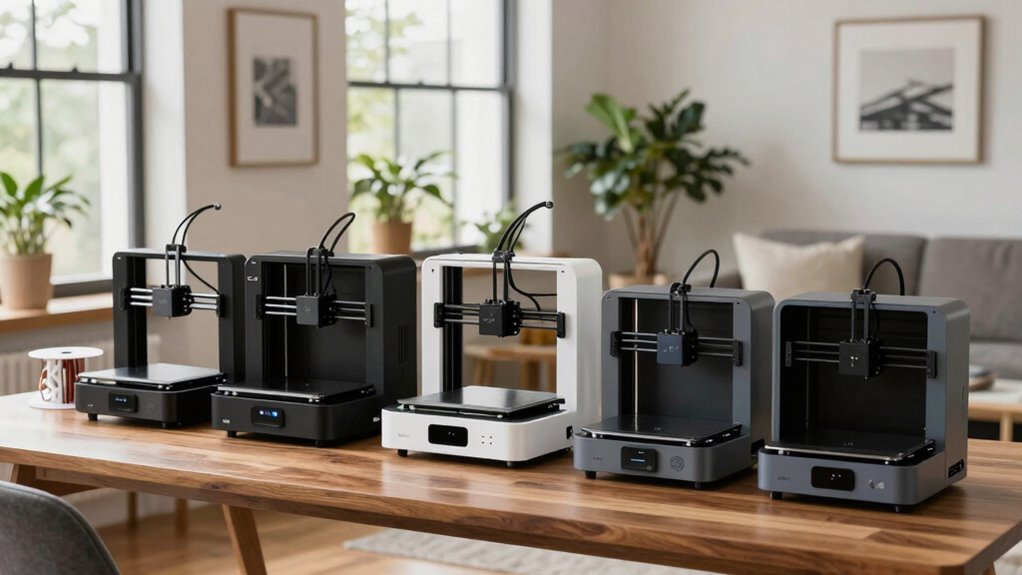

Finding a quiet 3D printer that fits into an apartment environment can be challenging, but several models stand out for their low noise levels and user-friendly features. The FlashForge Adventurer 5M offers high-speed printing with automatic leveling, making it a solid choice for those who prioritize efficiency. Meanwhile, the Bambu Lab A1 provides quiet operation combined with multi-color printing support, perfect for creative projects without disturbing neighbors. On the other hand, the Creality SPARKX i7 balances large build volume with noise reduction, ideal for more ambitious prints. Each of these models has tradeoffs—whether in price, setup complexity, or multi-material capabilities—that influence who they are best suited for.

Get business pricing on monitors, keyboards and dev gear
- Business-only prices and quantity discounts
- Tax-exempt purchasing
- Multiple users, one account, clear invoices
Complete the kit


Key Takeaways
- Quiet operation is achievable in a variety of printer designs, from all-metal cores to active noise canceling.
- Advanced features like auto calibration and remote monitoring are common in higher-end models and enhance user experience.
- Multi-color and multi-material capabilities tend to add noise or complexity, so consider your true needs.
- Large build volumes are available in quieter models, but often come with higher price tags.
- Beginners should prioritize ease of setup and quiet operation over speed or multi-color features.
| FlashForge Adventurer 5M 3D Printer with Auto Leveling and High-Speed Printing |  | Best Overall for Speed and Precision | Print Size: 220x220x220mm | Max Speed: 600mm/s | Extruder Temperature: 280°C | VIEW ON AMAZON | See Our Full Breakdown |
| Bambu Lab A1 3D Printer, Ready-to-Use FDM 3D Printer for Beginners and Kids |  | Best for Quiet, Multi-Color Printing | Acceleration: 10,000 mm/s² | Multi-Color Printing: Supported with AMS lite | Auto Calibration: Full-auto calibration | VIEW ON AMAZON | See Our Full Breakdown |
| Creality SPARKX i7 3D Printer with AI Camera Monitoring, Auto Leveling, Quiet High-Speed Desktop Printing |  | Best for Large Volume and Smart Monitoring | Build Volume: 260×260×255mm | Hotend: Quick-swap hotend | Connectivity: WiFi | VIEW ON AMAZON | See Our Full Breakdown |
| Anycubic Kobra X Multicolor 3D Printer |  | Best for Multi-Color and Expandability | Color Capability: 4 colors built-in, expandable up to 19 | Build Volume: 260mm x 260mm x 260mm | Max Speed: 600mm/s | VIEW ON AMAZON | See Our Full Breakdown |
| Bambu Lab A1 Mini 3D Printer + LED Lamp Kit |  | Best for Beginners and Creative DIY | Compatibility: LED Lamp Kit included | Features: Automatic calibration, quiet operation, high-speed printing | Ecosystem: MakerWorld, Bambu Handy app | VIEW ON AMAZON | See Our Full Breakdown |
More Details on Our Top Picks
FlashForge Adventurer 5M 3D Printer with Auto Leveling and High-Speed Printing
The FlashForge Adventurer 5M stands out for its combination of quick setup, high-speed capabilities, and reliable auto bed leveling. Its CoreXY all-metal structure supports rapid printing up to 600mm/s, making it attractive for those who value efficiency. However, at maximum speeds, noise levels can increase significantly, which may be a concern for apartment settings. Compared to the Bambu Lab A1, it’s less focused on multi-color printing but excels in straightforward, fast production. Its complex setup could challenge beginners, but experienced users will appreciate the versatility.
Pros:- Automatic bed leveling for easy setup
- High-speed printing up to 600mm/s
- Real-time app monitoring for convenience
- Versatile nozzle options and quick nozzle swaps
Cons:- Potentially high noise levels at maximum speed
- Limited filament compatibility with direct drive extruder
- Complex setup may require technical skills
Best for: Those who need high-speed, precise prints with a focus on efficiency and don’t mind managing some noise at peak speeds.
Not ideal for: Quiet-focused users or those seeking simple plug-and-play operation without noise concerns.
- Print Size:220x220x220mm
- Max Speed:600mm/s
- Extruder Temperature:280°C
- Nozzle:3S Detachable Nozzle
- Structure:CoreXY All Metal
- Warm-up Time:35 seconds
Our verdict“Best suited for experienced users prioritizing speed and precision over noise levels.”
Bambu Lab A1 3D Printer, Ready-to-Use FDM 3D Printer for Beginners and Kids
The Bambu Lab A1 excels in delivering quiet operation thanks to active motor noise canceling, making it ideal for apartment environments. Its automatic calibration and support for multi-color printing with AMS lite streamline the process, especially for beginners or those who want vibrant, detailed results. Compared with the FlashForge Adventurer 5M, this model is less focused on high-speed printing but offers a much quieter experience. Its support for multi-color projects adds creativity without significant noise tradeoffs. However, multi-color printing requires additional purchase of the AMS lite unit, which could be an extra step for new users.
Pros:- Quiet operation with active noise canceling
- Automatic calibration simplifies setup
- Supports multi-color printing for vibrant designs
- User-friendly interface
Cons:- Requires AMS lite for multi-color printing, which involves extra cost
- Limited information about pricing and ratings
- Not designed for professional-grade production
Best for: Beginners and creative users seeking quiet, multi-color printing without complex setup.
Not ideal for: Professional or high-speed users who don’t prioritize noise reduction or multi-material support.
- Acceleration:10,000 mm/s²
- Multi-Color Printing:Supported with AMS lite
- Auto Calibration:Full-auto calibration
- Flow Rate:Active flow rate compensation
- Nozzle:1-Clip quick swap
- Noise Level:Active motor noise canceling
Our verdict“Ideal for hobbyists and beginners who want quiet, colorful prints in a straightforward package.”
Creality SPARKX i7 3D Printer with AI Camera Monitoring, Auto Leveling, Quiet High-Speed Desktop Printing
The Creality SPARKX i7 offers a large build volume combined with quiet operation, making it appealing for more ambitious projects in an apartment setting. Its automatic bed leveling and AI camera monitoring facilitate easy, reliable prints, especially for users who want remote oversight. While it supports multi-color printing via optional accessories, the setup can be complex for beginners. Compared with the Bambu Lab A1, it provides a larger print space but may require more investment in accessories and setup time. Its quiet operation helps keep noise levels manageable during long or large prints.
Pros:- Automatic bed leveling simplifies initial setup
- Smart camera for remote monitoring
- Quiet operation during high-speed printing
- Large build volume supports bigger projects
Cons:- Multi-color printing needs optional CFS Lite system
- Some features require extra setup or accessories
- Price range not specified
Best for: Enthusiasts needing a large build volume with remote monitoring and quiet operation.
Not ideal for: Those seeking a straightforward, plug-and-play experience or casual hobbyists.
- Build Volume:260×260×255mm
- Hotend:Quick-swap hotend
- Connectivity:WiFi
- Build Plate:PEI
- Features:Auto leveling, smart camera, quiet operation, expandable multi-color system
Our verdict“Best for experienced users who want large-scale printing with quiet operation and remote management.”
Anycubic Kobra X Multicolor 3D Printer
The Anycubic Kobra X offers built-in four-color capability with the option to expand to 19 colors, making it a versatile choice for multi-material projects. It features LeviQ 3.0 bed leveling for high precision and supports various materials like PLA, PETG, and TPU. Its high-speed, quiet operation makes it suitable for home environments, but setup can be complex for newcomers, especially when expanding color options or integrating additional features. Compared to simpler models like the Mini, it provides more color options but at the cost of increased setup complexity and potential noise from multiple extruders.
Pros:- Multi-color printing with expandable palette
- Fast, high-precision printing
- Advanced bed leveling for perfect first layers
- Supports multiple filament types
Cons:- Complex setup for beginners
- Limited compatibility with some units
- Can be noisy during multi-color operations
Best for: Creative users looking for multi-color printing with expandability, not for those seeking simplicity.
Not ideal for: Beginners or those who want a straightforward, quiet printer without multi-material complexity.
- Color Capability:4 colors built-in, expandable up to 19
- Build Volume:260mm x 260mm x 260mm
- Max Speed:600mm/s
- Nozzle Temperature:300℃
- Connectivity:Dual-band Wi-Fi, LAN
Our verdict“Designed for experienced makers who want multi-color flexibility in a quiet, high-performance package.”
Bambu Lab A1 Mini 3D Printer + LED Lamp Kit
The Bambu Lab A1 Mini is tailored for newcomers and DIY enthusiasts aiming for quiet, reliable printing. Its automatic calibration and simple setup minimize frustration, while the included LED Lamp Kit adds a creative touch to projects. It supports a connected ecosystem through MakerWorld and Bambu Handy app, making print management straightforward. Compared with larger, more feature-rich models, it’s less suited for complex multi-color or multi-material projects, but its quiet operation and ease of use make it an excellent starter printer for home décor and gifts.
Pros:- Easy setup and use for beginners
- Quiet, reliable operation
- Includes LED Lamp Kit for creative projects
- Supports connected management via app
Cons:- Limited advanced features
- Compatibility needed for LED lamp projects
- Not suitable for complex multi-color printing
Best for: Beginners and hobbyists seeking a quiet, easy-to-use 3D printer with creative potential.
Not ideal for: Professional or high-volume production users needing advanced features or multi-material support.
- Compatibility:LED Lamp Kit included
- Features:Automatic calibration, quiet operation, high-speed printing
- Ecosystem:MakerWorld, Bambu Handy app
- Intended Use:Beginners, DIY, home décor, gifts
Our verdict“Perfect for newcomers and casual users wanting quiet, creative 3D printing at home.”

How We Picked
We focused on printers explicitly designed or optimized for quiet operation, prioritizing models with noise-reduction features such as active motor noise canceling and sound-dampening enclosures. We also examined user reviews, technical specifications, and feature sets to determine which printers balance low noise with reliable performance. The selection includes a mix of entry-level, mid-range, and premium options to match different budgets and use cases, emphasizing ease of use for apartment dwellers who need a quieter environment.
Factors to Consider When Choosing Quiet 3d Printers For Apartments
Choosing a quiet 3D printer for an apartment involves balancing noise levels with features like print volume, ease of use, and multi-material support. Key considerations include sound damping technology, enclosure design, and operational noise from motors and fans. For those prioritizing simplicity and quiet performance, models with active noise canceling and minimal moving parts tend to excel. If you need large build volumes or multi-color options, be prepared for some tradeoffs in noise or complexity. This guide helps clarify which features matter most for apartment-friendly 3D printing.Understanding Noise Levels
Most 3D printers produce some noise during operation, primarily from fans, motors, and stepper drivers. The best quiet models incorporate active noise canceling, sound-dampening enclosures, or optimized motor control. For apartment use, consider printers with built-in noise reduction features or those that can be placed inside sound-absorbing enclosures for additional quietness. Recognize that higher speeds and large fans generally increase noise, so prioritize models where noise reduction is explicitly a feature.
Key Features for Apartment-Friendly 3D Printing
Look for automatic bed leveling to reduce setup noise and hassle, as manual leveling often involves multiple adjustments. Quiet operation is often paired with features like remote monitoring, which minimizes the need to be physically near the machine during long prints. Compact size and enclosed designs help contain sound and reduce disturbance. Multi-color or multi-material support adds flexibility but can introduce noise and complexity, so consider whether your printing needs justify these features.
Tradeoffs to Keep in Mind
While quieter printers tend to be less aggressive in speed or multi-material options, some models do strike a good balance. Enclosed printers may cost more but significantly reduce noise and fumes. More advanced models with active noise canceling or soundproofing are often priced higher and may require additional setup steps. Weigh your priorities: if noise is your main concern, focus on models specifically designed for quiet operation even if that means sacrificing some speed or size.
Frequently Asked Questions
Do quiet 3D printers cost more than standard models?
In general, quiet 3D printers tend to be priced higher because they incorporate specialized noise reduction features, active noise canceling, or enclosures that add to manufacturing costs. However, this investment can be worthwhile for apartment dwellers who need a peaceful environment, especially if you plan to print frequently or during quiet hours.
Can I make any 3D printer quieter?
While some modifications like adding soundproof enclosures or damping pads can reduce noise levels, not all printers are equally adaptable. Devices with active noise canceling motors or designed with noise reduction in mind will benefit most. For best results, choose a model that already emphasizes quiet operation rather than relying solely on aftermarket modifications.
Is enclosed printing necessary for quiet operation?
Enclosures can significantly reduce noise and contain fumes, making them highly recommended for apartment use. They also help maintain stable temperatures, which can improve print quality. However, they often come with higher costs and may require additional space, so evaluate whether an enclosed design aligns with your environment and budget.
How important is print volume in choosing a quiet 3D printer?
Print volume is a key factor depending on your projects. Larger build sizes are often found in more robust or less compact machines, which can generate more noise. Many quiet models focus on smaller or mid-sized prints to conserve space and reduce operational noise. Decide on your typical project size to select a model that balances quietness with your needs.
Are multi-color or multi-material printers usually noisier?
Yes, multi-color and multi-material printers tend to be noisier because they often involve multiple extruders or additional moving parts, which increase mechanical noise. While some advanced models incorporate quiet motors and sound-dampening features, expect a slight increase in noise compared to single-material, single-color printers. Consider your project requirements carefully when choosing between multi-color capabilities and quiet operation.
Fall Picks
fall essentials
As an affiliate, we earn on qualifying purchases.