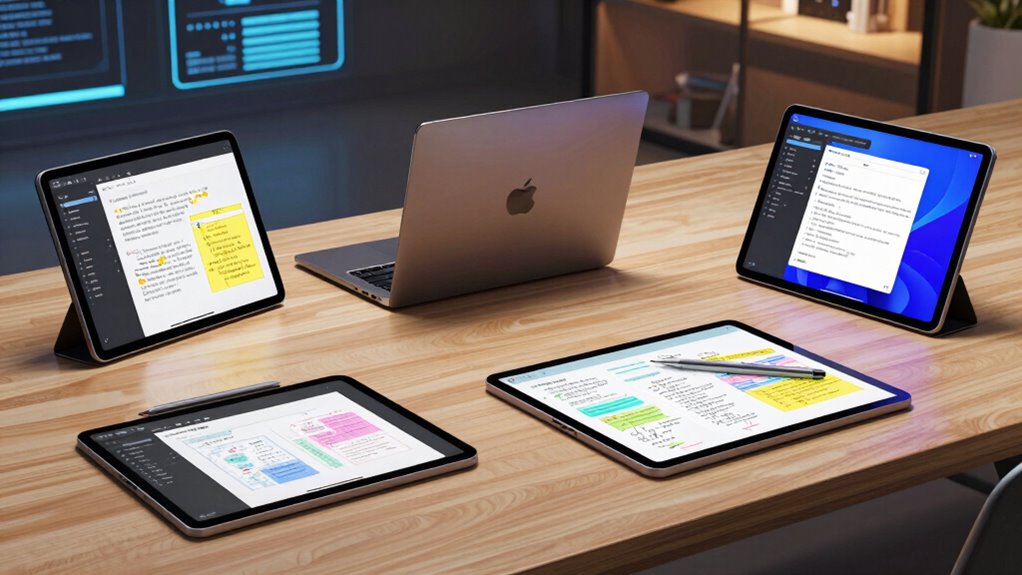

Choosing the right tablet for note taking and code review involves balancing display quality, stylus support, processing power, and portability. In 2026, the market offers versatile options, from high-resolution LCDs to specialized E Ink screens. Among the top picks, the Lenovo Idea Tab College stands out for its vivid 2.5K display and long battery life, making it a great all-rounder. The TCL Note A1 NXTPAPER offers a smooth 120Hz refresh rate and a high-pressure stylus, ideal for detailed writing and sketching. Meanwhile, the BOOX Note Air 5 C caters to those who prefer E Ink technology for extended reading and note-taking without glare. Each highlights distinct strengths, but also carries specific tradeoffs like display vibrancy or refresh speed that influence suitability based on your priorities.

Get business pricing on monitors, keyboards and dev gear
- Business-only prices and quantity discounts
- Tax-exempt purchasing
- Multiple users, one account, clear invoices
Key Takeaways
- High-resolution LCD tablets excel in vibrant visuals and fast refresh rates, ideal for code review and multimedia.
- E Ink tablets like the BOOX Note Air 5 C are best for extended reading and distraction-free note taking, but lack color vibrancy.
- Stylus support and pressure sensitivity are vital for precise note-taking; compatibility varies across devices.
- Processing power influences multitasking ability, especially for coding tasks; more powerful processors are found in premium models.
- Portability and battery life are key for on-the-go productivity, with some tablets offering all-day use and lightweight designs.
| Lenovo Idea Tab College Tablet 11″ 2.5K IPS Touchscreen, 90Hz, MediaTek Dimensity 6300, 8GB RAM, 256GB Storage, Pen & Folio Case |  | Best Overall for Versatile Use | Display: 11″ 2.5K IPS touchscreen | Refresh Rate: 90Hz | Processor: MediaTek Dimensity 6300 | VIEW ON AMAZON | See Our Full Breakdown |
| TCL Note A1 NXTPAPER Paper Tablet, 11.5″ 2.2K 120Hz Display, 8GB RAM, 256GB Storage |  | Best for Smooth Note Taking and Creativity | Display: 11.5-inch 2.2K NXTPAPER | Refresh Rate: 120Hz | Stylus: T-Pen Pro with 8192 pressure sensitivity | VIEW ON AMAZON | See Our Full Breakdown |
| BOOX Note Air 5 C 10.3″ E Ink Tablet with Color ePaper, 6GB RAM, 64GB Storage, Android 15 |  | Best for Long Reading and Distraction-Free Note Taking | Display: 10.3-inch Kaleido 3 color e-ink | Resolution: 2480 x 1860 B/W, 1240 x 930 color | Processor: Octa-core | VIEW ON AMAZON | See Our Full Breakdown |
| Samsung Galaxy Tab S10 Lite, 6GB RAM, 128GB Storage, 10.9” LCD, Gray |  | Best for Entertainment and All-Around Productivity | Display: 10.9-inch LCD | RAM: 6GB | Storage: 128GB | VIEW ON AMAZON | See Our Full Breakdown |
| TCL TAB A1 Plus NXTPAPER Android Tablet, 12.2″ 2.4K, 6GB RAM, 256GB Storage |  | Best for Large Screen Productivity and Reading | Display: 12.2″ 2.4K | Refresh Rate: 120Hz | Processor: Snapdragon 4 Gen 2 | VIEW ON AMAZON | See Our Full Breakdown |
| tablets for note taking and code review | Display | Storage | Processor | RAM |
|---|---|---|---|---|
| Lenovo Idea Tab College Tablet | 11" 2.5K IPS touchscreen | 256 GB | MediaTek Dimensity 6300 | — |
| TCL Note A1 NXTPAPER Paper Tab | 11.5-inch 2.2K NXTPAPER | 256GB | — | 8GB |
| BOOX Note Air 5 C 10.3" E Ink | 10.3-inch Kaleido 3 color e-ink | 64GB | Octa-core | 6GB |
| Samsung Galaxy Tab S10 Lite | 10.9-inch LCD | 128GB | Exynos 1380 | 6GB |
| TCL TAB A1 Plus NXTPAPER Andro | 12.2" 2.4K | 256GB | Snapdragon 4 Gen 2 | 6GB + up to 10GB virtual RAM |
More Details on Our Top Picks
Lenovo Idea Tab College Tablet 11″ 2.5K IPS Touchscreen, 90Hz, MediaTek Dimensity 6300, 8GB RAM, 256GB Storage, Pen & Folio Case
The Lenovo Idea Tab College combines a high-resolution 2.5K IPS display with a 90Hz refresh rate, making it suitable for crisp visuals during code review or note-taking. Its MediaTek Dimensity 6300 provides enough processing power for multitasking, though it may lag behind premium tablets in intensive coding workflows. The stylus support is a major plus, especially with the included folio case that enhances productivity. However, it lacks cellular connectivity options, which limits its portability for on-the-go use. Compared to LCD-focused devices, its vivid display makes it better suited for multimedia-heavy tasks, but its price can be higher due to the premium screen and stylus features.
Pros:- High-resolution 2.5K display with vivid visuals
- Long battery life up to 12 hours
- Supports stylus input for note-taking and sketching
- Powerful MediaTek processor for multitasking
Cons:- No mention of cellular connectivity options
- Limited camera capabilities
- Potentially higher price due to premium features
Best for: Students and professionals looking for a balanced tablet with excellent display quality and stylus support.
Not ideal for: Users needing cellular connectivity or top-tier processing power for intensive coding tasks.
- Display:11″ 2.5K IPS touchscreen
- Refresh Rate:90Hz
- Processor:MediaTek Dimensity 6300
- Memory:8 GB RAM
- Storage:256 GB
- Battery Life:Up to 12 hours
Our verdict“A versatile and visually impressive tablet suited for students and casual professionals who value display quality and stylus support.”
TCL Note A1 NXTPAPER Paper Tablet, 11.5″ 2.2K 120Hz Display, 8GB RAM, 256GB Storage
The TCL Note A1 NXTPAPER shines with its 11.5-inch 2.2K display and 120Hz refresh rate, providing smooth visuals that enhance reading, note-taking, and creative work. Its stylus, the T-Pen Pro, offers 8192 pressure sensitivity, making it ideal for detailed sketches or handwriting. The AI-powered note management features further streamline workflows, and its lightweight, slim design boosts portability. The main tradeoff lies in its lack of cellular options and some software optimization needed after setup. Compared to LCD tablets, its refresh speed and pressure-sensitive stylus make it better suited for detailed writing and drawing, though color vibrancy may be less compared to LCD screens.
Pros:- High-resolution 2.2K display with 120Hz refresh rate
- Stylus with high pressure sensitivity
- AI features for converting handwritten notes
- Lightweight and portable
Cons:- No specific price info available
- Exact weight not specified
- Requires software updates for optimal performance
Best for: Students and creative professionals seeking smooth stylus input and high refresh rate visuals.
Not ideal for: Users requiring cellular connectivity or the most vibrant color displays for multimedia.
- Display:11.5-inch 2.2K NXTPAPER
- Refresh Rate:120Hz
- Stylus:T-Pen Pro with 8192 pressure sensitivity
- Storage:256GB
- RAM:8GB
- Battery:8000mAh
Our verdict“An excellent choice for those prioritizing fluid writing, sketching, and AI-enhanced note management in a lightweight package.”
BOOX Note Air 5 C 10.3″ E Ink Tablet with Color ePaper, 6GB RAM, 64GB Storage, Android 15
The BOOX Note Air 5 C employs a 10.3-inch color E Ink display, making it perfect for extended reading and simple note-taking without fatigue. Its support for various formats and running on Android 15 opens up a flexible environment for third-party apps. The stylus with pressure sensitivity enables precise notes and sketches, although the slower refresh rate of E Ink technology limits its use for animations or fast-paced editing. Compared with LCD tablets, it sacrifices vibrancy and responsiveness but gains battery longevity and eye comfort—ideal for long study sessions or reading-focused workflows.
Pros:- High-resolution color E Ink display
- Runs on Android 15 for app flexibility
- Stylus with pressure sensitivity
- Long-lasting battery life
Cons:- Color E Ink has darker or grayer appearance
- Slower refresh rates limit animations
- Limited color vibrancy compared to LCDs
Best for: Readers and writers who need prolonged use without eye strain or distractions.
Not ideal for: Users who require vibrant color displays or fast refresh rates for coding animations or multimedia editing.
- Display:10.3-inch Kaleido 3 color e-ink
- Resolution:2480 x 1860 B/W, 1240 x 930 color
- Processor:Octa-core
- RAM:6GB
- Storage:64GB
- Battery:3,700mAh
Our verdict“A specialized device for extended reading and distraction-free note taking, best suited for those prioritizing eye comfort over vibrancy.”
Samsung Galaxy Tab S10 Lite, 6GB RAM, 128GB Storage, 10.9” LCD, Gray
The Galaxy Tab S10 Lite offers a large 10.9-inch LCD with vibrant colors and a long battery life extending up to 16 hours, making it ideal for both entertainment and productivity. Its included S Pen provides a smooth writing experience, especially for note review or quick sketches. The device’s expandable storage up to 2TB through microSD is a notable advantage for users who need plenty of space for code snippets, documents, or media files. However, its internal storage is limited to 128GB without microSD, and some features are tied to the Samsung ecosystem. Compared to other high-end tablets, it balances affordability with strong multimedia capabilities.
Pros:- Large, vibrant 10.9-inch LCD display
- Long-lasting battery up to 16 hours
- Expandable storage up to 2TB
- Includes S Pen for notes and sketches
Cons:- Limited to 128GB internal storage without microSD
- Higher price compared to basic tablets
- Some features require additional Samsung devices
Best for: Users who want a large, vibrant screen with good battery life and expandable storage for coding and entertainment.
Not ideal for: Those needing the most powerful processor or a device with cellular connectivity built-in.
- Display:10.9-inch LCD
- RAM:6GB
- Storage:128GB
- Battery Life:Up to 16 hours
- Processor:Exynos 1380
Our verdict“A solid choice for multimedia and note-taking on the go, especially for users who value expandable storage and a large screen.”
TCL TAB A1 Plus NXTPAPER Android Tablet, 12.2″ 2.4K, 6GB RAM, 256GB Storage
The TCL TAB A1 Plus NXTPAPER stands out with its massive 12.2-inch 2.4K display, providing a paper-like view that reduces eye strain during extended reading or note-taking sessions. Its Snapdragon 4 Gen 2 processor ensures smooth multitasking, and with 6GB RAM plus virtual RAM, it handles demanding tasks with ease. The device’s AI features and versatile modes boost productivity, while the 10,000mAh battery supports hours of use. The main tradeoffs include limited details on software support and absence of cellular connectivity, which could affect on-the-go flexibility. Compared to smaller tablets, its large screen makes it more suitable for extensive work sessions and media consumption.
Pros:- Massive 12.2″ 2.4K display with paper-like view
- Powerful Snapdragon 4 Gen 2 processor
- Long-lasting 10,000mAh battery with fast charging
- Versatile modes and AI features
Cons:- Limited info on software updates or support
- No mention of 5G or cellular options
- Potentially higher price due to premium features
Best for: Power users who want a large, high-resolution screen for reading, note-taking, and streaming.
Not ideal for: Those needing cellular connectivity or a more compact device for portability.
- Display:12.2″ 2.4K
- Refresh Rate:120Hz
- Processor:Snapdragon 4 Gen 2
- RAM:6GB + up to 10GB virtual RAM
- Storage:256GB
- Battery:10,000mAh
Our verdict“An excellent large-screen tablet for productivity and reading, especially suited for those who prioritize display size and clarity.”

How We Picked
Our selection process focused on tablets that balance display quality, stylus support, processing performance, and portability, all crucial for effective note taking and code review. We examined user reviews, expert opinions, and technical specs, prioritizing devices with high-resolution screens, responsive stylus input, and sufficient RAM and storage for multitasking. Devices had to support versatile note-taking features, whether via stylus, handwriting recognition, or e-ink technology. We also considered battery life and build quality to ensure these tablets could sustain long work sessions on the move. Our goal was to identify options that cater to a range of needs from students and developers to creative professionals, emphasizing real-world tradeoffs over specs alone.
| tablets for note taking and code review | Processor |
|---|---|
| Lenovo Idea Tab College Tablet | MediaTek Dimensity 6300 |
| TCL Note A1 NXTPAPER Paper Tab | — |
| BOOX Note Air 5 C 10.3" E Ink | Octa-core |
| Samsung Galaxy Tab S10 Lite | Exynos 1380 |
| TCL TAB A1 Plus NXTPAPER Andro | Snapdragon 4 Gen 2 |
Factors to Consider When Choosing Tablets For Note Taking And Code Review
Selecting a tablet for note taking and code review depends on your primary workflow—whether you prioritize display quality, portability, or versatility. Key factors include screen size and resolution, stylus support, processing power, and battery life. Understanding how each feature impacts your productivity will help you make an informed decision. For heavy coding, a faster processor and more RAM are essential, while for extended reading or writing sessions, an E Ink display might be preferable despite some limitations in color and responsiveness.
Display Technology and Size
High-resolution LCD screens (like those on the Lenovo Idea Tab or Samsung Galaxy Tab S10 Lite) deliver vibrant visuals, making them ideal for detailed code review and multimedia tasks. Larger screens (12.2 inches or more) enhance productivity by providing more space for multitasking, but they may reduce portability. E Ink screens, such as on the BOOX Note Air 5 C, excel at long reading sessions with minimal eye strain but lack vibrancy and fast refresh rates, limiting their use for fast-paced editing or animations.
Stylus Support and Input Fidelity
A stylus with pressure sensitivity and palm rejection significantly improves note-taking accuracy. Devices like the TCL Note A1 and Samsung Galaxy Tab S10 Lite include styluses optimized for writing and sketching, which can be crucial for code review annotations or drawing diagrams. Compatibility and form factor matter—some tablets support styluses only via Bluetooth, while others have active digitizers integrated into the device. Consider your workflow and whether stylus features justify the price premium.
Processing Power and Multitasking
For coding and heavy multitasking, processors like Snapdragon 4 Gen 2 or higher with at least 6GB RAM are recommended. Devices with lower specs may struggle with multiple open apps or complex tasks, leading to frustration. The Lenovo Idea Tab and TCL Note A1 offer solid performance for most workflows, but high-end tablets like the Galaxy Tab S10 Lite provide a smoother experience with better app responsiveness and multitasking capabilities.
Battery Life and Portability
Extended battery life supports long work sessions away from power sources. Tablets like the TCL TAB A1 Plus and Samsung Galaxy Tab S10 Lite excel here, with 10,000mAh batteries or more, lasting well over a day of usage. Portability is also key—lighter models or those with a compact form factor are easier to carry around, especially for students or mobile workers. Balancing screen size, weight, and battery life ensures seamless productivity on the move.
Frequently Asked Questions
Is a stylus necessary for note taking and code review?
While not strictly necessary, a stylus greatly enhances precision and speed when jotting down notes, sketching diagrams, or annotating code. Devices with pressure-sensitive styluses and palm rejection provide a natural writing experience similar to paper, which can improve clarity and reduce fatigue during extended sessions. If your workflow involves frequent handwriting or drawing, investing in a stylus-enabled tablet is highly recommended.
Are E Ink tablets suitable for coding and note review?
E Ink tablets like the BOOX Note Air 5 C excel at long reading and distraction-free note-taking, especially for extended study sessions, due to their eye-friendly displays. However, their slow refresh rates and limited color vibrancy make them less suitable for tasks requiring fast editing, animations, or multimedia. They are best when you prioritize reading comfort over vibrant visuals or rapid interaction.
What processing specs are necessary for coding on a tablet?
For smooth coding and multitasking, look for devices with at least a Snapdragon 4 series or comparable processor and 6GB or more of RAM. These specs ensure your code editors, browsers, and development tools run responsively without lag. Lower-end processors may struggle with simultaneous app use, leading to frustration, especially when compiling or running resource-intensive applications.
How important is battery life for productivity tablets?
Battery life directly impacts your ability to work without interruptions, especially during long coding sessions or reading marathons. Tablets with 10,000mAh batteries or higher, like the TCL TAB A1 Plus or Galaxy Tab S10 Lite, can last a full day or more. A longer-lasting battery reduces the need for frequent recharging, making it easier to stay productive on the move or in environments with limited power sources.
Should I prioritize display size over portability?
It depends on your primary use case. Larger screens (like 12.2 inches on the TCL TAB A1 Plus) offer more workspace, which benefits multitasking and detailed note review. However, they tend to be heavier and less portable. Smaller devices are easier to carry but may limit your workspace, requiring more switching between apps. Balancing screen size with weight and battery life will help you select a device suited to your mobility needs.
Conclusion
For students or casual users seeking a versatile device with vibrant visuals and stylus support, the Lenovo Idea Tab College offers a great balance. Creative professionals or those prioritizing smooth writing and high refresh rates should consider the TCL Note A1 NXTPAPER. Long-form readers or users who prefer distraction-free note-taking will find the BOOX Note Air 5 C ideal. If multimedia, expandable storage, and a large screen are your main concerns, the Samsung Galaxy Tab S10 Lite fits well. Ultimately, your choice hinges on your workflow demands and whether you value display vibrancy, writing precision, or extended reading comfort most.
Columbus Day / Indigenous Peoples' Day Picks
long weekend sales
As an affiliate, we earn on qualifying purchases.