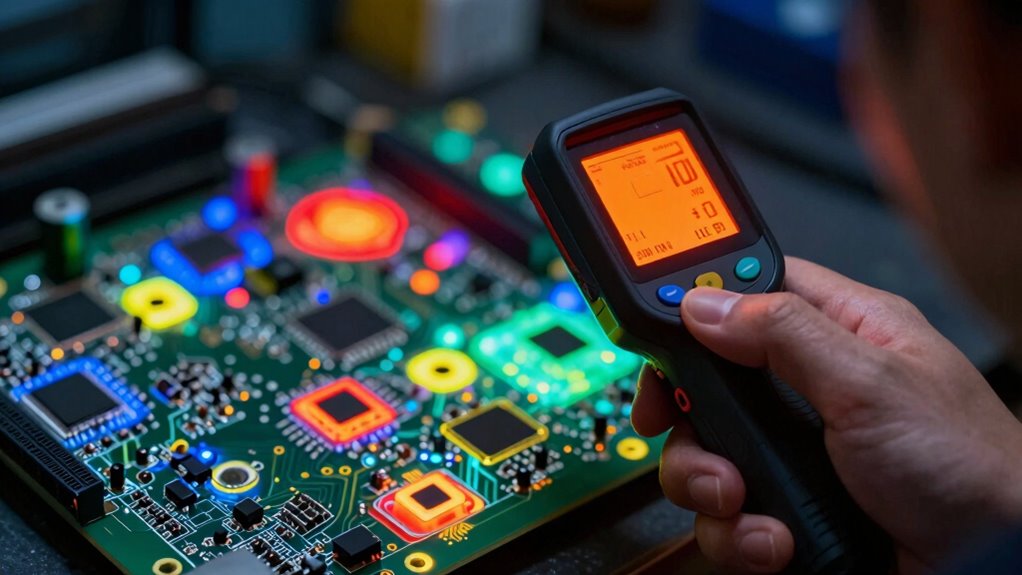
When it comes to troubleshooting printed circuit boards (PCBs), thermal cameras provide a non-contact way to detect faulty components and overheating spots. The best options combine high resolution, quick response times, and user-friendly interfaces. The TOPDON TC004 Mini Thermal Imaging Camera stands out for its compact design and decent resolution, making it ideal for quick diagnostics. Meanwhile, the Thermal Master P3 offers superior resolution with 512×384 pixels, perfect for detailed analysis. The challenge lies in balancing resolution, portability, and price—higher resolution often means higher cost, but not always the best usability. Continue reading for a detailed breakdown of these options and how to choose the right thermal camera for your PCB troubleshooting needs.

Get business pricing on monitors, keyboards and dev gear
- Business-only prices and quantity discounts
- Tax-exempt purchasing
- Multiple users, one account, clear invoices
Key Takeaways
- Resolution plays a critical role; higher pixel counts enable more detailed fault detection on PCBs.
- Portability and size matter for field diagnostics, with compact models offering convenience but sometimes sacrificing features.
- Compatibility with smartphones or tablets can streamline workflow, especially for quick, on-the-go troubleshooting.
- Price varies widely, with premium models offering better resolution and features but at a higher cost.
- Features like macro lenses and fusion imaging significantly improve defect detection on small PCB components.
| TOPDON TC004 Mini Thermal Imaging Camera, 240 x 240 Resolution |  | Best Overall for Versatile PCB Troubleshooting | Resolution: 240 x 240 | Thermal Imaging Technology: TISR | Field of View: 40° x 30° | VIEW ON AMAZON | See Our Full Breakdown |
| Minhe 2.4 Inch LCD Handheld Thermal Imager with USB Interface – Infrared Temperature Detector for PCB, Automotive, Electrical Components |  | Best Value for Entry-Level PCB Diagnostics | Display: 2.4 inch LCD | Temperature Range: -40°C to +300°C | Sensor Resolution: 24×32 | VIEW ON AMAZON | See Our Full Breakdown |
| Thermal Master P3 Thermal Camera for iOS & Android, 512×384 X³IR Resolution |  | Best for High-Resolution Mobile Use | Resolution: 512×384 | Thermal resolution: 256×192 upscaled to 512×384 | Refresh Rate: 25Hz | VIEW ON AMAZON | See Our Full Breakdown |
| GH192 Thermal Imaging Camera 240×240 IR Resolution with Visual Camera and Fusion Imaging |  | Best for Fusion Imaging and Visual Inspection | Resolution: 240×240 IR | Camera: 2MP visible light | Display: 2.8-inch IPS | VIEW ON AMAZON | See Our Full Breakdown |
| Thermal Master P1 Thermal Camera for USB-C iOS/Android |  | Best Compact USB-C Thermal Camera for Professionals and Hobbyists | Resolution: 320×240 | Temperature Range: -4°F to 1112°F | Refresh Rate: 25Hz | VIEW ON AMAZON | See Our Full Breakdown |
| Thermal Camera for Android USB-C with 512×384 Super Resolution and Macro Lens |  | Best for High-Resolution Mobile Inspection | Resolution: 512×384 | Thermal Resolution: 256×192 (enhanced to 512×384 with TISR technology) | Temperature Range: -15°C to 550°C | VIEW ON AMAZON | See Our Full Breakdown |
| Thermal Imaging Camera 240 x 240 Resolution, 25Hz Refresh Rate |  | Best for Durable Field Use and Long Inspections | Resolution: 240×240 | Refresh Rate: 25Hz | Thermal Sensitivity: ≤60mK | VIEW ON AMAZON | See Our Full Breakdown |
| InfiRay P2 Pro Thermal Imaging Camera for Android Type-C |  | Best for Industrial and High-Detail PCB Diagnostics | IR Resolution: 256×192 | Frame Rate: 25 Hz | Temperature Range: -4°F to 1022°F | VIEW ON AMAZON | See Our Full Breakdown |
| thermal cameras for pcb troubleshooting | Temperature Range | Resolution | Refresh Rate | Weight |
|---|---|---|---|---|
| TOPDON TC004 Mini Thermal Imag | -4°F to 842°F (-20°C to 450°C) | 240 x 240 | 25Hz | — |
| Minhe 2.4 Inch LCD Handheld Th | -40°C to +300°C | — | — | lightweight (not specified) |
| Thermal Master P3 Thermal Came | -4°F to 1112°F | 512×384 | 25Hz | 0.93 oz |
| GH192 Thermal Imaging Camera 2 | -4°F to 1022°F | 240×240 IR | — | — |
| Thermal Master P1 Thermal Came | -4°F to 1112°F | 320×240 | 25Hz | 17g |
| Thermal Camera for Android USB | -15°C to 550°C | 512×384 | — | — |
| Thermal Imaging Camera 240 x 2 | -4°F to 1022°F | 240×240 | 25Hz | — |
| InfiRay P2 Pro Thermal Imaging | -4°F to 1022°F | — | — | 9g |
More Details on Our Top Picks
TOPDON TC004 Mini Thermal Imaging Camera, 240 x 240 Resolution
The TOPDON TC004 stands out for its combination of high-resolution imaging and portable design, making it a top choice for detailed PCB diagnostics. Its 240×240 resolution, enhanced with TISR technology, offers clear thermal images that surpass the basic clarity of lower-res models like the GH192. While it boasts a long 15-hour battery life and IP54 waterproof durability, the absence of a charging head and reliance on an electronic manual are notable drawbacks. This camera is ideal for technicians needing detailed imaging on the go, though those seeking a more integrated smartphone solution might prefer the Thermal Master P3. The TC004 balances performance with durability, but the limited temperature range could restrict some applications.
Pros:- High-resolution thermal imaging (240×240) with detailed clarity
- Long battery life supports extended troubleshooting sessions
- Waterproof and drop-resistant design enhances durability
- Smart alerts and photo capture streamline diagnostics
Cons:- No included charging head complicates initial setup
- Electronic manual required for configuration
Best for: Professional PCB troubleshooters who need detailed thermal imaging with durability and long operation time
Not ideal for: Beginners or hobbyists expecting a plug-and-play device with smartphone integration
- Resolution:240 x 240
- Thermal Imaging Technology:TISR
- Field of View:40° x 30°
- Refresh Rate:25Hz
- Temperature Range:-4°F to 842°F (-20°C to 450°C)
- Battery Life:15 hours
- Waterproof Rating:IP54
- Drop Resistance:up to 2 meters
Our verdict“This camera suits experienced professionals who prioritize detailed images and rugged portability over integrated smartphone use.”
Minhe 2.4 Inch LCD Handheld Thermal Imager with USB Interface – Infrared Temperature Detector for PCB, Automotive, Electrical Components
The Minhe 2.4 Inch LCD Handheld Thermal Imager offers a straightforward, portable solution for inspecting PCB and electrical components, with a simple USB interface for data transfer. Its modest sensor resolution (24×32) limits detailed imaging compared to higher-end models like the Thermal Master P3, but its wide temperature range (-40°C to +300°C) makes it suitable for basic troubleshooting tasks. The device is easy to use and customize with adjustable colors, yet the limited sensor resolution may hinder fine-detail analysis. Its reliance on a computer for full functionality can be inconvenient for quick field checks. This pick is best for those on a budget or new to thermal imaging, but professionals requiring pixel-level detail might find it lacking.
Pros:- Affordable, easy to operate
- USB connectivity simplifies data transfer
- Wide temperature measurement range
Cons:- Limited sensor resolution affects image detail
- Requires connection to a PC for full use
- No standalone display or advanced analysis tools
Best for: Beginners or budget-conscious technicians focusing on quick, basic PCB inspections
Not ideal for: Advanced users needing high-resolution images and standalone operation
- Display:2.4 inch LCD
- Temperature Range:-40°C to +300°C
- Sensor Resolution:24×32
- Connectivity:USB
- Emissivity Adjustment:Yes
- Weight:lightweight (not specified)
Our verdict“This device works well for entry-level inspection and quick checks but falls short for detailed PCB troubleshooting.”
Thermal Master P3 Thermal Camera for iOS & Android, 512×384 X³IR Resolution
The Thermal Master P3 excels in offering high-quality, portable thermal imaging directly through your smartphone, with a 512×384 resolution and Razor-Sharp X³ Super Resolution. Its manual focus and wide temperature range (-4°F to 1112°F) make it suitable for detailed PCB inspections and broader industrial applications. Compared with the TOPDON TC004, it lacks a dedicated standalone device but compensates with the convenience of mobile connectivity and professional app features like spot tracking. Its small size and lightweight design make it perfect for fieldwork, although its reliance on a smartphone and limited battery life (dependent on the device) could be drawbacks for some users. This camera is ideal for professionals seeking high-res images without carrying bulky equipment.
Pros:- High-resolution thermal imaging with Razor-Sharp X³ Upres
- Compatible with both iOS and Android devices
- Compact, lightweight, and portable design
- Advanced app features like spot tracking and alerts
Cons:- Requires a smartphone for operation
- Limited battery life depending on phone
- Some features need familiarity with app controls
Best for: Mobile professionals who need high-resolution thermal imaging with app-based controls
Not ideal for: Those preferring standalone devices or working without smartphones
- Resolution:512×384
- Thermal resolution:256×192 upscaled to 512×384
- Refresh Rate:25Hz
- Temperature Range:-4°F to 1112°F
- Size:2.32 × 1.06 × 0.68 inches
- Weight:0.93 oz
- Focus:Manual
- Connectivity:USB-C, Lightning
Our verdict“This camera suits professionals who want high-quality thermal images on the go via their smartphones but don’t need standalone operation.”
GH192 Thermal Imaging Camera 240×240 IR Resolution with Visual Camera and Fusion Imaging
The GH192 combines thermal and visual imaging, offering a 240×240 IR sensor alongside a 2MP visible camera, making it well-suited for detailed inspections of PCB and electrical components. Its fusion imaging capability allows users to overlay thermal data onto visual images, providing context that improves troubleshooting accuracy, unlike basic IR-only models. The device’s auto temperature tracking and alarm features speed up anomaly detection, though manual adjustments for emissivity and distance are necessary for precise results. Its IP54 rating and 8-hour battery life add to its practicality for fieldwork, but the relatively moderate IR resolution may not satisfy professionals demanding pixel-level detail. It fits well for users requiring both thermal and visual insights in a portable package.
Pros:- Fusion imaging with visual camera overlay
- Auto temperature tracking and alarms
- Durable, portable design with long battery life
- Multiple image modes and palettes
Cons:- Requires manual setting adjustments for accuracy
- Limited IR resolution compared to high-end models
Best for: Technicians needing combined thermal and visual imaging for detailed PCB and electrical inspections
Not ideal for: Users requiring ultra-high-resolution thermal images or standalone visual inspection tools
- Resolution:240×240 IR
- Camera:2MP visible light
- Display:2.8-inch IPS
- Temperature Range:-4°F to 1022°F
- Battery Life:8 hours
- Drop Resistance:6.6 ft
- Ingress Protection:IP54
- Accuracy:±2°C
Our verdict“This device is ideal for professionals seeking integrated thermal and visual inspection with user-friendly features, though it doesn’t match the resolution of premium models.”
Thermal Master P1 Thermal Camera for USB-C iOS/Android
The Thermal Master P1 offers a 320×240 IR resolution in a compact, lightweight package, making it highly portable for field inspections of PCBs and electrical systems. Its wide temperature range (-4°F to 1112°F) and digital zoom tools provide flexibility for various troubleshooting scenarios. While its high resolution ensures clear thermal images, its reliance on separate adapters for iPhones with Lightning ports and the need for app familiarity could pose barriers for quick, casual use. The device’s long battery life—up to 8 hours—makes it suitable for extended work sessions, yet its limited standalone capabilities mean it’s best for users comfortable with smartphone integration. This camera is suited for professionals who value image clarity and portability but don’t require standalone operation.
Pros:- High-resolution thermal images (320×240)
- Compatible with multiple devices via USB-C and adapters
- Long-lasting battery (up to 8 hours)
- Compact size for easy transport
Cons:- Requires extra adapters for iPhones with Lightning ports
- Limited to USB-C connectivity, needing additional accessories
- Some advanced features require app familiarity
Best for: Mobile professionals needing high-res thermal imaging with long battery life and portability
Not ideal for: Users preferring standalone, all-in-one thermal cameras with no dependency on smartphones
- Resolution:320×240
- Temperature Range:-4°F to 1112°F
- Refresh Rate:25Hz
- Power Consumption:0.32W
- Dimensions:2.32×1.06×0.68 inches
- Weight:17g
Our verdict“This camera is a solid choice for mobile professionals seeking high-quality images and portability with some dependency on smartphone apps.”
Thermal Camera for Android USB-C with 512×384 Super Resolution and Macro Lens
This compact infrared thermal camera excels in providing high-resolution imaging directly through Android devices, thanks to its 512×384 pixel sensor enhanced by TISR technology. Unlike the InfiRay P2 Pro, which offers a slightly lower IR resolution but is more versatile in industrial applications, this model emphasizes portability and detailed PCB inspections with its included macro lens. However, its exclusive compatibility with Android USB-C devices and dependence on an app can limit usability for some users. The super resolution imaging delivers crisp thermal details, ideal for detecting small faults on PCBs, but the reliance on specific devices and platforms narrows its appeal.
Pros:- High-resolution thermal imaging with super resolution technology
- Includes a magnetic macro lens for detailed PCB inspections
- Supports multiple color palettes for versatile analysis
- Lightweight and portable, weighing only 30g
Cons:- Limited to Android USB-C devices, excluding iOS compatibility
- Requires app installation, which may affect ease of use
- Restricted to Android platform only
Best for: Android users seeking a portable, high-res thermal camera for detailed PCB troubleshooting and electrical inspections.
Not ideal for: iOS users or those needing a device-agnostic, plug-and-play solution without app dependencies.
- Resolution:512×384
- Thermal Resolution:256×192 (enhanced to 512×384 with TISR technology)
- Temperature Range:-15°C to 550°C
- Accuracy:±3.6°F / ±2%
- Field of View:56° x 42°
- Power:Draws power from connected Android device, 0.33W
Our verdict“Best suited for Android users who need portable, detailed thermal imaging for PCB troubleshooting on the go.”
Thermal Imaging Camera 240 x 240 Resolution, 25Hz Refresh Rate
This 240×240 resolution thermal camera combines durability with reliable imaging, making it suitable for extended inspections in tough environments. Compared with the InfiRay P2 Pro, which offers a slightly higher IR resolution but with a more compact design, this model emphasizes ruggedness with IP54 waterproofing and drop resistance up to 1.5 meters. Its long battery life of up to 9 hours makes it well-suited for field engineers performing prolonged troubleshooting tasks, though its weight and need for external stabilization via tripod can be disadvantages. Its clarity and durability make it a strong choice for industrial and electrical inspections where environmental resilience is vital.
Pros:- High-resolution imaging with clear heat detail
- Long-lasting battery supports extended use
- Waterproof and drop-resistant design enhances durability
- Supports multiple color palettes for versatile detection
Cons:- Relatively heavy for handheld operation, requiring stabilization
- Needs external tripod for stability during measurements
- Bulkier than ultra-portable options like the InfiRay P2 Pro
Best for: Electrical or mechanical technicians needing a durable, long-lasting thermal camera for extended troubleshooting in harsh conditions.
Not ideal for: Indoor or quick inspection scenarios where portability and compactness are prioritized over ruggedness.
- Resolution:240×240
- Refresh Rate:25Hz
- Thermal Sensitivity:≤60mK
- Temperature Range:-4°F to 1022°F
- Battery Life:Up to 9 hours
- Waterproof/Dustproof:IP54
Our verdict“Ideal for professionals who need a rugged, reliable thermal camera capable of sustained use in challenging environments.”
InfiRay P2 Pro Thermal Imaging Camera for Android Type-C
The InfiRay P2 Pro delivers a professional-grade thermal imaging experience with a 256×192 IR resolution and a fast 25Hz frame rate, making it suitable for detailed PCB and microcircuit troubleshooting. Its all-metal housing and lightweight design (only 9g) distinguish it from bulkier options like the 240×240 camera, offering a more portable solution for on-the-spot diagnostics. Unlike the B0FNCSGWKP model, which emphasizes high resolution and macro capabilities, this device is tailored for industrial and electrical environments, with simplicity in powering via the smartphone and no need for batteries. Its limited compatibility with only certain Android devices and the need for a specific app, however, restricts its universal appeal.
Pros:- High-resolution IR imaging with a fast frame rate
- Extremely lightweight and portable, weighing only 9g
- Includes magnetic macro lens for detailed inspections
- No external power source needed, powered via smartphone
Cons:- Limited to Android Type-C devices, excluding iOS and some Android models
- Requires specific app installation, which may complicate setup
- Lacks the advanced resolution and environmental features of larger, more expensive cameras
Best for: Industrial technicians and electrical engineers needing a lightweight, high-resolution thermal camera for PCB and microcircuit diagnostics on Android devices.
Not ideal for: iOS users or those seeking a camera with macro lenses included or broader device compatibility.
- IR Resolution:256×192
- Frame Rate:25 Hz
- Temperature Range:-4°F to 1022°F
- Housing:All-metal
- Weight:9g
- Compatibility:Android Type-C
Our verdict“Best suited for professionals who need a compact, high-res thermal tool for PCB diagnostics on compatible Android smartphones.”

How We Picked
These thermal cameras were evaluated based on resolution, usability, build quality, connectivity options, and value for PCB troubleshooting. We prioritized models offering clear thermal images at close ranges, as PCB diagnostics require precise detection of hot spots on tiny components. Ease of use, including interface design and portability, also influenced the ranking since technicians often need rapid results in diverse environments. Cost was a factor, but not at the expense of core performance features, ensuring each pick offers a solid balance of quality and affordability. Our selections aim to cater to different user needs—from hobbyists to professional repair technicians—while maintaining high standards for thermal accuracy and reliability.| thermal cameras for pcb troubleshooting | Temperature Range |
|---|---|
| TOPDON TC004 Mini Thermal Imag | -4°F to 842°F (-20°C to 450°C) |
| Minhe 2.4 Inch LCD Handheld Th | -40°C to +300°C |
| Thermal Master P3 Thermal Came | -4°F to 1112°F |
| GH192 Thermal Imaging Camera 2 | -4°F to 1022°F |
| Thermal Master P1 Thermal Came | -4°F to 1112°F |
| Thermal Camera for Android USB | -15°C to 550°C |
| Thermal Imaging Camera 240 x 2 | -4°F to 1022°F |
| InfiRay P2 Pro Thermal Imaging | -4°F to 1022°F |
Factors to Consider When Choosing Thermal Cameras For Pcb Troubleshooting
Choosing the right thermal camera for PCB troubleshooting involves evaluating several key factors. Beyond resolution, consider how the device’s size and interface affect your workflow. Compatibility with your existing tools, like smartphones or laptops, can streamline diagnostics. Price is also a major consideration, but investing in higher resolution or additional features can pay off in better fault detection. Understanding these factors helps prevent common mistakes, such as underestimating the importance of thermal sensitivity or overpaying for unnecessary features. This guide covers the most critical aspects to clarify your decision-making process.Resolution and Thermal Sensitivity
Higher resolution cameras provide more detailed thermal images, which are essential for identifying small or subtle faults on PCBs. Look for models with at least 240×240 pixels; however, 384×384 or higher resolutions will offer significantly clearer images. Thermal sensitivity, or the ability to detect small temperature differences, is equally important for pinpointing hot spots accurately. Lower sensitivity can miss subtle thermal anomalies, so prioritize models with a sensitivity of 0.05°C or better for PCB diagnostics.
Size, Portability, and Ease of Use
Most PCB troubleshooting is done in tight spaces, so a compact, lightweight design is preferable. Devices with ergonomic grips and simple controls reduce fatigue during extended use. Touchscreen interfaces or smartphone connectivity can simplify operation, especially for technicians who prefer familiar platforms. However, smaller devices might sacrifice some features or battery life, so weigh convenience against functionality based on your typical work environment.
Connectivity and Compatibility
Many modern thermal cameras connect via USB or Bluetooth to smartphones or tablets, making it easier to view images and capture data on-site. Compatibility with Android or iOS devices expands flexibility, but ensure your preferred device supports the camera’s app and features. For professional workflows, models with integrated displays might offer faster access to thermal data without additional devices. Consider your existing tools and whether a wired or wireless connection best suits your needs.
Price and Feature Tradeoffs
While premium models deliver high resolution and advanced features, they come with a higher price tag. Budget options may suffice for simple diagnostics but might lack the detail needed for small component faults. Be cautious of overly cheap models that compromise thermal sensitivity or build quality. Assess whether extra features like macro lenses, fusion imaging, or higher refresh rates justify the price increase for your specific use case.
Additional Features for PCB Troubleshooting
Features such as macro lenses enhance the ability to see tiny components, while fusion imaging combines thermal and visual data for comprehensive analysis. High refresh rates are beneficial for dynamic measurements, but may be less critical for static PCB diagnostics. Some models offer adjustable emissivity settings, important for accurate temperature readings on different materials. Prioritize features that directly improve defect detection without adding unnecessary complexity or cost.
Frequently Asked Questions
Can a smartphone-based thermal camera provide enough detail for PCB troubleshooting?
Yes, many smartphone-compatible thermal cameras now offer high resolutions suitable for PCB diagnostics. While they may not match the performance of dedicated industrial models, they often provide sufficient detail for detecting hot spots and faulty components in small circuits. These devices are especially useful for quick, on-the-spot assessments and can be a cost-effective solution for hobbyists and small repair shops. However, for highly detailed or professional-grade work, a dedicated thermal camera with higher resolution might be necessary.
What resolution do I need for effective PCB troubleshooting?
For effective PCB troubleshooting, a resolution of at least 240×240 pixels is recommended, as it balances detail and affordability. Higher resolutions, such as 384×384 or above, improve the ability to detect small thermal anomalies and precisely locate faults on tiny components. Keep in mind that resolution alone isn’t enough; thermal sensitivity and image clarity are equally important for accurate diagnostics.
Is a thermal camera with a macro lens worth the extra cost?
Absolutely, a macro lens can be a valuable addition if you often troubleshoot densely packed or tiny PCB components. It allows for close-up thermal imaging, revealing defects that might be invisible with standard lenses. While it adds to the overall cost, the enhanced detail can save time and improve diagnostic accuracy, making it a worthwhile investment for professional repair technicians or serious hobbyists.
Should I prioritize portability over advanced features?
It depends on your typical workflow. If you frequently perform field repairs or need to carry your device between locations, portability becomes a priority. Smaller, handheld models with wireless connectivity are ideal, even if they lack some advanced features found in larger units. Conversely, if your work station is fixed and detailed analysis is paramount, investing in a more feature-rich, larger device might be preferable.
How important is thermal sensitivity for PCB troubleshooting?
Thermal sensitivity is critical; it determines how small temperature differences your camera can detect. For PCB troubleshooting, a sensitivity of 0.05°C or better ensures you won’t miss subtle hot spots that indicate failing components. Less sensitive cameras might overlook minor but significant thermal anomalies, leading to incomplete diagnostics or missed faults. Always check the sensitivity specifications before purchasing.
Conclusion
For those seeking the best overall performance, the Thermal Master P3 combines high resolution with versatile features suitable for professional PCB diagnostics. Budget-conscious users or hobbyists will find the TOPDON TC004 Mini offers impressive value with reliable performance. Professionals needing portability and quick field diagnostics should consider the InfiRay P2 Pro, thanks to its compact design and high resolution. Beginners or occasional troubleshooters should opt for models with simple interfaces, like the Minhe, to ease into thermal diagnostics without overwhelming complexity. Your choice ultimately depends on your specific needs, budget, and the level of detail required for your PCB repair tasks.Halloween Picks
halloween
As an affiliate, we earn on qualifying purchases.