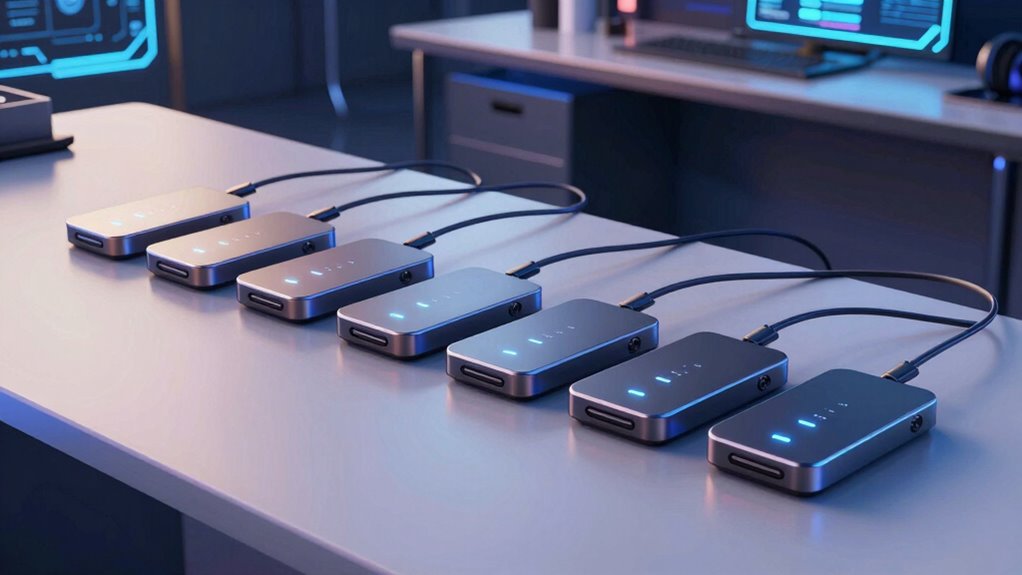

For developers, a reliable Thunderbolt dock with power delivery can streamline workflows by providing fast data transfer, multiple display support, and charging capabilities all in one device. The Lenovo ThinkPad Thunderbolt 4 Smart Dock Gen 2 7500 stands out as the best overall, offering robust performance and compatibility. The Dell WD19TBS excels with its high wattage charging, making it ideal for power-hungry laptops, while the Belkin Thunderbolt 4 Dock Pro impresses with its extensive port selection. Buyers often face tough tradeoffs between port variety, charging power, and size. Continue reading for a detailed breakdown that will help you find the perfect dock for your development setup.

Get business pricing on monitors, keyboards and dev gear
- Business-only prices and quantity discounts
- Tax-exempt purchasing
- Multiple users, one account, clear invoices
Key Takeaways
- Top picks balance port versatility with power delivery capacity tailored for developers’ multitasking needs.
- The best overall dock offers a combination of performance, build quality, and compatibility, but may come at a premium.
- Higher wattage docks are better suited for demanding laptops but tend to be larger and more expensive.
- Compact docks with fewer ports are ideal for portability but may limit expandability during intensive workflows.
- Compatibility with both Mac and Windows, along with future-proofing features like Thunderbolt 5, are key considerations for longevity.
| Lenovo ThinkPad Thunderbolt 4 Smart Dock Gen 2 7500 |  | Best Overall for High-End Multi-Monitor Setups | Data Speed: Up to 40 Gbps | Display Support: 1x 8K 60Hz or 2x 4K 144Hz | Power Delivery: PD 3.1, up to 100W | VIEW ON AMAZON | See Our Full Breakdown |
| Dell Thunderbolt Dock WD19TBS – 130W Power Delivery, 180W AC |  | Best for Compatibility and Power at a Moderate Price | Model: WD19TBS | Hardware Interface: Thunderbolt 3 | Total USB Ports: 7 | VIEW ON AMAZON | See Our Full Breakdown |
| Belkin Thunderbolt 4 Dock Pro, 14-in-1 Triple Display Docking Station with 96W Power Delivery | 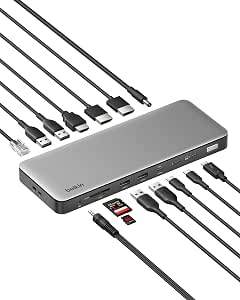 | Best for Massive Expansion and Versatility | Ports: 14 total | Data Transfer Speed: Up to 40Gbps | Power Delivery: 96W | VIEW ON AMAZON | See Our Full Breakdown |
| Belkin Connect Thunderbolt 4 Docking Station, 5-in-1 USB-C Multiport Core Hub with 96W Power Delivery |  | Best Compact Multi-Display Dock for Travelers | Ports: 3x upstream Thunderbolt 4 USB-C, 1x downstream Thunderbolt 4 USB-C | Power Delivery: 96W | Display Support: Single 8K @ 30Hz or Dual 4K @ 60Hz | VIEW ON AMAZON | See Our Full Breakdown |
| Anker Prime TB5 Docking Station, 14-in-1 Thunderbolt 5 Dock for Laptops |  | Best Future-Proof for High-Speed Data and Dual 8K Displays | Total Ports: 14 | Max Data Transfer: 120Gbps | Max Charging Power: 140W | VIEW ON AMAZON | See Our Full Breakdown |
| WAVLINK Thunderbolt 4 Docking Station with Dual 4K HDMI for Mac and Windows |  | Best Overall for High-Resolution Flexibility | Certification: Thunderbolt 4 | Video Output: Dual 4K@60Hz HDMI or single 8K@60Hz | Thunderbolt Downstream Display: Up to 8K@60Hz or 4K@120Hz | VIEW ON AMAZON | See Our Full Breakdown |
| Plugable Thunderbolt 4 Dock with 100W Charging, Dual HDMI, 13 Ports (TBT4-UD5) |  | Best for Versatile Port Selection and Broad Compatibility | Model: TBT4-UD5 | Connection: Thunderbolt 4 | Power Delivery: 100W (96W certified) | VIEW ON AMAZON | See Our Full Breakdown |
| Plugable Thunderbolt 5 Docking Station, 16-in-1, Dual HDMI 2.1 up to 8K (TBT-UDH2) |  | Best for Cutting-Edge Display Performance and High Power | ASIN: B0G6G8763V | Ports: 2x HDMI 2.1, 6x USB-C, SD card reader | Display Output: 8K@60Hz or dual 4K@120Hz (Thunderbolt 4) | VIEW ON AMAZON | See Our Full Breakdown |
| Lenovo ThinkPad Thunderbolt 5 Smart Dock 7500 |  | Best for Enterprise and High-End Power Users | Data Transfer Speed: 120Gbps | Power Delivery: 180W | Display Support: Up to three 8K or four 4K monitors | VIEW ON AMAZON | See Our Full Breakdown |
| thunderbolt dock with power delivery for developer | Power Delivery | Ports |
|---|---|---|
| Lenovo ThinkPad Thunderbolt 4 | PD 3.1, up to 100W | Thunderbolt 4, HDMI 2.1, DisplayPort 1.4, USB-A 3.2 Gen 2, USB-C 3.2 Gen 2, RJ45 |
| Dell Thunderbolt Dock WD19TBS | 130W | — |
| Belkin Thunderbolt 4 Dock Pro | 96W | 14 total |
| Belkin Connect Thunderbolt 4 D | 96W | 3x upstream Thunderbolt 4 USB-C, 1x downstream Thunderbolt 4 USB-C |
| Anker Prime TB5 Docking Statio | — | — |
| WAVLINK Thunderbolt 4 Docking | — | — |
| Plugable Thunderbolt 4 Dock wi | 100W (96W certified) | 13 total including HDMI, USB-A, SD/microSD |
| Plugable Thunderbolt 5 Docking | — | 2x HDMI 2.1, 6x USB-C, SD card reader |
| Lenovo ThinkPad Thunderbolt 5 | 180W | HDMI 2.1, DisplayPort 2.1, USB-A, USB-C |
More Details on Our Top Picks
Lenovo ThinkPad Thunderbolt 4 Smart Dock Gen 2 7500
The Lenovo ThinkPad Thunderbolt 4 Smart Dock Gen 2 7500 stands out for supporting highly demanding multi-monitor configurations, including an 8K 60Hz or dual 4K 144Hz displays, making it ideal for developers working with visual-heavy applications. Compared with the Belkin Thunderbolt 4 Dock Pro, it offers higher display support and cloud-based remote management, which is vital for enterprise environments. However, its premium price and 100W power delivery may be limiting for users with high-power workstation laptops or gaming rigs that require more power. The dock’s comprehensive port selection ensures a fully connected workspace, and the integrated Thunderbolt 4 cable simplifies setup. Still, the higher cost and limited 100W charging capacity may deter those on a budget or with power-hungry devices.
Pros:- Supports up to an 8K 60Hz or dual 4K 144Hz displays, ideal for high-res workflows
- 100W Power Delivery charges high-end laptops without a separate adapter
- Wide array of ports including HDMI 2.1, DisplayPort 1.4, USB-C, USB-A, and Ethernet
- Cloud-based remote management for IT deployment
Cons:- Premium price point may be prohibitive for casual users
- Limited to 100W power delivery, which might be insufficient for some workstation laptops
Best for: Developers and IT teams needing robust multi-monitor setups with remote management capabilities
Not ideal for: Solo freelancers or hobbyists with simpler setups who don’t require enterprise features or 8K support
- Data Speed:Up to 40 Gbps
- Display Support:1x 8K 60Hz or 2x 4K 144Hz
- Power Delivery:PD 3.1, up to 100W
- Ports:Thunderbolt 4, HDMI 2.1, DisplayPort 1.4, USB-A 3.2 Gen 2, USB-C 3.2 Gen 2, RJ45
- Cable:Integrated 1M Thunderbolt 4 cable
- Management:Lenovo Accessories Fleet Manager (cloud-based)
Our verdict“This dock is perfect for enterprise developers and teams needing high-performance multi-monitor support with remote management features.”
Dell Thunderbolt Dock WD19TBS – 130W Power Delivery, 180W AC
The Dell WD19TBS Thunderbolt Dock offers a balanced mix of high power delivery and broad compatibility, making it suited for users who work across different laptop brands like HP and Lenovo. Its 130W charging capability easily supports most laptops, and with 7 USB ports plus HDMI, it provides extensive peripheral options. Compared to Belkin’s 14-in-1, this dock simplifies your setup with fewer ports but maintains sufficient versatility for most developers. The main tradeoff is its requirement for a bulky 180W AC adapter, which adds clutter and limits portability. Its compatibility with multiple brands makes it attractive for mixed-device environments, but the bulk and lack of additional display support beyond HDMI might be drawbacks for those with demanding visual setups.
Pros:- 130W Power Delivery can charge most laptops comfortably
- Multiple USB ports and HDMI for extensive peripheral connectivity
- Broad compatibility with Dell, HP, and Lenovo devices
- Single-cable solution reduces desk clutter
Cons:- Requires a 180W AC adapter, making the setup bulkier
- Limited to a single HDMI port without additional video outputs
Best for: Developers using Dell, HP, or Lenovo laptops seeking reliable power and broad compatibility
Not ideal for: Enthusiasts needing extensive multi-monitor configurations or higher display resolutions
- Model:WD19TBS
- Hardware Interface:Thunderbolt 3
- Total USB Ports:7
- HDMI Ports:1
- Power Delivery:130W
- AC Adapter Wattage:180W
Our verdict“This dock provides a solid, compatibility-focused solution for users who need reliable power and multiple peripherals without demanding multi-monitor setups.”
Belkin Thunderbolt 4 Dock Pro, 14-in-1 Triple Display Docking Station with 96W Power Delivery
The Belkin Thunderbolt 4 Dock Pro excels at expanding your workstation with an impressive 14 ports, supporting triple 4K displays on Windows and dual on macOS. Its 96W Power Delivery ensures your laptop stays charged during intensive multitasking, and the 40Gbps data speeds facilitate rapid file transfers—crucial for developers handling large datasets. Compared to the smaller Belkin 5-in-1, this model offers vastly more ports, making it suitable for complex setups, but its larger footprint and display limitations on macOS mean it’s less ideal for tight or Apple-only environments. The inclusion of safety features and a 3-year warranty adds peace of mind, though the size could be a concern for minimalist desks.
Pros:- Massive 14-port expansion including Thunderbolt 4, USB-A, HDMI, DisplayPort, SD/microSD, and Ethernet
- Supports triple 4K displays on Windows with full 40Gbps speeds
- High 96W charging supports most laptops during heavy use
- Built-in safety protections and 3-year warranty
Cons:- Triple display support limited to Windows; macOS supports only dual displays
- Large footprint may take up significant desk space
Best for: Developers with extensive peripheral needs and multi-monitor setups, especially on Windows platforms
Not ideal for: Mac users needing more than two external displays or those with limited desk space
- Ports:14 total
- Data Transfer Speed:Up to 40Gbps
- Power Delivery:96W
- Display Support:Triple 4K@60Hz (Windows); dual extended displays on macOS
- Ethernet:2.5GbE
- Dimensions:8.85 in x 3.39 in x 1.06 in
Our verdict“Ideal for power users who need maximum connectivity and multi-monitor support on Windows-based systems.”
Belkin Connect Thunderbolt 4 Docking Station, 5-in-1 USB-C Multiport Core Hub with 96W Power Delivery
The Belkin Connect Thunderbolt 4 Dock offers a minimalistic, 5-in-1 setup that supports a single 8K or dual 4K displays at 60Hz, making it well-suited for developers who prioritize portability and simplicity. Its 96W Power Delivery allows charging while working, and the high-speed 40Gbps data transfer supports large files and fast backups. Compared with larger docks like the Plugable 16-in-1, this model sacrifices port variety for a smaller form factor, which is ideal for those who need a lightweight, travel-friendly dock. The 8K resolution is limited to 30Hz, which could be a drawback for high-refresh-rate visual work, and the port count may be insufficient for users with many peripherals.
Pros:- Supports 8K at 30Hz or dual 4K at 60Hz for versatile display options
- High 40Gbps data speeds for large file transfers
- 96W Power Delivery charges devices while in use
- Compact, travel-friendly design with included cable and power supply
Cons:- 8K display limited to 30Hz, which may not suit high-refresh-rate needs
- Only 5 ports may be limiting for users with many peripherals
Best for: Mobile developers and remote workers needing a compact dock with high-resolution display support
Not ideal for: Developers with extensive peripheral needs or requiring higher refresh rates for displays.
- Ports:3x upstream Thunderbolt 4 USB-C, 1x downstream Thunderbolt 4 USB-C
- Power Delivery:96W
- Display Support:Single 8K @ 30Hz or Dual 4K @ 60Hz
- Data Transfer Speed:Up to 40Gbps
- Daisy-Chained Devices:Up to 6
- Includes:Thunderbolt 4 cable and power supply
Our verdict“Perfect for those prioritizing portability without sacrificing high-resolution display support on a limited port set.”
Anker Prime TB5 Docking Station, 14-in-1 Thunderbolt 5 Dock for Laptops
The Anker Prime TB5 Dock offers impressive future-proofing with dual Thunderbolt 5 downstream ports, supporting dual 8K@60Hz displays and a maximum data transfer of 120Gbps—well ahead of current needs. Its 140W Power Delivery makes it suitable for even the most power-hungry laptops, and the inclusion of SD/TF card readers plus an active cooling system ensures high-performance, extended operation. Compared with the Lenovo ThinkPad dock, the TB5 supports higher display resolutions and faster data speeds, making it ideal for developers pushing the boundaries of visual and data-intensive workflows. The main tradeoffs include its size and the lack of external USB-A hubs, which could limit peripheral expansion for some users.
Pros:- Supports dual 8K@60Hz displays, ideal for graphics and video developers
- Massive 120Gbps data transfer speeds facilitate rapid large-file handling
- Up to 140W Power Delivery supports demanding laptops
- Active cooling prevents overheating during intensive tasks
Cons:- Lacks external USB-A hubs, limiting peripheral expansion
- Size and weight may be less suitable for mobile use
Best for: Developers working with high-resolution visuals, large data sets, or future-proofing their setups
Not ideal for: Users with limited desk space or those who need multiple external USB-A ports for peripherals
- Total Ports:14
- Max Data Transfer:120Gbps
- Max Charging Power:140W
- Max Display Resolution:8K@60Hz
- Ethernet:2.5Gbps
- Cooling:Active cooling system
Our verdict“Designed for advanced users seeking maximum future-proofing and high data throughput in a dock that supports dual 8K displays.”
WAVLINK Thunderbolt 4 Docking Station with Dual 4K HDMI for Mac and Windows
This WAVLINK Thunderbolt 4 dock stands out for its robust support of dual 4K displays or a single 8K, offering impressive versatility for users needing high-resolution setups. Its full 40 Gbps data transfer and up to 96W charging make it suitable for demanding workflows, especially on Windows systems. Compared to the Plugable Thunderbolt 4 Dock, it provides more display options and a faster SD card reader, but its limited Mac display support means Mac users might need to compromise on multi-monitor setups. The dock’s compatibility with Thunderbolt 4/5 and USB4 ensures broad device support, yet Mac users with M1/M2 chips may find their display options restricted to just one monitor without using Thunderbolt downstream ports.
Pros:- Thunderbolt 4 certification with 40 Gbps transfer speed
- Supports dual 4K@60Hz or single 8K@60Hz displays
- Up to 96W charging with included 160W power adapter
- Fast SD/MicroSD V4.0 card reader and 2.5G Ethernet
Cons:- Limited display support on Mac M1/M2 chips—only single display
- Dual monitor extension on Macs often requires using one HDMI and one downstream port
Best for: Developers working primarily on Windows or Linux who need dual 4K displays and fast data transfer.
Not ideal for: Mac users with M1/M2 chips seeking native dual external display support without workarounds.
- Certification:Thunderbolt 4
- Video Output:Dual 4K@60Hz HDMI or single 8K@60Hz
- Thunderbolt Downstream Display:Up to 8K@60Hz or 4K@120Hz
- Data Transfer:40 Gbps
- Power Delivery to Host:96W
- Power Adapter:160W
- Card Reader:SD/MicroSD V4.0, 312MB/s
Our verdict“This dock delivers excellent high-res display support and fast data transfer, ideal for Windows-based developers needing maximum resolution flexibility.”
Plugable Thunderbolt 4 Dock with 100W Charging, Dual HDMI, 13 Ports (TBT4-UD5)
The Plugable TBT4-UD5 is tailored for users who need a broad array of ports, combining 13 versatile connections with high power delivery. Its 100W charging capacity and dual HDMI 4K support make it suitable for professional setups, though it’s slightly limited on Macs with newer chips that require clamshell mode for dual displays. Compared to the WAVLINK model, it offers more ports and a recognized award from Wirecutter, but it lacks DisplayPort options and has display limitations on certain MacBooks. It’s a well-rounded choice for Windows users and Mac users with compatible chips, especially when multiple peripherals are part of the workflow.
Pros:- Award-winning design recognized by Wirecutter
- 100W charging (96W certified) powers most laptops
- 13 ports including dual HDMI, SD/microSD, Ethernet, and audio
- Driverless setup with broad Windows and Mac compatibility
Cons:- Limited dual external display support on M1/M2 Macs—often only one monitor without workaround
- No USB-C video output—only HDMI for external displays
Best for: Developers and professionals who want a high number of ports, including SD/microSD and Ethernet, in a single dock.
Not ideal for: Mac users with M1/M2 chips who need native dual monitor support without workarounds.
- Model:TBT4-UD5
- Connection:Thunderbolt 4
- Power Delivery:100W (96W certified)
- Displays:Single 8K or dual 4K 60Hz
- Ports:13 total including HDMI, USB-A, SD/microSD
- Ethernet:Gigabit
Our verdict“This dock offers extensive port options and high power delivery, suited for professionals needing multiple peripherals on Windows and Mac systems with compatible chips.”
Plugable Thunderbolt 5 Docking Station, 16-in-1, Dual HDMI 2.1 up to 8K (TBT-UDH2)
Designed for users seeking the latest in display tech, the Plugable TBT-UDH2 features dual HDMI 2.1 ports supporting ultra-high resolutions up to 8K 60Hz or 4K 144Hz, making it ideal for high-refresh or high-res workflows. Its 140W charging capacity surpasses many competitors, and its 16-in-1 port array includes six USB-C ports and UHS-II card readers. Compared to the Thunderbolt 4 options, it offers more advanced display support and higher charging wattage, but its compatibility with older Macs is limited, and the requirement for Thunderbolt 5 or newer hosts narrows the user base. For those with compatible systems, it provides a future-proof, high-performance docking experience.
Pros:- Supports dual HDMI 2.1 ports up to 8K at 60Hz or 4K at 144Hz
- 140W laptop charging with two front 30W ports
- Fanless, driverless, and TAA-compliant design
- Supports Thunderbolt 5, USB4, and Windows 11+
Cons:- Limited compatibility with older Macs—only single display support on most models
- Requires Thunderbolt 5 host for full dual 8K support
Best for: Developers and content creators working on Thunderbolt 5 systems demanding the latest display and data transfer capabilities.
Not ideal for: Users with Thunderbolt 4 or earlier systems, or those with Macs that can’t support dual 8K outputs without adapters.
- ASIN:B0G6G8763V
- Ports:2x HDMI 2.1, 6x USB-C, SD card reader
- Display Output:8K@60Hz or dual 4K@120Hz (Thunderbolt 4)
- Laptop Charging:140W
- Cooling:Fanless
- Compatibility:Thunderbolt 5/4, USB4
Our verdict“This dock offers unmatched display performance and high power for Thunderbolt 5 users, especially content creators needing high-resolution outputs.”
Lenovo ThinkPad Thunderbolt 5 Smart Dock 7500
The Lenovo ThinkPad Thunderbolt 5 Smart Dock 7500 exemplifies high-end enterprise-grade docking, combining 120Gbps data transfer with 180W Power Delivery, capable of supporting three 8K displays or four high-refresh 4K monitors. Its extensive port array includes HDMI 2.1, DisplayPort 2.1, USB-A/C, and Ethernet, complemented by cloud management via AWS and security features like Intel vPro. Compared with the Plugable TBT-UDH2, this dock offers more advanced display and management capabilities, but its premium price makes it less suitable for casual or budget-conscious users. It requires Thunderbolt 5-compatible systems for full performance, making it a choice mainly for enterprise deployments or tech-savvy professionals needing maximum display flexibility.
Pros:- 120Gbps data transfer speeds with Thunderbolt 5
- Supports up to three 8K displays or four 4K monitors
- 180W Power Delivery for charging high-performance laptops
- Cloud-based management via AWS and security with Intel vPro
Cons:- High price point not suitable for casual users
- Requires Thunderbolt 5 host for full capabilities
Best for: Large organizations and power users needing maximum display support and remote fleet management.
Not ideal for: Developers on a budget or those with older Thunderbolt 4 or USB-C systems not supporting full Thunderbolt 5 features.
- Data Transfer Speed:120Gbps
- Power Delivery:180W
- Display Support:Up to three 8K or four 4K monitors
- Ports:HDMI 2.1, DisplayPort 2.1, USB-A, USB-C
- Management:AWS cloud-based fleet management
- Security:Intel vPro
Our verdict“This flagship docking station is designed for enterprise environments or advanced users needing maximum display and data throughput, with remote management features.”

How We Picked
The products featured in this roundup were evaluated based on multiple criteria that matter to developers: performance in data transfer and display support, the quality and number of ports, power delivery wattage, build quality, and overall compatibility. We prioritized docks that balance high performance with ease of use, ensuring they can handle demanding development tasks. Cost was also a factor, but not at the expense of essential features. Docks that offer future-proofing, like Thunderbolt 5 support, and those with proven reliability received higher rankings, helping buyers find options that deliver value over time.Factors to Consider When Choosing Thunderbolt Dock With Power Delivery For Developers
Choosing the right Thunderbolt dock with power delivery involves understanding several key factors that impact daily use. Developers need a setup that balances multiple monitors, fast data transfer, and reliable charging without sacrificing portability or budget. Recognizing what features truly matter can help avoid overspending on unnecessary ports or underpowering your laptop. Here are some critical considerations to guide your selection.Power Delivery Capacity
Power delivery (PD) wattage determines how well the dock can charge your laptop during intensive workloads. Many developer laptops require 85W or more to maintain optimal performance, especially during heavy processing. Docks with lower wattage might suffice for ultrabooks but can lead to slower charging or underpowered devices during demanding tasks. Always match the dock’s PD rating with your laptop’s power needs to avoid disruptions and ensure a seamless experience.
Port Selection and Compatibility
Developers often connect multiple peripherals, including external monitors, storage drives, and audio interfaces. A dock with a diverse array of ports—such as multiple Thunderbolt, USB-C, HDMI, and Ethernet—can simplify your workspace. However, more ports can increase size and cost. Prioritize docks that support your current setup but also offer some future expandability, considering the types of devices you plan to connect in the long run.
Display Support and Video Output
Running multiple high-resolution monitors is common among developers. Look for docks that support dual 4K displays or even 8K at 60Hz, depending on your needs. Thunderbolt 4 and 5 docks typically excel here, offering reliable, high-bandwidth video output. Be cautious of docks with limited display support, which can bottleneck your workflow by restricting your screen real estate or causing lag during intensive graphics tasks.
Build Quality and Size
Durability matters when choosing a dock, especially if you move between workspaces or travel frequently. Metal enclosures tend to be more robust than plastic, but they can also be heavier. Size is another tradeoff: compact docks are easier to carry but might have fewer ports or lower wattage. Consider your workspace environment and whether portability or expandability is your priority to find the best balance.
Future-Proofing and Compatibility
Technology evolves rapidly, so selecting a dock with support for the latest standards like Thunderbolt 5 can safeguard your investment. Compatibility with both Mac and Windows systems adds versatility if you switch between devices. Also, check firmware updates and manufacturer support—these can extend the lifespan of your dock and ensure it remains functional with future devices.
Frequently Asked Questions
Can I use a Thunderbolt dock with my non-Thunderbolt USB-C laptop?
While some docks are compatible with USB-C laptops, Thunderbolt docks generally require Thunderbolt ports for full functionality. Using a Thunderbolt dock with a non-Thunderbolt USB-C port might limit features like high-speed data transfer and dual 4K display support. Always verify compatibility with your specific device to avoid disappointment or reduced performance.
Is it worth paying extra for Thunderbolt 5 support?
Investing in Thunderbolt 5 support can offer increased bandwidth and future compatibility, especially as more devices adopt the new standard. However, for most developers today, Thunderbolt 4 docks meet all core needs. Consider your need for high-resolution displays, multiple peripherals, and whether your current or future devices will benefit from the latest standard before paying a premium.
How important is the number of ports versus dock size?
The number of ports directly impacts your ability to connect peripherals without additional hubs, but more ports often mean a larger, less portable dock. If portability matters most, opt for a dock with essential ports and consider additional hubs for expandability. Conversely, if you work mainly at a fixed desk, a larger dock with extensive ports could streamline your setup.
Should I prioritize higher wattage or more ports?
This depends on your specific setup. For power-hungry laptops, higher wattage is critical to avoid slow charging or power deficits. If your workflow relies heavily on multiple external devices, prioritize docks with more ports. Ideally, choose a dock that offers both, but if tradeoffs are necessary, match the dock’s capabilities to your primary needs.
Are docks with multiple Thunderbolt ports more reliable?
Multiple Thunderbolt ports can improve flexibility and reduce the need for daisy-chaining devices, which can sometimes introduce stability issues. However, the overall build quality and chipset support are equally important for reliability. Focus on well-reviewed models from reputable brands to ensure your dock performs consistently over time.
Conclusion
For those seeking the best overall experience, the Lenovo ThinkPad Thunderbolt 4 Smart Dock Gen 2 offers a balanced combination of performance, build quality, and compatibility. Buyers prioritizing value should consider the Belkin Thunderbolt 4 Dock Pro, which provides extensive ports at a more accessible price. Professionals with demanding setups or future-proofing in mind might find the Thunderbolt 5 docks from Anker or Lenovo worth the extra investment. Beginners and casual users should focus on docks with essential ports and reliable power delivery, while developers with multi-monitor or high-power needs need models supporting dual 4K or higher resolutions and robust charging capabilities. Ultimately, your choice should reflect your specific workflow, device compatibility, and budget constraints.
As an affiliate, we earn on qualifying purchases.Fall Picks
fall essentials