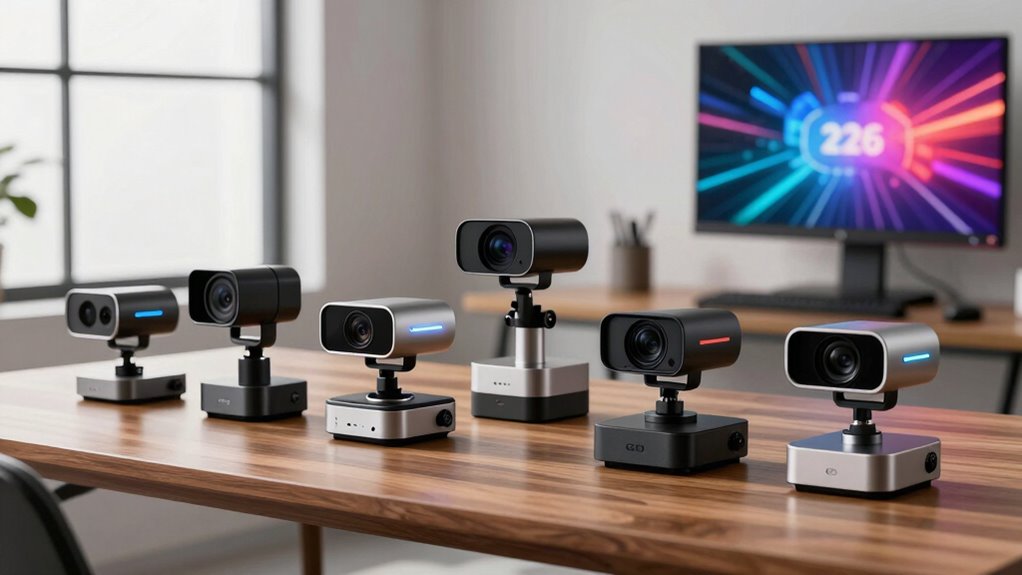

Finding the right webcams and video gear can be overwhelming with so many options available. The Logitech C922x stands out as the best overall choice thanks to its reliable 1080p video quality and built-in microphones. For those on a tighter budget, the NexiGo N60 offers decent performance at a lower price, while the Logitech Brio delivers premium 4K resolution for professional streaming. However, tradeoffs include differences in video quality, features, and price points. Keep reading to see a detailed comparison that will help you make an informed decision for your needs.

Get business pricing on monitors, keyboards and dev gear
- Business-only prices and quantity discounts
- Tax-exempt purchasing
- Multiple users, one account, clear invoices
Key Takeaways
- The Logitech C922x balances high-quality video with affordability, making it ideal for most users.
- Premium streamers should consider the Logitech Brio for 4K resolution, despite its higher price.
- Built-in microphones vary in quality; models like the C960 and C100 include effective dual mics for clearer audio.
- Privacy features such as covers and software controls are increasingly important for remote workers.
- Price often correlates with features like 4K support, multiple microphone options, and advanced light correction.
| Logitech C922x HD Pro Webcam with Full HD 1080p/30fps and 720p/60fps Video, Light Correction, Dual Mics, Compatible with Microsoft Teams, Google Meet, Zoom, Nintendo Switch, Mac | 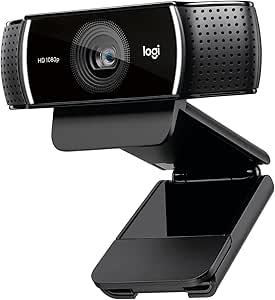 | Best Overall Webcam for Versatile Streaming and Video Calls | Video Resolution: Full HD 1080p at 30 fps | Light Correction: Yes | Autofocus: Yes | VIEW ON AMAZON | See Our Full Breakdown |
| NexiGo N60 1080P Webcam with Microphone, Software Control & Privacy Cover |  | Best Budget-Friendly Full HD Webcam with Privacy Features | Resolution: 1920 x 1080 (1080p) at 30 fps | Sensor: 2MP CMOS | Microphone: Built-in noise-cancelling | VIEW ON AMAZON | See Our Full Breakdown |
| EMEET C960 1080P Webcam with Dual Microphones |  | Best for Wide-Angle Clarity and Conference Calls | Resolution: 1920×1080 (1080p) at 30 fps | Sensor Type: CMOS | Viewing Angle: 90 degrees | VIEW ON AMAZON | See Our Full Breakdown |
| EMEET C100 2K Webcam with Privacy Cover, Built-in Mic & Metal Clip |  | Best for High-Resolution Close-Up and Privacy Control | Resolution: 2K @ 30FPS (2048 pixels) | Sensor Type: CMOS | Focal Range: 20 cm – 3 m | VIEW ON AMAZON | See Our Full Breakdown |
| NUROUM C10 1080P Conference Webcam with Microphone and Speaker | 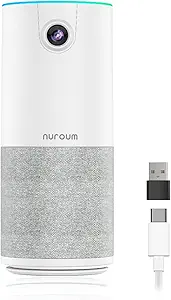 | Best All-in-One for Hybrid Meetings and Small Rooms | Camera Resolution: 1080P at 30 fps | Lens: 90° wide-angle glass lens | Microphone: 4-element noise-canceling | VIEW ON AMAZON | See Our Full Breakdown |
| Logitech Brio 101 Full HD 1080p Webcam for Streaming and Meetings, Black |  | Best for Casual Streaming and Basic Video Calls | Resolution: Full HD 1080p | Microphone: Built-in | Privacy Cover: Integrated | VIEW ON AMAZON | See Our Full Breakdown |
| Logitech C920x HD Pro Webcam Full 1080p/30fps with Stereo Microphones |  | Best for Content Creators and Intermediate Users | Resolution: Full 1080p at 30 fps | Autofocus: Yes | Lighting Adjustment: Yes | VIEW ON AMAZON | See Our Full Breakdown |
| Logitech Brio Ultra 4K HD Webcam for Streaming and Meetings – Black |  | Best for High-Resolution Professionals and Power Users | Max Resolution: 4K at 30 fps | Zoom: 5x digital | Field of View: 65°, 78°, or 90° presets | VIEW ON AMAZON | See Our Full Breakdown |
| webcams and video gear | Compatibility | Resolution | Microphones |
|---|---|---|---|
| Logitech C922x HD Pro Webcam w | Microsoft Teams, Google Meet, Zoom, Nintendo Switch, Mac | — | Dual stereo mics |
| NexiGo N60 1080P Webcam with M | Windows 7/8/10/11, Mac OS X 10.7+, Android 4.0+, Linux | 1920 x 1080 (1080p) at 30 fps | — |
| EMEET C960 1080P Webcam with D | Windows 7/10/11, macOS, Linux, Android TV | 1920×1080 (1080p) at 30 fps | 2 omnidirectional noise-reduction |
| EMEET C100 2K Webcam with Priv | — | 2K @ 30FPS (2048 pixels) | — |
| NUROUM C10 1080P Conference We | Windows, MacOS, Linux | — | — |
| Logitech Brio 101 Full HD 1080 | Major platforms including Teams, Zoom, Google Meet | Full HD 1080p | — |
| Logitech C920x HD Pro Webcam F | Windows 11, Mac | Full 1080p at 30 fps | Dual stereo |
| Logitech Brio Ultra 4K HD Webc | — | — | Dual omnidirectional noise-canceling |
More Details on Our Top Picks
Logitech C922x HD Pro Webcam with Full HD 1080p/30fps and 720p/60fps Video, Light Correction, Dual Mics, Compatible with Microsoft Teams, Google Meet, Zoom, Nintendo Switch, Mac
The Logitech C922x stands out for delivering crisp, detailed Full HD video with auto light correction, making it ideal for content creators and professionals who need reliable performance across platforms. Compared with the NexiGo N60, it offers better low-light handling and dual microphones, which result in clearer audio. However, the C922x lacks a privacy shutter, which can be a drawback for those prioritizing security. Its 30 fps at 1080p is sufficient for most streaming needs but less smooth than higher frame rates found in premium models like the Logitech Brio. This pick is best for users who want quality and compatibility without paying a premium for 4K or advanced features.
Pros:- Sharp Full HD 1080p video with auto light correction
- Dual microphones provide clearer, more natural sound
- Compatible with multiple conferencing platforms and gaming consoles
- Includes background removal software
Cons:- No built-in privacy shutter for physical lens protection
- Limited to 30 fps at 1080p, which may feel less smooth for fast motion
Best for: Content creators, streamers, and professionals seeking high-quality video with versatile platform compatibility
Not ideal for: Users with limited desk space or who prioritize privacy shutters, as it lacks a physical cover
- Video Resolution:Full HD 1080p at 30 fps
- Light Correction:Yes
- Autofocus:Yes
- Microphones:Dual stereo mics
- Compatibility:Microsoft Teams, Google Meet, Zoom, Nintendo Switch, Mac
- Includes:3-month XSplit VCam license
Our verdict“This webcam is best suited for users who need reliable, high-quality streaming with broad device and platform support.”
NexiGo N60 1080P Webcam with Microphone, Software Control & Privacy Cover
The NexiGo N60 offers a straightforward plug-and-play solution for users seeking reliable Full HD video at an affordable price. It matches the EMEET C960 in resolution but edges ahead with a broader OS compatibility and a built-in noise-cancelling microphone. Compared to pricier options like the Logitech C920x, it lacks autofocus and advanced features but compensates with a physical privacy cover, which is a significant advantage for security-conscious users. The fixed-focus lens is optimized for a mid-range distance, so it may not be flexible enough for dynamic environments. This model makes the most sense for everyday users who want decent quality without complicated setup or extra bells and whistles.
Pros:- Full HD 1080p video with broad OS compatibility
- Built-in noise-cancelling microphone improves audio clarity
- Includes a physical privacy cover for security
- No drivers needed for plug-and-play setup
Cons:- Fixed focus limits flexibility for varying distances
- Not compatible with Xbox or PlayStation consoles
- Some users may need firmware updates for optimal audio
Best for: Home users and remote workers needing a simple, secure webcam with decent video quality
Not ideal for: Streamers or content creators who require high frame rates or autofocus for dynamic scenes
- Resolution:1920 x 1080 (1080p) at 30 fps
- Sensor:2MP CMOS
- Microphone:Built-in noise-cancelling
- Connectivity:USB 2.0/3.0
- Compatibility:Windows 7/8/10/11, Mac OS X 10.7+, Android 4.0+, Linux
- Not Compatible With:XBOX, PS4, PS5
Our verdict“Ideal for everyday remote work where security and simplicity are priorities over advanced features.”
EMEET C960 1080P Webcam with Dual Microphones
The EMEET C960 delivers crisp 1080p Full HD video with a 90-degree wide-angle view, making it a solid choice for group meetings on platforms like Zoom and Google Meet. Its anti-glare lens and automatic low-light correction improve image quality in various environments. The dual omnidirectional microphones ensure clear audio for small teams, but the fixed focus can be limiting if you need to frequently adjust your distance from the camera. Compared to the NUROUM C10, it offers a wider viewing angle but lacks the built-in speaker, which makes it less suitable for larger conference rooms. This webcam is ideal for team calls and small group collaborations where wide coverage and easy setup are valued.
Pros:- Crisp 1080p video with anti-glare lens
- Wide 90-degree viewing angle for group calls
- Dual noise-reducing microphones
- Plug-and-play with major conferencing apps
Cons:- Fixed focus limits flexibility for varying distances
- No built-in speaker for audio playback
- Incompatible with Windows Hello
Best for: Small team meetings, remote collaboration, and users needing wide-angle coverage
Not ideal for: Solo streamers or creators who need autofocus or high customization options
- Resolution:1920×1080 (1080p) at 30 fps
- Sensor Type:CMOS
- Viewing Angle:90 degrees
- Microphones:2 omnidirectional noise-reduction
- Compatibility:Windows 7/10/11, macOS, Linux, Android TV
- Special Features:Privacy cover, auto low-light correction
Our verdict“Best suited for small teams and remote meetings requiring wide-angle coverage and straightforward setup.”
EMEET C100 2K Webcam with Privacy Cover, Built-in Mic & Metal Clip
The EMEET C100 offers a sharp 2K resolution at 30fps, surpassing many 1080p options in detail and clarity. Its fixed focus keeps images crisp within 12 to 40 inches, ideal for close-up work or presentations without hunting for autofocus. The physical privacy cover adds a layer of security, and the sturdy metal clip ensures stable positioning. Compared to the Logitech C922x, it provides higher resolution but lacks autofocus, which can be inconvenient for users needing versatility at different distances. The built-in mic is basic, and there’s no external microphone support, making it less suitable for professional audio needs. This camera is perfect for users prioritizing image quality and privacy at a reasonable price.
Pros:- High 2K resolution with sharp details
- Physical privacy cover to protect the lens
- Sturdy metal clip with multi-angle adjustment
- Plug-and-play with no drivers required
Cons:- Fixed focus limits flexibility for varying distances
- No external microphone or advanced audio options
- Lacks autofocus for quick focus adjustments
Best for: Content creators, educators, or remote workers needing high-res images and privacy features
Not ideal for: Users who need autofocus or professional-grade audio equipment
- Resolution:2K @ 30FPS (2048 pixels)
- Sensor Type:CMOS
- Focal Range:20 cm – 3 m
- Focus Type:Fixed Focus
- Connectivity:USB-A
- Tripod Mount:1/4″ thread
Our verdict“Ideal for users who want high-resolution images and strong privacy features without the complexity of autofocus or external mics.”
NUROUM C10 1080P Conference Webcam with Microphone and Speaker
The NUROUM C10 is designed as an all-in-one conference solution, combining a 1080p camera, a high-fidelity speaker, and noise-canceling microphones. Its 90-degree wide-angle lens captures entire small rooms clearly, making it well-suited for hybrid meetings or team collaboration in compact spaces. Compared to the EMEET C960, it adds a speaker, reducing clutter and simplifying setup for small conference rooms. Its portability and USB-C connectivity make it easy to deploy in different locations. However, its reliance on external power and limited to small spaces mean it’s less ideal for large conference halls or expansive environments. This product excels for small teams seeking an integrated audio-visual setup that’s easy to move and set up.
Pros:- All-in-one design with camera, mic, and speaker
- Wide 90° field of view for small rooms
- Automatic low-light adjustment
- Easy setup with USB-C and plug-and-play
Cons:- Limited to small rooms; not suitable for large spaces
- Requires external power source
- No internal battery for portable use
Best for: Small team meetings, hybrid work setups, and remote collaboration in compact spaces
Not ideal for: Large conference rooms or high-end streaming where advanced audio or video customization is needed
- Camera Resolution:1080P at 30 fps
- Lens:90° wide-angle glass lens
- Microphone:4-element noise-canceling
- Speaker:High-fidelity loudspeaker
- Compatibility:Windows, MacOS, Linux
- Cable:USB-C
Our verdict“Best for small teams needing an integrated, portable conference system with simple setup and reliable audio-visual quality.”
Logitech Brio 101 Full HD 1080p Webcam for Streaming and Meetings, Black
The Logitech Brio 101 stands out for its simple, plug-and-play design that delivers Full HD 1080p video suitable for everyday meetings and streaming. It excels in auto-light balance, helping users maintain clear visibility even in less ideal lighting conditions. Compared to the Logitech C920x, the Brio 101 offers easier setup with a built-in privacy cover and compatibility with Logi Options+ for basic framing adjustments, though it lacks advanced zoom or high frame rates. Its fixed black color might not suit all setups, and reliance on USB-A could limit compatibility with newer devices. This webcam suits those who want a straightforward, reliable option without extra bells and whistles.Pros:- Full HD 1080p resolution for clear video quality
- Auto-light balance enhances visibility in various lighting conditions
- Integrated privacy cover and built-in microphone for convenience
- Plug-and-play USB-A connection with major platform compatibility
Cons:- USB-A may not suit devices without this port, limiting flexibility
- Limited to fixed framing and basic adjustments without the Logi Options+ app
- Black color may not match all setups
Best for: Casual streamers, remote workers, and students needing dependable 1080p video with minimal fuss
Not ideal for: Content creators or professionals requiring advanced features like higher frame rates or adjustable framing
- Resolution:Full HD 1080p
- Microphone:Built-in
- Privacy Cover:Integrated
- Connection:USB-A
- Compatibility:Major platforms including Teams, Zoom, Google Meet
- Lighting:Auto-Light Balance / RightLight
Our verdict“This webcam is ideal for users who prioritize simplicity and reliable HD quality for everyday meetings.”
Logitech C920x HD Pro Webcam Full 1080p/30fps with Stereo Microphones
The Logitech C920x HD Pro offers a balance of quality and affordability, providing crisp 1080p video at 30 fps that is well-suited for streaming and professional video calls. Its autofocus and automatic light correction help maintain sharp visuals even in fluctuating lighting, outperforming basic webcams like the NexiGo N60. Dual stereo microphones deliver clear audio, making it a strong choice for content creators who need decent sound quality without dedicated mics. The inclusion of a 3-month XSplit VCam license for background effects adds value, though the absence of a privacy shutter means users may need extra protection for sensitive use. Compared with the Brio 101, it sacrifices 4K support for a lower price point but still provides robust features for intermediate users.Pros:- Sharp 1080p video with autofocus and auto-light correction
- Dual stereo microphones for clear, natural sound
- Includes background removal software with XSplit VCam license
- Compatible with Windows and Mac
Cons:- No privacy shutter included, which can be a concern for sensitive environments
- Limited to 30 fps at 1080p, less smooth than higher frame rate models
- Requires software for advanced background features
Best for: Content creators, remote professionals, and streamers seeking high-quality 1080p video with background editing features
Not ideal for: Those who need 4K resolution or advanced camera controls, as it caps at 30 fps and lacks a privacy shutter
- Resolution:Full 1080p at 30 fps
- Autofocus:Yes
- Lighting Adjustment:Yes
- Microphones:Dual stereo
- Included Software:3-month XSplit VCam license
- Compatibility:Windows 11, Mac
Our verdict“This webcam offers a compelling mix of video and audio quality for creators and professionals who want more than basic streaming capabilities.”
Logitech Brio Ultra 4K HD Webcam for Streaming and Meetings – Black
The Logitech Brio Ultra 4K is tailored for those who need the highest video quality available in a webcam, supporting 4K at 30 fps for ultra-sharp images. Its 5x digital zoom and three adjustable field-of-view options provide flexible framing, surpassing the fixed view of the Brio 101 and the 30 fps limit of the C920x. RightLight 3 auto-exposure ensures optimal clarity in challenging lighting, while dual noise-canceling microphones capture professional sound quality. The inclusion of Windows Hello facial recognition and an attachable privacy shutter adds security and convenience. However, this premium model’s price might be excessive for casual users or those only engaging in basic video calls. It makes the most sense for professionals, streamers, or anyone requiring top-tier video quality and advanced features.Pros:- Stunning 4K resolution with autofocus and 5x digital zoom
- Multiple field-of-view options for flexible framing
- RightLight 3 auto-exposure adapts to various lighting conditions
- Includes Windows Hello for secure facial login and privacy shutter
Cons:- Higher price point may be overkill for simple video calls
- 4K streaming requires more bandwidth and processing power
- Features like zoom and field-of-view are more useful for advanced setups
Best for: Power users, professional streamers, and remote workers demanding 4K quality and versatile framing options
Not ideal for: Budget-conscious users or those with basic video conferencing needs who won’t utilize 4K or advanced features
- Max Resolution:4K at 30 fps
- Zoom:5x digital
- Field of View:65°, 78°, or 90° presets
- Microphones:Dual omnidirectional noise-canceling
- Light Correction:RightLight 3
- Additional Features:Windows Hello, privacy shutter
Our verdict“This webcam is best suited for professionals and streamers who need the highest resolution and advanced customization in their video gear.”

How We Picked
Our evaluation focused on key aspects that matter most to users of webcams and video gear. Performance criteria included video resolution, frame rates, image clarity, and low-light capability. Usability factors such as ease of setup, built-in features like microphones and privacy covers, and compatibility with popular platforms influenced rankings. Build quality and value for money were also considered, alongside user reviews and reliability reports. Products were ranked based on how well they balance these elements for different types of users, from casual streamers to professionals.| webcams and video gear | Compatibility |
|---|---|
| Logitech C922x HD Pro Webcam w | Microsoft Teams, Google Meet, Zoom, Nintendo Switch, Mac |
| NexiGo N60 1080P Webcam with M | Windows 7/8/10/11, Mac OS X 10.7+, Android 4.0+, Linux |
| EMEET C960 1080P Webcam with D | Windows 7/10/11, macOS, Linux, Android TV |
| EMEET C100 2K Webcam with Priv | — |
| NUROUM C10 1080P Conference We | Windows, MacOS, Linux |
| Logitech Brio 101 Full HD 1080 | Major platforms including Teams, Zoom, Google Meet |
| Logitech C920x HD Pro Webcam F | Windows 11, Mac |
| Logitech Brio Ultra 4K HD Webc | — |
Factors to Consider When Choosing Webcams And Video Gear
Choosing the right webcam or video gear depends on your specific needs, whether for streaming, video calls, or professional presentations. It’s important to consider several factors that influence your experience, including resolution, microphone quality, and ease of use. Understanding these elements helps avoid common pitfalls like overpaying for unnecessary features or selecting a device incompatible with your setup. A thoughtful approach ensures you get the best value and performance for your investment.Video Resolution and Frame Rate
Higher resolution webcams, such as 4K models, provide sharper images but often come with higher costs and increased system requirements. For most everyday use, 1080p at 30fps offers a good balance of clarity and performance. If you stream professionally or need detailed visuals, 4K might be worth the investment, but ensure your computer and internet connection can handle it. Remember, higher resolution doesn’t always mean better quality if the lighting or camera sensor is lacking.
Microphone Quality
Clear audio is just as important as good video, especially for meetings or live streams. Built-in microphones vary widely—dual microphones often improve stereo sound and background noise reduction. Consider models with noise suppression features if you work in noisy environments. External mics can be a worthwhile upgrade, but many webcams now include decent integrated audio for casual use. Test microphone quality before purchasing if possible, as poor audio can ruin otherwise great visuals.
Lighting and Low-Light Performance
Good lighting can dramatically improve your video quality. Many webcams include automatic light correction, but their effectiveness differs. If you record in dim environments, look for models with advanced light sensors or adjustable settings. Investing in simple lighting accessories can also enhance image clarity without needing a high-end camera. Avoid webcams with poor low-light performance, as grainy or dark images diminish professionalism and viewer engagement.
Privacy and Security Features
With increased remote work, privacy features like physical covers or software controls have become essential. A webcam with a removable cover or a shutter provides peace of mind when not in use. Some models also offer customizable privacy settings or indicator lights that confirm when the camera is active. Protecting your privacy prevents accidental sharing or hacking, making this a key consideration beyond image quality.
Compatibility and Ease of Setup
Ensure your chosen webcam is compatible with your computer’s operating system and your preferred conferencing platforms. USB connections are standard and straightforward, but check for additional requirements like software installations or drivers. A user-friendly setup process saves time and frustration, especially for less tech-savvy users. Compatibility with multiple devices and platform integration can also add convenience, particularly for those using multiple systems.
Frequently Asked Questions
Do I need a 4K webcam for professional streaming?
Not necessarily. While 4K webcams like the Logitech Brio provide sharper images, most streaming platforms and viewers are accustomed to 1080p quality, which is sufficient for professional purposes. Higher resolutions demand more bandwidth and processing power, so unless you have a high-end setup and need the extra detail, a good 1080p camera will serve you well. Consider your streaming goals and equipment before opting for 4K, as it can be an unnecessary expense for many users.
Is built-in microphone quality important in a webcam?
Yes, especially if you don’t plan to use an external microphone. Many webcams include microphones that are suitable for casual calls and meetings, but their quality varies. For clearer audio, look for models with dual microphones or noise-reduction features. Poor microphone quality can lead to misunderstandings and reduce the professionalism of your presentations or streams, so prioritize audio performance alongside video features.
Should I prioritize privacy features when choosing a webcam?
Absolutely. Privacy features like physical covers or shutters are increasingly important, particularly for remote workers or those concerned about security. These features prevent accidental camera activation and unauthorized access, providing peace of mind. Even if a webcam offers excellent video quality, lacking privacy controls can be a significant drawback, especially in sensitive environments. Consider this factor as part of your overall security and peace of mind.
How does lighting correction impact video quality?
Lighting correction greatly influences how well your camera performs in varying conditions. Models with advanced light sensors or HDR capabilities can compensate for poor lighting, ensuring your face remains clear and natural-looking. Without good lighting correction, videos can appear washed out, dark, or grainy, especially in dim rooms. Investing in a webcam with reliable light correction features can make a noticeable difference in overall image quality.
Are more expensive webcams worth the investment?
Higher-priced webcams often include features like 4K resolution, better microphones, and enhanced low-light performance, which can be valuable for professionals or serious streamers. However, for casual use, a mid-range or budget model may suffice and offer better value. Carefully consider your specific needs and how much you rely on high-quality video and audio. Sometimes, spending more ensures longevity and more advanced features, but not always—balance features against your actual use case and budget.
Conclusion
For general users seeking reliable quality without breaking the bank, the Logitech C922x offers an excellent all-around experience. Those aiming for the best image quality and willing to invest should consider the Logitech Brio for 4K streaming. Beginners or casual users will find the NexiGo N60 straightforward and affordable. Professionals needing privacy controls or advanced features might prioritize models like the NUROUM C10. Ultimately, your choice depends on your specific setup, budget, and how you plan to use your video gear.
Evergreen bestsellers Picks
bestsellers
As an affiliate, we earn on qualifying purchases.