

🔍 Read the full analysis: A Storage Upgrade Guide: 13 Best Portable SSDs For 2027 on ThorstenMeyerAI.com

Get business pricing on monitors, keyboards and dev gear
- Business-only prices and quantity discounts
- Tax-exempt purchasing
- Multiple users, one account, clear invoices
TL;DR
A guide published by ThorstenMeyerAI.com compares 13 portable SSD choices, with the Samsung T7 1TB presented as a balanced everyday option and the Samsung T9 and SanDisk Extreme 4TB models aimed at heavier workloads. The recommendations rely on advertised specifications; real transfer speeds depend on the drive model, host port, cable and workload. Some SanDisk listings reportedly differ in speed claims, so buyers should verify the exact model before purchase.
ThorstenMeyerAI.com has published a guide to 13 portable SSDs, comparing models by advertised speed, capacity, connection requirements and design. It names the Samsung T7 1TB as a balanced starting point for everyday use, while advising buyers considering faster or larger drives to check whether their devices support the required connection and workload.
The guide says the Samsung T7 1TB uses USB 3.2 Gen 2 and is a practical choice for routine transfers without relying on a faster USB 3.2 Gen 2×2 port, a consideration also covered in this portable SSD comparison. It contrasts that option with the Samsung T9, whose 1TB, 2TB and 4TB versions are listed with advertised speeds of up to 2,000 MB/s. The guide stresses that those figures depend on compatible host hardware and a suitable cable.
For buyers comparing SanDisk drives, the article separates the standard Portable SSD line from the more rugged-style Extreme family. It describes the 500GB model as suited to lighter carry needs and larger-capacity versions as better fits for growing photo, video or project libraries. It also flags that listings with similar family names and capacities may show different speed claims, particularly for some 1TB and 2TB Extreme listings, and recommends checking the precise model specification.
The ranking considers capacity, advertised performance, portability and intended use, rather than treating a larger drive or higher speed figure as automatically better, including for developers choosing a portable SSD. The guide says published maximums are not guaranteed real-world results: the host device, cable, file sizes and sustained workload can all affect transfer performance. It does not provide independent benchmark results in the supplied material.
The 13 picks
- 1
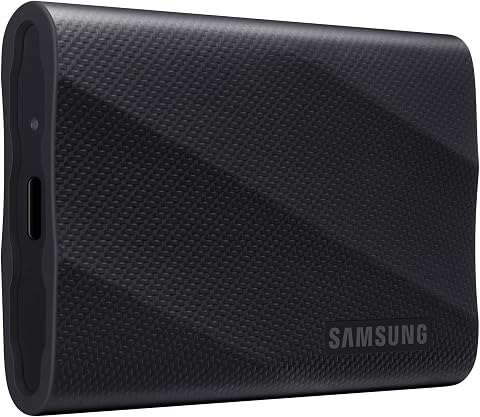 Samsung T9 Portable SSD 4TB, USB 3.2 Gen 2×2 External Solid State DriveView on Amazon →
- 2
 SanDisk Extreme Portable SSD, 4TB, Up to 2000MB/sView on Amazon →
- 3Samsung T9 Portable SSD 2TB, USB 3.2 Gen 2×2, Up to 2,000 MB/sView on Amazon →
- 4SanDisk Extreme Portable SSD, 2TB, Up to 2000MB/sView on Amazon →
- 5
 SanDisk Extreme 2TB Portable SSDView on Amazon →
- 6
 SanDisk 2TB Portable SSD, Up to 1000 MB/s Read Speed, BlackView on Amazon →
- 7Samsung T9 Portable SSD 1TB, USB 3.2 Gen 2×2, Up to 2,000 MB/sView on Amazon →
- 8SanDisk Extreme Portable SSD, 1TB, Up to 2000MB/sView on Amazon →
- 9
 Samsung T7 Portable SSD 1TB Titan Gray, USB 3.2 Gen 2, Up to 1,050MB/sView on Amazon →
- 10SanDisk 1TB Extreme Portable SSD, Up to 1050MB/sView on Amazon →
- 11SanDisk 1TB Portable SSD, Up to 1000MB/s Read Speed, BlackView on Amazon →
- 12SanDisk 500GB Portable SSD, Up to 1000MB/s Read Speed, BlackView on Amazon →
- 13
 SSK Portable SSD 500GB External Solid State Drive USB-C/USB-AView on Amazon →
Match SSD Speed to Your Devices
The buying decision can affect both transfer times and cost. A buyer whose computer supports only USB 3.2 Gen 2 may not benefit from paying extra for a drive advertising up to 2,000 MB/s over USB 3.2 Gen 2×2. Conversely, photographers, video editors or others who regularly move large files may value a faster compatible drive and more capacity.
Capacity also shapes portability and day-to-day usefulness: a smaller model can be easier to carry for current documents, while a 2TB or 4TB drive can hold larger active projects. The guide cautions that an SSD containing the sole copy of important files is not a backup strategy; a separate copy remains necessary regardless of the drive’s design.
Products Worth Considering

Apple Watch Ultra 3 GPS + Cellular 49mm Smartwatch with Natural Titanium Milanese Loop

Bose QuietComfort True Wireless Noise-Cancelling Earbuds, Black

LG UltraGear 34G600A-B 34-Inch Curved WQHD Gaming Monitor, 160Hz, FreeSync Premium, HDR10
As an affiliate, we earn on qualifying purchases.
How the Guide Compares 13 Drives
The source describes its ranking as a comparison of published specifications and likely use cases. Its stated criteria include advertised transfer speed, usable capacity, connection requirements, portability and how a drive’s design fits the expected workload. The order favors broadly useful options over speed claims alone, and treats capacity variants as choices for different needs rather than assuming the largest is best.
One recurring distinction is between a connector’s shape and its data speed. USB-C does not, by itself, establish USB 3.2 Gen 2×2 support. Buyers are advised to check their device specifications, confirm the included or replacement cable is suitable, and verify file-system compatibility if they plan to move the drive between operating systems. Reformatting may erase existing contents.
“The Samsung T7 is the balanced starting point.”
— ThorstenMeyerAI.com guide
Specifications Need Model-Level Checks
The supplied source does not identify all 13 products and capacity variants by full model name, nor does it include independent test results, prices or a publication date. Its recommendations should be read as a buying guide based on listed specifications, not as a report of controlled performance testing. It is also unclear which exact SanDisk listings have differing speed claims; the guide tells readers to check the product listing but does not resolve the discrepancy here.
Actual performance for an individual buyer remains uncertain without knowing the host device, port standard, cable, file types and sustained transfer conditions. The source also advises checking protection details for each exact rugged-style model rather than assuming that every drive in a product family has the same resistance to damage or exposure.
Verify Models Before You Buy
Before purchasing, buyers should compare the exact model number and capacity against the manufacturer or retailer’s current listing, then confirm the computer or mobile device supports the drive’s connection standard. For large transfers, they should treat maximum speed figures as advertised ceilings, not guaranteed results. Anyone relying on an SSD for work or personal archives should also keep a separate copy of important files.
The source material does not announce a follow-up test or a later update. Prices, availability and listing specifications can change, so readers should confirm those details at the time of purchase.
Key Questions
Which drive does the guide recommend for everyday use?
It presents the Samsung T7 1TB as a balanced starting point, citing its USB 3.2 Gen 2 interface and everyday usefulness. That recommendation is based on the guide’s stated comparison, not independent benchmark results in the supplied material.
Will a Samsung T9 reach its advertised 2,000 MB/s speed?
Not in every setup. The guide says the T9’s advertised maximum requires a compatible USB 3.2 Gen 2×2 host connection and cable; the port’s USB-C shape alone does not confirm that capability. Workload and file sizes can also affect results.
Should I choose a 500GB, 1TB, 2TB or 4TB SSD?
Choose based on the files you expect to keep on the drive. The guide describes 500GB as suitable for lighter carry needs and larger capacities as more appropriate for growing photo, video or project collections. More capacity does not automatically mean faster performance.
Are SanDisk Extreme listings all the same speed?
The source warns that some listings with similar names and capacities show different advertised speeds, including certain 1TB and 2TB Extreme listings. Check the exact model and its specifications before buying rather than relying on family name or capacity alone.
Source: ThorstenMeyerAI.com