
Network attached storage enclosures range from simple personal backup boxes to expandable servers built for demanding workloads. I’d choose the UGREEN NASync DXP4800 GT as the best overall balance for buyers who want four bays and room to grow, while the Synology DS225+ stands out for a more approachable two-bay setup and the TrueNAS Mini R for high-capacity, rack-mounted storage. The main tradeoffs are bay count, network speed, software simplicity, and whether you want a diskless enclosure or storage that arrives with a drive. A larger, faster NAS can support more users and future expansion, but it also asks for more setup and maintenance. Read on for the full breakdown and help matching each option to your storage needs.

Get business pricing on monitors, keyboards and dev gear
- Business-only prices and quantity discounts
- Tax-exempt purchasing
- Multiple users, one account, clear invoices
Key Takeaways
- Four and five bays offer a meaningful growth path: The UGREEN DXP4800 GT, QNAP TS-453E-8G, and MINISFORUM N5 Pro models have more room for drive expansion than the many two-bay choices.
- Network speed should match the whole setup: The ORICO HS200’s dual 2.5GbE and the TrueNAS Mini R’s dual 10GbE matter most when computers, switches, and cabling can use those links.
- Diskless does not mean ready to store files: Most listed enclosures need drives purchased and installed separately; the Synology DS124 and Buffalo LinkStation 210 include a drive.
- Software experience separates beginner-friendly picks from server-style systems: Synology’s one- and two-bay options suit straightforward personal storage, while TrueNAS and higher-end MINISFORUM models call for more planning.
- Similar product names do not guarantee the same configuration: The two MINISFORUM N5 Pro listings differ in their stated included components, so buyers should confirm the exact bundle before choosing.
| ORICO HS200 2-Bay Diskless NAS with Dual M.2 NVMe Slots and Dual 2.5GbE |  | Best for Flexible 2-Bay Storage | Drive bays: 2 HDD bays | M.2 slots: 2 NVMe SSD slots | Maximum stated capacity: 64TB | VIEW LATEST PRICE | See Our Full Breakdown |
| UGREEN DH2300 2-Bay NAS for Personal Storage and Device Backup |  | Best for Straightforward Personal Backups | Drive bays: 2 | Maximum stated capacity: 64TB | Memory: 4GB | VIEW LATEST PRICE | See Our Full Breakdown |
| UGREEN NASync DXP4800 GT 4-Bay NAS |  | Best for Fast Multi-User Workflows | Drive bays: 4 | Processor: AMD Ryzen Embedded R2514, 4 cores and 8 threads, up to 3.70GHz | Memory: 8GB DDR4, expandable to 64GB | VIEW LATEST PRICE | See Our Full Breakdown |
| MINISFORUM N5 Pro 5-Bay AI NAS with AMD Ryzen AI 9 HX PRO 370, 128GB SSD, and Dual Ethernet |  | Best Premium Expansion Platform | Processor: AMD Ryzen AI 9 HX PRO 370, 12 cores and 24 threads, up to 5.1GHz | Drive bays: 5 SATA HDD bays | Maximum stated capacity: Up to 188TB | VIEW LATEST PRICE | See Our Full Breakdown |
| Ubiquiti UniFi UNAS 2 Network Attached Storage Server |  | Best Compact UniFi Network Fit | Drive support: 2 × 3.5-inch HDDs | Processor: Quad-core ARM Cortex-A55, 1.7GHz | Memory: 4GB | VIEW LATEST PRICE | See Our Full Breakdown |
| Synology DiskStation DS124 1-Bay NAS Server with 4TB HDD |  | Best for a Ready-to-Use Single-Drive Setup | Processor: RTD1619B, 4-core, 1.7 GHz | Memory: 1 GB DDR4 non-ECC | Storage: 4 TB, one 3.5-inch HDD | VIEW LATEST PRICE | See Our Full Breakdown |
| MINISFORUM N5 Pro 5-Bay NAS with AMD Ryzen AI 9 HX Pro 370 |  | Best for High-Performance Expansion | Processor: AMD Ryzen AI 9 HX Pro 370, 12 cores / 24 threads, up to 5.1 GHz | Drive bays: 5 x 3.5-inch SATA | Maximum storage capacity: Up to 188 TB | VIEW LATEST PRICE | See Our Full Breakdown |
| Synology DS225+ Private Cloud Media Server – Intel CPU for Hardware Transcoding (2-Bay Diskless NAS) | 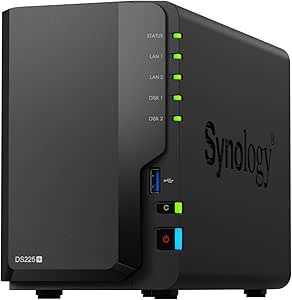 | Best for Synology Media and Backup | Model: DS225+ | Drive bays: 2 | Drive status: Diskless | VIEW LATEST PRICE | See Our Full Breakdown |
| UGREEN DXP2800 2-Bay NAS for Home, Work, and Media |  | Best Value for Flexible 2-Bay Hardware | Processor: Intel N100 quad-core | Memory: 8GB DDR5 | Drive bays: 2 HDD bays | VIEW LATEST PRICE | See Our Full Breakdown |
| BUFFALO LinkStation 210 2TB 1-Bay NAS with Included Hard Drive |  | Best for Simple Shared Storage | Model: LS210D0201 | Storage capacity: 2 TB | Drive bays: 1 | VIEW LATEST PRICE | See Our Full Breakdown |
| QNAP TS-453E-8G 4-Bay NAS Enclosure, 8GB RAM, Intel Celeron J6412, Dual 2.5GbE |  | Best for 2.5GbE Four-Bay Storage | Drive bays: 4 | Processor: Intel Celeron J6412, 4 cores, up to 2.6 GHz | Memory: 8GB built-in, not expandable | VIEW LATEST PRICE | See Our Full Breakdown |
| Synology DiskStation DS223j 2-Bay NAS Enclosure (Diskless) |  | Best for Simple Home Backups | Drive bays: 2 | Drives included: No | Dimensions: 6.5 × 3.94 × 8.9 in (D × W × H) | VIEW LATEST PRICE | See Our Full Breakdown |
| TrueNAS Mini R Rackmount ZFS Storage Server, 12-Bay, 32GB RAM, 8-Core CPU, Dual 10GbE, Diskless |  | Best for Rackmount Capacity and 10GbE | Drive bays: 12 x 3.5-inch hot-swap SATA | Processor: 8-core Intel Atom, 2.2 GHz | Memory: 32GB ECC RAM | VIEW LATEST PRICE | See Our Full Breakdown |
| network attached storage enclosure | Drive bays | Memory | Processor |
|---|---|---|---|
| ORICO HS200 2-Bay Diskless NAS | 2 HDD bays | — | — |
| UGREEN DH2300 2-Bay NAS for Pe | 2 | 4GB | — |
| UGREEN NASync DXP4800 GT 4-Bay | 4 | 8GB DDR4, expandable to 64GB | AMD Ryzen Embedded R2514, 4 cores and 8 threads, up to 3.70GHz |
| MINISFORUM N5 Pro 5-Bay AI NAS | 5 SATA HDD bays | 2 DDR5 SO-DIMM slots, up to 96GB ECC | AMD Ryzen AI 9 HX PRO 370, 12 cores and 24 threads, up to 5.1GHz |
| Ubiquiti UniFi UNAS 2 Network | — | 4GB | Quad-core ARM Cortex-A55, 1.7GHz |
| Synology DiskStation DS124 1-B | — | 1 GB DDR4 non-ECC | RTD1619B, 4-core, 1.7 GHz |
| MINISFORUM N5 Pro 5-Bay NAS wi | 5 x 3.5-inch SATA | — | AMD Ryzen AI 9 HX Pro 370, 12 cores / 24 threads, up to 5.1 GHz |
| Synology DS225+ Private Cloud | 2 | — | — |
| UGREEN DXP2800 2-Bay NAS for H | 2 HDD bays | 8GB DDR5 | Intel N100 quad-core |
| BUFFALO LinkStation 210 2TB 1- | 1 | — | — |
| QNAP TS-453E-8G 4-Bay NAS Encl | 4 | 8GB built-in, not expandable | Intel Celeron J6412, 4 cores, up to 2.6 GHz |
| Synology DiskStation DS223j 2- | 2 | — | — |
| TrueNAS Mini R Rackmount ZFS S | 12 x 3.5-inch hot-swap SATA | 32GB ECC RAM | 8-core Intel Atom, 2.2 GHz |
More Details on Our Top Picks
ORICO HS200 2-Bay Diskless NAS with Dual M.2 NVMe Slots and Dual 2.5GbE
The ORICO HS200 is a flexible pick for buyers who want a compact NAS that can pair two HDDs with two NVMe SSDs. That mix gives you room for high-capacity files alongside faster storage, while dual 2.5GbE can support quicker transfers than the 1GbE connection on the UGREEN DH2300. Its support for TrueNAS, Windows 11, Ubuntu, and Debian also leaves more room to choose a software environment than the DH2300’s appliance-style feature set. Docker, virtual machines, HDMI output, and 4K streaming broaden its uses beyond simple backups. The tradeoff is added setup complexity: this is better suited to buyers willing to configure their NAS than people who want the most straightforward home backup box. Drives are not included, and the stated WAN transfer speed of 10MB/s may limit remote use.
Pros:- Combines two HDD bays with two M.2 NVMe slots for different storage needs.
- Dual 2.5GbE ports offer more network bandwidth than the UGREEN DH2300’s 1GbE port.
- Supports multiple operating systems, Docker, and virtual machines.
- HDMI output and 4K streaming support add local media options.
Cons:- Diskless configuration means buyers must supply and configure their own drives.
- The stated WAN transfer speed is 10MB/s, which may be restrictive for remote access.
- Its broader software and virtualization options can involve more setup than a basic personal NAS.
Best for: Tech-comfortable home users who want HDD capacity, NVMe storage, faster-than-gigabit wired networking, and the option to run containers or virtual machines.
Not ideal for: Buyers who want a simple, ready-to-use backup appliance or depend on fast remote transfers; drives are separate and the stated WAN speed is limited.
- Drive bays:2 HDD bays
- M.2 slots:2 NVMe SSD slots
- Maximum stated capacity:64TB
- Networking:2 × 2.5GbE
- USB:2 × USB-A and 1 × USB-C, 5Gbps
- Video output:1 × HDMI
- Supported operating systems:TrueNAS, Windows 11, Ubuntu 24, Debian 12
- Included storage:Diskless
Our verdict“Choose the HS200 if you want a versatile two-bay NAS with NVMe expansion and faster networking, and are comfortable handling the setup yourself.”
UGREEN DH2300 2-Bay NAS for Personal Storage and Device Backup
The UGREEN DH2300 focuses on personal files and automatic backups rather than server projects. Its two bays support up to 64TB, while AI photo tagging, duplicate finding, and backup tools help households manage photos and files from phones, tablets, and computers. Compared with the ORICO HS200, the DH2300 is more limited: it has 1GbE networking and does not support Docker, virtual machines, or server applications. That narrower scope is a benefit for buyers who want a simpler home-storage role, but a drawback if their plans may grow into media services or self-hosted apps. Drives are sold separately, and there is no built-in Wi-Fi; the listed maximum transfer rate is up to 125MB/s over its wired connection.
Pros:- Two bays support a stated maximum capacity of up to 64TB.
- Automatic backups cover multiple personal devices.
- AI photo tagging and duplicate finding can make large photo libraries easier to organize.
- RAID modes, permission controls, two-factor authentication, and encrypted transfers add data-management options.
Cons:- Drives are not included, so the NAS needs a separate storage purchase.
- The 1GbE port is slower than the ORICO HS200’s dual 2.5GbE networking.
- No Docker, virtual machine, or server-application support; Wi-Fi also requires an external USB adapter.
Best for: Households seeking centralized photo storage and automatic backups for phones, computers, and tablets without running containers or virtual machines.
Not ideal for: Home-lab users, server-app users, and buyers who need multi-gigabit networking or built-in Wi-Fi.
- Drive bays:2
- Maximum stated capacity:64TB
- Memory:4GB
- Ethernet:1GbE
- Maximum stated file transfer speed:Up to 125MB/s
- Drive interface and form factor:SATA, 3.5-inch drives
- Wireless:No built-in Wi-Fi; external USB adapter required
- Included drives:No
Our verdict“Pick the DH2300 for guided personal backups and photo organization, but skip it if you need a NAS for apps, virtualization, or faster networking.”
UGREEN NASync DXP4800 GT 4-Bay NAS
The UGREEN NASync DXP4800 GT is the strongest fit here for a multi-user setup where network throughput and storage flexibility matter. Its four bays, two M.2 slots, and support for U.2 NVMe in up to two bays offer more ways to configure storage than the two-bay ORICO HS200. More distinctively, dual 10GbE gives compatible workstations and switches room for much faster transfers than either two-bay model can provide. The Ryzen Embedded processor, expandable memory, Docker, and virtual machine support suit media work, surveillance, and home-lab services. That capability comes with a larger setup commitment: it is diskless, its preinstalled RAM is non-ECC, and ECC requires a compatible upgrade. Plex also needs manual setup through Docker, so this is less turnkey than the DH2300.
Pros:- Four bays plus SATA, U.2 NVMe, and M.2 support allow varied storage configurations.
- Dual 10GbE ports support high-bandwidth wired workflows and link aggregation.
- Expandable DDR4 memory and Docker and virtual machine support suit advanced services.
- SD card, USB-C, and HDMI connections support direct media imports and local use.
Cons:- Diskless configuration requires a separate drive purchase and setup.
- Preinstalled memory is non-ECC; ECC requires a compatible memory upgrade.
- Plex requires manual installation through Docker rather than a simple dedicated setup.
Best for: Small teams and advanced home users moving large files across a 10GbE network, or running storage alongside containers, virtual machines, and surveillance.
Not ideal for: People seeking a simple low-complexity backup NAS, or buyers without compatible 10GbE networking and a plan for purchasing drives.
- Drive bays:4
- Processor:AMD Ryzen Embedded R2514, 4 cores and 8 threads, up to 3.70GHz
- Memory:8GB DDR4, expandable to 64GB
- Networking:2 × 10GbE
- Storage support:SATA drives, U.2 NVMe in up to 2 bays, and 2 × M.2 SSD slots
- Maximum stated capacity:Up to 144TB
- Operating system:UGOS Pro
- Included drives:Diskless
Our verdict“Choose the DXP4800 GT when you can use its 10GbE speed and four-bay flexibility; for basic personal backups, the DH2300 is simpler.”
MINISFORUM N5 Pro 5-Bay AI NAS with AMD Ryzen AI 9 HX PRO 370, 128GB SSD, and Dual Ethernet
The MINISFORUM N5 Pro is the most expansive enclosure in this group, aimed at buyers building a high-capacity system with room for demanding workloads. Five SATA bays and three M.2 slots provide more drive options than the four-bay UGREEN DXP4800 GT, while the Ryzen AI 9 HX PRO 370, support for up to 96GB ECC memory, and PCIe expansion leave substantial room for compute and hardware upgrades. Its 10GbE and 5GbE ports can also serve fast wired networks. This scale is not free of compromises in the design: the built-in 128GB system SSD occupies one M.2 slot, trimming available NVMe expansion, and OCuLink is not hot-swappable. The diskless drive bays also mean the advertised capacity depends on separately supplied drives.
Pros:- Five SATA bays and up to 188TB stated capacity support large storage pools.
- Three M.2 slots and configurable U.2/M.2 support provide flexible SSD expansion.
- 10GbE and 5GbE networking support link aggregation and fast wired transfers.
- ECC memory support, RAID options, USB4, OCuLink, and PCIe expansion offer a broad upgrade path.
Cons:- The built-in 128GB system SSD uses one of the three M.2 slots.
- OCuLink does not support hot-swapping.
- Storage drives are not included, adding setup and configuration work.
Best for: Advanced NAS builders who need five-bay capacity, ECC memory support, high-speed networking, and expansion options for storage or compute hardware.
Not ideal for: Buyers with modest backup needs, limited space, or no interest in configuring drives and upgrades; its expansion features may go unused.
- Processor:AMD Ryzen AI 9 HX PRO 370, 12 cores and 24 threads, up to 5.1GHz
- Drive bays:5 SATA HDD bays
- Maximum stated capacity:Up to 188TB
- Memory:2 DDR5 SO-DIMM slots, up to 96GB ECC
- NVMe slots:3 M.2 slots; one is occupied by the system SSD
- Networking:1 × 10GbE and 1 × 5GbE; link aggregation supported
- Video and expansion:HDMI, 2 × USB4, OCuLink PCIe 4.0 x4, and PCIe x16
- Included storage:128GB system SSD; HDD bays are diskless
Our verdict“Choose the N5 Pro if you need an expandable five-bay platform with ECC and fast networking; the DXP4800 GT is a smaller step down for many advanced users.”
Ubiquiti UniFi UNAS 2 Network Attached Storage Server
The Ubiquiti UniFi UNAS 2 is a compact two-drive option for buyers already building around wired UniFi equipment. Its tabletop footprint and 2.5GbE networking make it a more space-conscious alternative to the four-bay UGREEN DXP4800 GT, though the DXP4800 GT offers far more disclosed storage flexibility and compute features. The UNAS 2’s quad-core ARM processor and 4GB of RAM point toward a focused storage role rather than the Docker and virtual machine workloads supported by the ORICO HS200. Its product details do not specify an included drive or maximum capacity, so buyers should confirm drive compatibility and software needs before choosing it. The listing also describes Bluetooth 4.1, but does not establish it as a replacement for a wired network connection.
Pros:- Supports two 3.5-inch hard drives in a compact tabletop enclosure.
- Wired networking supports speeds up to 2.5GbE.
- Lightweight enclosure weighs 1.3kg without hard drives.
- A focused alternative to larger four- and five-bay NAS systems.
Cons:- The product data does not specify a maximum storage capacity.
- Hard drives are not specified as included.
- The listed hardware details do not establish Docker or virtual machine support.
Best for: UniFi users seeking a small tabletop NAS for two 3.5-inch drives and a wired connection up to 2.5GbE.
Not ideal for: Buyers who need published capacity guidance, advanced app or virtualization support, or a drive-included NAS.
- Drive support:2 × 3.5-inch HDDs
- Processor:Quad-core ARM Cortex-A55, 1.7GHz
- Memory:4GB
- Networking:10Mb LAN, 100Mb LAN, 1GbE, and 2.5GbE
- Bluetooth:Bluetooth 4.1
- Dimensions:12.9 × 13.5 × 22.37cm
- Weight:1.3kg without HDD
- Mounting and enclosure:Tabletop; polycarbonate
Our verdict“Choose the UNAS 2 for a compact two-drive setup that fits a UniFi-oriented network, but pick the ORICO HS200 if you need more clearly specified expansion and workload support.”
Synology DiskStation DS124 1-Bay NAS Server with 4TB HDD
The DS124 is the easiest pick here for someone who wants network storage without sourcing a drive first: its 4 TB HDD is included, and Synology DSM adds file sharing, backups, synchronization, and media-server tools. Compared with the diskless Synology DS225+, it costs you a second drive bay and hardware-transcoding capability, but it is a simpler starting point for one-person or light household storage. Its Btrfs and snapshot support can help recover earlier file versions, though snapshots on a single drive are not a substitute for a separate backup. The tradeoff is the one-bay design: there is no internal drive redundancy, and the single 1GbE port is less suited to fast transfers than the UGREEN DXP2800’s 2.5GbE connection. I’d choose it for a modest, low-power personal cloud, not an expandable media archive.
Pros:- Includes a 4 TB 3.5-inch HDD, so storage can be set up without buying a separate drive.
- Synology DSM supports file sharing, synchronization, backup, and media-server functions.
- Btrfs and snapshot features support file recovery and data protection workflows.
- Stated operating power consumption is 10.7 W.
Cons:- A single drive bay provides no internal drive redundancy.
- One 1GbE LAN port is slower than the 2.5GbE networking on the UGREEN DXP2800.
- Memory and drive upgrades are separate purchases and require installation.
Best for: Individuals or small households who want a Synology-managed backup and file-sharing setup with a drive included.
Not ideal for: Buyers who need drive redundancy, multi-user expansion, or faster-than-gigabit network transfers.
- Processor:RTD1619B, 4-core, 1.7 GHz
- Memory:1 GB DDR4 non-ECC
- Storage:4 TB, one 3.5-inch HDD
- Network:1 x RJ-45 1GbE LAN
- USB:2 x USB 3.2 ports
- File systems:EXT4, Btrfs
- Operating system:Synology DSM
- Power consumption:10.7 W during operation
Our verdict“Choose the DS124 if you want a compact Synology NAS with a 4 TB drive included and can live with one-bay, 1GbE limits.”
MINISFORUM N5 Pro 5-Bay NAS with AMD Ryzen AI 9 HX Pro 370
This N5 Pro is the performance-and-expansion outlier in this group. Its five SATA bays, additional M.2 and U.2 interfaces, and support for up to 188 TB give it far more room to grow than the two-bay Synology DS225+ or UGREEN DXP2800. The 10GbE and 5GbE ports, USB4, and PCIe 4.0 slot also suit demanding transfers and add-on hardware, while the Ryzen AI 9 HX Pro 370 offers unusually capable processing for a NAS enclosure. That flexibility comes with setup costs: no storage drives are included, and the built-in 128GB system SSD occupies one of three M.2 slots. Removing it to use that slot also disables MinisCloud OS and related functions. I’d place this above simpler home NAS options for buyers planning a sizable, fast storage system, but below them for anyone seeking a straightforward appliance.
Pros:- Five 3.5-inch SATA bays plus M.2 and U.2 interfaces support substantial storage expansion.
- 10GbE and 5GbE networking with link aggregation suit fast local transfers.
- USB4, 8K HDMI, and a PCIe 4.0 slot provide a broad set of expansion and connection options.
- Slide-out motherboard and modular design simplify access for RAM and SSD upgrades.
Cons:- Storage drives are sold separately, adding setup work and requiring a separate drive plan.
- The 128GB system SSD occupies one M.2 slot; removing it disables MinisCloud OS and related functions.
- Its extensive hardware is more than many basic backup and file-sharing households need.
Best for: Advanced home-lab users and small teams building a high-capacity NAS for large files, fast networking, and future expansion.
Not ideal for: First-time NAS buyers who want included drives, a simple setup, or a compact low-complexity backup server.
- Processor:AMD Ryzen AI 9 HX Pro 370, 12 cores / 24 threads, up to 5.1 GHz
- Drive bays:5 x 3.5-inch SATA
- Maximum storage capacity:Up to 188 TB
- M.2 slots:3 total; one occupied by the system drive
- U.2 interfaces:2
- System drive:128GB built-in SSD with MinisCloud OS
- Networking:1 x 10GbE and 1 x 5GbE; link aggregation supported
- Expansion:1 x PCIe 4.0 slot
- Included storage drives:None
Our verdict“Pick the N5 Pro for a drive-free, high-performance build with substantial expansion headroom, provided you are comfortable configuring the system.”
Synology DS225+ Private Cloud Media Server – Intel CPU for Hardware Transcoding (2-Bay Diskless NAS)
The DS225+ is the more natural fit than the DS124 when a household wants a two-drive setup for a media library and more flexible data protection. Its Intel CPU supports hardware transcoding for 4K streaming, while Synology’s snapshots and automated backups add useful safeguards beyond simple network folders. It also supports smart surveillance for up to 30 IP cameras with AI detection, making it more versatile than the included-drive BUFFALO LinkStation 210, which focuses on basic storage and sharing. The DS225+ is still a compact two-bay enclosure, not a large archive platform: the diskless design means you must supply and install drives, and two bays limit expansion compared with the five-bay MINISFORUM N5 Pro. I’d pick it for a Synology-centered home media and backup setup, not for buyers who prioritize maximum capacity or an all-in-one purchase.
Pros:- Intel CPU supports hardware transcoding for 4K media streaming.
- RAID, snapshots, and automated backups provide several data-protection options.
- Supports up to 30 IP cameras with AI detection.
- Compact tabletop enclosure suits home or office placement.
Cons:- Diskless configuration requires buyers to select and install their own drives.
- Two bays limit raw storage expansion compared with the MINISFORUM N5 Pro.
- Its media and surveillance features may be unnecessary for buyers seeking only simple shared folders.
Best for: Households that want a compact Synology NAS for 4K media streaming, automated backups, and optional camera recording.
Not ideal for: Buyers who want included drives, more than two bays, or a high-capacity system with faster networking specified.
- Model:DS225+
- Drive bays:2
- Drive status:Diskless
- Storage volume capacity:40 TB
- Processor feature:Intel CPU with hardware transcoding
- Surveillance support:Up to 30 IP cameras with AI detection
- Dimensions:9.14 x 4.25 x 6.5 in (D x W x H)
- Weight:1300 g
- Warranty:3 years
Our verdict“Choose the DS225+ if you want Synology software, 4K hardware transcoding, and two-bay flexibility in a compact enclosure.”
UGREEN DXP2800 2-Bay NAS for Home, Work, and Media
The DXP2800 packs a notably capable base configuration into a small two-bay enclosure: an Intel N100 processor, 8GB DDR5 RAM, and 2.5GbE give it a stronger hardware starting point than the basic one-bay BUFFALO LinkStation 210. Two M.2 NVMe slots add room for SSD storage or acceleration, while support for Docker, virtual machines, and Plex-compatible apps makes it appealing to buyers who want more than shared folders. Its stated capacity reaches 80 TB, though actual usable space depends on the drives and configuration. Unlike the Synology DS225+, which emphasizes Synology’s media and backup ecosystem, the DXP2800 is a more hardware-flexible choice for users interested in apps and mixed workloads. The main catch is that it arrives without HDDs or SSDs; its two HDD bays also make it a poor match for anyone planning a large multi-bay array.
Pros:- 2.5GbE networking can improve transfers on a compatible network compared with 1GbE NAS options.
- 8GB DDR5 RAM and an Intel N100 quad-core processor support more demanding apps than basic file sharing.
- Two HDD bays and two M.2 NVMe slots offer flexible storage arrangements.
- Supports Docker, virtual machines, and Plex-compatible media-server apps.
Cons:- HDDs and NVMe SSDs are sold separately, so setup requires choosing and installing storage.
- Two HDD bays provide less expansion room than the five-bay MINISFORUM N5 Pro.
- Surveillance use requires compatible network cameras.
Best for: Technically comfortable home users who want 2.5GbE, NVMe options, and room to run media or container applications.
Not ideal for: Buyers who want a ready-to-use NAS with drives included or need more than two HDD bays for future growth.
- Processor:Intel N100 quad-core
- Memory:8GB DDR5
- Drive bays:2 HDD bays
- M.2 slots:2 M.2 NVMe SSD slots
- Maximum storage capacity:Up to 80 TB
- Networking:2.5GbE
- Drive status:Diskless; HDDs and SSDs sold separately
- Weight:2.6 pounds
- Warranty:2 years
Our verdict“Choose the DXP2800 for a compact, diskless two-bay NAS with 2.5GbE and app flexibility, if you are ready to supply the drives.”
BUFFALO LinkStation 210 2TB 1-Bay NAS with Included Hard Drive
The LinkStation 210 is the least demanding option here: it connects to a router, includes a 2 TB HDD, and focuses on centralized files, automated computer backups, and private sharing. That makes it a simpler starting point than the diskless Synology DS225+ or UGREEN DXP2800, both of which require drive selection and installation. Folder access restrictions and SSL-encrypted file transfers add basic controls for household sharing, and the package includes an Ethernet cable. But simplicity comes with firm limits: its single drive bay leaves no room for an internal redundant drive, and the listed Ethernet connection offers less speed detail than the DXP2800’s 2.5GbE. Compatibility is listed for Windows and macOS 15 and earlier, so buyers with newer operating-system needs should check support before choosing it. I’d treat this as straightforward personal storage, not a scalable NAS platform.
Pros:- Includes a 2 TB hard drive, Ethernet cable, and setup materials.
- Supports centralized file storage and automated computer backups.
- Folder access restrictions allow private file sharing among users.
- Includes SSL-encrypted file transfers and a two-year warranty.
Cons:- One drive bay provides no internal redundancy or drive expansion.
- Compatibility is listed for Windows and macOS 15 and earlier.
- Its basic feature set is less suited to media transcoding or advanced apps than the Synology DS225+ and UGREEN DXP2800.
Best for: Households with a small Windows or compatible macOS backup need that want a preconfigured single-drive network storage device.
Not ideal for: Users who need internal drive redundancy, multi-bay expansion, advanced apps, or confirmed support beyond macOS 15.
- Model:LS210D0201
- Storage capacity:2 TB
- Drive bays:1
- Included drive:HDD
- Compatibility:Windows and macOS 15 and earlier
- Connectivity:Ethernet
- Security:SSL-encrypted file transfers and folder access restrictions
- Warranty:2 years
Our verdict“Choose the LinkStation 210 for basic shared storage and backups with a drive included, but skip it if you need room to grow or drive redundancy.”
QNAP TS-453E-8G 4-Bay NAS Enclosure, 8GB RAM, Intel Celeron J6412, Dual 2.5GbE
I’d choose the QNAP TS-453E-8G for a household or small office that wants four drive bays and faster-than-gigabit networking without moving to a rack server. Its quad-core Celeron J6412 and dual 2.5GbE ports give it more room for concurrent file transfers than the compact two-bay Synology DS223j, while the tower format is easier to place outside a rack. The tradeoff is a fixed 8GB of memory: buyers can’t add RAM later if their services or workloads grow. It’s also diskless, so storage capacity depends on separately purchased drives. Compared with the 12-bay TrueNAS Mini R, this QNAP is a smaller-scale option with fewer expansion possibilities, but it avoids the rack and infrastructure needs of that server.
Pros:- Four bays allow more drive and capacity configurations than the two-bay Synology DS223j.
- Dual 2.5GbE ports support faster network links than standard gigabit connections.
- Quad-core Intel processor suits shared-storage workloads.
- Metal enclosure provides a sturdy tower chassis.
Cons:- The built-in 8GB memory is not expandable.
- Hard drives are not included, so the enclosure cannot provide storage on its own.
Best for: Small offices and home power users who want four drive bays, dual 2.5GbE connections, and a tower NAS for shared storage.
Not ideal for: Buyers planning memory-intensive services or future RAM upgrades, and anyone who wants a ready-to-use NAS with drives included.
- Drive bays:4
- Processor:Intel Celeron J6412, 4 cores, up to 2.6 GHz
- Memory:8GB built-in, not expandable
- Network:2 x 2.5 Gigabit Ethernet (2.5G/1G/100M)
- Form factor:Tower
- Enclosure material:Metal
- Drives included:No
Our verdict“Choose the TS-453E-8G if you want four bays and dual 2.5GbE in a tower, but skip it if expandable memory is a priority.”
Synology DiskStation DS223j 2-Bay NAS Enclosure (Diskless)
The Synology DS223j is the straightforward choice here for a home looking to centralize files, sync devices, and automate backups without needing a rack or a large bay count. Its compact, quiet, energy-efficient tabletop design makes it less imposing than the four-bay QNAP TS-453E-8G, while support for phones and computers suits a mixed-device household. Backup options that can target cloud and external drives add flexibility beyond basic file sharing. The main compromise is capacity headroom: with just two drive bays, it offers fewer storage arrangements than the QNAP, and far less expansion than the 12-bay TrueNAS Mini R. It also arrives without drives. I’d pick it for personal storage and routine backups, not for buyers building a larger shared-storage or high-throughput system.
Pros:- Compact tabletop enclosure suits home spaces with limited room.
- Supports private cloud storage and file access across mobile and desktop devices.
- Automated backups can target cloud services and external drives.
- Supports compatible IP cameras with remote viewing.
Cons:- Only two drive bays limit capacity and storage configurations compared with the QNAP TS-453E-8G.
- Diskless setup requires separate drive purchases before it can store files.
Best for: Households with phones and computers that want a compact NAS for shared files, syncing, and automated backups.
Not ideal for: Small businesses or media-heavy households that need many drive bays, high-speed networking, or room to expand beyond two drives.
- Drive bays:2
- Drives included:No
- Dimensions:6.5 × 3.94 × 8.9 in (D × W × H)
- Weight:0.87 kg
- Mounting:Tabletop
- Compatible devices:Android, desktop, laptop, iPhone
- Warranty:2 years
Our verdict“Pick the DS223j for quiet, compact home backups and file sharing, but choose a larger-bay model if your storage needs are likely to grow.”
TrueNAS Mini R Rackmount ZFS Storage Server, 12-Bay, 32GB RAM, 8-Core CPU, Dual 10GbE, Diskless
For a rack-based storage build, the TrueNAS Mini R is the scale-up pick: its 12 hot-swap bays, 32GB ECC memory, and dual 10GbE ports are aimed at larger storage pools and demanding shared workloads, not casual home backup. Hot-swap bays make drive changes more convenient than the four-bay QNAP TS-453E-8G, and IPMI offers remote management without requiring someone at the server. Its protocol support, virtualization, and plugins also give administrators more ways to fit it into an existing setup. That capability brings practical costs: it weighs 41.7 pounds, needs a compatible rack, and ships without drives. The included short rail kit only fits rack depths from 19 to 26.6 inches, so buyers should check their rack before choosing it.
Pros:- Twelve 3.5-inch hot-swap bays provide far more expansion than the four-bay QNAP TS-453E-8G.
- 32GB ECC memory and an 8-core processor suit heavier storage and media workloads.
- Dual 10GbE ports support high-throughput network links.
- IPMI remote management and multiple file-sharing protocols suit managed environments.
Cons:- Diskless configuration requires a separate drive purchase before storage is available.
- The short rail kit supports only 19–26.6-inch rack depths.
- Rackmount size and 41.7-pound weight make it a poor fit for ordinary home spaces.
Best for: IT teams and advanced storage users who need a rackmount NAS with many hot-swap bays, ECC memory, and dual 10GbE.
Not ideal for: Home users seeking a compact, quiet tabletop backup NAS, or rack owners whose cabinets fall outside the included rail kit’s depth range.
- Drive bays:12 x 3.5-inch hot-swap SATA
- Processor:8-core Intel Atom, 2.2 GHz
- Memory:32GB ECC RAM
- Network:2 x RJ45 10 Gigabit Ethernet
- Remote management:IPMI
- Supported protocols:NFS, SMB, AFP, iSCSI, S3
- Rack depth supported by included rails:19–26.6 inches
- Drives included:No
Our verdict“Choose the TrueNAS Mini R for rack-based, high-capacity storage and 10GbE, provided your rack fits the rails and you’re prepared to supply the drives.”
How We Picked
I ranked these network attached storage enclosures by how well their hardware, drive capacity, network connections, and intended setup fit distinct buyer needs. Bay count and expansion options matter because they shape both initial storage and the path to adding drives later. I also weighed whether a product includes storage, offers faster-than-gigabit networking, and appears aimed at simple personal backups or more demanding multi-user workloads.
The order favors balanced choices that make sense for a broad range of home and small-office buyers, then places more specialized or entry-level options according to their strengths and limits. A fast interface is less useful if the rest of a home network cannot support it, and a large rackmount server is not a sensible default for someone seeking simple device backups. Because several products are diskless and two N5 Pro listings have different stated bundles, I treat drive costs and configuration checks as part of the buying decision rather than assuming every enclosure is ready to use.
Factors to Consider When Choosing Network Attached Storage Enclosures
Before choosing an enclosure, decide what job it needs to do and what you already own. The right number of bays, network connection, and software approach can matter more than a headline processor or a long feature list.
Choose Bay Count Around Growth, Not Just Today’s Files
A one-bay NAS can cover basic access and backup, but it leaves fewer options if the drive fails or your library grows. Two bays offer a practical starting point, though the usable capacity and drive-failure protection depend on how the drives are configured. Four or more bays provide more flexibility for larger libraries and storage layouts, but they also raise the cost of filling the system and can increase power use. Avoid buying extra bays solely for a vague future need if you are unlikely to install additional drives. Instead, estimate your current data, likely growth, and how much downtime or recovery effort you can accept. Remember that RAID is not a backup: keep another copy of important files on a separate device or service.
Treat Network Speed as a System-Wide Requirement
Faster Ethernet can shorten large transfers and help several users share a NAS, but only when the computer, switch, router, and cabling support the same speed. A 2.5GbE or 10GbE port connected to a gigabit-only network will not deliver its full link rate. For routine document storage and phone backups, a faster connection may matter less than reliable software and enough drive capacity. Check whether the NAS has one fast port or multiple ports, and do not assume multiple ports automatically combine into a faster connection for every device. If the network is the bottleneck, budget for compatible equipment before paying extra for high-speed NAS networking. Small-file tasks and drive performance can also limit real transfer speeds.
Compare Diskless and Drive-Included Setups Honestly
A diskless enclosure lets you pick drive capacity and model, which can suit buyers who already own compatible disks or want a tailored setup. It also means the ready-to-use cost includes the drives, and installation, formatting, and configuration are part of the job. Models that include a drive reduce those initial steps, but a single included disk does not provide a second copy of the data. Before purchasing, check the supported drive types, capacity limits, and whether the unit accepts the drive sizes you plan to use. For a multi-bay NAS, buying matched drives can simplify planning, though the manufacturer’s compatibility guidance should still take priority. Keep a separate backup plan in either case.
Match the Software to Your Appetite for Maintenance
A NAS operating system affects daily tasks such as creating shared folders, setting permissions, updating software, and restoring files. A more guided interface can reduce setup friction for household backups, while systems aimed at advanced storage users may offer deeper control at the cost of more decisions. Think about who will administer the NAS after the first setup and whether other household members need simple access. Check the update approach, supported backup tools, remote-access options, and how easy it is to replace a failed drive. Do not choose an advanced platform just because it offers more controls if you do not want to maintain them. Conversely, a very simple appliance may frustrate users who need custom services or detailed storage management.
Plan for Noise, Placement, and Ongoing Power Use
A NAS is often left running, so its location affects everyday comfort as much as its specifications do. Multiple hard drives and cooling fans can make a multi-bay enclosure less suitable for a quiet desk or bedroom than a small, low-capacity setup. Rackmount models also need appropriate space, airflow, and network access, not just an empty shelf. Check the enclosure’s footprint and cooling design, and leave room for cables and drive access. Consider whether you can tolerate drive noise during sustained transfers and whether the NAS will sit near people. A system that fits the room and stays easy to reach is more likely to be maintained properly.
Pay for Compute and Expandability Only When the Workload Needs Them
More capable processors and memory can help when a NAS runs several services, handles multiple users, or performs media tasks alongside file storage. They do not automatically make ordinary backups faster, since disks, network links, and software can set the pace. List the tasks you expect to run, including media conversion, virtual machines, surveillance, or shared office files, and verify that the selected model supports them. Larger enclosures can provide useful room to expand, but each added drive brings more heat, power demand, and maintenance. A small appliance may be a better fit when its job is simply to hold a second copy of family files. Choose headroom for a specific workload rather than buying capacity or compute without a plan.
Frequently Asked Questions
Should I choose a diskless NAS or one that includes a hard drive?
A diskless model is a better fit if you already have compatible drives or want to choose capacity and drive type yourself. It also gives you more setup work and means the actual system cost includes drives that may not be part of the package. An included-drive option can simplify initial setup, but check whether it has one drive or multiple drives and what that means for capacity and fault tolerance. A single-drive NAS is not protected from that drive failing. Whichever route you choose, plan a separate backup copy for important data.
Is a two-bay NAS enough, or should I buy a four-bay enclosure?
A two-bay NAS can suit personal storage, device backups, and a modest media collection, especially when you value a smaller setup. A four-bay model makes more sense when you expect storage needs to grow or want more flexibility in drive configuration. Extra bays are not free capacity by themselves: you still need to buy and maintain the drives. Think about how much data you expect to add over the next few years and whether replacing the enclosure later would be inconvenient. If your needs are uncertain, compare the cost of filling extra bays with the cost of upgrading when capacity runs short.
Do I need 2.5GbE or 10GbE for home NAS storage?
For routine backups, documents, and media playback, standard gigabit networking may be adequate. Faster Ethernet becomes more useful for frequent large-file transfers or several users working from the NAS at once. The faster port only helps when the rest of the network path supports it, including the client device and switch. Upgrading a NAS without checking those parts can leave the connection running at a lower speed. Start by checking your current network equipment and the size and frequency of the transfers you expect.
Can RAID replace a separate backup?
No. RAID can keep some systems available after a drive failure, depending on the chosen layout, but it does not protect against accidental deletion, malware, theft, fire, or damage to the NAS itself. A reliable plan keeps another copy on a separate device or in a remote location. For files that matter, check that the second copy runs on a schedule and that you know how to restore it. A NAS can serve as one part of a backup plan, not the entire plan. Keep the recovery copy disconnected or otherwise protected when practical.
What should I check before choosing between the two MINISFORUM N5 Pro listings?
The two listings name the same N5 Pro family but describe different included components: one specifies a 128GB SSD, while the other does not state that item in its title. Confirm the exact model, package contents, and any preinstalled storage before ordering. Also check whether the listed memory and network configuration match the work you intend to do. For a multi-bay NAS, verify drive compatibility and how the system handles setup and storage expansion. Do not assume that similarly named listings have identical bundles.
Conclusion
For the broadest mix of capacity and room to grow, I’d start with the UGREEN NASync DXP4800 GT as the best overall pick. The UGREEN DXP2800 is the more straightforward value choice for buyers who can work within two bays, while the TrueNAS Mini R is the best premium fit for users who need a rackmount, 12-bay system and can manage a more involved setup. For beginners seeking a familiar personal-storage approach, I’d compare the Synology DS225+ with the included-drive Synology DS124, choosing based on whether two bays or a simpler single-drive package matters more. For specialized needs, the ORICO HS200 suits buyers with a 2.5GbE setup who want dual M.2 slots, and the QNAP TS-453E-8G offers a four-bay alternative with 8GB RAM and dual 2.5GbE. Before committing, check drive requirements, network compatibility, and the exact bundle—especially for the two N5 Pro listings.